

Imagine a world where you could slash your electricity bill by up to 90% just by plugging in a small device—one that’s supposedly backed by Elon Musk himself. Sounds too good to be true, right? That’s because it is. Welcome to the world of fake energy-saving devices exploiting Musk’s name and reputation to sell worthless gadgets like Stop Watt, Miracle Watt, Real Watt, Pro Power Save, and ESaver Watt.
These scams have spread like wildfire across social media, search engines, and even spoofed news sites. This article pulls back the curtain on the Elon Musk energy-saving devices scam, providing a deep dive into how it works, why it’s fake, and what to do if you’ve already fallen for it.
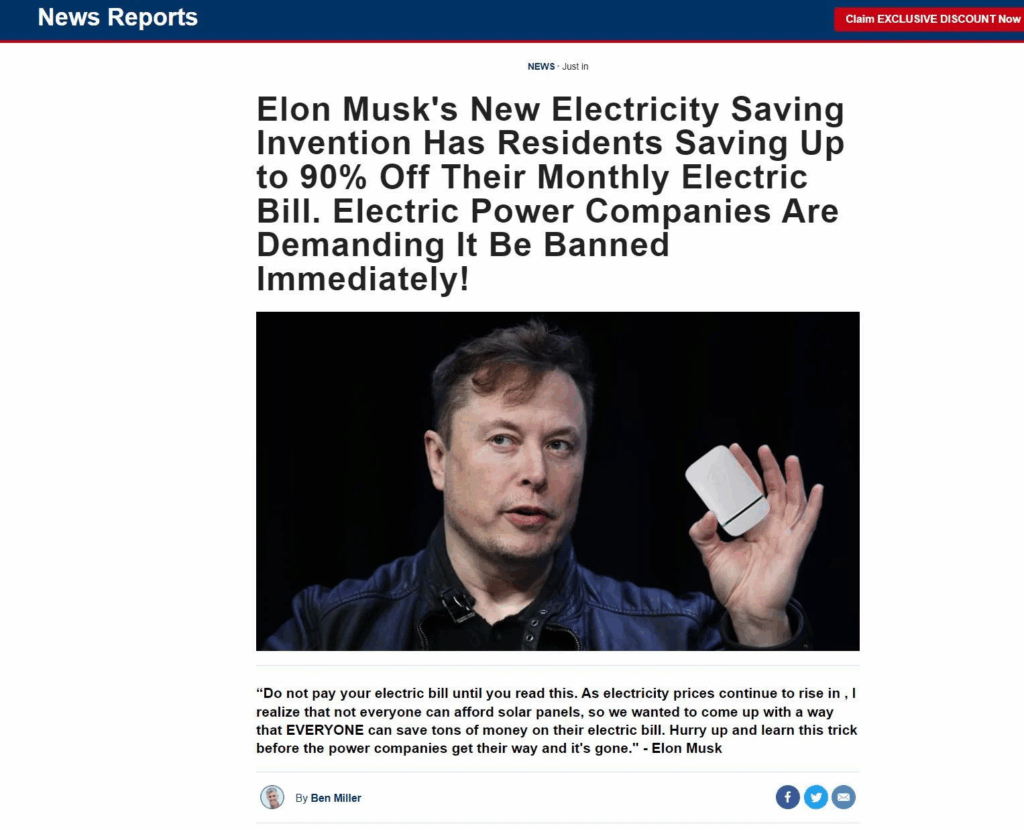
Scam Overview
The scam begins with an eye-catching promise: a revolutionary energy-saving device that slashes your monthly utility bills—allegedly backed by tech mogul Elon Musk. These devices often go by names like:
- Stop Watt
- Miracle Watt
- True Watt
- Real Watt
- Watt Rescue
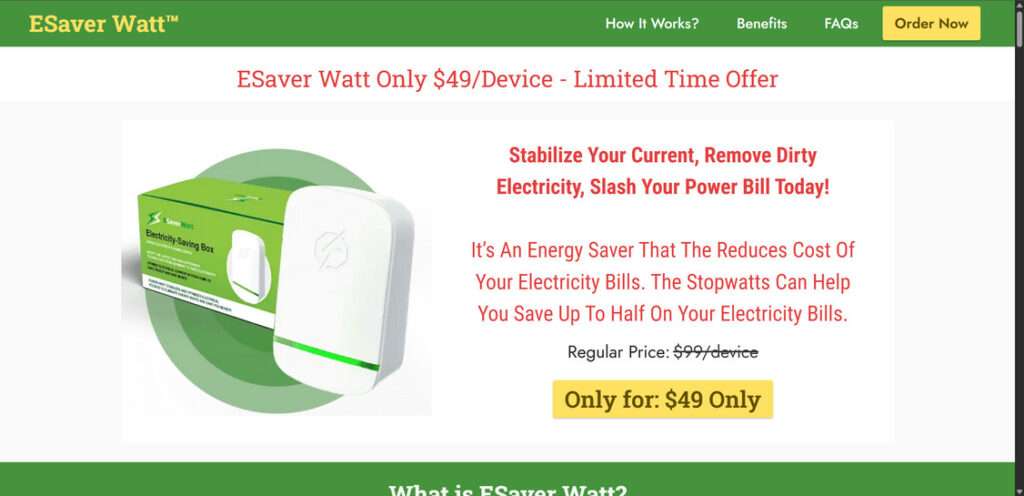
- ESaver Watt
- Pro Power Save
- Voltmod
Each product has its own slick branding and website, but the formula is identical: exaggerated promises, fake celebrity endorsements, fabricated reviews, and fraudulent media coverage.
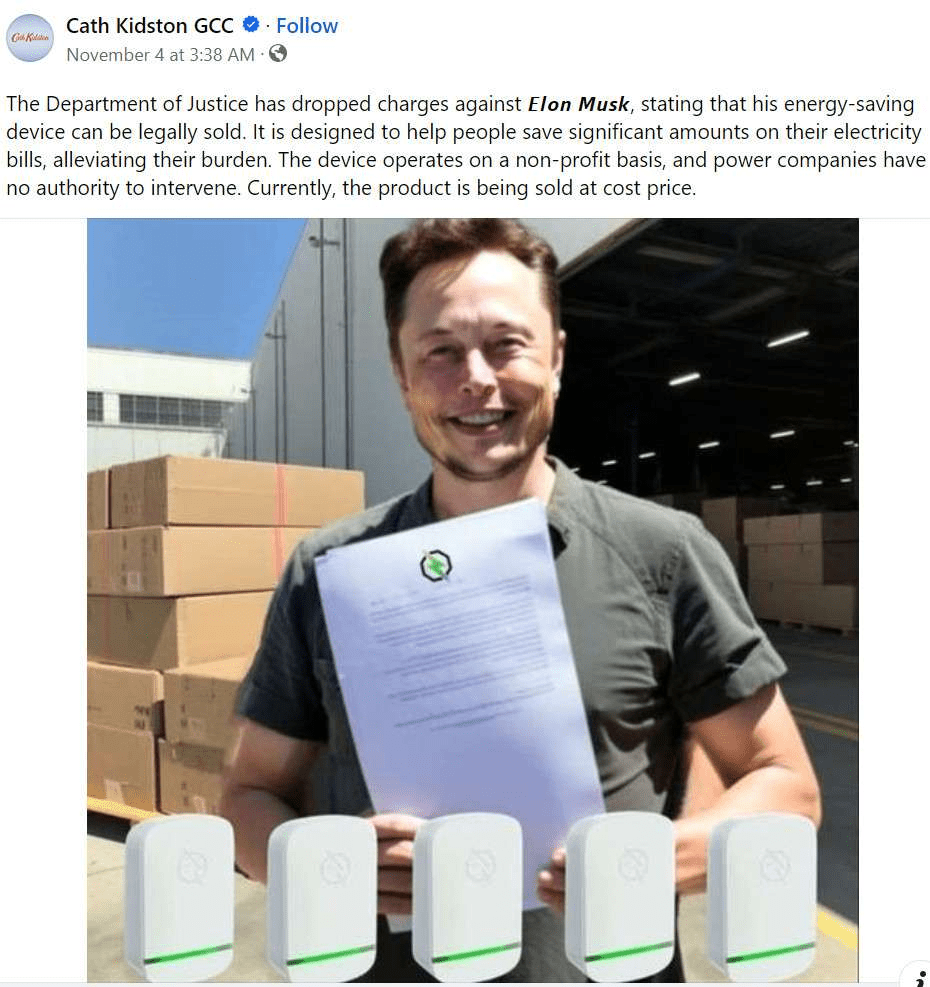
False Endorsements by Elon Musk
Scammers use Musk’s name and photo to create the illusion of legitimacy. AI-generated images show him holding the device, supposedly introducing it at Tesla events or on television. These are completely fake. Musk has never endorsed any of these products, nor has Tesla been involved in their creation.
One widely shared video even includes a fabricated Fox News segment claiming Musk is “fighting the power companies” with this new tech. The segment is a deepfake, the URL is spoofed, and the news anchors are AI-generated or pulled from unrelated clips.
Unrealistic Claims
Each device claims it can reduce electricity bills by 30% to 90%. They supposedly “filter dirty electricity,” “stabilize voltage,” or “optimize current.” These pseudoscientific terms are meant to sound impressive but are completely meaningless in this context.
There’s no verifiable lab testing, no peer-reviewed data, and no electrical engineering explanation for how these devices supposedly work. Multiple reputable sources, including Consumer Reports and the Better Business Bureau, have debunked these claims.
Fabricated Reviews and Testimonials
The product websites feature glowing testimonials with photos of smiling customers who supposedly saved hundreds of dollars. These reviews are entirely fabricated, often using stock photos or AI-generated faces. Names like “Dorothy Smith” and “James Allen” are frequently recycled across different product sites.
Even the before-and-after power bills shown in ads are photoshopped, with inconsistent dates, suspicious fonts, and impossible numbers.
Spoofed News Coverage
To make the scam seem credible, fake articles are created on websites designed to mimic CNN, Fox News, Bloomberg, and TechCrunch. These articles are loaded with typos, broken links, and sensational headlines like “Elon Musk Destroys Utility Companies With New Invention.”
These pages are often propped up with aggressive SEO tactics so they show up in search results when people Google terms like “Elon Musk electricity device.”
No Real Contact Information
Scam websites often hide or fake their contact information. The “customer service” numbers don’t work, emails bounce back, and return addresses lead to empty buildings or foreign warehouses.
How The Scam Works
Here’s a detailed breakdown of how the Elon Musk energy-saving device scam operates, from discovery to delivery.
Step 1: Initial Exposure
You encounter a compelling ad on Facebook, TikTok, Instagram, or Google. It claims Elon Musk has released a new device that helps regular people “fight back” against high energy bills. The video may even feature a fake interview or AI voiceover.
Step 2: Click-Through to Fake News Site
Clicking the ad leads to a page that looks like a legitimate news outlet. It tells a story about how Musk or Tesla secretly developed this product, only for it to be “banned” or “silenced” by greedy energy companies. This creates urgency and stokes outrage.
Step 3: Redirect to Sales Page
A button at the bottom of the article takes you to an e-commerce site selling the device. The product page is professionally designed and full of fake reviews, performance claims, and limited-time offers to pressure you into buying.
Step 4: Payment Collection
You’re asked to enter your name, address, and credit card information. The site may also upsell you on buying multiple units by offering “bulk discounts.”
Step 5: Data Harvesting
While you think you’re just buying a device, scammers are collecting your personal information. This data can be resold or used for future scams.
Step 6: Delivery of a Worthless Gadget
If you receive anything at all, it’s a cheap plastic shell with a capacitor and an LED light. It does nothing. Sometimes, the device never arrives, and attempts to follow up are ignored.
Step 7: Disappearing Act
The scam site eventually disappears, often reappearing under a new name like VoltShield, EcoVolt, or PureWatt. Meanwhile, your payment and data are already in the hands of scammers.
Recognizing Fake Energy Saving Devices
Here are red flags to recognize one of these scammer products:
- Outlandish claims of 50-90% energy savings with no credible proof. Genuine energy savers provide more modest savings of 5-20%.
- Claims to “stabilize” current, “rebalance loads” and other technobabble. These mean nothing.
- Heavy use of Elon Musk’s name, quotes and image indicating his endorsement. Musk has never endorsed any such products.
- No real contact information, company details, address or phone number – just an online order form.
- Requirement to pay the full amount upfront before receiving the product. Real firms charge upon shipment.
- High regular prices crossed out to make the price look heavily discounted. This is purely for show.
- Fake endorsements using celebrity names and media logos without permission.
- No money-back guarantee or warranty of any kind in the small print.
- No customer reviews anywhere from verified buyers – only fake positive testimonials.
- Delayed or no shipment, ignoring refund requests. The “company” shuts down after collecting payments.
You are looking at a scam if you see these signs. No genuine energy-saving device will display them.
What’s Really Inside the Energy Saving Devices?
Since these so-called “Elon Musk Energy Saving Devices” fail to actually reduce electricity usage, what do they really contain inside?
Independent technology analysis and unboxing videos have revealed the devices harbor only cheap, basic components with no legitimate energy-saving capabilities:
- A simple circuit board
- Low-grade capacitor
- LED indicator light
- Standard electrical plug
In essence – commodity parts that provide zero energy conservation function while deceiving buyers.
The onboard capacitor may supply minor power factor correction, but this does not lower total energy draw. The LED light is merely an illusion the device is actively “working” when plugged in.
Across the board, electrical engineering experts have debunked the outlandish efficiency claims. These gadgets cannot actively “stabilize” voltage, curb waste from other electronics, or deliver meaningful surge protection as advertised.
Ultimately, the Energy Saving Devices contain nothing beyond basic electronics enclosed in plastic housing. They are functionally empty scam gadgets without any ability to reduce energy bills. The LED light and capacitor serve to disguise the worthless nature of the devices while demanding premium prices.
By better understanding the useless internal components, potential victims can avoid being deceived by the Energy Saver Scam’s hollow promises and fake functionality. Claims of dramatic electricity savings require advanced circuitry – none of which appears inside these fraudulent devices.
Dangers of the Energy Saving Devices Scam
Besides simply wasting money on an ineffective device, there are more serious risks associated with products:
- Fire hazard – Electrical devices that are poorly made in other countries can overheat and ignite fires.
- Damages appliances – Faulty electrical devices can actually damage or fry your expensive appliances and electronics.
- Data theft – Deceptive sites like the one promoting these Energy Saving Devices can steal your credit card and personal information for identity theft.
- Delay real savings – Buying bogus products prevents you from taking legit steps to reduce energy usage and bills.
These Energy Saving Devices can potentially put your home and financial information at risk. It also causes consumers to waste time and money on fake electrical savings rather than proven solutions.
What To Do If You’ve Fallen Victim to This Scam
If you’ve already purchased one of these devices, here’s what you should do immediately:
- Contact Your Bank or Credit Card Company
- Request a chargeback and report the transaction as fraudulent.
- Monitor for any additional unauthorized transactions.
- Report the Scam
- Report the incident to the FTC: reportfraud.ftc.gov
- File a complaint with your local consumer protection agency.
- Report the website to Google Safe Browsing or Web of Trust.
- Change Your Passwords
- If you used the same email/password combo elsewhere, update those credentials immediately.
- Warn Others
- Leave reviews on Trustpilot, Reddit, and social media to help others avoid the trap.
- Share the scam details with friends, family, and online communities.
- Watch for Follow-Up Scams
- Scammers often re-target victims. Be wary of future emails or calls claiming to offer refunds or support related to your “purchase.”
The Bottom Line
The Elon Musk energy-saving device scam is a carefully orchestrated fraud that preys on consumers’ trust in technology and recognizable public figures. These devices—Stop Watt, Miracle Watt, ESaver Watt, and others—do not work, are not endorsed by Elon Musk, and offer no real benefit.
If it sounds too good to be true, it probably is. Do your research, question extraordinary claims, and always verify before buying. Exposing these scams is the first step in putting an end to them for good.

Join the discussion
0 commentsShare your experience or ask a question about this article.
Discussion
Start the conversation
Have a question or something useful to share? Add the first comment.