

An email warning that your mailbox is about to become dormant can feel both urgent and believable. Email providers do occasionally ask users to review security settings, so a button labeled “Verify Email Now” may look like the quickest way to keep an account active.
The Email Address Re-verification message is not a routine service notice. It is a credential-phishing scam that sends recipients to a counterfeit cPanel login page built to capture their email address and password.
Overview
The Email Address Re-verification scam arrives as an unexpected account-expiration or security message. It claims that users of a particular domain must verify their email addresses again and warns that unverified mailboxes will become dormant.
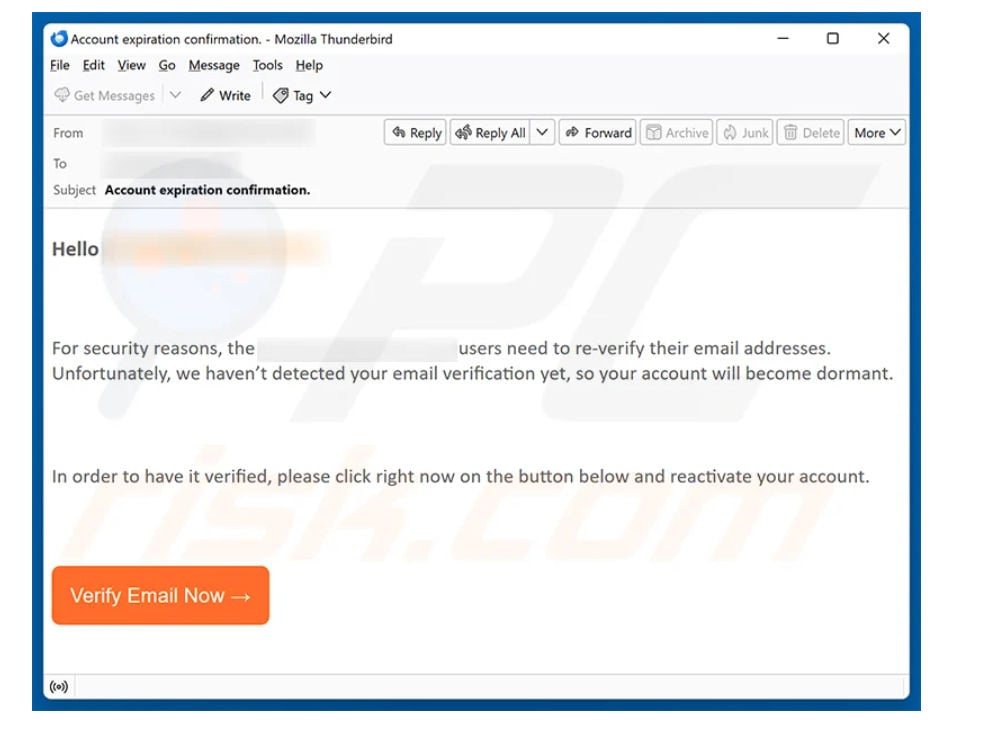
The version examined for this article used the subject “Account expiration confirmation.” Its body referred to everstoneminerals[.]com and said the recipient’s email verification had not been detected.
Everstoneminerals.com is not responsible for the scam. Criminals borrowed the domain name to make the email sound like an internal service-desk message. Sender information may have been spoofed, or the message may have traveled through a compromised account.
The email provides a large orange “Verify Email Now” button. Clicking it opens a fake cPanel page hosted on listoyo[.]com, a legitimate website that appears to have been compromised and abused to host the phishing content.
The malicious URL can include the victim’s email address as a parameter. That address is then placed into the username field automatically, creating the impression that the page recognizes the account and belongs to the correct mail provider.
What the fake re-verification email says
The message is short enough to read quickly and vague enough to work against many organizations. The example supplied to us reads:
Subject: Account expiration confirmation.
Hello [recipient],
For security reasons, the everstoneminerals.com users need to re-verify their email addresses. Unfortunately, we haven’t detected your email verification yet, so your account will become dormant.
In order to have it verified, please click right now on the button below and reactivate your account.
Verify Email Now
Service desk
The unusual grammar is a warning sign, but polished writing would not make the request safe. Modern phishing campaigns frequently use clean templates, copied logos, accurate names, and well-written text.
The decisive problem is the destination. A real account-security procedure should remain on the organization’s known webmail or hosting domain. This button takes the recipient to an unrelated site.
The fake cPanel login page
The phishing page displays the cPanel logo, a username field, a password field, a blue login button, language links, and a copyright notice. On a quick glance, it resembles a normal webmail sign-in page.
cPanel itself is legitimate software used by many hosting providers. The company has no connection to this phishing campaign. Criminals copy its branding because business and domain-based email users recognize the interface.
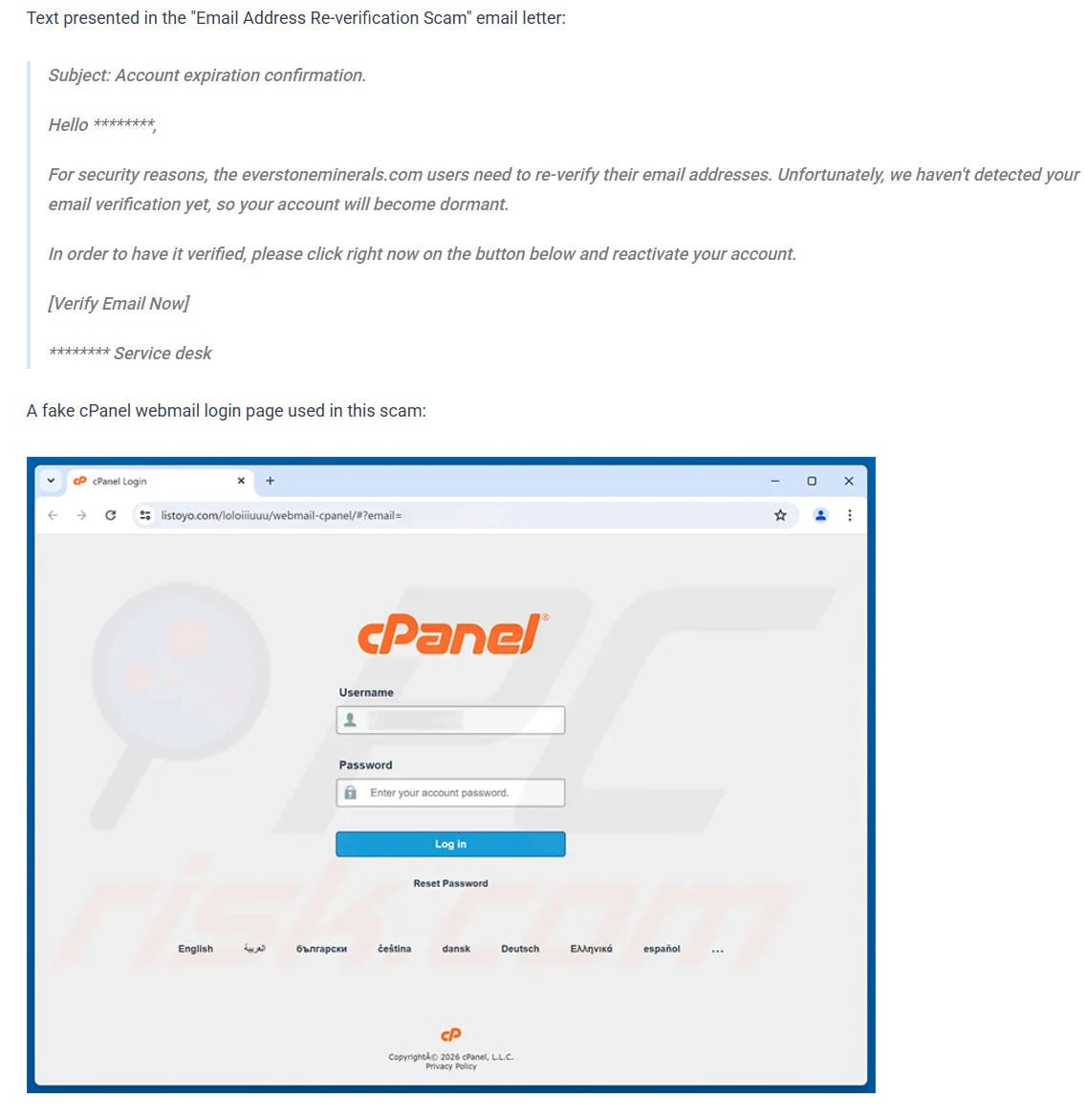
Entering a password does not verify anything. The form sends the credentials to the people controlling the phishing kit. The page may then show an error, request the password again, or redirect the victim to a legitimate website to reduce suspicion.
cPanel advises users not to click links or open attachments in suspicious messages. Its support guidance also recommends checking full email headers, including SPF, DKIM, and DMARC results, when a message claims to come from cPanel.
Why an email password is so valuable
An inbox is more than a collection of messages. It is often the recovery channel for banking, shopping, social media, cloud storage, payroll, and administrative accounts.
Once criminals can read the mailbox, they can search for invoices, password-reset messages, client conversations, identity documents, and other information that helps them plan further fraud.
They may request password resets on connected services and delete the resulting emails before the owner notices. They can also create forwarding rules that silently copy future messages to an attacker-controlled address.
For a business mailbox, the criminals may study genuine payment conversations and wait for an opportunity to send a fake bank-account update. Messages sent from the compromised account are more convincing because customers and colleagues already trust the address.
Warning signs in this campaign
- The recipient did not request an email-address verification.
- The subject threatens account expiration without identifying a genuine policy or deadline.
- The email creates urgency with phrases such as “click right now.”
- The greeting and service-desk signature are generic.
- The message borrows a domain name but does not prove that the domain owner sent it.
- The button opens a website unrelated to the claimed organization or hosting provider.
- The destination requests an existing mailbox password instead of using a normal authenticated account setting.
- The email address appears prefilled, making the fake page look personalized.
- The cPanel logo is used as proof of legitimacy even though logos can be copied.
A secure padlock is not enough. HTTPS only encrypts the connection between the browser and the site. A phishing page can have a valid certificate while still sending the password to criminals.
How to verify a real mailbox notice safely
Do not use the email’s button. Open a new browser tab and navigate to the webmail address you normally use, or open the hosting provider’s app or control panel from a saved bookmark.
For a typical cPanel server, secure access may use the organization’s domain with port 2083 or an address such as cpanel.example.com. The exact login method is set by the hosting provider, so contact that provider through a known website if you are unsure.
A real administrator should be able to confirm the policy independently. Forward the suspicious email as an attachment or provide its headers, but do not forward the password or a security code.
Sender names can be forged
The “From” line shown by an email application is not conclusive. Display names are easy to copy, and a visible address can sometimes differ from the server that actually delivered the message.
Full headers provide better evidence. Look for authentication results, sending servers, return paths, and reply-to addresses. An SPF or DKIM failure is a strong warning, although a pass does not guarantee that the message is harmless if a real account was compromised.
When an unexpected email asks for credentials, the safest verification is still an independent contact with the organization through a known channel.
How The Scam Works
The campaign uses a short path from fear to credential theft. Each stage is designed to make the next one feel like a normal part of account maintenance.
1. Criminals prepare a broad or targeted mailing list
Addresses can come from public websites, previous data breaches, contact forms, business directories, or automated guessing against known domains.
The scammers do not need access to the recipient’s real account. Knowing that an address exists is enough to send a convincing mailbox notice.
2. The email invents a re-verification requirement
The message says security rules have changed or that verification was not detected. This creates a problem the recipient did not know existed.
Because the notice is framed as routine maintenance rather than a prize or payment request, it can bypass the skepticism people apply to more obvious scams.
3. Dormancy or expiration creates pressure
The threat of losing access discourages careful inspection. A busy employee may click immediately because an inactive mailbox would interrupt work.
The email avoids detailed technical explanations that could expose contradictions. It offers one simple solution: press the button now.
4. The button hides the unrelated destination
Button text can say anything while linking somewhere completely different. On a computer, hovering over the button may reveal the destination. On a phone, a long press can often preview it without opening the page.
In this campaign, the domain shown by the browser does not belong to the claimed organization, hosting provider, or cPanel.
5. The URL carries the email address into the form
A query parameter can prefill the username field. This personalization is automated and does not prove that the website knows the account through a legitimate system.
It also confirms to the criminals that a particular address clicked the link, making that recipient a more valuable target for follow-up messages.
6. A cloned cPanel interface requests the password
The fake page copies familiar colors and login elements. A victim focused on the logo may overlook the unrelated domain in the address bar.
Password managers can provide an important warning here. A properly configured manager usually will not autofill credentials on a domain it has never associated with the account.
7. Submitted credentials are captured
When the victim presses Log in, the form transmits the email address and password to the attacker’s collection endpoint.
The attacker can test the credentials quickly. Automated tools may attempt webmail, cPanel, cloud services, and other accounts where the password might have been reused.
8. The page conceals the theft
A generic “incorrect password” message may encourage a second submission, giving the criminal another password variation. A redirect to the real provider can make the event appear to be a temporary login problem.
No confirmation screen can erase the exposure. Once a password was entered on the wrong domain, it should be treated as compromised.
9. The mailbox is used for additional attacks
Criminals may change recovery settings, create forwarding rules, steal confidential information, reset other accounts, or send phishing messages to trusted contacts.
Business accounts can be used for invoice fraud, payroll diversion, vendor impersonation, and requests for sensitive documents.
10. The phishing page moves when reported
Compromised websites and phishing paths are disposable. Once one page is removed, the same cPanel template can appear on another domain.
This is why blocking only listoyo[.]com is not enough. Users must recognize the request and verify account notices independently.
What To Do If You Have Fallen Victim
Do not panic. A fast, organized response can stop the attacker before the stolen password leads to a larger account takeover.
- Change the email password from a trusted device. Open the real provider through a saved bookmark or typed address. Create a long, unique password that has never been used on another site.
- Change the cPanel or hosting password if it was the same. Contact the hosting provider through its official support page if you cannot sign in. Do not use contact information from the phishing email.
- Replace every reused password. Start with banking, cloud storage, domain registration, social media, and work accounts. Password reuse allows one stolen credential to unlock many services.
- Enable multi-factor authentication. Prefer a passkey, security key, or authenticator app when available. Do not approve unexpected login prompts or share one-time codes.
- Sign out other sessions. Use the provider’s security settings to revoke active sessions, app passwords, remembered devices, and connected applications you do not recognize.
- Inspect forwarding and filtering rules. Remove unfamiliar forwarding addresses, inbox rules, delegates, recovery addresses, and automatic deletion rules. Attackers use them to maintain hidden access.
- Review sent, deleted, and trash folders. Look for messages you did not send, password resets, invoice changes, and deleted security alerts. Check account activity for unfamiliar locations or devices.
- Notify the administrator or hosting provider. A business account may require server logs, password rotation, mailbox review, and notification to colleagues or customers. cPanel recommends rotating all affected authentication methods after a compromise.
- Warn contacts if messages were sent from your account. Tell them not to open recent links, attachments, payment requests, or password-reset messages that appeared to come from you.
- Scan the device when appropriate. This version primarily steals credentials through a web form. If you also downloaded a file, installed software, or opened an attachment, update the device and run a trusted security scan.
- Report the phishing message. Mark it as phishing in the email service. Forward it to the organization’s security team and report it to the Anti-Phishing Working Group where supported.
- Monitor connected accounts. Watch for password resets, financial transactions, changed recovery details, and new login alerts. The FTC’s hacked-account recovery guidance provides additional steps.
If you only opened the email and did not click, reply, download anything, or enter credentials, mark it as phishing and delete it. Simply viewing the message does not mean the mailbox was compromised.
If you clicked but entered nothing, close the page and clear any permission it requested, such as browser notifications. Change the password if there is any chance a password manager autofilled and submitted it.
The Bottom Line
The Email Address Re-verification email is a phishing attempt, not a legitimate account-expiration notice. It uses a false dormancy warning and a copied cPanel interface to steal webmail credentials.
Never verify a mailbox through an unexpected email button. Open the known provider independently, check the browser’s domain before entering a password, and contact the real administrator if an account notice cannot be confirmed.

Join the discussion
0 commentsShare your experience or ask a question about this article.
Discussion
Start the conversation
Have a question or something useful to share? Add the first comment.