

What if you could cut your energy bill by nearly half just by plugging in a small plastic device? Sounds like the future, right? That’s the promise ESaverWatt makes — a “miracle” energy-saving device flooding social media and e-commerce platforms with glowing ads and fake testimonials. But behind the curtain, ESaverWatt is just another scam preying on people who want to save money.
In this detailed exposé, we’re going deep into the anatomy of the ESaverWatt scam. You’ll learn how it operates, what it really contains, what victims are saying, and how to protect yourself — or recover your money if it’s already too late.
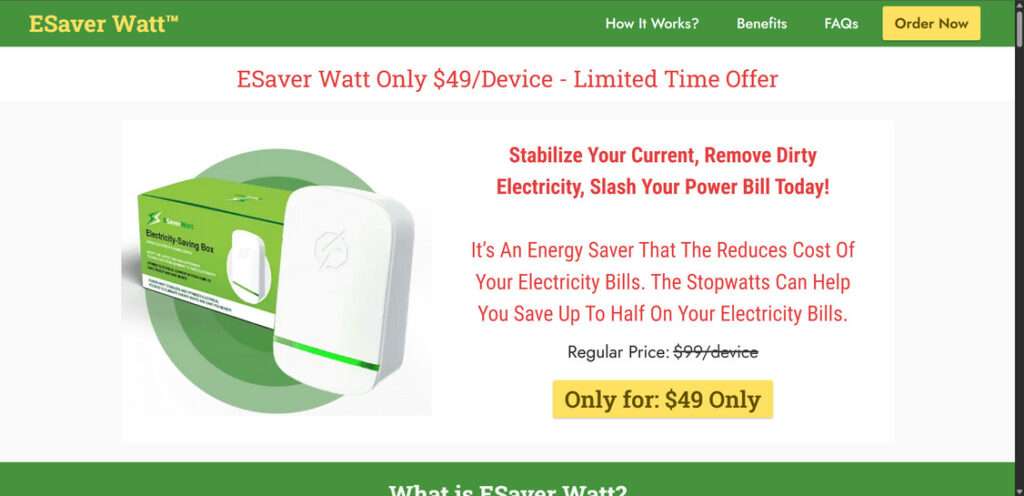
What Is ESaverWatt Really?
The ESaverWatt device is marketed as a revolutionary plug-in solution that “optimizes your home’s electricity usage.” The boldest claims include:
- Cutting energy bills by up to 40%
- Using advanced electrical stabilization technology
- “Cleaning dirty electricity” from your power supply
- Developed in conjunction with Tesla engineers or Elon Musk
- Backed by verified reviews, scientific testing, and lab data
But when you dig deeper, the entire story begins to fall apart — quickly and spectacularly.

Dissecting the Claims
Let’s take a closer look at each of the major claims:
“Stabilizes Your Electrical Current”
The idea that a simple wall plug can stabilize voltage across your entire home’s circuit is absurd. According to licensed electricians and electrical engineers featured on YouTube reviews, no device this small could manage load fluctuations for an entire household.
Real voltage regulation equipment is complex, heavy-duty, and installed by professionals — it doesn’t fit inside a plastic case the size of a deck of cards.
“Lab-Tested and Scientifically Proven”
The supposed “lab reports” featured on ESaverWatt’s website are vague, lack credentials, and are full of generic graphs with no scale, no units, and no source attribution. That’s a huge red flag. Several users on Reddit pointed out that the same graphs are used on similar scams like Voltbox and StopWatt — both now widely discredited.
“Advanced Technology Inside”
Multiple teardown videos show that ESaverWatt contains nothing more than a:
- Tiny capacitor
- LED light
- Basic circuit board
- Generic plug
There’s no microprocessor, no voltage sensor, and no advanced energy-saving tech. This is pure theatrical design — the blinking LED is the only sign of “functionality,” meant to trick users into thinking the device is doing something.
“Thousands of 5-Star Reviews”
A close inspection of their reviews page reveals names like “Dorothy Smith” and “James P.” alongside stock images that have been scraped from free image databases. The language in these reviews is repetitive, overly enthusiastic, and suspiciously similar — likely AI-generated or written by paid copywriters.
“Featured on Major News Networks”
Some promotional materials use edited screenshots of Fox News, CNN, and Forbes articles, inserting the device and altering headlines to include mentions of ESaverWatt. None of these news organizations have published legitimate coverage of the product.
What Real Users Are Saying
A quick trip to BBB or Trustpilot tells a very different story than the company’s website. Verified buyers report:
- No change at all in energy usage
- Feeling “duped” by deceptive advertising
- Poor or nonexistent customer service
- Broken refund promises
- Multiple unauthorized charges
A Trustpilot user writes:
“Scam device. Bought two and saw no difference in my energy bill. The LED light comes on, but that’s all it does. Tried contacting support and got no response. Complete waste of money.”
How the ESaverWatt Scam Works
Understanding how this scam draws people in and closes the trap is key to avoiding similar schemes in the future. Here’s an expanded breakdown of each phase of the ESaverWatt scam operation.
Step 1: Luring Victims via Social Media Ads
It all begins with eye-catching ads that promise massive savings with little effort. You’ll see phrases like:
- “Lower your electric bill instantly!”
- “Elon Musk’s secret finally revealed!”
- “Why aren’t more people using this?”
These ads are heavily promoted on:
- YouTube pre-rolls
- TikTok influencer collabs
- Instagram sponsored posts
Often, they feature fake news clips and edited videos that look professional and credible — even using deepfake tech in some cases to falsely show celebrities endorsing the product.
Step 2: Redirect to Fake News Websites
Click the ad and you’re taken to a fake news site that looks shockingly real. Common domains include names like:
techuncovertoday.comsmartgadgettrends.comecoenergytips.net
These pages are designed to mimic legitimate media outlets. They’ll use a fake author name, bogus data tables, and photoshopped graphics to create trust.
Step 3: Fake Reviews and Testimonials
On the purchase page, you’ll encounter dozens of fake 5-star reviews:
- Generic names like “John T.” or “Maria B.”
- Stock profile photos
- Cookie-cutter praise that repeats phrases like “game-changer,” “saves me hundreds,” or “works like magic”
There are also “video testimonials” from actors, who appear on multiple scam product pages under different names.
Step 4: Artificial Scarcity Pressure
This is classic scam psychology — using urgency and scarcity to rush your decision. Examples include:
- “Only 3 units left at this price!”
- “Exclusive today-only offer — ends in 10 minutes!”
- “Almost out of stock — act now!”
A fake countdown timer may start the moment you land on the site. This is meant to override logical thinking and nudge you into making a rushed purchase.
Step 5: The Checkout Trap
Once convinced, you proceed to a sketchy checkout page that may:
- Not include proper business information
- Ask for extra purchases via sneaky checkboxes
- Automatically enroll you in a subscription (fine print only)
Buyers often report being charged for multiple units or unexpected “warranty” fees.
Step 6: Delivery and Deception
Once the device arrives, users note:
- Cheap materials
- No paperwork or instructions
- Device does nothing but light up
When plugged in, the LED glows to create the illusion of function. But behind the scenes, nothing is happening to your energy consumption.
Step 7: Refund Runaround
Trying to return the product? Most users hit a brick wall.
- Emails go unanswered.
- Phone numbers are fake or disconnected.
- Return addresses are PO Boxes in untraceable locations.
- Some users are told they missed the “return window,” despite contacting the seller immediately.
Others find international transaction fees on their credit card — indicating the product may ship from China or Eastern Europe, despite marketing claims of being “American-made.”
What to Do If You’ve Fallen for the ESaverWatt Scam
If you’ve already purchased ESaverWatt, don’t panic. Here’s a detailed plan to protect yourself and possibly get your money back.
1. Unplug the Device
Remove the ESaverWatt from your outlet. There’s no indication that it’s dangerous, but cheap electronics can sometimes overheat or short-circuit. Don’t take the risk.
2. Document Everything
Save every piece of evidence you have, including:
- Email confirmations
- Product photos
- Screenshots of the website
- Any communication with the seller
This will be crucial for disputes and refund requests.
3. Contact the Seller
Use the email provided in your order confirmation. If it’s a valid contact, send the following message:
“I am requesting a full refund for the ESaverWatt device based on deceptive advertising and product ineffectiveness. I will file a dispute with my card provider and report this transaction to consumer protection agencies if this issue is not resolved within 7 business days.”
Be polite but firm.
4. Initiate a Chargeback
If you paid with a credit card, contact your bank or card issuer immediately. Explain:
- The product was not as described
- You were misled by fake claims
- Refund was not honored
Most major card issuers support consumer protections and will reverse the charge if evidence supports your case.
5. Report the Scam
File complaints with:
- Federal Trade Commission (FTC)
- BBB Scam Tracker
- Internet Crime Complaint Center (IC3)
- [Your local consumer protection agency]
6. Warn Others
Help protect the next person by sharing your story:
- Leave reviews on Trustpilot, Reddit, Amazon, or YouTube
- Post on Facebook scam warning groups
- Comment on ESaverWatt ads (if they’re still running)
7. Watch for Additional Charges
Some victims report recurring fees or mystery transactions after buying ESaverWatt. Contact your bank to:
- Block the merchant
- Cancel any ongoing subscriptions
- Monitor for suspicious activity
Frequently Asked Questions (FAQ) About the ESaverWatt Scam
Is ESaverWatt a legitimate energy-saving device?
No, ESaverWatt is not a legitimate product. It does not have any proven ability to reduce energy consumption. Electrical engineers and teardown experts have confirmed that it contains only basic components like a capacitor and LED light, which have no impact on electricity usage.
Does ESaverWatt actually save you money on your electricity bill?
No, multiple users have reported seeing zero difference in their electric bills after using the device. There is no scientific or technical evidence that supports any of the savings claims made by ESaverWatt.
Why do so many websites and ads say ESaverWatt works?
The product is heavily promoted through fake reviews, fabricated testimonials, and AI-generated images. The websites and ads are part of a coordinated scam operation meant to create the illusion of credibility and effectiveness.
Was ESaverWatt really developed by Elon Musk or Tesla?
No. This is a completely false claim. Elon Musk and Tesla have no connection to ESaverWatt. Scammers use doctored photos and fake news articles to trick consumers into believing the device is endorsed by reputable figures.
Is ESaverWatt safe to use?
While the device is unlikely to cause immediate harm, it is made of low-quality parts. Using unverified electrical devices in your home could pose risks such as overheating or short-circuiting, especially if left plugged in long-term.
How do I know if I’ve been scammed?
If you purchased ESaverWatt and noticed no change in your electricity usage, received a device that does nothing but light up, or are unable to contact the seller for support or refunds, you are likely a victim of the scam.
Can I get a refund for ESaverWatt?
Getting a refund from the seller is extremely difficult, as many users report ignored messages and disappearing customer service. However, you may be able to initiate a chargeback through your bank or credit card company.
What should I do if I already bought ESaverWatt?
Unplug the device, save all your purchase records, and contact your card provider to request a chargeback. Also report the scam to the Federal Trade Commission, BBB Scam Tracker, and other consumer protection agencies.
Are there other scams like ESaverWatt?
Yes. Similar fake devices have appeared under different names like Voltbox, StopWatt, and EcoWatt. These scams use the same tactics and fake endorsements to sell worthless products.
How can I avoid falling for scams like this in the future?
Always research a product before purchasing, especially if it seems too good to be true. Look for independent reviews on trustworthy platforms like YouTube or Reddit, and verify endorsements through legitimate sources. Avoid products that rely on pressure tactics or make bold claims without real evidence.
The Bottom Line
ESaverWatt isn’t a miracle energy-saving device. It’s a modern snake oil product sold through deceptive ads, fake reviews, and false promises. The device contains no working technology, no energy-saving properties, and no value to you as a consumer.
Scams like ESaverWatt thrive in the shadows — so bring them into the light. Share this guide, report the fraud, and don’t fall for empty promises masked by slick marketing.

Join the discussion
0 commentsShare your experience or ask a question about this article.
Discussion
Start the conversation
Have a question or something useful to share? Add the first comment.