

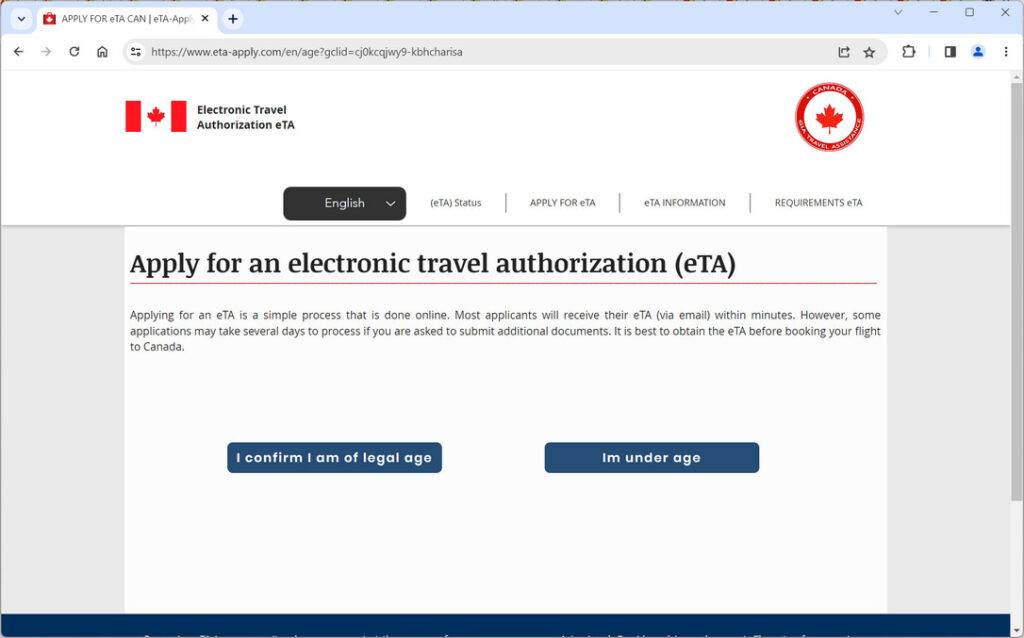
Those looking to travel to Canada often require an Electronic Travel Authorization (eTA) visa. A notorious scam website, eta-apply.com, impersonates the official Canadian government eTA application site to defraud applicants. This article will uncover how this unscrupulous visa scam works, how to avoid being victimized, and what to do if you unfortunately fell prey.
The eTA Scam
An eTA is an electronic visa required for certain foreign nationals traveling to Canada by air. Legitimate eTAs are issued via the official Government of Canada website cic.gc.ca, for a fee of CA$7.
Criminals are capitalizing on eTA requirements by operating fraudulent copycat websites that deceive applicants into paying exaggerated visa fees. One prolific example is eta-apply.com – a scam designed to dupe travelers into spending hundreds of dollars for visa services.
How the eta-apply.com Scam Operates
The eta-apply.com website fraudulently impersonates the real Canadian government eTA application portal. Using official Canadian government branding without authorization, the site appears authentic at first glance.
Applicants are prompted to enter personal and passport details to “apply” for an eTA. The site then generates an application form demanding payment of CA$899 for visa processing – over 100 times the actual government fee.
Unsuspecting victims submit payment believing eta-apply.com is the official portal. However, it is an elaborate scam to steal visa applicants’ money and data. The exorbitantly high fees go directly to the criminals behind the website.
Identifying and Avoiding the eta-apply.com Scam
While deceiving at first, there are key indicators that can help identify and steer clear of the eta-apply.com scam:
- Verify URLs – The official eTA site URL is cic.gc.ca. Other .com or .org sites are fraudulent.
- Check for a lock icon – Legitimate sites always use HTTPS connections. Non-secure HTTP sites indicate scams.
- Look for discrepancies – Spelling errors, grammatical mistakes, and inconsistent branding point to scams.
- Research official fees – The real Canadian eTA fee is only CA$7, not hundreds of dollars.
- Avoid third-party visa services – Applying directly via the government website is safest.
- Check domain registration details – Scam sites often use hidden registration data.
- Do not rush – Scammers pressure urgency to avoid scrutiny. Carefully evaluate any eTA site.
These signs can help travelers identify and steer clear of eta-apply.com and other eTA visa scams. Applying directly via cic.gc.ca is always the safest option.
What to Do if Scammed by eta-apply.com
If you paid eta-apply.com and suspect you fell victim to the scam, take these steps immediately:
- Contact your bank – Report the fraudulent charges and have them reversed if possible. Cancel any compromised cards.
- Monitor accounts – Watch for signs of further misuse of financial and identity data provided to the scammers.
- Change passwords – Update passwords for online accounts with reused credentials to prevent access.
- Review credit reports – Check for any suspicious activities that point to potential identity theft.
- Apply for a legit eTA – Safely reapply directly via the real Government of Canada cic.gc.ca website.
- Report the scam – File a complaint with the Canadian Anti-Fraud Centre to help warn others.
- Spread awareness – Share your experience with others to help prevent them from being defrauded too.
- If you suspect your device is infected with malware, you should run a scan with Malwarebytes Anti-Malware Free.
Conclusion
Websites like eta-apply.com deliberately deceive eTA applicants by impersonating government sites to steal hundreds of dollars. Checking for signs like unsecure connections and inflated fees can avoid becoming a victim. Those defrauded should act swiftly to limit financial damage, secure sensitive data, and obtain a legitimate visa. The eta-apply.com scam provides a cautionary tale on the importance of double-checking crucial travel documents and applying directly through official government channels.

Reviews & discussion
0 commentsShare a firsthand experience, or ask a question.
Community reviews
eta-apply.com
Moderated reader experiences, not an editorial verdict.
Start the conversation
Have a question or something useful to share? Add the first comment.