

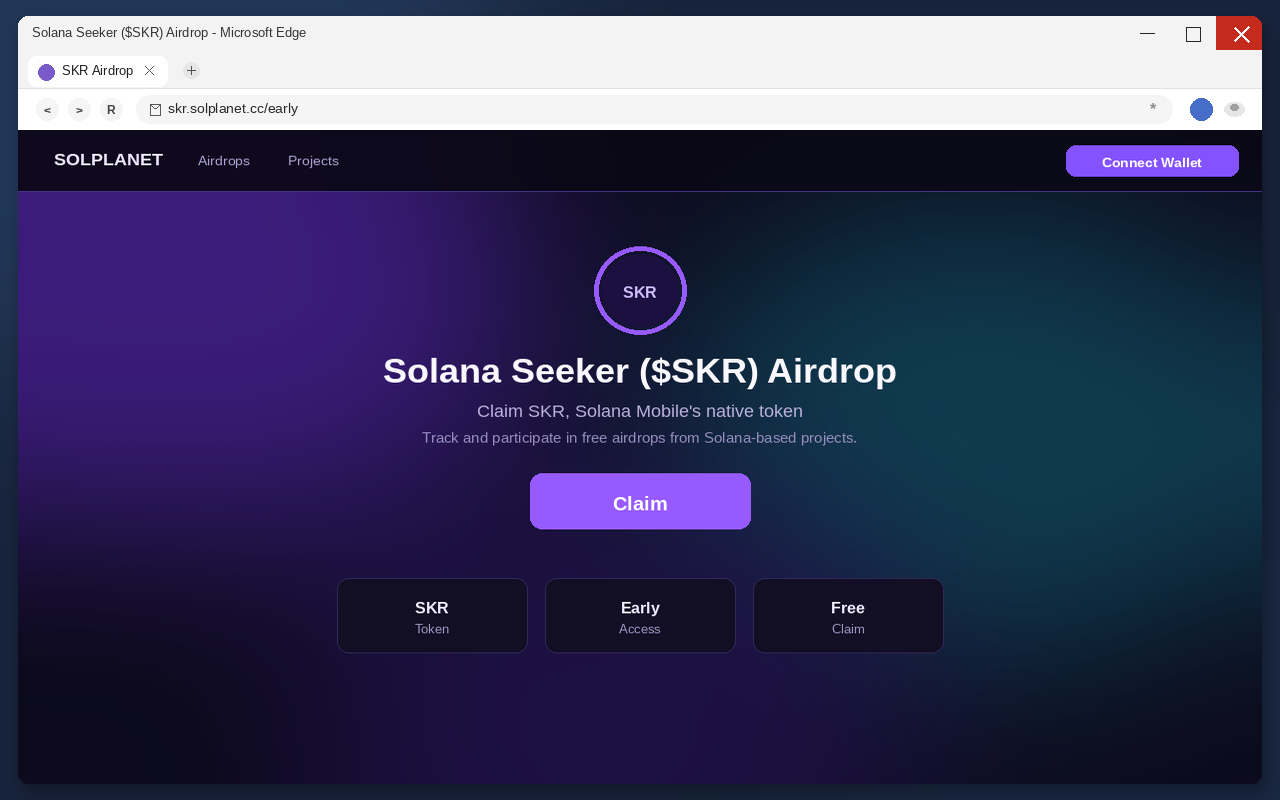
You see a page that says Solana Seeker ($SKR) is ready to claim. The name is already in your head. Seeker is a real Web3 phone. SKR is Solana Mobile’s real native token. The pitch is free tokens for people who got there early. One Claim button. Then Connect Wallet.
That is the trap, not a launch.
One of the pages pushing this has been skr.solplanet[.]cc/early. Treat that address as a snapshot, not as the shop. The next copy will use a different hostname. It will still wear the SKR name. It will still ask you to connect a wallet to collect an airdrop.
Do not connect. Do not approve. Do not sign. Close the tab.
Overview
The fake Solana Seeker ($SKR) airdrop is a wallet drain dressed as a token claim. It is a pattern, not a single storefront. The operator borrows a real product name, a real ticker, and a real phone, then asks for the one action that can empty a wallet: a connection followed by an approval or a signature.
You are the target because you already know the words. You have seen Seeker. You have seen SKR. You may already hold the token, or you may be waiting for an official allocation. The page does not have to invent a universe. It only has to stand next to one that exists and ask you to collect inside a browser tab that Solana Mobile does not operate.
It is not affiliated with Solana, Solana Labs, or Solana Mobile. The real companies did not post these claim pages. The fake pages are the scam. The phone, the token, and the official channels are not.
Once a wallet is connected, the tab can present a contract that looks like a claim and behaves like a drain. Outgoing transfers can be automated. They can look vague in a transaction list. Some drainers estimate the value of what is sitting in the wallet and take the expensive pieces first. Cryptocurrency transfers are not reversible. There is no chargeback desk on a confirmed chain transfer.
The U.S. Federal Trade Commission has already measured how expensive that class of theft is. Since the start of 2021, more than 46,000 people reported losing over $1 billion in crypto to scams. That was about one out of every four dollars reported lost to fraud in the period the FTC published, more than any other payment method. The median individual reported loss was $2,600. About 49% of those crypto-loss reports started with an ad, a post, or a message on social media. A fake SKR claim is the same family of pitch: free value, familiar brand, one rushed signature.
The SKR impersonation is the first hook
SKR is not an invented ticker. It is the native asset of the Solana Mobile ecosystem. Seeker is not an invented gadget name. It is Solana Mobile’s Web3 smartphone. The scam does not need a new story. It needs your existing one.
That is why the headline works. Solana Seeker ($SKR) Airdrop sounds like an ecosystem reward, not a stranger’s form. If you already follow Seeker, or you already hold SKR, or you already saw official talk about the token going live, the fake page arrives in a mind that is primed to collect. The page does not have to prove it is Solana Mobile. It only has to look close enough that you skip the proof.
Official SKR information lives on Solana Mobile’s SKR page. Official claims for people who earned an allocation have been described through Solana Mobile’s own wallet flow, not through a surprise early tab that appeared in a feed. A third-party path that asks you to connect a wallet to collect SKR is not that flow. Treat the borrowed name as a warning, not as a credential.
Search makes the impersonation worse. After you see the ticker, you will search it. The results can include clones that reused the same headline. A result that ranks for “SKR airdrop claim” is not an official window. It is often the next shop wearing the same costume.
The tell is the request, not the spelling. Anyone can register a hostname that contains skr, seeker, sol, airdrop, or claim. Those words are cheap. They are not a license from Solana Mobile. If the tab wants a wallet connection to hand you SKR, and it is not published on the official site, you are looking at the impersonation.
The claim button is the door, not the prize
The Claim control is not a delivery. It is a door. Behind it sits Connect Wallet. Until you connect, the page is only a picture. After you connect, the page can ask the wallet to sign a contract. That contract is not SKR arriving. It is permission leaving.
These pages keep the copy short on purpose. Claim SKR. Early window. Native token. Free airdrop. Those sentences do one job. They tell you the token is real so the button feels like collecting something you already earned. A countdown, a live badge, or the word early is not a distribution schedule. It is pressure.
Nothing on a random claim tab can drop SKR into your wallet as a gift. A real distribution can be checked on official channels, with a published path, and without a surprise contract that wants spending power. The button wants the connect. The connect is how the rest of the trap loads.
Do not treat a lock icon as ownership. Encrypted delivery only means the trip to that host is wrapped. It does not mean Solana Mobile owns the host. Encrypted delivery of a drain is still a drain. A green padlock has never been a company badge.
People click Claim because it feels smaller than “send money.” There is no invoice. There is no dollar field to argue with. The page never has to name a price. You pay later, on-chain, with whatever was already sitting in the wallet you connected. That is why the same button works on people who would never wire $500 to a stranger.
The drain is the product
Connect Wallet is the product. A connection by itself can look harmless. Many real apps ask for a public address. Drainers abuse that habit. They take the familiar connect dialog and follow it with an approval, a signature, or a transaction the victim reads as “claim.”
People approve because the headline already told them what the click is for. The wallet prompt is where the headline should be ignored. Read the prompt. If it is a spend, a transfer, an unlimited allowance, or a blob you cannot explain in one sentence, reject it.
Connecting the wallet can authorize a malicious contract. That is the mechanism, not a side effect. The contract is the drainer’s tool. It can move tokens, NFT items, and other assets the wallet controls. The outgoing transfers can be automated. They can look vague. Vague is useful. Vague buys time while the expensive balances leave.
Some drainers approximate value and choose what to steal first. That is why a wallet that “only” held one liquid token can still be cleaned out in seconds, and why a wallet with several assets can lose the valuable ones while junk remains. The leftover junk is not proof the page was kind. It is proof the script ranked the inventory.
There is no undo button after a confirmed transfer. Chain records are public. Reversals are not. Anyone who later promises to roll the transfer back for a fee is selling a second story, not a refund.
Do not test the connect with a “small” wallet as a curiosity. A drain can still take what is there. A drain can still sit on the connection and wait for a later deposit. The cheap test is the one that never opens the page in a wallet at all.
How The Scam Works
The shop is simple once you stop reading it as a reward. Put a real ticker in the headline. Host it on a throwaway domain. Ask for a wallet. Convert the claim into a signature. Drain what the script can reach. Repeat on the next hostname if this one dies.
That kill chain does not care which letters sit in the address bar this week. If you learn only the current URL, you will miss the next copy. Learn the sequence. The sequence is what survives the domain change.
The bait arrives as a free SKR drop
You do not type an official address the way you type a bank URL. The page is brought to you. Compromised websites can throw a pop-up. Rogue ads can dress a fake airdrop as a news card. Social posts and private messages can do the rest, including from accounts that used to belong to real people or real projects.
The FTC’s crypto-loss reports already showed the social-media pattern. Nearly half of the people who reported losing crypto said the contact started there. Of those who named a platform, 32% pointed to Instagram and 26% pointed to Facebook. WhatsApp sat at 9%. Telegram sat at 7%. A SKR claim link is one more costume on that road.
The message is short because short travels. SKR airdrop is live. Early claim. Solana Seeker token. Connect to check. Each line is meant to make you move before you open Solana Mobile’s official site. Urgency is not a bonus on this pitch. It is the delivery system.
If the account posting the link was hacked, the costume gets even better. A familiar name above a SKR claim is enough for many people. The post can match the kind of thing that account usually shares. That match is not verification. It is stolen furniture in a stolen room.
Token mentions do the same work inside chats and comment threads. Someone replies that the claim is live under a real SKR post. Someone DMs a “you are eligible” screenshot. Someone pastes a short link that expands into a claim tab. The bait is the ticker you already trust. The destination is still a stranger’s connect button.
Paid placements copy the same shape for people who never open crypto social feeds. A fake news card. A “your wallet is eligible” interstitial. A push alert from a site you should never have allowed to notify you. The story is still that SKR is live and you are late. The destination is still a claim page that wants a wallet.
The fake SKR claim page does the selling
The landing tab is built to feel like an ecosystem portal. The pitch is a Solana Seeker ($SKR) airdrop. It says you can claim SKR. It may also talk like a hub for other Solana drops so the tab feels like infrastructure, not a one-off. A hub feels safe. It is still a claim page on a domain Solana Mobile does not operate.
Look at the hostname anyway. If it is not Solana Mobile’s official site, stop. A name that contains skr, seeker, sol, airdrop, or claim is not a credential. Anyone can register those words by Tuesday. The operator is counting on you to read the ticker and skip the rest of the address.
The page does not need a long whitepaper. It needs you to believe the Claim control is how SKR arrives. People who already wanted the token will fill in the missing proof themselves. That is the point of using a real ticker. You bring the trust. The page only has to collect it.
What you will not get is the boring proof a real distribution can survive. A published official path. A claim that lives where Solana Mobile already publishes SKR facts. A flow that does not ambush you with a surprise spender. Missing proof is not a soft launch. It is the tell.
Do not let the tab certify itself. A logo you recognize, a dark theme that looks like other Solana pages, and a button that says Claim are all cheap. Official SKR facts belong on Solana Mobile’s SKR page, opened from a bookmark or typed by you. A surprise tab that arrived from an ad does not get to be the source that proves the ad.
Connect Wallet opens the door
Claim leads to Connect Wallet. That prompt can look like any other app connection. Familiar wallet chrome is not proof the SKR offer is real. The only wallet that matters is the one on your device, and the only question that matters is what that wallet is being asked to do.
If you stop before connecting, the drain has nothing to hold. Close the tab. Do not return. Do not open the same URL in a “burner” just to see the dialog. Curiosity is how the next prompt gets a chance.
If you already connected and then felt the floor drop, do not reconnect to “cancel” the session on their page. Disconnect from inside your wallet. The scam site is not a help desk for the permission it just requested.
A connection can also be a scouting step. Some pages only need the public address first. They read what you hold. Then they build the next prompt around the expensive pieces. That is why “I only connected, I did not sign” is not the all-clear people want it to be. Disconnect anyway. Watch the address. Do not feed it.
Do not share a screen with a stranger who offers to “walk you through the claim.” Do not install a remote-access tool so someone can tap Connect for you. The connect is the attack. Help that wants to press it for you is part of the attack.
Approve or sign finishes the theft
After the connect, the page can ask you to approve a contract, sign a message, or confirm a transaction. The label on the site will still say claim. The wallet screen is the only honest surface, and even that can be crowded. Read the spender, the amount, the token, and whether the allowance is unlimited. If the request is blank, unreadable, or larger than the SKR you thought you were collecting, reject it.
People sign because the page already announced the meaning of the click. That is social engineering, not cryptography. A signature is not a receipt for SKR. A signature can be the exact authority the drainer needs to move assets without asking you again.
Gas that looks tiny is not a reason to relax. A small network fee can sit in front of a large allowance. A message with no fee can still be a permit. If you cannot explain the prompt without using the word claim, you do not understand the prompt. Reject it.
Hardware wallets slow the hand. They do not bless the contract. If the device is asking you to sign a spend you cannot explain, decline it. A blinking confirm button is not a claim ticket. “I used a hardware wallet” is not a refund after you approved the spend.
Unlimited allowances are the worst version of this step. They can leave a spender in place after the tab is closed. A balance that still looks fine at 5:00 p.m. can be empty at 9:00 p.m. Unchanged is not cleared. Unchanged can mean “not yet.”
The drain takes what it can, then the site dies
Once the malicious contract is in place, transfers can run without a second conversation. Balances can fall while you are still staring at a success spinner. They can also fall later, after you have already told yourself nothing happened. Delay is not safety. A watching script can wait for a better balance, a cheaper fee, or a moment when you are not looking.
Because some drainers rank assets by value, the first missing piece may be the token you actually care about. Dust can remain. An NFT can leave. A liquid balance can leave. What remains is not a refund. Do not send more funds to “complete” a claim, cover a fee, or unlock the rest. That deposit is another meal.
Then the hostname goes away. A report lands. A host pulls the file. An ad account dies. The operator stands up the same SKR headline on a fresh domain and buys the next round of clicks. If you bookmarked the old address, you bookmarked a corpse. The next victim will see the same Claim button with a different spelling in the bar.
That rotation is why a site-by-site autopsy does not protect you next week. The clone will not reuse last Tuesday’s hostname. It will reuse the pitch. Free SKR. Claim. Connect Wallet. Approve. If you can recognize that sequence, the new domain does not get a free pass.
The chain will show the movement. It will not reverse it. Save the transaction IDs. They are the record. They are not a lever that pulls the coins back.
What To Do If You Have Fallen Victim to This Scam
If you only opened a SKR claim page and never connected a wallet, close it. Do not go back. You do not need a special cleaner for a tab you already shut. The rest of this list is for people who connected, approved, signed, or are not sure what the wallet prompt did.
Stay on a device you trust. Do not let a stranger remote in. Do not reopen the claim tab to “revoke from the same site.” That site is not your control panel. The hostname you saw today may already be gone. The steps below still work.
- Disconnect the site inside the wallet, then leave it disconnected. Open your wallet’s connected-app or connected-site list. Remove the SKR claim page and any other unknown sessions from this incident. Do not reconnect to check a balance on their page. Disconnecting does not by itself cancel token approvals, but it stops the next prompt from arriving through the same door. If the wallet offers a “forget this site” or revoke-session control, use it. Then close the browser tab.
- Do not reconnect, and do not send more assets to the same address. A drained or partially drained wallet can still be watched. Fresh deposits, bridging attempts, and “recovery fees” are how a second pass gets paid. Leave the old address alone except for the careful move in the next steps. Do not try to claim SKR again on a copycat domain that appeared after you searched the ticker.
- Create a new wallet with a new recovery phrase. Use the official wallet application on a clean device. Generate a brand-new phrase. Write it down offline. Do not reuse the old phrase, do not type the old phrase into a website, and do not import the old phrase into a “sweeper” a stranger sent you. The old wallet may still be useful as a place you drain from. It is no longer a place you keep value. Treat every account derived from the old phrase as exposed if you typed that phrase anywhere, and treat it as high risk if you only signed a malicious contract.
- Move remaining assets to the new wallet first. If anything of value is still sitting in the old wallet, send it to addresses generated from the new phrase. Start with the most liquid and most valuable balances. Leave enough native token in the old wallet to pay network fees. Verify every destination on the wallet screen before you confirm. Move NFTs and less obvious tokens after the liquid balances, not before, if fees are tight. Speed matters more than sorting the junk. Do not route the rescue through the claim page, a “support chat,” or a helper who wants to share a screen.
- Revoke approvals and spending permissions on the old wallet. After the remaining value is out, use the wallet’s official approval manager or a reputable blockchain explorer for the network you used. Revoke token allowances, NFT operator permissions, and any contract connected to this airdrop flow. Unlimited allowances are the ones to kill first. Revocation is extra important if you signed but still see a balance, because the contract may still be allowed to pull later. Revocation does not rebuild a phrase you typed into a form. If the recovery phrase was exposed, the new wallet is the only home. The old one is a leftover.
- Preserve transaction IDs and the rest of the record. Copy every TXID, destination address, token mint, timestamp, and current balance you can still see. Screenshot the claim page URL you actually opened, the wallet prompt if you still have it, and the connected-site list. Export a CSV from an explorer if the wallet makes that easy. Keep the originals. This packet is what an exchange, an investigator, an insurer, or a tax professional can actually use. A memory of “I clicked Claim” is not a record.
- Alert identifiable venues, then file the reports. If stolen funds moved toward a centralized exchange deposit, contact that exchange’s fraud desk with the TXIDs and the destination addresses. A freeze is not a promise. Delay makes it less likely. Report the URL you opened to the wallet vendor, to the ad or social platform that showed the link, and to the FTC’s fraud reporting site. In the United States you can also use the FBI IC3. Use the matching national fraud desk if you are elsewhere. Reporting will not rewind the chain. It can still shorten the life of the next clone.
- Ignore recovery agents, drain-back services, and anyone who DMs you first. After a visible SKR loss, inboxes fill up with people who say they can reverse a Solana transfer, unlock a drainer, or file a case for an upfront crypto fee. That is a second scam. Do not pay a tracer. Do not share the new recovery phrase. Do not install remote-access software so someone can “rebuild the claim.” Work with the exchange you already have an account with, with law enforcement, or with counsel you hired on purpose. Nobody can privately cancel a confirmed transfer because they asked nicely in a chat.
If you never approved anything, disconnecting and reviewing permissions may be enough, but still watch the old address for a few days before you trust it with new funds. If you approved or signed, finish the move to the new wallet even if the balance looks unchanged. Unchanged can mean “not yet.”
Official SKR activity, if you are actually in Solana Mobile’s program, belongs on Solana Mobile’s official site and in the official wallet flow they publish. It does not belong on a random early-claim URL that showed up in an ad.
The Bottom Line
Fake Solana Seeker ($SKR) airdrop claim pages drain wallets. They use a real token name and a real phone name. They are not affiliated with Solana, Solana Labs, or Solana Mobile. The pitch is free SKR. The product is Connect Wallet. The finish is a malicious contract and a drain that can rank what to steal first. Confirmed transfers do not come back.
The domain is disposable. Next week’s clone will not need last week’s hostname. The tell is a page that asks you to connect a wallet to claim SKR and is not published on Solana Mobile’s official site. Close it. If you already connected, disconnect, do not reconnect, move what is left to a new wallet, revoke the approvals, save the TXIDs, report the URL you actually opened, and ignore anyone who promises a paid reversal.

Join the discussion
0 commentsShare your experience or ask a question about this article.
Discussion
Start the conversation
Have a question or something useful to share? Add the first comment.