

A polished page announces that Season 01 of an Ethereum Genesis airdrop is live. It displays a huge community pool, thousands of participating wallets, and an average reward large enough to make one quick eligibility check feel worthwhile.
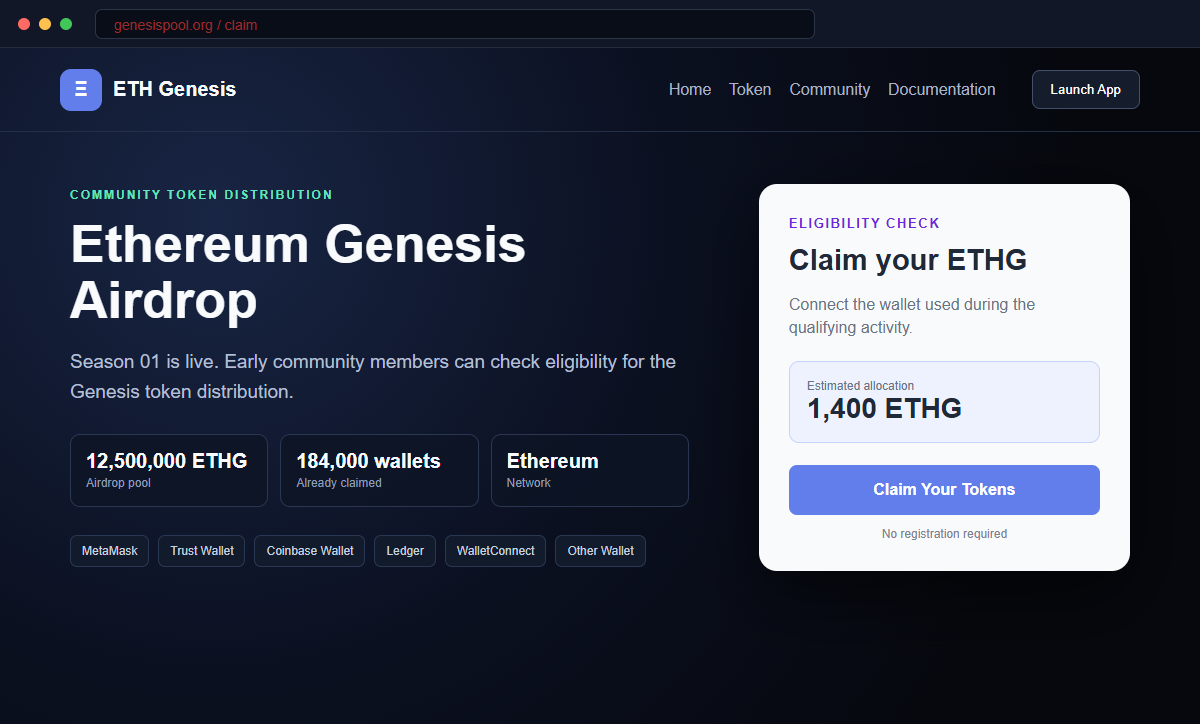
The Ethereum Genesis Airdrop scam is not distributing an official Ethereum reward. Its real goal is to obtain the recovery phrase that controls a visitor's self-custody wallet.
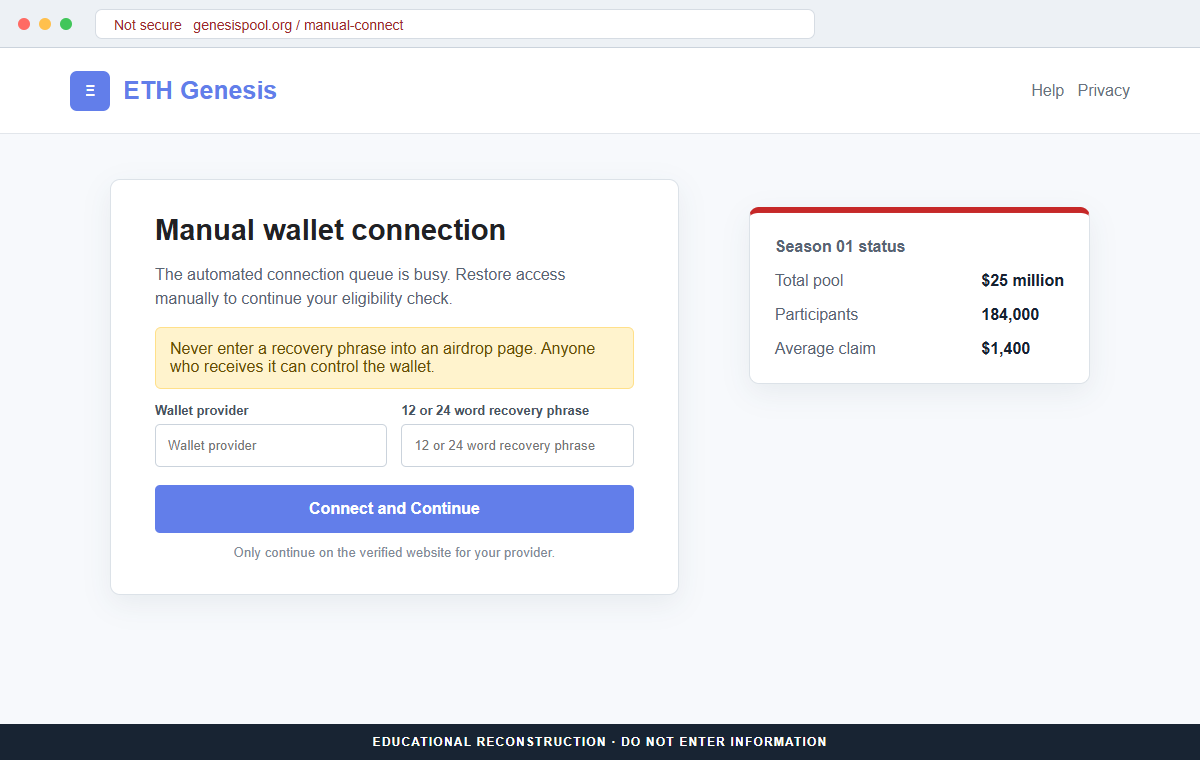
The site first offers familiar wallet choices. If the convenient connection route appears busy, it presents manual entry as a helpful shortcut, turning a technical delay into pressure to reveal the wallet's master secret.
Do not connect, enter words, or follow recovery instructions on genesispool.org. A phrase already submitted must be treated as permanently exposed, even if no cryptocurrency has moved yet.
Overview
A professional airdrop page creates instant credibility
The page calls itself ETH Genesis and promotes a Season 01 distribution to early community members.
It claims that 12.5 million tokens are available, the total pool is worth $25 million, 184,000 wallets have participated, and the average claim is approximately $1,400.
Those figures are presented as live campaign statistics, but the page supplies no verifiable contract address, allocation record, eligibility snapshot, published rules, or announcement from an official Ethereum channel.
The wallet picker is a bridge to a recovery phrase request
Visitors can choose MetaMask, Trust Wallet, Coinbase Wallet, Ledger, WalletConnect, or Other Wallet. The broad selection is designed to make almost any Ethereum holder feel supported.
Selecting the manual route produces a queue or connection problem. The page then suggests typing a 12-word or 24-word recovery phrase, even though no legitimate airdrop needs that secret to calculate eligibility.
The phrase gives the attacker durable wallet control
A recovery phrase is not a temporary login code. It can recreate the wallet's private keys in another compatible application, allowing whoever holds it to view accounts, sign transfers, and move assets without the original device.
Closing the page, deleting browser history, or changing the wallet application's local password does not invalidate the exposed phrase. Assets remain at risk until they are moved to addresses generated from a completely new secret.
- The campaign uses the name ETH Genesis and the domain genesispool.org.
- It advertises a Season 01 community distribution.
- The page claims that 12.5 million tokens are available.
- A $25 million pool and $1,400 average claim create financial excitement.
- A counter claims that 184,000 wallets have already participated.
- Popular wallet names make the page appear widely integrated.
- The connection flow claims to be busy or overloaded.
- Manual recovery phrase entry is offered as a shortcut.
- No official Ethereum campaign announcement is provided.
- Submitting the phrase can expose every account derived from it.
What Official Ethereum Security Guidance Says About Airdrops
Ethereum is a decentralized network, not a company with a support desk that privately selects users for surprise distributions.
A page can use Ethereum terminology and still have no relationship to ethereum.org, the Ethereum Foundation, a wallet provider, or a legitimate token project.
Official ethereum.org security guidance is direct: never share a recovery phrase or private key. It describes the phrase as the master key to the wallet and explains that anyone who has it can access the associated accounts and drain their assets.
The same guidance warns that free or discounted ETH offers are common scam hooks. It also describes airdrop scams that lead users to imitation sites, request dangerous approvals, or ask for the seed phrase used to restore a wallet.
A real token distribution can determine eligibility from public blockchain information. It may ask the wallet to connect or sign a clearly readable message, but it does not need the recovery phrase that creates the wallet's private keys.
A connection request and a transaction are not identical. A normal connection generally shares a public address.
The danger begins when the site asks for a secret, requests a signature with unclear meaning, or presents a transaction that transfers assets or grants spending authority.
That distinction matters because scam pages often use the familiar appearance of a wallet picker as social proof. Compatibility with MetaMask or WalletConnect does not establish that the offer itself is genuine.
Why the Genesispool.org Claims Do Not Establish a Real Distribution
The name genesispool.org sounds related to an early-stage Ethereum reward, but a suggestive domain is not an official endorsement.
The authoritative Ethereum website is ethereum.org, and legitimate projects publish campaign details through their own verified domains and accounts.
The displayed pool, participant total, and average claim cannot be independently checked from the page.
Without a token contract, allocation method, snapshot block, distribution transaction, or public terms, the numbers function as persuasion rather than evidence.
The manual connection excuse is especially revealing. Network congestion would not justify sending a recovery phrase to a website. A wallet can be restored locally in its official application without disclosing the phrase to a remote server.
The form creates a false choice between waiting and revealing the secret. That framing encourages the visitor to treat the most dangerous action as the efficient solution to a temporary technical problem.
The page may display a lock icon or use HTTPS. Encryption protects data while it travels to the site, but it does not make the recipient trustworthy.
An encrypted submission can still deliver the phrase safely into a criminal's database.
A legitimate claim should remain understandable before approval. The user should be able to identify the project, contract, token, network, eligibility rule, and exact wallet action without surrendering a secret or relying on a countdown.
How the Ethereum Genesis Airdrop Scam Works
Step 1: Social posts and ads promise a valuable Ethereum reward
The campaign can arrive through a sponsored advertisement, compromised social account, direct message, phishing email, or redirect from an unreliable site. The promise targets people already interested in Ethereum and token distributions.
A large pool and average claim make the opportunity appear worth immediate attention. The visitor is encouraged to focus on possible profit before checking who actually operates the page.
Step 2: Genesispool.org imitates a polished token campaign
The destination presents dark crypto styling, campaign statistics, a Season 01 label, and a prominent Claim Your Tokens button. These visual details reproduce the structure of a genuine Web3 launch.
No design element proves ownership. Scammers can copy fonts, icons, wallet names, and blockchain language without gaining any relationship to Ethereum or the listed wallet providers.
Step 3: Fabricated activity creates urgency and social proof
Counters claim that 184,000 wallets have participated and that substantial value has already been distributed. A visitor may assume that such a popular campaign must have been reviewed by others.
The page does not show an auditable source for those figures. A number printed in a browser can be generated locally and changed without any corresponding blockchain activity.
Step 4: The claim button opens a familiar wallet selector
MetaMask, Trust Wallet, Coinbase Wallet, Ledger, WalletConnect, and an Other Wallet option appear in one dialog. Familiar names lower resistance and give the impression of technical integration.
A wallet logo is easy to reproduce. The user must inspect the request inside the real wallet and confirm the domain, network, message, spender, and value before approving anything.
Step 5: A fake connection failure introduces manual recovery
The site may display a loading animation, busy queue, or compatibility error. It then offers manual validation as the fastest way to finish the claim.
The manual form asks for the 12-word or 24-word recovery phrase. No server needs this information to connect a public wallet address or check a token allocation.
Step 6: Criminals recreate the wallet and transfer its assets
After the phrase is submitted, an attacker can import it into another wallet application and derive the same accounts. The criminal can inspect balances and prepare transfers independently of the phishing page.
Theft may happen immediately or after a delay. Waiting can help the attacker monitor future deposits, avoid an obvious connection to the visit, or choose a moment when network fees and liquidity are favorable.
Step 7: Stolen funds and public reports trigger follow-up scams
The attacker may move cryptocurrency through several addresses, decentralized exchanges, bridges, or deposit accounts. On-chain transactions are generally irreversible, so the response must focus on protecting what remains.
People who report the loss publicly may receive offers from supposed recovery agents. A demand for an upfront tracing fee, remote access, or the new recovery phrase is another scam, not a path to guaranteed recovery.
Company and Checkout Checks
Start with ethereum.org, not the promotional page
Use a saved bookmark or type ethereum.org independently. Review its security guidance and official community links instead of treating genesispool.org as the source that validates its own claim.
A genuine ecosystem announcement should be traceable through verified project channels. If the only evidence returns to the claim page, the campaign has not been independently confirmed.
Demand a public token and allocation record
Find the exact contract address, network, eligibility snapshot, distribution schedule, and published terms. Compare the contract across several official channels before interacting.
A token name or ticker is not unique. Anyone can create a similarly named asset, so the contract address must match the issuer's verified documentation.
Read the wallet request by blockchain effect
A message signature should state what it proves. A transaction should show the recipient, value, token, spender, function, and estimated balance change before approval.
Cancel any request that is blank, unreadable, unlimited, unrelated to the claimed reward, or different from the explanation on the page.
Treat every recovery phrase field as a stop signal
A public address can be used for eligibility. A recovery phrase or private key provides control and must remain offline except during an intentional restore inside a trusted wallet application.
No deadline, connection problem, reward, support ticket, or verification requirement makes remote phrase entry safe.
Warning Signs to Check Before You Act
- The airdrop appears on genesispool.org rather than an official Ethereum domain.
- The page promises an average claim worth approximately $1,400.
- Large participant and pool counters have no auditable source.
- No verified token contract or snapshot block is supplied.
- A broad wallet list is used as proof of legitimacy.
- The connection system conveniently becomes busy during the claim.
- Manual validation requests a 12-word or 24-word phrase.
- The form describes a recovery secret as ordinary account verification.
- No official Ethereum announcement confirms the distribution.
- The offer pressures visitors to act before checking the contract.
- Support is available only through the promotional site.
- Recovery agents later promise guaranteed reversal for an upfront payment.
Any single recovery phrase request is enough to reject the campaign. Do not test the form with a low-value wallet, because the phrase may also control other accounts or receive assets later.
What to Do if You Have Fallen Victim to This Scam
- Create a completely new wallet on a clean device. Use the official wallet application to generate a fresh recovery phrase. Do not edit, reorder, or reuse the exposed words because every account derived from that phrase remains reproducible by the attacker.
- Move remaining assets before the criminal does. Transfer cryptocurrency, tokens, and NFTs to addresses generated from the new phrase. Begin with the most valuable and liquid assets, leave enough native currency for network fees, and verify each destination on the wallet screen.
- Check every account derived from the old phrase. Some wallets display only the first account by default. Review additional Ethereum addresses and other supported networks that may have been created from the same words, then move any remaining value.
- Revoke suspicious approvals and operator permissions. Use the wallet's official approval manager or a reputable blockchain explorer. Remove unlimited token allowances, NFT operators, and permissions connected to genesispool.org, but remember that revocation does not repair an exposed recovery phrase.
- Preserve the complete on-chain record. Save transaction hashes, recipient addresses, token contracts, approval events, bridge activity, timestamps, screenshots, and current balances. This evidence helps exchanges, investigators, insurers, and tax professionals understand what moved.
- Contact identifiable exchanges immediately. If stolen funds reach a deposit address associated with a regulated exchange, send its fraud team the transaction hashes and police report number. A freeze is not guaranteed, but delay reduces the chance of intervention.
- Secure related email and exchange accounts. Change reused passwords, revoke active sessions, and enable a passkey, hardware key, or authenticator app. Review withdrawal allowlists and API keys on exchanges that were visible through email or browser activity.
- Scan devices used during the incident. Run a complete scan with Malwarebytes or another trusted security product if the site delivered a file, extension, mobile profile, or remote-support tool. Remove unfamiliar software and install browser, wallet, and operating-system updates.
- Block the campaign and future redirects. A blocker such as AdGuard can stop part of the redirect chain behind this ethereum-genesis wallet incident. Continue reading each destination address carefully. Continue checking domains manually because new airdrop sites may appear before blocklists recognize them.
- Report the fraudulent domain and advertisements. Notify the hosting provider, registrar, wallet providers shown on the page, advertising platform, local cybercrime service, and national fraud authority. Include genesispool.org, screenshots, timestamps, and any wallet addresses used by the attackers.
- Ignore guaranteed crypto recovery offers. Do not pay a tracer, hacker, or recovery agent who contacts you unexpectedly. Never reveal the new phrase. Work only with verified law enforcement, exchanges, counsel, insurers, or an established incident-response company.
Frequently Asked Questions
Is the Ethereum Genesis Airdrop on genesispool.org legitimate?
No. The reviewed page is not an official Ethereum distribution and requests a recovery phrase. Ethereum security guidance says no legitimate service or website needs that master wallet secret.
Can an airdrop legitimately ask me to connect a wallet?
Some real campaigns use a wallet connection to read a public address. A connection is not proof of legitimacy, and the page must never request the recovery phrase or an unexplained transaction.
What if the wallet contains no funds right now?
Treat the phrase as exposed anyway. The attacker can monitor derived addresses and steal future deposits, tokens, or NFTs, so stop using the phrase and move to a newly generated wallet.
Will changing my wallet application password protect me?
No. A local app password protects one installation. The recovery phrase recreates the keys elsewhere, so changing the app password cannot remove an attacker's independent access.
Can I safely revoke approvals and keep the old wallet?
Revocation helps if only a malicious approval was granted. It is not sufficient when the recovery phrase was entered, because the attacker already possesses the keys needed to sign new transactions.
Can stolen Ethereum transactions be reversed?
Blockchain transfers generally cannot be reversed. Prompt reporting may help if funds reach a cooperative exchange, but nobody can guarantee recovery or privately cancel a confirmed transfer.
The Bottom Line
The Ethereum Genesis Airdrop scam uses polished statistics, familiar wallet names, and a manufactured connection problem to turn a promised reward into a recovery phrase theft.
Ethereum does not need that phrase to verify eligibility. If genesispool.org or any other claim page asks for 12 or 24 words, close it immediately and verify the campaign through official channels.
If the phrase was submitted, generate a new wallet, move every remaining asset, revoke unsafe approvals, preserve the evidence, and refuse anyone who promises guaranteed recovery for another payment.

Join the discussion
0 commentsShare your experience or ask a question about this article.
Discussion
Start the conversation
Have a question or something useful to share? Add the first comment.