

Smart glasses are often marketed as the future of wearable technology, blending fashion with cutting-edge AI features. Among the latest entrants in this market are the Euvelle Smart Glasses (Cyan AI Glasses), promoted as an all-in-one personal assistant that can translate languages, record video, take calls, play music, and even help with tinnitus.
At first glance, these glasses seem futuristic and highly innovative, especially with claims of being “ChatGPT-powered.” But are they really as advanced as they appear, or are they part of yet another overhyped dropshipping operation?
In this article, we will break down everything you need to know about Euvelle Smart Glasses. We’ll explore their marketing claims, the real product features, how the operation works, and what you should do if you’ve already purchased them and feel misled. By the end, you’ll have a clear answer to the big question: Are Euvelle Smart Glasses legit or just another over hyped product?
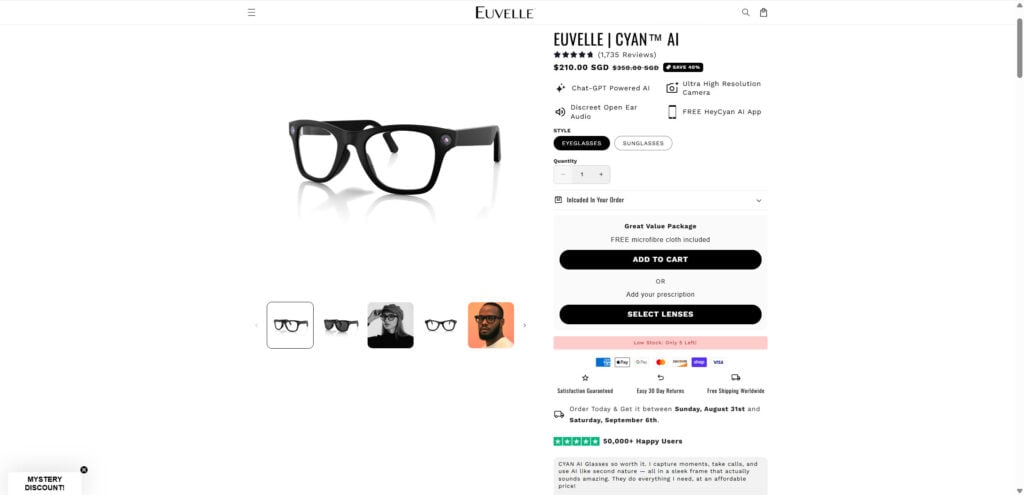
Overview of Euvelle Smart Glasses
The Euvelle Smart Glasses, branded as Cyan AI, are marketed as the perfect blend of style and intelligence. According to their website, they offer a range of futuristic features that seem almost too good to be true. Let’s break down what they advertise versus what they actually deliver.
Claimed Features
On the official Euvelle website, the glasses are promoted with the following features:
- ChatGPT-Powered AI – Supposedly, the glasses can answer questions, provide translations, and act as a voice-powered assistant.
- Ultra-High Resolution Camera – A 10MP camera with video recording capability up to 320Hz.
- Discreet Open-Ear Audio – Built-in speakers allow you to listen to music and take calls without traditional headphones.
- 32GB Built-In Memory – Marketed as sufficient for hours of recordings and storage.
- Battery Life – 6–8 hours of use, 60 hours of standby, with 40-minute recharge time.
- Voice Commands – Activated by saying “Hey Cyan,” allegedly enabling tasks like taking notes, capturing photos, or translating live conversations.
- Medical Claims – Some marketing mentions potential help with tinnitus, which is highly questionable and medically unsupported.
The Catch
While the specs seem impressive, digging deeper reveals significant red flags:
- ChatGPT Integration Claim: The glasses themselves do not have onboard AI. They simply connect to your phone via Bluetooth and use your phone’s assistant (Google Assistant, Siri, or a basic companion app). Labeling them as “ChatGPT-powered” is misleading.
- Camera Specs: The “ultra-high-resolution” claim does not hold up. Competitor smart glasses like Meta’s Ray-Ban Stories have more realistic, tested specs.
- Medical Claims: Suggesting the glasses help with tinnitus is not only misleading but also irresponsible. No medical device certification exists for such use.
- Exaggerated Marketing: The site frequently uses grandiose language like “your new superpower” or “unlock a smarter world,” without offering verifiable demonstrations.
- Pricing Concerns: Euvelle lists the glasses at $210 SGD (approx. $150 USD) on “discount” from a supposed $350 MSRP. However, the exact same design is widely available on wholesale sites like Alibaba for $29–$40.
Comparison to Wholesale Market
Images of Euvelle Smart Glasses match exactly with generic Bluetooth camera glasses available on marketplaces like AliExpress and Alibaba. These wholesale versions sell for under $40, raising suspicions that Euvelle is simply dropshipping—buying cheap bulk items and selling them at a massive markup while disguising them as premium, AI-powered tech.
Customer Experience
Many buyers online have reported similar issues when purchasing from dropshipping sites like Euvelle:
- Slow Shipping: Since products come directly from Chinese suppliers, delivery often takes weeks.
- Misleading Branding: Customers expect premium tech but receive basic Bluetooth camera glasses.
- Lack of Support: The website offers little in terms of real customer service or return policies.
- Overhyped Claims: The glasses don’t live up to advertised AI functions, making them little more than novelty gadgets.
In short, the Euvelle Smart Glasses are essentially basic Bluetooth camera glasses with rebranded marketing and inflated prices.
How The Operation Works
To understand whether Euvelle Smart Glasses are legit or a scam, it’s crucial to look at how the business model operates. The signs strongly point toward a classic dropshipping operation with exaggerated tech claims.
Step 1: Rebranding Generic Glasses
Euvelle does not manufacture its own hardware. Instead, it sources generic smart glasses from Chinese wholesale suppliers. These same glasses can be found on Alibaba, AliExpress, and other sites for under $40.
To make them appear premium, Euvelle rebrands them under the name “Cyan AI” and designs a sleek website with marketing language that suggests futuristic capabilities.
Step 2: Inflated Pricing Strategy
Once rebranded, the glasses are marked up significantly.
- Wholesale price: $29–$40
- Euvelle’s price: $210 (discounted from $350)
The fake “discount” is a psychological trick often used in dropshipping operation to make buyers feel like they’re getting a deal.
Step 3: Exaggerated Claims
Euvelle fills its website with bold promises that the product cannot realistically deliver:
- AI-Powered Assistant: In reality, it’s just a Bluetooth connection to your phone.
- Medical Benefits: Claims of helping with tinnitus are completely unsupported by science.
- Super High Resolution: The specs are inflated, with no verifiable proof.
- Backed by Major Media: They include logos of Forbes, Vogue, Wired, and others on their site, implying endorsements that do not exist.
Step 4: Social Proof Manipulation
To appear trustworthy, Euvelle uses:
- Fake Reviews: Many glowing reviews are generic, vague, or copied from other product sites.
- Trust Badges: Labels like “50,000+ Happy Users” are presented without evidence.
- Influencer Photos: Stock images and AI-generated pictures are used to simulate happy customers.
Step 5: Shipping & Fulfillment
When a customer places an order, Euvelle forwards the purchase to a wholesale supplier who ships the glasses directly to the buyer. This means:
- Long shipping times (2–6 weeks).
- Lack of quality control.
- Difficulty processing returns since items come from overseas suppliers.
Step 6: Limited Support & Refund Barriers
If customers are dissatisfied, they often find:
- No real customer service team.
- Generic email addresses with slow or no replies.
- Complicated or impossible return processes.
This leaves buyers frustrated and unable to get refunds.
Step 7: Repeat Marketing to New Customers
As complaints rise, many dropshipping operations simply rebrand and launch under new names. It is not uncommon to see the same glasses sold under multiple brand names across different websites, all claiming to be the “latest AI innovation.”
This cycle keeps running as long as new customers are attracted by the flashy marketing.
What To Do If You’ve Fallen Victim
If you purchased Euvelle Smart Glasses and feel misled, you still have options. Here’s a step-by-step guide:
- Contact the Seller Immediately
- Email Euvelle’s customer service and request a refund.
- Keep all correspondence for documentation.
- Dispute the Charge with Your Bank or Card Provider
- If you paid with a credit card or PayPal, file a chargeback dispute.
- Provide screenshots of misleading advertising and product listings.
- Report to Consumer Protection Agencies
- In the U.S., you can file a complaint with the FTC (Federal Trade Commission).
- In other countries, reach out to your local consumer protection body.
- Leave Reviews to Warn Others
- Post your experience on Trustpilot, Reddit, or tech forums.
- The more visibility your warning gets, the fewer people fall for the same trap.
- Check for Alternative Solutions
- If you want real smart glasses, research reputable brands like Meta Ray-Ban Stories or Bose Frames, which have verifiable specs and warranties.
- Be Wary of Similar Sites
- Dropshipping operation often pop up under new names. Be cautious of websites with:
- Too-good-to-be-true discounts.
- Stock photos for reviews.
- No real company address.
- Dropshipping operation often pop up under new names. Be cautious of websites with:
The Bottom Line
The Euvelle Smart Glasses (Cyan AI) are marketed as revolutionary, AI-powered eyewear, but in reality, they are generic Bluetooth camera glasses sold at inflated prices. The exaggerated claims, fake reviews, and dropshipping structure point to a shady operation rather than a legitimate tech company.
If you’re considering buying them, proceed with caution. You’re far more likely to receive a basic novelty gadget than the futuristic AI assistant promised. For those who have already purchased and feel deceived, follow the steps outlined above to try to recover your money.
At the end of the day, Euvelle Smart Glasses are a classic example of why consumers should always research before buying tech that sounds too good to be true.

Join the discussion
0 commentsShare your experience or ask a question about this article.
Discussion
Start the conversation
Have a question or something useful to share? Add the first comment.