

An unexpected party invitation can be hard to ignore, especially when the host appears to be someone you know. Curiosity takes over, and a familiar-looking RSVP button feels like the quickest way to learn what you have been invited to.
The Evite invitation scam is built around that ordinary moment. What appears to be a celebration notice can quietly become a test of your email password, phone number, and security codes.
Overview
What the Evite invitation scam looks like
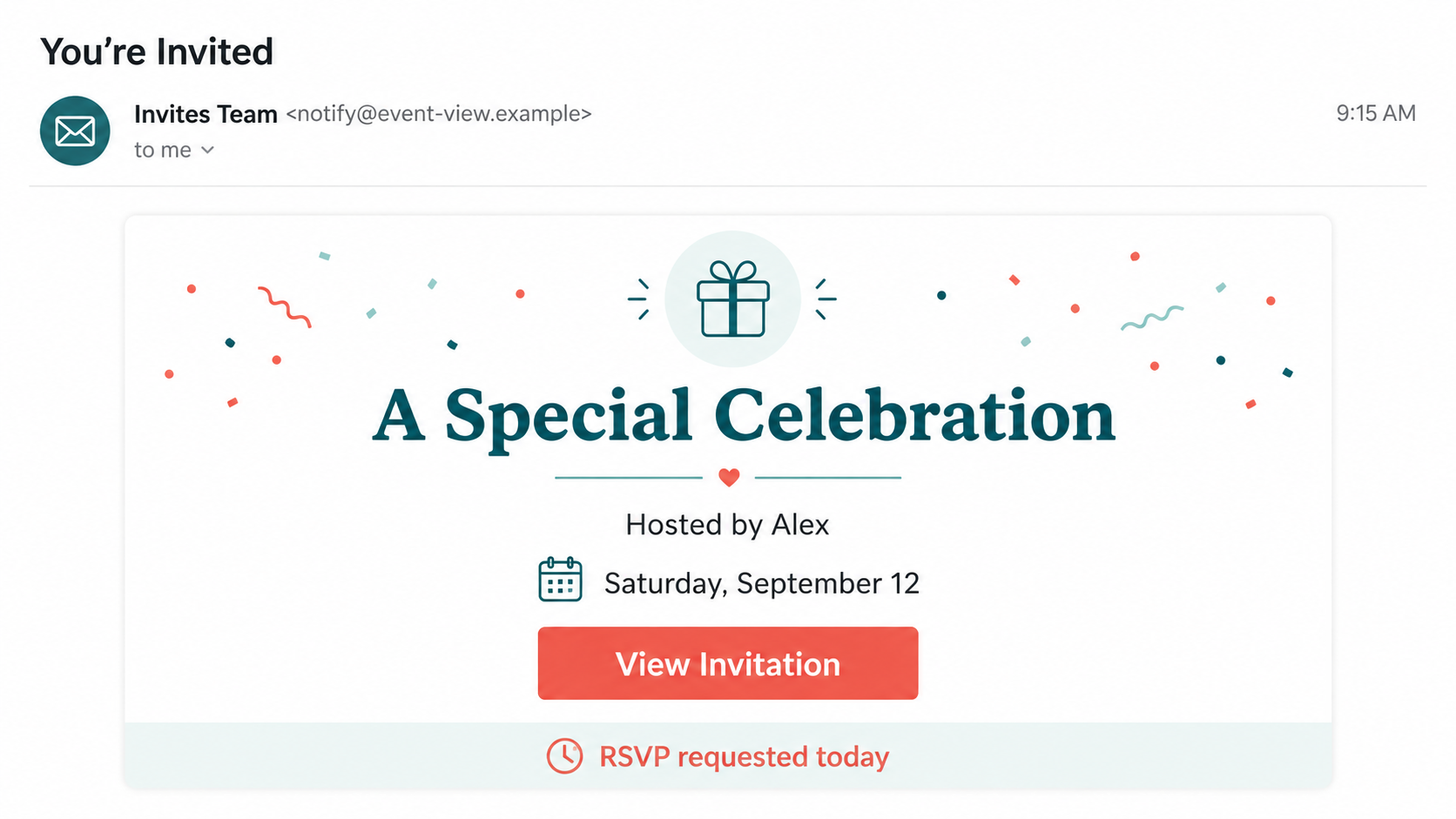
The message arrives by text or email and says you have been invited to a wedding, graduation, birthday, memorial, reunion, or private celebration. It may use the Evite name, copy the appearance of another invitation platform, or present a generic event card.
Some messages name a real friend, coworker, or relative as the host. That detail may come from a compromised account, an exposed contact list, or public social media information. Other versions stay deliberately vague so curiosity fills in the missing details.
What the sender wants from you
The link does not simply show an invitation. It opens a page that asks for your email address and password, a phone number, or a one-time security code. The FTC has specifically warned about fake party invitations that use this sequence to take over accounts.
A stolen email account is the main prize. It can unlock password resets, private conversations, receipts, cloud files, and contact lists. The criminal can then send convincing invitations from your real address and make the next round look even more personal.
Why a fake invitation feels believable
Real online invitations often arrive unexpectedly, contain colorful event cards, and use large RSVP buttons. A criminal does not need to invent an unfamiliar process. The scam succeeds by copying a routine one and adding a sign-in step that many recipients accept without thinking.
The page may look polished and work smoothly on mobile. Correct spelling, a padlock icon, and attractive design do not identify the owner of a website. The destination address and the information requested are far stronger clues.
- The invitation names a vague event but withholds the location and host details.
- The message asks you to act before a short RSVP deadline.
- The link opens a domain unrelated to the invitation service it imitates.
- You must enter an email password just to view basic event information.
- The page asks for a code that was sent to your phone or inbox.
- The alleged host cannot confirm sending the invitation through another channel.
How the Evite Invitation Scam Works
Step 1: The invitation creates a personal question
The opening message is usually brief. It may say, “You’re invited,” “Save the date,” or “Alex sent you an invitation.” That small amount of information creates a gap the recipient naturally wants to close.
A real name makes the lure stronger, but it does not prove who sent it. Attackers can collect names from social media, past data breaches, compromised mailboxes, or another victim’s address book.
The event theme often matches the season. Graduation, holiday, wedding, and reunion language gives the campaign a timely reason to appear in your inbox, even when the sender knows nothing about your plans.
Step 2: The RSVP button hides the destination
The large button may say “View invitation,” “RSVP now,” or “See event details.” Its label describes what the attacker wants you to expect, not where the link actually goes.
On a small screen, the destination can be difficult to inspect. The link may use a redirect service or a domain containing words such as invite, guest, event, RSVP, secure, or access.
The safest response is to leave the message closed and contact the supposed host using a conversation you started yourself. A genuine host can tell you the event date and resend the invitation through the platform they actually used.
Step 3: A copied page asks for your email login
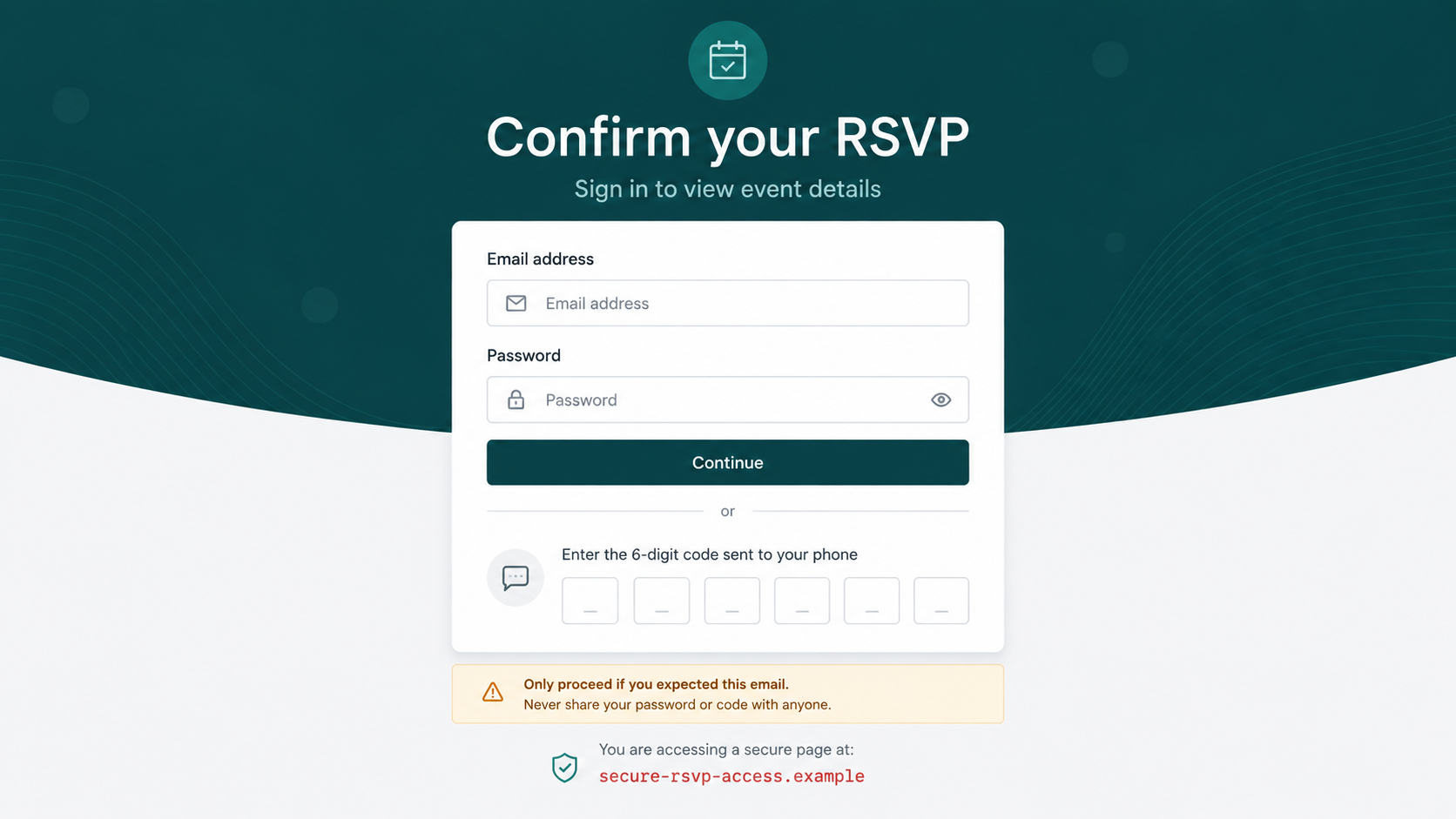
The landing page may resemble a digital invitation service, but the first screen blocks the event details. It claims that signing in with your email account is required to confirm your identity or reveal the host.
A party invitation does not need your email password. That password authenticates you to your mail provider, not to a host’s guest list. A page asking for it is trying to capture credentials.
Some forms deliberately reject the first password as incorrect. The second attempt is also recorded, giving the attacker two likely passwords and increasing the chance that one works on another account.
Step 4: The scam requests a one-time code
After collecting credentials, the page may request a six-digit code. At the same moment, the criminal tries to sign in to the real email account or starts a password reset, causing a genuine code to reach the victim.
The timing makes the fake page seem connected to a legitimate security system. In reality, entering the code can approve the attacker’s login, complete a password change, or add a new recovery method.
No invitation host needs a code from your email provider. If the message says to share, forward, or type a security code to see party details, close the page immediately.
Step 5: The attacker takes over the mailbox
Once inside, the criminal may change the password, recovery address, or forwarding rules. Quiet forwarding is especially dangerous because the victim may regain access while copies of future messages continue going to the attacker.
The mailbox reveals who the victim knows and how they communicate. The attacker can send the same invitation to friends, coworkers, and relatives from an address those people already trust.
They may also search for financial alerts, shopping accounts, travel records, identity documents, and password-reset messages. A single stolen mailbox can become a hub for several forms of fraud.
Step 6: The campaign spreads through trusted contacts
Recipients are more likely to open a message when it comes from a familiar account. The criminal can reply within an existing conversation or imitate the owner’s tone, making simple warning signs harder to notice.
Some victims receive a second message claiming that the first login failed and another code is needed. Others are redirected to a harmless event page so the theft is less obvious.
The attack continues until the provider blocks the activity, the victim secures the account, or enough contacts report the messages. Fast action can reduce both personal damage and the number of people targeted next.
Company, Address, and Fulfillment Checks
Check who actually sent the message
A display name such as “Evite,” “Invitations,” or a friend’s name can be typed by anyone. Expand the sender details and inspect the full address, while remembering that a compromised familiar account can still send malicious links.
Do not reply to the suspicious thread to verify it. Start a fresh text, call the host, or use a different established channel. Ask for the event date and venue rather than sending the questionable link back.
Read the registered domain carefully
Look at the address that owns the page, not reassuring words placed elsewhere in the URL. Extra words, hyphens, misspellings, unusual endings, and unrelated domains are reasons to stop.
A secure connection only protects traffic between you and that page. Criminals can obtain encryption for phishing sites, so a padlock does not confirm that the page belongs to Evite or any other invitation company.
Question the requested sign-in method
Basic event details should not depend on handing an invitation page the password to your email account. A prompt for a mailbox password or an unrelated provider code is a decisive warning sign.
The FTC’s party invitation phishing alert advises people to confirm unexpected invitations with the host before clicking. That independent check breaks the scam’s carefully staged urgency.
Verify how the event is fulfilled
A real invitation leads to recognizable host, date, location, and RSVP information. It does not require a software download, browser extension, payment, gift card, or remote-access tool to reveal those details.
If the event is genuine, the host can provide the essential information without forcing you through the original link. Refusal, evasive answers, or repeated pressure to sign in should end the interaction.
Warning Signs Before You RSVP
Do not judge the message by its colors or grammar. Concentrate on whether the process makes sense and whether the invitation can be confirmed away from the sender’s chosen route.
- Unexpected timing: You were not discussing an event, yet the message demands a quick response.
- Missing context: The invitation withholds the location, occasion, or full host identity until after login.
- Email-password request: The page asks for credentials belonging to Gmail, Outlook, Yahoo, or another provider.
- Code collection: You are told to enter or share a one-time code to open the invitation.
- Unrelated address: The registered domain does not match the service shown on the page.
- Download requirement: The event supposedly needs an app, extension, document, or viewer from an unfamiliar source.
- Host confusion: The person named in the invitation cannot verify the event through a separate conversation.
An invitation may be real even if it is unexpected. That is why independent confirmation is so effective: it resolves the uncertainty without giving the message a chance to collect anything.
What to Do if You Have Fallen Victim to This Scam
- Close the page and stop responding. Do not submit another password or code. Save screenshots, the sender address, the destination URL, and the time of the message before deleting anything.
- Change the exposed email password. Open the provider’s real app or type its address yourself. Create a unique passphrase that has never been used on another account.
- End unfamiliar sessions. Review recent sign-ins, connected devices, recovery addresses, phone numbers, app passwords, and third-party access. Remove anything you do not recognize.
- Inspect mailbox rules. Attackers often create forwarding, filtering, or deletion rules that hide security notices. Check sent mail and trash for messages the intruder may have created.
- Protect accounts tied to that inbox. Change reused passwords and review shopping, banking, cloud, and social accounts. Turn on strong multifactor authentication, preferably through an authenticator or security key.
- Warn your contacts. Tell people that invitations sent from your account may be fraudulent. Use another trusted channel so the warning is not hidden by the compromised mailbox.
- Scan if a file or extension was installed. Update the device and run a full Malwarebytes scan. Remove unfamiliar browser extensions, applications, downloads, and notification permissions.
- Reduce repeat exposure. AdGuard can help block known phishing domains and malicious redirects, but it cannot revoke stolen credentials. Account recovery and session review remain essential.
- Report the campaign. Forward suspicious texts to 7726, report phishing through your mail provider, and file details at ReportFraud.ftc.gov.
- Use an identity recovery plan if needed. If you shared financial or identity information, follow the personalized steps at IdentityTheft.gov and notify affected institutions promptly.
Frequently Asked Questions
Is every unexpected Evite message a scam?
No. Genuine invitations can arrive without advance notice, and a host may use an address you do not recognize. The safe response is to confirm the event with the host through a separate conversation before opening the link.
A real invitation should not demand your email password or a provider security code. Those requests change an ordinary RSVP into a credential-theft attempt.
Can the sender address be real?
Yes. A scam can come from a compromised mailbox belonging to a friend or colleague. That account history and familiar name make the message more persuasive than a random spam address.
Independent verification still works. Contact the person through a number or conversation you already trust and ask whether they sent the invitation.
What happens if I clicked but entered nothing?
Closing the page without submitting information usually limits the risk. Do not allow notifications, install anything, or approve downloads. Clear any permissions you accidentally granted.
If a file opened or the browser behaved unexpectedly, update your security software and run a scan. Monitor the account for unusual sign-in notices.
Why does the fake page ask for a six-digit code?
The attacker may be trying to complete a real login or password reset while you are on the phishing page. The genuine service sends you a code, and the fake form passes it to the criminal.
Never treat an unexpected code as proof that the invitation is legitimate. It often proves that someone is attempting to access your account.
Can an invitation link install malware?
A link may lead to a malicious download or pressure you to install a viewer, browser extension, or remote-access program. Simply viewing a modern updated page is less concerning than running the file it offers.
Do not follow instructions to weaken security settings. If you installed something, disconnect from sensitive accounts until the device has been checked.
How should I verify a real digital invitation?
Ask the host directly, then open the invitation using the platform’s official app or a website address you typed yourself. Compare the event details with what the host confirms.
Do not use contact information provided only inside the questionable message. Verification is strongest when it starts from a channel the scammer did not control.
The Bottom Line
The Evite invitation scam turns curiosity about a real-looking event into a request for credentials and security codes. The visual polish matters far less than the destination and the information the page demands.
Pause before the RSVP click, contact the host independently, and never use an invitation page to enter your email password. Those few moments of verification can stop an account takeover before it begins.
If information was submitted, secure the mailbox first and work outward to connected accounts and contacts. Speed matters because a stolen account can become the sender of the next convincing invitation.

Join the discussion
0 commentsShare your experience or ask a question about this article.
Discussion
Start the conversation
Have a question or something useful to share? Add the first comment.