

An online ad offers flexible contractor work that pays $200 for an event lasting about three hours. The website looks clean, the duties sound simple, and applicants only need a smartphone and a way to travel.
What the page does not explain is just as important as the attractive hourly rate.
Overview
The offer is specific about pay but vague about the work
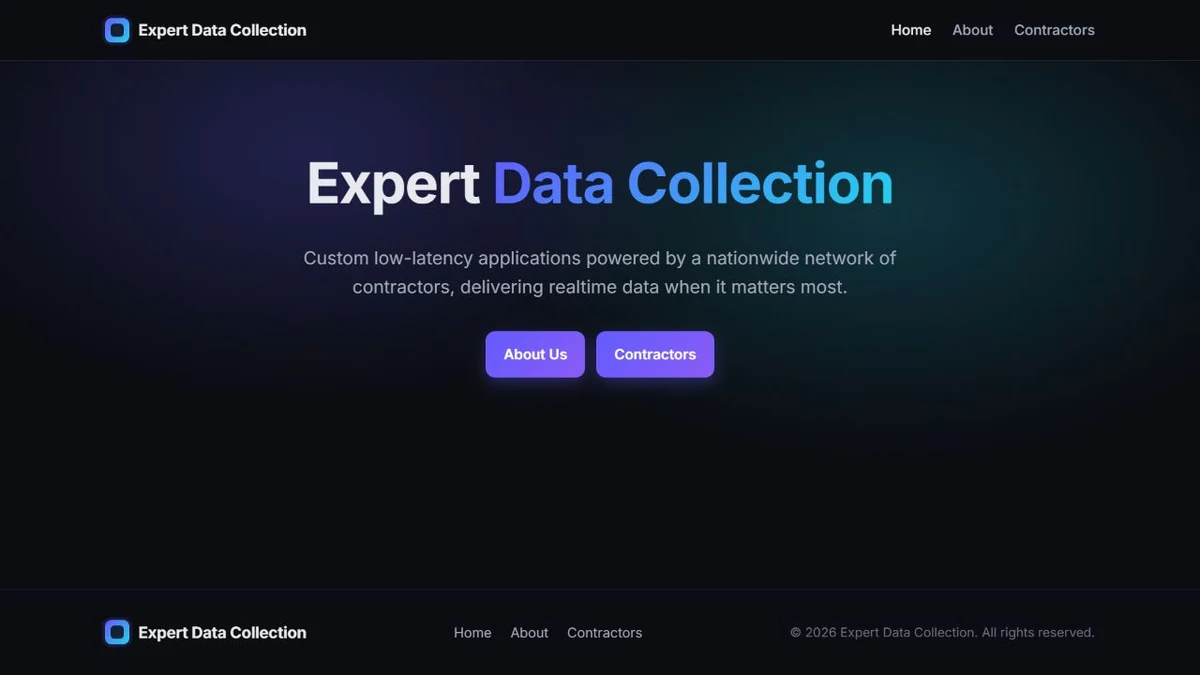
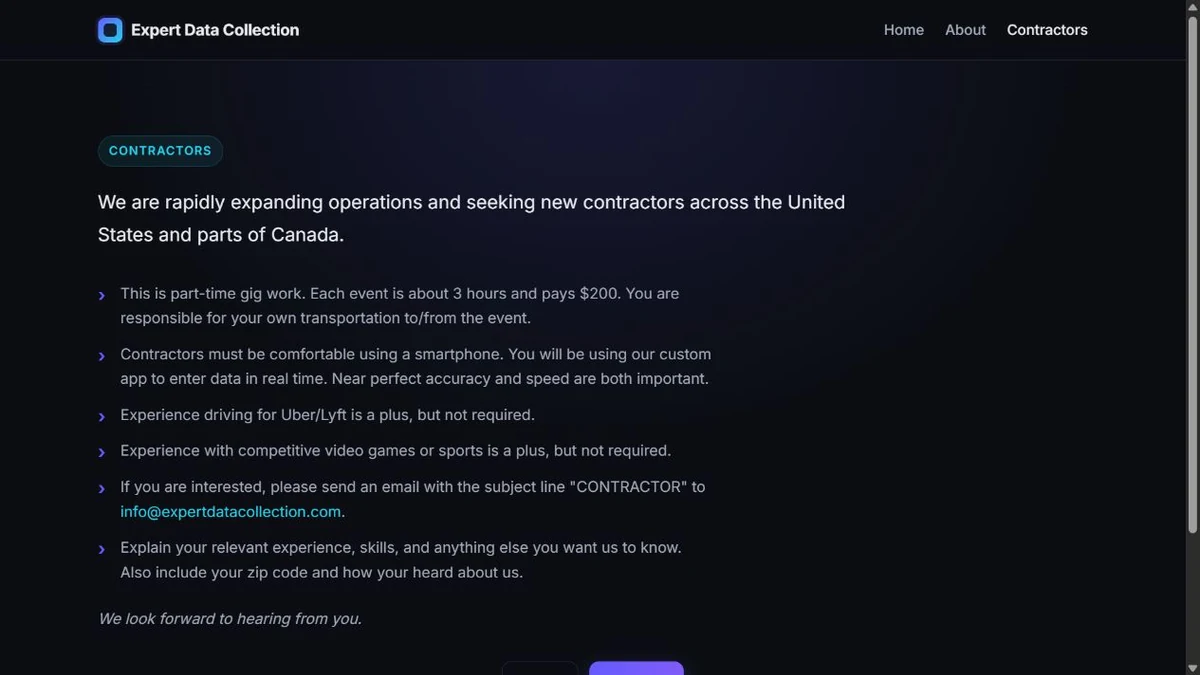
Expert Data Collection says it builds low-latency applications powered by a nationwide network of contractors. Its contractor page offers part-time gig work, describes each event as roughly three hours, and says each event pays $200.
The page says contractors use a custom smartphone app to enter real-time data. It lists driving for rideshare services, competitive gaming, and sports experience as useful, but it does not identify the events, customers, locations, data being collected, or why those unrelated experiences matter.
A recent Reddit scam report flagged an advertisement for the site because the pay was unusually high and the public footprint appeared thin. That post is a warning from a user, not proof that every contact using the name has taken money or identity information.
The domain is new and the business identity is incomplete
Public RDAP data shows expertdatacollection.com was registered on April 28, 2026 and is currently registered for one year. The registrar is NameCheap, while Cloudflare nameservers shield the hosting destination.
The website says the operation is based in Austin, Texas, but it does not provide a street address, telephone number, legal entity name, officer, customer, privacy policy, terms, or social profile. The footer repeats only the trading name.
A new domain and private registration are not automatic proof of fraud. Small businesses can launch quietly. The risk comes from combining a very recent footprint, premium pay, paid advertising, and a recruitment page that does not tell applicants who will contract with them.
No one should send sensitive data until the employer is verified
The public contractor page asks applicants to email a ZIP code and a description of relevant experience. It does not publicly request a Social Security number, bank account, driver’s license, payment, or software installation.
That distinction matters. MalwareTips found red flags that justify caution, but the public page alone does not establish a completed theft. The decisive test is what happens after an applicant emails: interview quality, contract identity, app distribution, personal-data requests, payment instructions, and the ability to verify real events.
Before replying, ask:
- What exact data will be collected at each event?
- Who is the legal company signing the contractor agreement?
- What customer or venue authorizes the collection?
- Where is the company registered and insured?
- Why is the pay far above ordinary entry-level event work?
- Where is the privacy notice for the custom app?
- Will the app come from a verified Apple or Google developer account?
- What information is required before a real interview?
- How and when are contractors paid?
- Can a venue confirm the assignment independently?
An honest recruiter should be able to answer these questions without moving the conversation to an encrypted app or demanding immediate identity documents.
Why the $200 Event Pitch Deserves Scrutiny
The arithmetic is designed to catch attention. A $200 payment for about three hours works out to roughly $66.67 an hour before travel and tax. That is an exceptional rate for a role advertised without formal qualifications, an interview process, or a detailed job description.
High pay is not impossible. Time-sensitive specialist work can command a premium. A credible employer should therefore explain the scarce skill, unusual schedule, confidentiality requirement, travel burden, equipment need, or commercial value that supports the rate.
The site instead uses broad phrases such as real-time data, near-perfect accuracy, speed, and custom app. These sound technical but do not let an applicant assess safety, legality, data ownership, or whether the assignment can be performed as promised.
The mention of rideshare, sports, and competitive gaming experience may imply travel to live events and rapid observation. It may also be generic copy intended to attract a wide audience. Applicants need a concrete brief before drawing either conclusion.
Travel creates another hidden issue. A worker may spend time and fuel reaching an event, only to learn that admission, equipment, deposits, or app access must be paid personally. A fake recruiter can introduce those costs after the applicant is emotionally committed.
Do not accept “reimbursement” as a substitute for verified company spending. Fake job schemes often send a check, show a pending payment, or promise repayment after the worker buys equipment. The FTC warns that no honest employer sends a check and then directs a recruit to send money or buy gift cards.
How a High-Pay Contractor Job Scam Can Work
Step 1: A targeted ad sells the rate
The ad leads with flexible work and exceptional pay. It may appear beside discussions about scams, jobs, local events, gaming, or gig work because those audiences are likely to notice an easy smartphone-based role.
The ad does not need to explain the full scheme. Its job is to generate a reply from people willing to discuss availability and location.
Step 2: A sparse website passes the first glance
The landing page has a logo, navigation, responsive design, corporate language, and a domain-based email address. That is enough for many applicants who only check whether a site exists.
The missing legal identity is easy to overlook because the design feels more complete than the underlying business information.
Step 3: Email moves the applicant off the public page
The contractor page instructs people to send an email with their ZIP code and experience. Once the exchange becomes private, the recruiter can tailor the story and request information that never appeared publicly.
Different applicants may receive different duties, rates, forms, or app links, making the operation harder to evaluate from the website alone.
Step 4: A quick acceptance removes normal hiring friction
A risky recruiter may skip a meaningful interview and say the applicant’s location is urgently needed. A short questionnaire or text conversation can be presented as onboarding.
Fast acceptance feels flattering, but it also prevents the applicant from meeting a manager, confirming customers, or understanding the role.
Step 5: The custom app becomes a control point
The site says contractors use a custom app. A legitimate employer can distribute it through a verified store account, provide a privacy notice, explain permissions, and support managed devices.
A scammer may instead send an APK, configuration profile, remote-access tool, or web login that collects credentials and identity data. Never sideload software because a recruiter says an event is about to start.
Step 6: Money or identity requests appear later
The applicant may be asked for payroll details, tax forms, a driver’s license, banking information, equipment purchases, admission costs, or a deposit. Some data is normal after a verified hire, but timing and channel matter.
There should be a signed agreement with an identified legal entity before sensitive information moves through a secure system.
Step 7: The assignment or payment fails
A fake event can be canceled after the worker spends money. A promised check can be counterfeit. A dashboard balance can remain pending. The recruiter may demand one more fee to release payment or simply disappear.
If the operation’s real goal is identity collection, no assignment needs to occur at all.
The Site’s Public Footprint Does Not Answer Basic Employer Questions
The About page says the company is based in Austin and plans to expand across the United States and parts of Canada during 2026. It does not name founders, executives, customers, advisers, or a legal entity.
The Contractors page identifies a single email address and asks for a ZIP code. There is no public application portal, equal-opportunity statement, independent payroll provider, tax explanation, or contractor agreement to review.
The website source includes a Reddit advertising pixel. That supports the user’s report that an ad was seen on Reddit, but it does not reveal who bought the advertisement or validate the underlying business.
The domain age provides context. A business claiming a 2026 expansion can reasonably have a 2026 domain, but applicants cannot rely on a long history of customer reviews, archived work, employee profiles, or prior events.
Searches for the exact name should be treated carefully because generic words produce unrelated results. A lack of complaints is not proof of safety when the domain is new.
Ask the recruiter to provide the full legal entity name, registration jurisdiction, tax form process, workers’ compensation or insurance details where applicable, and a client contact who can confirm the event. Verify each item outside the email thread.
Safe Ways to Test an Unverified Job Offer
- Use a secondary email address that does not reveal your full identity.
- Do not include a birth date, driver’s license, or bank information in the first reply.
- Ask for the legal entity and a sample contract before scheduling.
- Request a video interview with a named manager.
- Search the manager independently and contact the company through a separate route.
- Verify the venue using a number found on its official site.
- Inspect an app-store developer name before installing anything.
- Refuse APK files, remote-access tools, and configuration profiles.
- Never pay admission, equipment, training, background-check, or activation fees.
- Never deposit a check and send part of it elsewhere.
- Stop if the role changes after you reply.
- Keep screenshots of the ad and every promise.
MalwareTips’ guide to the WhatsApp job offer scam explains why recruiters often move applicants into private chats before revealing the payment stage.
What a Legitimate Event-Data Job Should Provide
Real event-data work exists. Sports, media, transportation, retail, and research companies pay contractors to record time-sensitive observations. The existence of that industry is why a vague offer can sound credible.
A legitimate assignment should name the category of event and the information being captured. An applicant must know whether the task involves public scores, crowd counts, pricing, traffic, audio, images, or personal data.
The employer should explain who is allowed to collect the information. Some venues prohibit commercial data capture, photography, recording, or device use. A contractor should not discover those restrictions after arriving.
There should be a clear accuracy standard and training example. “Near perfect accuracy” is not a usable requirement without a schema, timing rule, review process, and correction policy.
The custom app should have an identified developer, privacy notice, permission explanation, retention policy, and support channel. Location, camera, microphone, or accessibility permissions need a business reason.
Pay terms should distinguish the event fee from travel, admission, parking, cancellation, overtime, and tax. An unusually high headline can shrink quickly when hidden costs are pushed to the worker.
A real client or venue may require confidentiality, but the contractor can still receive enough information to verify the assignment. Secrecy should never prevent the worker from knowing who is legally responsible.
The contract should state whether the worker is an employee or independent contractor, who carries insurance, how disputes are handled, and when payment becomes due.
If the employer refuses these basic details until after identity upload or software installation, the applicant is being asked to assume all risk before the company assumes any obligation.
Ask to review one redacted assignment from start to finish. A credible operator can demonstrate the workflow without exposing a customer’s confidential data.
Also ask how mistakes are handled. A company demanding near-perfect accuracy should have quality review, correction, appeals, and payment rules that do not let one disputed entry erase an entire event fee.
Confirm whether the worker must use a personal data plan, battery pack, vehicle, admission ticket, or second device. Hidden equipment requirements can turn a high hourly headline into an expensive unpaid test.
Finally, request the name of the person responsible for worker safety during an event. A website mailbox is not enough when a contractor is traveling to an unfamiliar location and collecting information for an unknown client.
Get every answer before sharing tax or banking data. Verification should reduce uncertainty first, not reward an applicant for taking another unmeasured risk.
Company, Address, and Fulfillment Checks
Identify the contracting company
The site uses the name Expert Data Collection but does not publish a legal suffix or registration number. Ask for the entity that will issue tax documents and pay invoices.
A domain-based email is not a company registration.
Verify the Austin address claim
The About page says the operation is based in Austin, Texas, but the public pages do not list a street address or telephone number. Request a business address and verify it independently.
Do not send identity documents to a mailbox that has not been tied to a real employer.
Inspect the domain and app history
RDAP shows the domain was registered on April 28, 2026 through NameCheap. Ask for the verified Apple or Google listing of the custom app and compare its developer identity with the contracting company.
A download hosted only on the website should be treated as untrusted until independently reviewed.
Define the event and payment delivery
Obtain the venue, date, customer, duties, travel policy, pay schedule, cancellation policy, and tax status in writing. Call the venue or customer through a separately found number.
No legitimate event requires a contractor to send money to receive wages.
What to Do if You Have Fallen Victim to This Scam
- Stop communication and payments. Do not send an activation fee, buy equipment, or complete another paid task.
- Save the advertisement. Capture the platform, advertiser name, destination URL, date, and targeting context.
- Preserve recruiter details. Save emails, headers, phone numbers, app links, contracts, and payment instructions.
- Report the ad. Tell the platform that the advertiser presented an unverified high-pay job and include what happened after contact.
- Contact your bank. If you sent money or deposited a check, explain the suspected job fraud immediately.
- Protect your identity. If you shared tax, license, or banking data, use IdentityTheft.gov to build a recovery plan.
- Freeze credit if necessary. Contact all three US credit bureaus when sensitive identity data was exposed.
- Remove untrusted software. Uninstall unofficial apps, profiles, extensions, and remote-access tools.
- Change exposed passwords. Start with email and any account used to communicate with the recruiter.
- Run Malwarebytes. Perform a full scan if you installed the custom app or opened an unexpected attachment.
- Use AdGuard as a supporting layer. It can block many malicious domains and redirects, but it cannot certify an employer or prevent voluntary data submission.
- Report the scheme. File with ReportFraud.ftc.gov and the state attorney general.
Frequently Asked Questions
Is Expert Data Collection proven to be a scam?
The public evidence supports serious caution, not a definitive finding about every contact. The new domain, missing legal identity, exceptional pay, and vague duties should be resolved before anyone shares sensitive data or spends money.
Is $200 for three hours automatically fake?
No. Specialist event work can pay well. A real employer should explain the skill, customer, venue, contract, and payment process that justify the rate.
Is it safe to email my ZIP code?
A ZIP code alone is limited information, but it confirms location and an active applicant. Use a secondary email and do not add a full address, birth date, identity document, or bank information.
Can I install the custom app?
Only after verifying the employer and developer. Prefer an official app-store listing tied to the same legal entity, review permissions, and never sideload an APK or configuration profile.
What if the recruiter sends a contract?
A PDF can be fabricated. Verify the entity, signer, address, customer, and payment account independently. A contract is evidence only when the parties behind it are real and reachable.
Should I attend an event before being paid?
Not without a verified assignment and written terms. Confirm the venue directly, understand cancellation and travel costs, and refuse any instruction to advance money on the employer’s behalf.
The Bottom Line
The Expert Data Collection job pitch is powerful because it combines simple work, flexible scheduling, technical language, and an implied rate near $66 an hour. The public website does not provide enough business detail to make that promise trustworthy.
Do not accuse a recruiter based on domain age alone, but do not let a polished page substitute for an employer. Verify the legal entity, customer, event, app publisher, and payment process before sending anything more revealing than a cautious question.








