


A university student receives an offer for remote research work from someone claiming to be a professor. The message reaches them at exactly the moment when experience, income, and a credible academic reference would be especially valuable.
The “hiring” process looks increasingly official until one request reveals what the job was built to collect.
Overview
The scam uses academic authority to lower suspicion
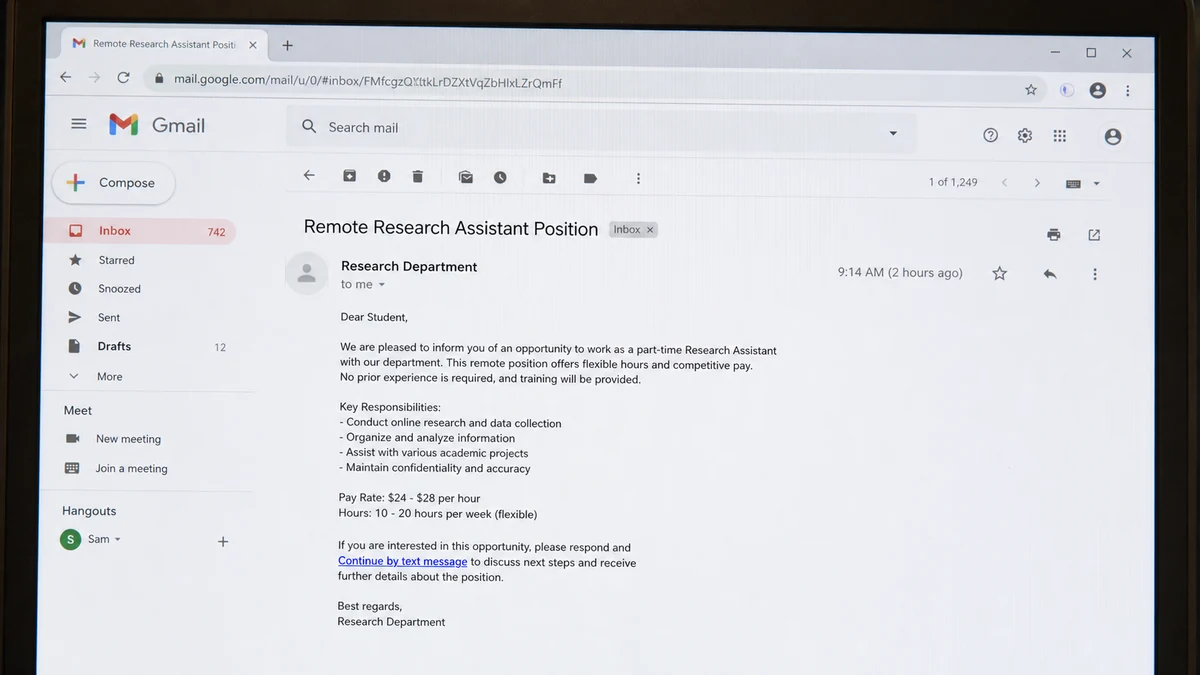
A recent student report described an unsolicited remote research assistant offer from someone claiming to be a professor. The supposed professor moved the conversation to text and presented the role as an opportunity to gain experience.
The victim said an .edu address associated with their school appeared in the process and posed as human resources. Academic email domains feel safer than free accounts, but they can be spoofed, compromised, newly created for an affiliate, or used without the professor’s knowledge.
Students often expect professors to hire assistants informally. That normal campus pattern gives the scam a believable explanation for direct contact, flexible duties, and a short hiring timeline.
The fraud combines identity theft with a fake-check setup
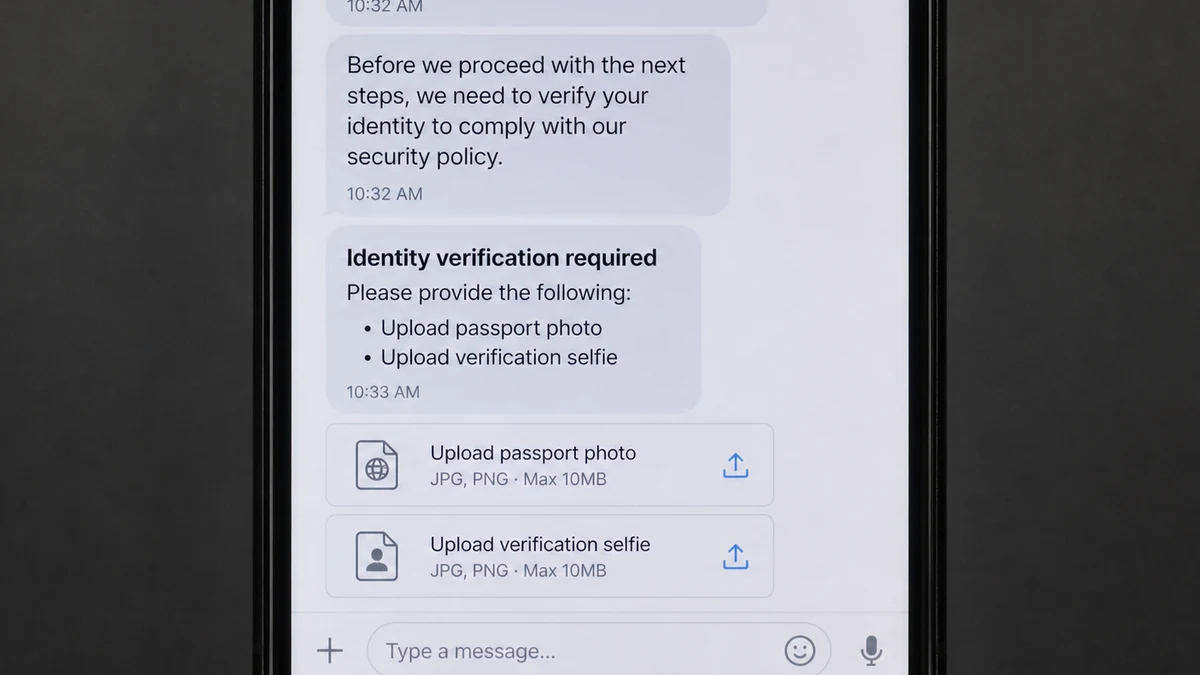
The reported applicant completed one verification using a driver’s permit and then received a separate verification request by message. They submitted a passport image and verification selfies through that second route.
The supposed employer later sent a check described as reimbursement for office supplies and survey materials. The applicant was told to buy Apple gift cards and send the codes. They recognized the scam before depositing the check or sharing the codes.
This is more than one trick. The operator may obtain document images and a live selfie, test email and phone access, collect payroll-style information, and then try to convert a counterfeit check into real gift-card value.
Real platforms can be inserted into a fake hiring story
The reporter said one part of the process used Outlier, a real remote-work platform. That does not establish that Outlier, the university, or any real professor authorized the contact.
A scammer can direct someone to a genuine site, ask them to create their own account, or exploit an existing onboarding flow. The legitimate page becomes a trust bridge while a separate text conversation controls the dangerous steps.
Check the full chain, not one link:
- Did the student apply through an official university job board?
- Does the professor list the position on a verified department page?
- Can the department confirm the role by telephone?
- Does the .edu sender exactly match the university domain?
- Why did identity verification move to a separate message?
- Who owns the verification domain and receives the document?
- Is a check being sent before work begins?
- Is the applicant asked to buy gift cards or send codes?
- Do job duties remain vague while sensitive requests become specific?
- Can payroll confirm the employer and tax process?
One verified website cannot authenticate the person who sent the text. Every handoff needs its own verification.
The Passport and Selfie Request Creates Lasting Risk
A password can be changed. A passport image and facial verification set cannot be replaced as easily. The combination may be useful for opening or recovering accounts, passing weak know-your-customer checks, creating convincing impersonation attempts, or threatening the victim.
Not every criminal use will succeed. Reputable financial platforms use additional signals, document authenticity checks, device reputation, liveness tests, and fraud monitoring. The victim should still assume the material may be reused.
The separate verification request is especially important. A legitimate employer may use a payroll or background-check provider, but it should explain the provider before sending documents, link to a privacy notice, and keep the process inside an authenticated applicant portal.
A text message asking for direct uploads removes those safeguards. The applicant may not know the legal data controller, retention period, breach contact, or jurisdiction.
Students should never send a passport image simply because a message uses a school name. Call the department using the number on the university’s official site and ask whether the professor is hiring and which service handles verification.
If a document has already been sent, preserve the URL and message. That evidence may help a verification provider disable an abusive account or help law enforcement connect later misuse to the original collection.
How the Fake Research Assistant Job Scam Works
Step 1: A professor offers a desirable remote role
The message promises flexible research work, useful experience, and professional connection. It may mention the student’s department, school, or academic interests to appear targeted.
The offer can arrive through email, text, a compromised campus account, or a job platform. A real professor’s name may be copied from a faculty directory.
Step 2: The conversation moves to text
Texting feels normal and fast, but it separates the exchange from university systems that might preserve warnings, block attachments, or reveal the sender’s real domain.
The “professor” can claim to be traveling, in a meeting, or too busy for a video call. Urgency becomes a substitute for an interview.
Step 3: The applicant receives an instant acceptance
A brief questionnaire replaces a competitive hiring process. The scammer may say the student’s profile was recommended or that the project begins immediately.
Fast acceptance creates emotional commitment. The victim begins to think like an employee and treats unusual requests as tasks from a supervisor.
Step 4: Verification harvests valuable identity data
The applicant is told to upload a driver’s license, passport, selfie, tax identifier, bank details, or direct-deposit form. A professional-looking page may display a secure lock icon and privacy language.
The operator can also use a genuine platform for part of the flow, then request a “second verification” outside it. That extra step should never be treated as routine without confirmation.
Step 5: A reimbursement check appears
The employer claims the student needs a laptop, printer, survey supplies, software, gift cards, or participant incentives. Instead of buying the materials directly, the employer sends a check for the applicant to deposit.
Banks may make part of a deposit available before discovering that a check is counterfeit. The visible balance is provisional, not proof that the check cleared.
Step 6: Real money leaves through gift cards
The applicant is instructed to purchase Apple or other gift cards and send the codes. Once the code is shared, the criminal can redeem or resell the value without possessing the physical card.
The FTC states that honest employers do not send checks and direct recruits to buy gift cards. This request is not an eccentric research task; it is the extraction stage.
Step 7: The check fails after the codes are gone
The bank reverses the counterfeit deposit, leaving the account holder responsible for the amount spent. The fake professor stops responding or claims another payment is needed to correct payroll.
The identity documents remain exposed even if no check was deposited, so stopping the money transfer does not end the recovery work.
Why the .Edu Address Does Not Settle Authenticity
Universities manage thousands of students, staff members, alumni, contractors, departments, mailing lists, and cloud accounts. A message can originate from an account that was compromised through phishing or weak password reuse.
The visible From line can also differ from the technical sender. Email authentication results, reply-to address, return path, and link destination may reveal that the message did not travel through the expected university infrastructure.
Even a technically genuine account can be misused. A compromised mailbox may contain real signatures, previous conversations, department templates, and contact lists, making the scam unusually convincing.
Do not reply to ask whether the email is real. If the account is compromised, the criminal receives the question. Start a new call to the department or a new message to an address copied from the official faculty directory.
Verify the job itself. A professor should be able to describe the project, funding source, supervisor, hours, deliverables, hiring classification, and university payroll path.
If human resources supposedly contacted you, call the university’s central HR number. Ask whether the sender works there and whether student employees are ever instructed to purchase gift cards.
Identity and Payment Warning Signs
- You never applied for the role.
- A professor immediately moves the conversation to text.
- There is no live interview or project discussion.
- You are hired before references or availability are checked.
- Identity documents are requested through a separate link.
- The verification page lacks a clear privacy notice.
- A passport and selfie are requested before a contract.
- The employer sends a check for equipment or supplies.
- You are told to buy gift cards and share the codes.
- The recruiter refuses a call through the department.
- The reply-to address differs from the visible sender.
- Urgency is used to prevent questions.
The FTC’s job-scam guidance specifically warns that fake recruiters ask for driver’s-license, Social Security, and bank information before providing meaningful job details.
MalwareTips explains a similar employer-impersonation pattern in the Indeed recruitment text scam.
A Practical Plan for Passport and Selfie Exposure
Start by writing down exactly what was sent. Record the document type, visible fields, front or back image, selfie format, verification link, date, recipient, and any account created during the process.
Preserve the upload confirmation and full URL. Do not revisit the page to test it, because a return visit can expose new device information or trigger another request.
Contact the real verification provider through its official support page. Ask whether the session identifier belongs to its service, which customer created it, and whether the data can be restricted or deleted.
Notify the passport issuer that a digital copy was disclosed to a suspected fraudster. Ask what notation, monitoring, or replacement process applies to a copied document that remains physically in your possession.
Freeze credit and obtain current reports. A freeze reduces the chance that a new creditor will open an account, while reports can show inquiries or accounts that appeared before the freeze.
Create alerts on bank, email, mobile, and payment accounts. Pay attention to password resets, new devices, account-recovery messages, SIM changes, and verification codes you did not request.
Secure the email account used for the application. Remove unknown forwarding rules and connected apps, replace reused passwords, and save recovery codes somewhere offline.
Tell close contacts that convincing messages may use your name, school, photo, or academic role. A short warning can stop an impersonator from obtaining money or more identity documents.
Do not send a second selfie to “cancel” the first verification. A scammer may claim that another pose, video, or document is required to close the file.
Expect follow-up calls that mention the job, check, or university. Detailed knowledge does not prove the caller is helping; it may prove they have the original scam records.
Keep a dated incident log. If misuse appears months later, the log connects the new event with the original exposure and makes reports to banks and authorities more precise.
Identity recovery is a process, not a single password change. Review the plan after one week, one month, and whenever a new alert appears.
Check government-benefit and tax accounts where applicable. A complete identity package can be used beyond ordinary credit applications, so secure official online accounts before an unfamiliar recovery request arrives.
Review payment-app profiles connected to the exposed phone number or email. Remove public search settings where possible and confirm that no new cards, banks, or devices were added.
Consider replacing the email used for sensitive applications if it becomes a persistent target. Keep the old account secured and monitored rather than deleting evidence or losing access to alerts.
Ask the university whether other students received the same offer. A campus-wide warning can stop new uploads and may help administrators identify the compromised account or repeated wording.
Do not blame yourself for responding to a convincing academic offer. Focus on containment, documentation, and quick reporting. Shame delays the steps that make later misuse easier to challenge.
Keep copies of every report number and support reply. If an account later appears, those records show that the document exposure was reported before the fraudulent application.
Review the situation again after tax season and the next academic term, when stolen student identities may be reused for new payroll, grant, or tuition stories.
Company, Address, and Fulfillment Checks
Confirm the professor and department
Find the professor on the official university directory and call the department using the published switchboard. Ask about the exact project and role without using contact details from the offer.
A matching name is not enough because faculty identities are public.
Trace the .Edu message independently
Check the complete domain, reply-to address, and message headers. Forward suspicious mail to the university security team and ask whether the sending account was compromised.
Do not continue verification through the original thread.
Verify every onboarding provider
A legitimate platform used during one step does not authorize a second form sent by text. Open the real platform independently and contact its support if your identity was submitted through a questionable invitation.
Ask who controls and retains the passport and selfie data.
Define what the check and supplies fulfill
A real university can purchase equipment through approved vendors, issue documented reimbursements after expenses, or use established payroll processes. It does not need a student to convert a check into gift-card codes.
Treat that instruction as proof to stop.
What to Do if You Have Fallen Victim to This Scam
- Stop responding. Do not deposit the check, send gift-card codes, or complete another verification.
- Contact the university. Notify campus security, the impersonated professor, department administration, and the email-security team.
- Preserve evidence. Save the original email with headers, text messages, URLs, uploaded filenames, check image, and gift-card receipts.
- Contact the verification platform. Ask it to preserve logs, restrict the abusive account, and explain where the document data went.
- Report passport exposure. Contact the issuing authority for guidance; do not assume replacement is always required without asking.
- Create an identity-theft plan. Use IdentityTheft.gov and document every exposed identifier.
- Freeze credit. Contact Equifax, Experian, and TransUnion, then review existing reports for unfamiliar accounts.
- Secure email and phone accounts. Change passwords, enable strong multifactor authentication, and add a carrier account PIN.
- Contact the bank. If the check was deposited, tell the fraud department immediately and do not spend the provisional balance.
- Contact the gift-card issuer. If codes were shared, report them with receipts as quickly as possible.
- Run Malwarebytes. Scan any device used to open attachments or install interview and verification software.
- Use AdGuard as a supporting layer. It can block many malicious links, but it cannot retract identity documents already uploaded or authenticate a professor.
- Report the fraud. File with ReportFraud.ftc.gov and IC3.gov.
Frequently Asked Questions
Can a scammer misuse a passport photo and selfie?
Yes. The material can support impersonation, account applications, recovery attempts, or further targeted scams, although reputable services use additional checks that may stop misuse.
Should I replace my passport immediately?
Contact the passport issuer and describe exactly what was exposed. Replacement rules and the effect of reporting a document vary, so follow the authority’s current guidance.
Does an .Edu email prove the professor sent it?
No. The address can be spoofed, compromised, or misused. Confirm through the department using a new channel found on the official university website.
What if I never deposited the check?
You avoided the fake-check loss, but identity exposure may remain. Preserve evidence, contact the verification provider, freeze credit where appropriate, and monitor accounts.
Is Outlier responsible for the scam?
The report does not establish that the real platform authorized the recruiter. A legitimate service can be inserted into a false story. Contact its official support about any account created through the approach.
Can gift-card codes be recovered?
Sometimes an issuer can freeze unredeemed value if contacted quickly. Keep the cards and receipts, call the number on the card or official site, and report the codes as stolen.
The Bottom Line
The fake research assistant job does not rely on one obviously fraudulent page. It combines academic authority, a possible .edu account, a real platform, identity verification, and a reimbursement story so that every step lends credibility to the next.
The gift-card request exposes the scheme, but the passport and selfie may be the longer-lasting loss. Verify professors and hiring departments outside the original conversation, and never let an urgent opportunity move identity checks into an unverified text link.

Join the discussion
0 commentsShare your experience or ask a question about this article.
Discussion
Start the conversation
Have a question or something useful to share? Add the first comment.