


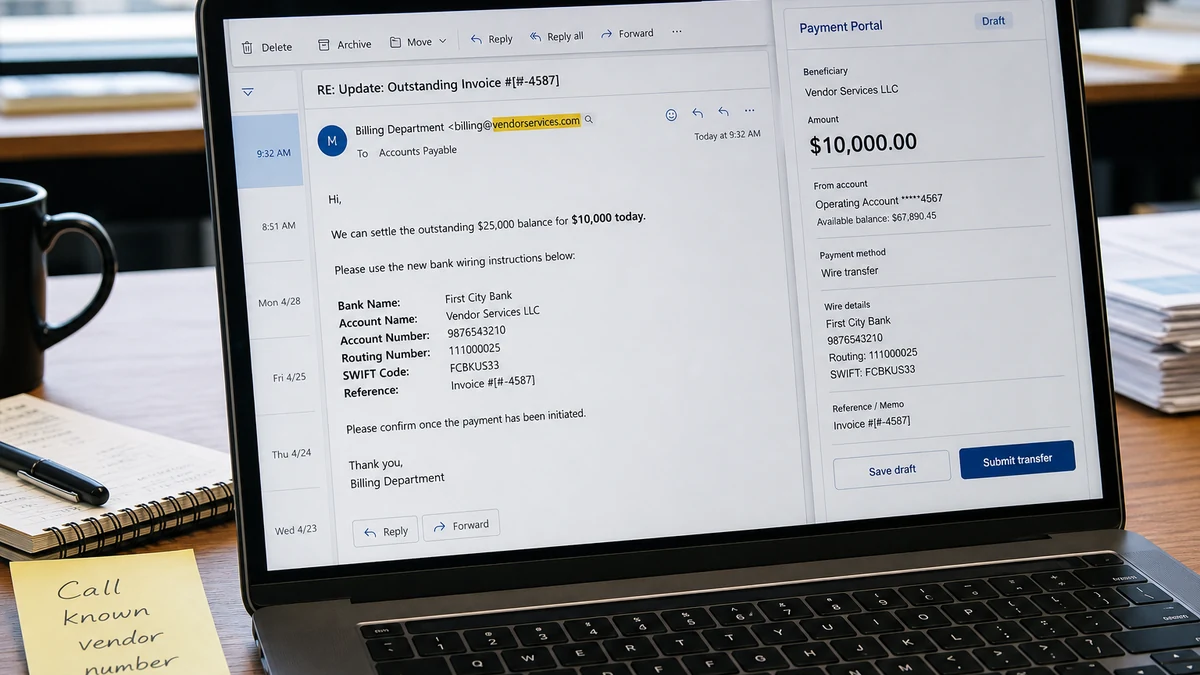
The email fits a real business problem. The company owes a vendor about $25,000, the account has been on hold, and the sender knows enough history to negotiate.
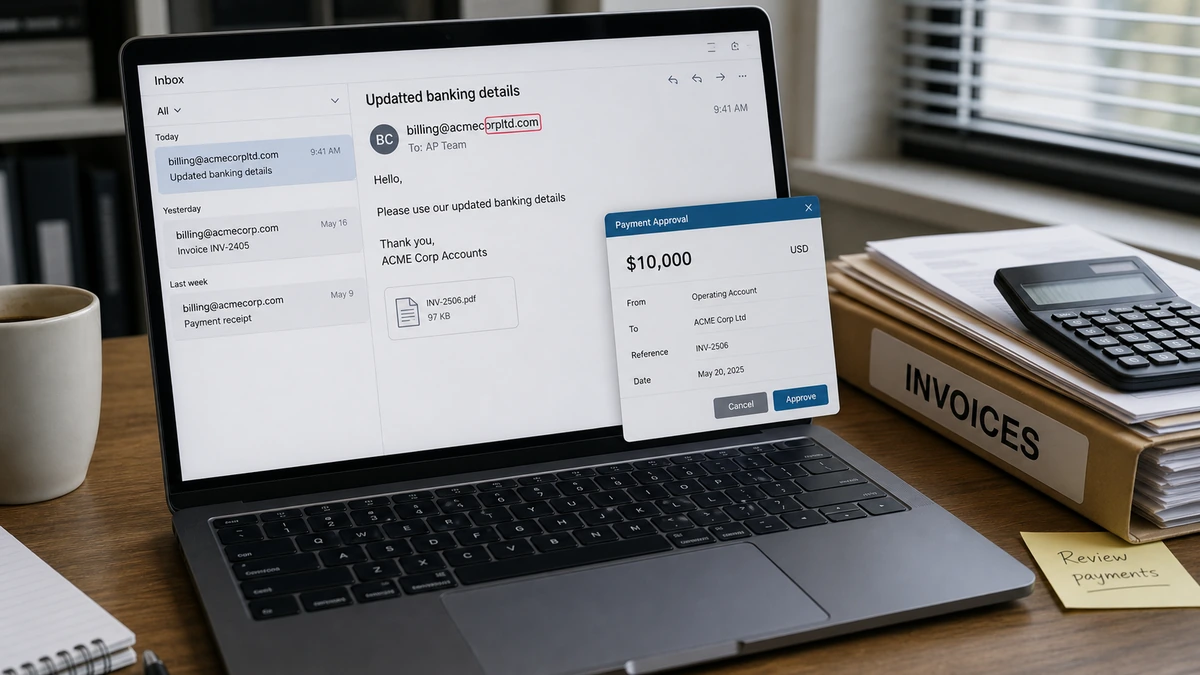
A $10,000 settlement looks like a practical solution. One extra letter in the email domain is the tiny detail standing between a good deal and an expensive mistake.
Overview
The debt and vendor relationship were real
This was not a random invoice from an unknown supplier. The company genuinely owed money, the account had been restricted for months, and the message referred to convincing order details.
Several facts could be checked against real business history. That made the email feel like a continuation of an existing dispute rather than a new approach.
Accurate context is what made the attempt dangerous. Stolen information can be completely true while the new payment instruction is completely false.
The fake identity was almost perfect
The sender’s domain resembled the vendor’s domain but contained one additional letter. The signature phone number reportedly had its last two digits transposed.
Both errors were easy to miss while the name, debt, order history, and settlement sounded familiar.
A mobile preview or display name can hide the full email address, and a familiar phone number shape can survive a quick glance even when two digits are wrong.
A separate phone call exposed the scam
The payment was stopped because the company contacted the vendor through an already trusted route, not the email address or telephone number inside the new message.
The genuine vendor said it had not offered the settlement. That one callback separated a real debt from the impostor’s instructions.
Warning signs include:
- A real vendor debt used as the opening.
- A generous settlement tied to quick payment.
- A sender domain differing by one character.
- A signature number that does not match approved records.
- Reluctance or inability to speak with a known contact.
- New beneficiary details introduced by email.
- Correct private history treated as identity proof.
- Pressure to solve an account hold immediately.
How the Vendor Invoice Scam Works
Step 1: The attacker identifies a real payment relationship
The strongest business email scams sit inside genuine activity. The operator learns that one company buys from another, an invoice is late, or a dispute is blocking service.
A single invoice can reveal names, addresses, email patterns, amounts, account numbers, products, and internal language. Public websites and professional profiles add employee roles.
Step 2: A lookalike domain is registered
One letter is added, removed, doubled, or replaced with a similar character. The resulting address survives a casual glance.
A display name such as “Accounts Receivable” does not authenticate the domain behind it. Staff must expand the address and inspect every character.
Step 3: Stolen history is woven into the message
The sender mentions legitimate orders, the amount owed, earlier discussions, or the account hold. Familiar details lower suspicion.
The operator is not asking the CFO to believe a new story. They place one fraudulent instruction inside a story the CFO already knows is true.
Step 4: A favorable settlement rewards speed
Settling roughly $25,000 for $10,000 appears to save money, restore the supplier relationship, and solve an operational problem at once.
Hesitation can feel like losing the concession. In reality, the larger and more attractive the change, the more important independent confirmation becomes.
Step 5: Live verification is avoided
When asked to speak, an impostor may delay, claim to be traveling, redirect the call, or push the conversation back to email.
A false number in the signature can reach an accomplice or simply prevent contact. Never verify a payment using details supplied in the same request.
Step 6: New bank details appear late
The beneficiary account may arrive only after several ordinary messages. By then, the conversation feels established.
A reply chain is not a security control. A compromised genuine mailbox can send the same instruction without a misspelled domain.
Step 7: The money moves before the vendor asks
Business transfers can be split and moved quickly. The fraud may be discovered only when the real vendor says the account is still unpaid.
Recovery then depends on how quickly the sending bank, receiving bank, and authorities are contacted.
Why Correct Details Made This More Dangerous
Generic invoice spam is easy to reject because the recipient does not recognize the supplier or amount. Here, several details matched reality.
The strongest deception was not a copied logo. It was the fit between the message and an unresolved accounting problem the company wanted to solve.
The public case does not establish how the attacker learned that history. A vendor mailbox, customer mailbox, cloud share, forwarded invoice, or prior exchange could have been exposed.
Without headers, login records, mailbox rules, and document-access logs, it would be wrong to declare which organization was compromised.
That uncertainty should not weaken the response. Private context inside a fraudulent request is itself a reason for both companies to investigate.
A near miss is not only an employee typo lesson. It may reveal that someone can see invoice traffic and is waiting for another opportunity.
Why One Extra Letter Is So Easy to Miss
People recognize familiar words by shape, especially under time pressure. The brain corrects a minor spelling change instead of examining each character.
Mobile previews may show only the display name. Autocomplete can also make the fake sender look like a known contact after one reply.
The altered telephone number reinforced the pattern. Each discrepancy was small enough to rationalize alone, but together they showed that the identity failed verification.
The attractive discount was another clue. Vendors negotiate, but a steep concession should be confirmed with someone already known at the supplier.
Knowledge of private history should not override these checks. In a context-rich attack, accuracy can be a symptom of earlier compromise.
Checking the domain is useful, but the process cannot depend on catching typos. A genuine vendor mailbox can also be taken over.
A Safer Payment-Change Procedure
Activate extra checks whenever the beneficiary, bank, method, settlement amount, timing, or communication route changes.
- Pause the transaction. An urgent deadline does not cancel verification.
- Expand the full sender address. Compare the domain character by character.
- Call a known vendor contact. Use the approved vendor record or signed agreement.
- Verify every changed field. Read back the beneficiary, bank, account, amount, and purpose.
- Require a second approver. That person should review the callback evidence, not only the email.
- Document the check. Record who was reached and which known number was used.
- Escalate private context. Security should investigate how the attacker learned the real history.
These controls work against lookalike domains, altered PDFs, and genuine-mailbox compromise. Email alone should never become the authority for moving money.
Where Payment Controls Commonly Break
A callback rule fails when staff use the telephone number printed in the suspicious message. That only moves the conversation from one attacker-controlled channel to another.
It also fails when the second approver reviews the same email but never examines the independent verification. Two people can be persuaded by the same stolen context.
Vendor records become dangerous when anyone can change contact and bank details in one step. Sensitive master-data edits should require separate authorization and an audit trail.
Urgent exceptions are another weak point. Attackers deliberately create deadlines because employees may skip controls to protect a supplier relationship or avoid an operational shutdown.
Conversation history can create false comfort. A long reply chain is still unsafe when an attacker controls a mailbox or has inserted a similar-looking address.
Senior titles do not fix the problem. A CFO under pressure can miss the same extra letter as anyone else, especially when the financial offer looks favorable.
Training should therefore focus on actions, not confidence. Staff do not need to decide whether an email feels fraudulent before starting the callback process.
The rule should protect employees who pause a payment. Nobody should be punished for delaying an urgent transfer long enough to authenticate changed instructions.
Finally, controls need regular testing across departments. A written policy that nobody practices may collapse the first time a real vendor dispute, an urgent deadline, and a convincing email arrive together.
What Finance and Security Teams Should Record
Preserve the sender, reply-to, return path, full headers, signature number, beneficiary details, amount, deadline, and every attempt to avoid a call.
Record which trusted vendor number was called and who denied the request. This creates a clean timeline and recognizes the employee who stopped the transfer.
Search the mail system for the lookalike domain, subject, beneficiary, and related wording. Another employee may have received a shorter version.
Review mail sign-ins, forwarding rules, OAuth grants, password resets, deleted messages, and cloud-document access on both sides.
Preserve the proposed beneficiary even though no money moved. The same account may appear in another company’s complaint.
Notify the real vendor before sharing screenshots broadly. Invoices contain customer data and account information that should not create another leak.
Run a tabletop exercise using a different typo and beneficiary. Test the callback process, not whether employees memorized one malicious domain.
What a Proper Near-Miss Response Looks Like
Stopping the transfer is the first step. Export the original email with headers, preserve attachments, and tell the vendor through verified contact information.
Compare what each company sees in its mailboxes. The attacker may have observed the relationship from either side or from a shared document.
Report the lookalike domain to the registrar, host, and mail-security vendors. Add it to organizational blocks while remembering a new spelling can appear tomorrow.
Alert employees who work with the vendor. The same history may be reused against another branch, buyer, or accounts-payable contact.
Update the vendor master record and payment-change controls across every relevant department. A prevented loss should improve the process before the attacker returns.
Do not wait for perfect attribution. Financial containment and technical investigation can proceed in parallel.
Company, Address, and Fulfillment Checks
The underlying vendor relationship was legitimate
The supplier and debt were real. Ordinary checks against the company name would therefore not expose the impostor.
The risk sat in the sender identity and new payment instruction.
A correct postal address proves little
An attacker can copy the vendor’s real address from an invoice or public record.
Correct contact details in a signature do not authenticate the mailbox or beneficiary.
The independent contact check failed
The domain contained an extra letter, and the signature phone number reportedly transposed two digits.
A call through the existing vendor record exposed both problems.
The promised account restoration could not occur
The impostor said payment would settle the debt and restore business. The real vendor had never authorized that offer.
Sending $10,000 to the new beneficiary would not reduce the legitimate $25,000 balance.
What to Do if You Have Fallen Victim to This Scam
- Call the sending bank immediately. Request a fraud recall or hold and provide the transfer reference, beneficiary, amount, and time.
- Notify the receiving bank if advised. Do not negotiate directly with the beneficiary.
- Report to IC3. Submit the complete payment and communication trail through IC3.gov.
- Preserve the original emails. Export full headers, attachments, invoices, timestamps, and call notes.
- Contact the real vendor. Use a known number and review every pending transaction.
- Secure affected accounts. Reset passwords, revoke sessions, inspect mailbox rules, and enable strong multi-factor authentication.
- Scan relevant devices. Use organizational endpoint tools and Malwarebytes after attachments or credential entry.
- Use AdGuard as preventive support. It can reduce malicious pages but cannot authenticate vendor email.
- Block the lookalike domain. Search for related messages before deleting anything.
- Warn finance and procurement. The operator may approach another employee with the same history.
- Review other beneficiary changes. Confirm recent exceptions through known contacts.
- Ignore recovery agents. Work with banks and law enforcement, not upfront-fee tracing services.
Frequently Asked Questions
Does a correct invoice amount prove the email is genuine?
No. Accurate amounts and order history can come from stolen email, leaked documents, exposed storage, or reconnaissance.
Why is one extra letter easy to miss?
People read familiar words as shapes, while mobile previews and display names may hide the full address.
Can the real vendor domain also be compromised?
Yes. New bank details and unusual settlements need a callback even when the sender domain is genuine.
Why offer such a large discount?
The discount makes speed feel profitable. The attacker prefers $10,000 quickly over a larger fake claim that receives scrutiny.
What if the transfer is still pending?
Call the bank’s fraud or wire team immediately. Do not rely only on an online cancellation button or email ticket.
Does this prove the vendor was hacked?
No. Several explanations are possible. Headers, account logs, mailbox rules, and document-access records are needed for attribution.
The Bottom Line
This scheme nearly turned a real $25,000 debt into a $10,000 payment to an impostor. Correct history and an attractive settlement hid one extra domain letter.
Any change involving money deserves a callback through a known route. Trust the vendor relationship, but authenticate the person giving the new instruction before funds leave.

Join the discussion
0 commentsShare your experience or ask a question about this article.
Discussion
Start the conversation
Have a question or something useful to share? Add the first comment.