


A new match seems unusually accomplished: professional football connections, luxury travel, successful investments, and a convincing plan for building a future together. The relationship grows serious, then money quietly becomes part of the conversation.
By the time the financial request arrives, the victim may feel she is helping someone she knows rather than trusting a stranger online.

Overview
The alleged scheme mixed romance with a wealthy sports persona
Federal prosecutors in Oregon announced charges in August 2026 involving an alleged romance and investment scheme. According to the U.S. Department of Justice, a man allegedly presented himself as a San Francisco 49ers player or wealthy real-estate investor.
The criminal complaint names Daejon Labrayae Love, 35, and Taylor Jamie Chan, 18. Both were charged with conspiracy to commit wire fraud and wire fraud. A criminal complaint is an accusation, and both defendants are presumed innocent unless proven guilty.
Prosecutors say the alleged operation began in February 2022 and continued until the arrests on August 24, 2026. Investigators identified 26 women in Oregon, Washington, Idaho, and California and estimated that about $1.3 million was received from victim investors.
Dating trust allegedly opened the door to fake investments
The relationships allegedly began largely through dating apps. A lavish online and in-person image made the supposed investor appear financially secure, while romantic promises gave the financial pitch an emotional meaning.
Warning signs in this type of relationship investment scam include:
- A match who quickly presents an extraordinary career or fortune
- Luxury photos that are difficult to verify independently
- A romantic partner who soon introduces an investment opportunity
- A second person who appears as an adviser or expert
- Account balances shown only through an app, screenshot, or screen share
- Requests for loans or transfers to personal accounts
- Pressure to borrow money to avoid missing an opportunity
The alleged financial proof was part of the performance
The Justice Department says phone applications were allegedly used to display fictitious bank and investment balances. Three-way FaceTime calls and messages from a supposed financial adviser reportedly reinforced the impression that the opportunity was real.
Victims allegedly sent money believing it would be invested on their behalf. Some also provided loans. According to prosecutors, the interviewed victims reported receiving no proceeds, returns, or genuine investment-account information.
The case is a strong reminder that a live video call, in-person meeting, expensive clothing, or polished dashboard does not verify an investment. A long relationship can still be part of a carefully managed financial deception.
What Federal Investigators Allege Happened
Prosecutors allege that Love created fictitious personas and displayed a lavish lifestyle on social media and in person. He reportedly claimed to be an NFL player for the 49ers or a wealthy investor connected to commercial real estate.
The complaint alleges that Chan posed as a financial adviser. Messages between the two were presented to victims as professional investment discussions, and three-way video calls allegedly showed fabricated gains while encouraging women to send more money.
Love allegedly told some women that he wanted to build wealth and a future with them. That language tied the supposed investment to the relationship, making hesitation feel like a lack of trust or commitment.
Authorities say some victims were encouraged to take out personal loans when they did not have cash available. Once a person had no more money or began asking too many questions, communication was allegedly blocked.
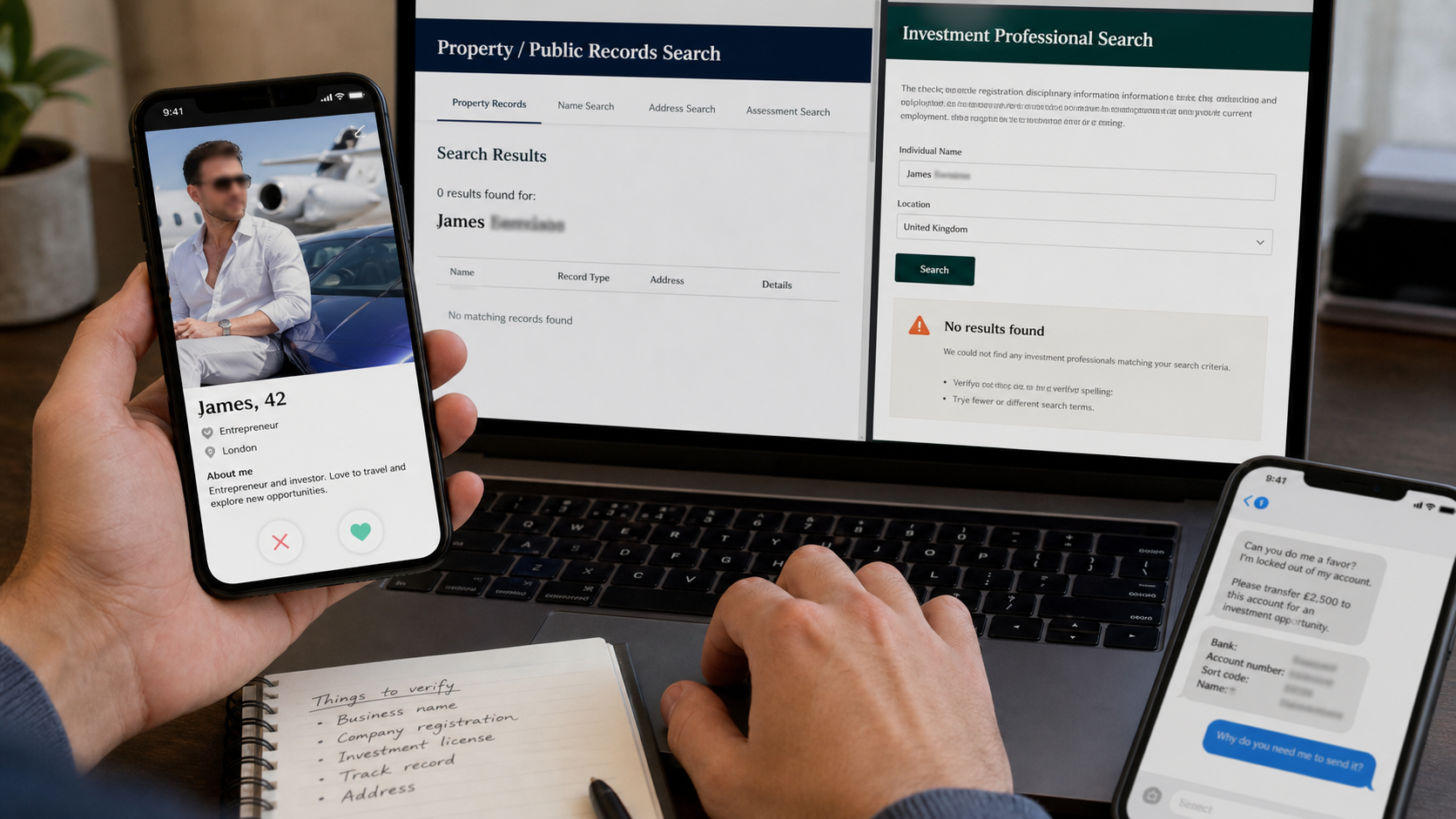
How the Fake 49ers Romance Investment Scam Works
Step 1: A remarkable dating profile starts the connection
The profile presents an attractive, successful adult with a story that stands out from ordinary matches. Professional sports, inherited wealth, real estate, luxury travel, and exclusive business contacts create immediate status.
The photos may be stolen, altered, selectively staged, or genuine images placed in a false context. Even a person who appears on live video can lie about employment, wealth, and the ownership of what appears behind him.
Step 2: The relationship becomes emotionally important
Frequent calls, affectionate messages, thoughtful gestures, and detailed future plans build routine and trust. Unlike a simple phishing email, a romance scam may develop for weeks or months before any direct financial request appears.
The scammer learns what the target wants, fears, and can afford. That knowledge makes later requests personal, plausible, and difficult to discuss with friends who were not present for the relationship’s gradual development.
Step 3: Wealth is demonstrated through controlled evidence
The target is shown luxury purchases, large account balances, profitable trades, valuable property, or conversations with business associates. Each piece of evidence is selected by the person making the claim.
A financial app can be a mock-up, a screenshot can be edited, and a temporary rental can look like an owned home. The victim rarely receives documents that can be confirmed directly with a regulated institution.
Step 4: A second person adds professional authority
A supposed adviser, accountant, assistant, or business partner enters the story. This person appears independent but supports the same claims and may communicate through messages, email, or a three-way video call.
The additional voice reduces suspicion because two people seem to confirm each other. In reality, both roles can be coordinated parts of the same alleged operation.
Step 5: The first transfer is framed as a shared opportunity
The romantic partner presents an investment as a way to build a future together. The request may begin with a manageable amount, a short-term loan, or a chance to join a deal before it closes.
Payment often goes to an individual, an unrelated company, a cryptocurrency wallet, or an account that does not match the investment described. A fabricated dashboard may later show the money growing even though no real asset was purchased.
Step 6: Apparent gains lead to larger requests
Once the first payment appears profitable on screen, the target is encouraged to invest more. A deadline, special allocation, property closing, tax event, or temporary cash problem may be used to justify urgency.
If savings are exhausted, the scammer may suggest personal loans, credit-card advances, retirement withdrawals, or borrowing from relatives. Romantic loyalty is used to overcome the financial warning signs.
Step 7: Questions trigger excuses, pressure, or silence
Requests to withdraw money may produce new fees, delays, technical problems, or demands for another deposit. The adviser and romantic partner may blame banks, regulators, taxes, or the victim for holding up the process.
When no more money is available, contact often changes sharply. Affection becomes anger, the account disappears, or the victim is blocked while the funds remain under the scammers’ control.
Why an In-Person Meeting Does Not Make an Investment Safe
Many people assume romance scams happen only through stolen photos and overseas messages. The allegations in this case show why that assumption is dangerous: a person can meet victims, appear on live video, and maintain several relationships while still misrepresenting finances.
Meeting someone proves only that the person exists. It does not prove an NFL contract, property ownership, business income, investment registration, or the legitimacy of a destination account.
Financial claims need financial verification. Ask for the legal name of the professional and firm, then locate the registration independently through Investor.gov or FINRA BrokerCheck. Contact the firm using the number in its official regulatory record.
Do not accept a link, screenshot, or telephone number provided by the romantic partner as independent evidence. If the person becomes offended by basic verification, that reaction is itself useful information.
Names and Aliases Mentioned by Investigators
The Justice Department says Love has used several names, including Jon Love, Daejon Love, Avril Lyto Love, and Jordan Love. A matching name alone does not prove that a new dating profile is connected to the charged case.
Scammers copy names and news stories after they become public. Conversely, a new alias can hide the same conduct. Evaluate the behavior, financial request, destination account, and verifiable credentials rather than relying only on a name search.
The FBI asked people with information about Daejon Love or Taylor Chan to submit a tip through tips.fbi.gov or call 1-800-CALL-FBI. Anyone reporting should preserve messages, payment records, profile links, and identifying details.
Someone who recognizes part of the alleged story should avoid confronting a profile or coordinating with other possible victims before preserving evidence. Quietly saving original messages, account numbers, and transaction records can help investigators establish dates and connections.
Company, Address, and Fulfillment Checks
The claimed employer must confirm the identity
A uniform, stadium photo, or social-media reference does not establish that someone works for an NFL team. Verify public rosters and contact the organization through details you locate independently.
The adviser and firm need regulatory records
Search Investor.gov and FINRA BrokerCheck for the individual and company. Compare the disclosed employer, telephone number, website, registration status, and disciplinary history with what you were told.
The destination account should match the investment
Money for a regulated investment should not be wired casually to a romantic partner, personal account, unrelated business, or newly supplied crypto wallet. A mismatch requires a complete stop and independent review.
Ownership claims require documents from independent records
Property, companies, and professional licenses can often be checked through government or regulatory databases. Documents and screenshots supplied by the claimant are not independent confirmation.
How to Protect Yourself Without Turning Dating Into an Investigation
You do not need to distrust every successful person you meet. The boundary is simpler: romance should never replace normal due diligence when money, debt, account access, or identity documents enter the relationship.
- Keep finances separate from a new online relationship
- Tell a trusted friend before sending money
- Verify professional credentials through official records
- Refuse investments held only in a private app or dashboard
- Never borrow money for an opportunity introduced by a partner
- Use a regulated financial professional who is independent of the relationship
- Treat secrecy and emotional pressure as reasons to stop
A genuine partner can tolerate a pause, an independent adviser, and basic verification. Someone who insists that love must be proven with money is creating a dangerous test.
What to Do if You Have Fallen Victim to This Scam
- Stop all payments and borrowing. Do not send a final fee, tax payment, emergency loan, or recovery deposit. Tell lenders not to release pending loan proceeds.
- Contact every financial institution involved. Report the transfers as fraud and ask about recalls, holds, beneficiary warnings, card disputes, or account protection. Give exact dates and destination details.
- Preserve the relationship evidence. Save dating profiles, usernames, photographs, call logs, messages, emails, video-call details, account screenshots, contracts, wallet addresses, and payment receipts before accounts disappear.
- Secure your accounts. Change passwords from a trusted device, begin with email, enable strong two-factor authentication, remove unknown sessions, and replace any card or account number you exposed.
- Remove unwanted software and scan your devices. If the person installed an app, configuration profile, or remote-access tool, disconnect the device and run a full Malwarebytes scan for spyware and credential theft.
- Block malicious links and follow-up ads. AdGuard can reduce access to known phishing pages, deceptive redirects, and malicious advertisements. Continue treating unsolicited recovery offers as unsafe.
- Protect your identity. If identity documents or a Social Security number were shared, place fraud alerts or credit freezes and review reports for accounts you did not open.
- Report the case to authorities. File at IC3.gov, contact local police, and use the FBI tip channels if the information may relate to the named federal case.
- Seek support without shame. Tell someone you trust and consider a counselor or victim advocate. The relationship was engineered to feel real, and emotional recovery deserves the same attention as financial recovery.
Is Your Device Infected? Run a Free Malware Scan
Slow performance, constant pop-ups, or strange behavior? These are classic signs of a malware infection. A quick way to check is to scan your device with Malwarebytes Free, one of the most trusted malware removal tools available. If you only visited a scam page and didn’t download or install anything, this scan is optional.
The free version detects and removes the most common threats, including:
- Adware — the cause of those annoying pop-ups
- Browser hijackers — unwanted redirects and changed homepages
- Trojans and spyware — hidden programs stealing your data
- Potentially unwanted programs (PUPs) — software you never asked for
👉 Select your device below — Windows, Mac, or Android — then follow the simple steps to download Malwarebytes, scan your system, and remove any threats it finds. The scan usually takes 5 to 20 minutes.
Run a Malware Scan with Malwarebytes for Windows
Malwarebytes is one of the most popular and trusted anti-malware tools for Windows — and it’s completely free for removing infections. It catches threats that many antivirus programs miss, including adware, browser hijackers, and trojans. Follow the steps below to scan your PC and remove what Malwarebytes finds.
Download Malwarebytes
Click the button below to download the latest version of Malwarebytes for Windows from the official source. The free version is all you need — it will scan your computer and remove adware, browser hijackers, and other malicious software at no cost.
Download MalwarebytesOfficial installer for Windows 11 and 10. Your download starts right away.Want real-time protection? See Malwarebytes Premium Malwarebytes Free for WindowsScans and removes malware at no cost
-
Install Malwarebytes
When the download finishes, open your Downloads folder and double-click the MBSetup file. If Windows shows a User Account Control pop-up, click “Yes” to allow the installation.

Follow the On-Screen Prompts to Install Malwarebytes
The setup wizard will walk you through a few quick screens:
-
Choose where you’re installing the program — “Personal Computer” or “Work Computer” — then click Next.

-
Malwarebytes will now install on your device. This usually takes under a minute.

-
When installation is complete, the “Welcome to Malwarebytes” screen will open automatically.

-
On the final screen, click Open Malwarebytes to launch the program.

-
Optional: Check for rootkits with a Custom Scan
You don’t need to change any settings for a normal scan. The standard Threat Scan in the next step is enough for most problems, so you can go straight to it.
If you also want to check for rootkits, use a Custom Scan. In current versions of Malwarebytes, rootkit scanning is only available there:
- On the Scanner tile, click the three-dot menu and select Advanced Scan.
- Choose Custom Scan. In its options, check Scan for rootkits.
- Select your system drive (usually C:\) as the location to scan, then start the scan. It takes longer than a Threat Scan.
- When it finishes, review and quarantine the results as described in the steps below.
Rootkit scanning isn’t available on Windows devices with ARM processors.
Start the Scan
Click the blue Scan button. Malwarebytes will automatically update its virus database and start checking your computer for malware.

-
Wait for the Scan to Finish
The scan checks your entire system for browser hijackers and other malicious programs, so it can take 5 to 20 minutes depending on your computer. Feel free to do something else — just check back occasionally to see the progress.

-
Quarantine the Detected Threats
When the scan is done, you’ll see a list of everything Malwarebytes found — malware, adware, and potentially unwanted programs. Click the “Quarantine” button to remove all of them at once.

Malwarebytes will now remove the malicious files and registry entries and move them safely into quarantine.

-
Restart Your Computer
Some threats can only be fully removed after a reboot. If Malwarebytes asks you to restart, click Yes. Once you’re logged back in, Malwarebytes has finished removing the threats it found.

When the scan is done, check whether the problems you noticed have stopped. If they continue, see the options below.
If you are still having problems with your computer after completing these instructions, then please follow one of the steps:
- Run a computer scan with ESET Online Scanner
- Ask for help in our Windows Malware Removal Help & Support forum.
Run a Malware Scan with Malwarebytes for Mac
Malwarebytes for Mac is a free on-demand scanner that removes the malware other security software tends to miss — adware, browser hijackers, and unwanted programs included. Cleaning an infected Mac with Malwarebytes has always been completely free, and it’s our go-to recommendation. Follow the steps below to scan your Mac and remove what Malwarebytes finds.
-
Download Malwarebytes for Mac
Click the button below to download the latest version of Malwarebytes for Mac.
Download MalwarebytesOfficial installer for macOS. Your download starts right away.Want real-time protection? See Malwarebytes PremiumMalwarebytes Free for MacScans and removes malware at no cost -
Open the Malwarebytes setup file
When the download finishes, open your Downloads folder and double-click the setup file to begin the installation.

-
Follow the On-Screen Prompts to Install Malwarebytes
The Malwarebytes for Mac Installer will guide you through a few quick screens. Click “Continue” and keep following the prompts until the installation completes.



When the installation is complete, Malwarebytes opens to the Welcome to Malwarebytes screen. Click “Get started“.
Malwarebytes needs Full Disk Access to check your whole Mac. When it asks, open System Settings > Privacy & Security > Full Disk Access, turn on Malwarebytes (it may be listed as Malwarebytes Protection), and confirm with your password or Touch ID. Then return to Malwarebytes. On macOS Monterey and earlier, this setting is in System Preferences > Security & Privacy > Privacy.
-
Select “Personal Computer” or “Work Computer”
Malwarebytes will ask what type of computer you’re installing it on. Click either Personal Computer or Work Computer, whichever applies.

-
Start the Scan
Click the “Scan” button. Malwarebytes will automatically update its detection database and begin checking your Mac for malware.

-
Wait for the Scan to Finish
Malwarebytes will scan your Mac for adware, browser hijackers, and other malicious programs. This can take a few minutes, so feel free to do something else — just check back occasionally to see the progress.

-
Quarantine the Detected Threats
When the scan is done, you’ll see a list of everything Malwarebytes found. Click the “Quarantine” button to remove all the threats at once.

-
Restart Your Mac
Malwarebytes will now remove all the malicious files it found. Some threats can only be fully removed after a reboot — if Malwarebytes asks you to restart, allow it. Once you’re logged back in, check whether the problems you noticed have stopped. If they come back, save the scan report and ask for help in our forum.

If the problems you noticed continue after the scan, see the options below.
If you are still experiencing problems while trying to remove a malicious program from your computer, please ask for help in our Mac Malware Removal Help & Support forum.
Run a Malware Scan with Malwarebytes for Android
Malwarebytes for Android scans your phone or tablet for malware, adware, and potentially unwanted apps. The free version scans only when you start a scan. Real-time protection, which checks apps automatically, is part of the paid Premium version.
-
Download Malwarebytes for Android.
You can download Malwarebytes for Android by clicking the link below.
Get Malwarebytes for AndroidOpens Google Play in a new tab.Want real-time protection? See Malwarebytes Premium for AndroidMalwarebytes for AndroidScans your phone and removes malware at no cost -
Install Malwarebytes for Android on your phone.
In the Google Play Store, tap “Install” to install Malwarebytes for Android on your device.

When the installation process has finished, tap “Open” to begin using Malwarebytes for Android. You can also open Malwarebytes by tapping on its icon in your phone menu or home screen.

-
Follow the on-screen prompts to complete the setup process
When Malwarebytes opens, it walks you through a short setup. Tap Get started and follow the prompts. If you see an offer for a trial or a paid plan, read it before you accept. You can skip it and keep using the free scanner.
Malwarebytes will ask for permission to access the files on your phone so it can scan them. Tap Allow, or turn on the permission in the Android screen that opens, then return to Malwarebytes.
-
Run a scan with Malwarebytes for Android
On the main screen, tap Scan now. In some versions, you open the menu, tap Scanner, and then tap Run a scan.
-
Wait for the Malwarebytes scan to complete.
Malwarebytes will now start scanning your phone for adware and other malicious apps. This process can take a few minutes, so we suggest you do something else and periodically check on the status of the scan to see when it is finished.

-
Remove the detected apps.
When the scan has been completed, you will see a list of the threats that Malwarebytes for Android has detected. Next to each detected item, tap the menu icon (three dots), then choose to uninstall the app or delete the file. Android then asks you to confirm. Tap OK or Uninstall to remove the app.
-
Restart your phone.
When the detected apps are removed, restart your phone if Malwarebytes asks you to. Then check whether the problems you noticed have stopped.
If the problems you noticed continue after the scan, see the options below.
If you are still having problems with your phone after completing these instructions, then please follow one of the steps:
- Ask for help in our Mobile Malware Removal Help & Support forum.
- Only as a last resort, reset your phone to factory settings. Read the warning below first.
- Back up your photos, videos, files, and messages, for example to your Google account or a computer.
- Make sure you know your Google account email and password. The phone asks for them after the reset. If you changed the password recently, Google recommends waiting 24 hours before you reset.
- On a Samsung phone, also make sure you know your Samsung account password.
- If you use an authenticator app for two-step verification, move your accounts to another device or save your backup codes first.
Stay Protected: Block Ads and Malicious Sites
No scan can prove a device is completely clean, so it helps to block threats before they reach you. Most infections start with a malicious ad or a fake download button — so blocking them at the source is your best defense.
We recommend AdGuard, which blocks malicious ads, phishing pages, and dangerous redirects before they can reach you.
👉 Download AdGuard and browse safely
Frequently Asked Questions
Were the defendants convicted of the alleged scheme?
The Justice Department announcement describes charges made through a criminal complaint. A complaint is an accusation, and each defendant is presumed innocent unless proven guilty in court.
How many victims did investigators identify?
Federal authorities said 26 women had been identified and interviewed at the time of the announcement. The FBI indicated that additional victims may exist.
How much money was allegedly received?
The Justice Department said financial records showed about $1.3 million received from victim investors. That figure is an allegation described by prosecutors, not a final judicial finding.
Can a romance scammer meet a victim in person?
Yes. An in-person meeting confirms physical identity but not employment, wealth, investment registration, or honest intent. Financial claims still require independent verification.
Is a video call with a financial adviser proof?
No. A second person can participate in the deception, and a screen can display fabricated balances. Verify the adviser through regulatory records and contact the listed firm independently.
Where should possible victims report information?
Preserve evidence and report to local police and the FBI’s Internet Crime Complaint Center. Information related to the named case can also be submitted at tips.fbi.gov or by calling 1-800-CALL-FBI.
The Bottom Line
The fake 49ers romance investment story allegedly combined emotional trust, claims of wealth, a supposed adviser, and fabricated financial displays. That combination can feel far more convincing than a simple online pitch.
Do not send or borrow money because a romantic partner promises a shared fortune. Verify every professional, firm, and destination account independently, and step away when affection is used to silence ordinary financial questions.

Join the discussion
0 commentsShare your experience or ask a question about this article.
Discussion
Start the conversation
Have a question or something useful to share? Add the first comment.