

Imagine receiving an urgent notice warning you that your Facebook page is about to be disabled for copyright violations. Panic sets in. You click the link to “resolve the issue” — and just like that, you have given hackers full access to your account.
The Facebook Copyright Infringement scam is a growing threat, targeting millions of users and businesses worldwide. In this guide, you will learn exactly how this scam operates, how to spot it, what to do if you fall victim, and most importantly, how to protect yourself. Let’s dive in.
What Is the Facebook Copyright Infringement Scam?
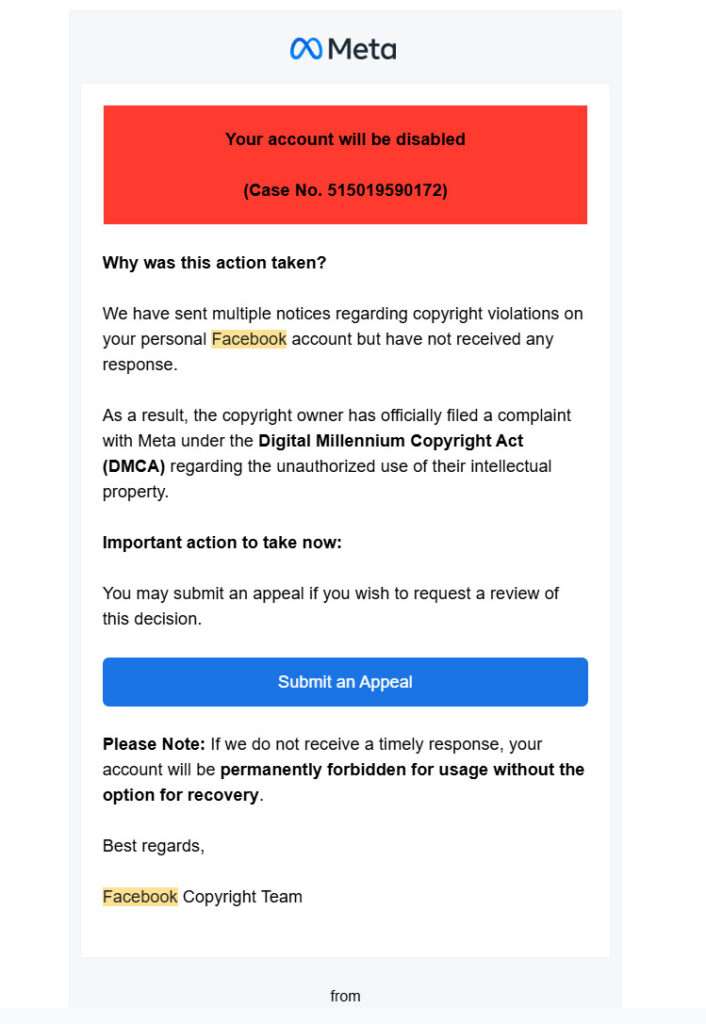
The Facebook Copyright Infringement scam is a sophisticated phishing attack where cybercriminals impersonate Facebook’s Copyright or Meta Protect teams. They send alarming messages via email, Facebook Messenger, or Instagram, claiming that your account has violated copyright laws by posting unauthorized content.
These messages typically look very convincing. They often include:
- A case number to add legitimacy
- Facebook or Meta logos
- Legal-sounding language referencing DMCA (Digital Millennium Copyright Act)
- Threats to suspend, limit, or permanently disable your account if you do not act immediately
- Links that lead to fake Facebook login pages designed to steal your credentials
The ultimate goal of this scam is to steal your Facebook login details. Once scammers gain access, they can:
- Lock you out of your account
- Scam your friends and followers
- Access sensitive personal or business information
- Run fraudulent ads through your Facebook Ad account
- Demand ransom to return your account
Because of the growing reliance on Facebook for both personal and business activities, these scams can cause significant financial and emotional harm.
Recent variations of the scam include:
- Meta Protect scams: Claiming your page requires “higher security protections.”
- Page Policy Appeals: Redirecting you to a fake Help Center requesting passwords.
- Account Disabling Notices: Threatening permanent account loss unless you submit an appeal.
Each variation uses the same playbook: urgency, fear, and a fake solution.
Why Is This Scam So Effective?
The Facebook Copyright Infringement scam is especially dangerous because it uses tactics that prey on fear and authority. Users are less likely to question a notice when they believe their account — and all the time, followers, and content they’ve built — is at risk.
Additionally, the fake login pages are often crafted with great attention to detail, copying Facebook’s fonts, layouts, and colors to fool even tech-savvy users.
Another reason for its success is the wide range of distribution methods. Scammers target users through:
- Personal emails
- Facebook direct messages
- Instagram DMs
- Comments on posts and Facebook Pages
- Even sponsored ads in rare cases
Because the scams can come from almost any direction, users must remain alert at all times.
How the Facebook Copyright Scam Works
Understanding the mechanics of the scam will make it easier for you to recognize and avoid it. Here’s a detailed breakdown:
Step 1: The Initial Message
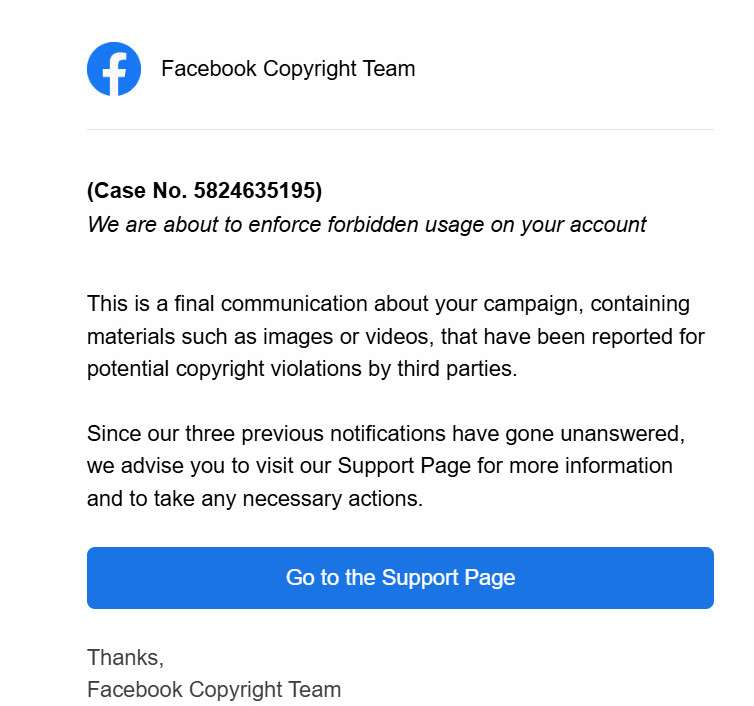
You receive a message that appears to be from the Facebook Copyright Team or Meta Support. It states that your account has violated copyright rules by posting protected material without authorization.
Common phrases include:
- “Final Notice of Intellectual Property Rights Infringement”
- “Your page has been reported for copyright violations.”
- “Immediate action is required to avoid page restrictions.”
The scam message usually contains a “Go to Support Page” or “Submit an Appeal” button.
Step 2: The Urgent Call to Action
The message pressures you to act quickly. It warns that your account will be permanently deleted, restricted, or penalized if you don’t respond.
This tactic is designed to cause panic, making you more likely to click the provided link without thinking.
Step 3: The Fake Facebook Page
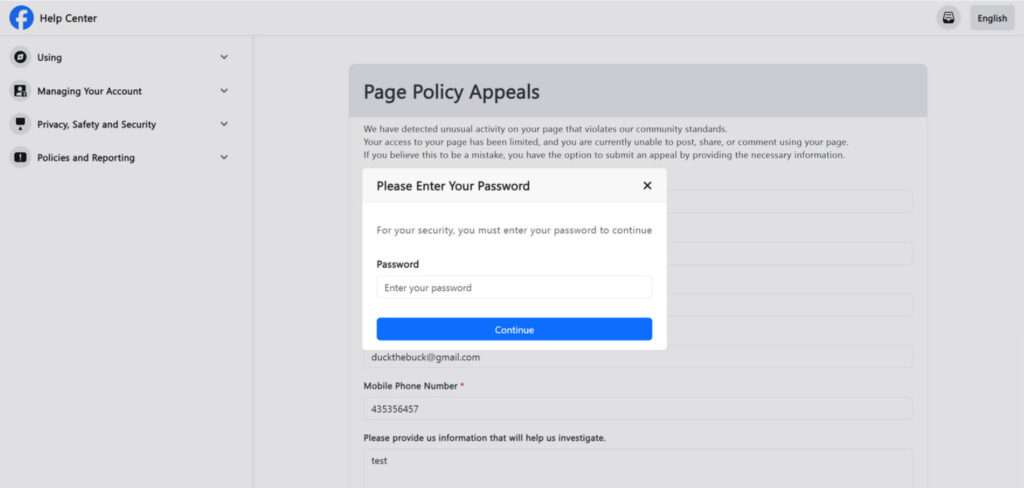
Clicking the link brings you to a fake Facebook Help Center, Meta Protect, or Page Appeal page. These pages are carefully crafted to mimic the real Facebook website.
You may see:
- Official-looking Facebook logos
- Typical Facebook navigation menus
- Forms requesting your login information
- Warnings about account suspension
The URL may look suspicious if you examine it closely (for example: facebook-account-security-appeal.com), but many users overlook this.
Step 4: Stealing Your Credentials
The fake site asks you to enter your Facebook username and password, and sometimes even additional information like your email address and phone number.
Once you submit your information, it is immediately captured by the scammer.
Step 5: Account Takeover
With your credentials in hand, the scammer can:
- Change your password and recovery options
- Lock you out of your account
- Access personal messages and photos
- Use your account to scam others or spread malware
- Take over your Facebook Business Pages and ad accounts
- Demand a ransom to return your account
In cases involving businesses, scammers often use hijacked ad accounts to run fraudulent ads, leading to massive financial losses.
How to Spot the Facebook Copyright Infringement Scam
Recognizing the signs of a Facebook Copyright Infringement scam early can save you from serious trouble. Scammers are good at making their messages look convincing, but there are always warning signs if you know what to look for. Here’s how to identify this scam before you fall for it.
1. Suspicious Sender Email or Profile
Always check who sent the message. Real Facebook or Meta communications come from official domains like @facebookmail.com or @support.facebook.com. If the email comes from an unusual domain like @appsheet.com or any unrelated website, it is a scam.
On Facebook or Instagram, scam messages often come from unofficial pages or profiles that may have strange usernames or no verification badge.
2. Urgent Language Designed to Panic You
Scam messages often use threatening language to create a sense of urgency. Phrases like:
- “Your account will be permanently disabled.”
- “Immediate action required.”
- “Final warning before your page is taken down.”
Legitimate companies rarely demand immediate action without allowing time for review or appeal through official channels.
3. Generic Greetings
Messages that start with “Dear User” or no name at all are major red flags. Facebook normally addresses you by your full name or the name of your page or business account in official communications.
4. Suspicious Links
Before clicking any link, hover your mouse over it (without clicking) to see the real URL. If the address does not end in facebook.com or meta.com, do not click it.
Scammers often use links that look similar but are slightly misspelled, like:
- faceboook-security.com
- meta-supporthelp.com
- facebook-login-appeal.net
Always navigate to Facebook manually through your browser instead of clicking links in a suspicious message.
5. Requests for Sensitive Information
Facebook will never ask you to enter your password, credit card details, or other sensitive information through an email or third-party site. If a page immediately asks you to “verify” your login credentials, it is almost certainly a phishing site.
6. Poor Grammar and Typos
Official Facebook communications are professionally written. If you notice:
- Awkward sentences
- Misspellings
- Strange capitalization
- Grammar mistakes
you are almost certainly dealing with a scammer.
7. Fake Facebook Pages Mimicking Help Centers
Scammers create fake Facebook Help Centers, Meta Protect pages, or Policy Appeal pages. Although they may look similar to the real thing, fake sites often have slight design differences, outdated logos, or missing links to real Facebook resources.
Double-check the URL and avoid logging in unless you are sure you are on the legitimate Facebook website.
8. Lack of Notifications Within Facebook
If you receive a serious warning about your account by email or direct message but see no notifications when you log directly into Facebook, the message is likely fake.
Facebook usually alerts you inside your account if there’s an issue, not just through external communications.
What to Do if You Have Fallen Victim to the Facebook Copyright Infringement Scam
If you have clicked on a phishing link and entered your information, you must act fast. Here are the steps you should follow:
1. Change Your Facebook Password Immediately
- Go to the official Facebook login page.
- Change your password to something strong and unique.
- If you cannot access your account, use Facebook’s “Forgot Password” feature.
2. Enable Two-Factor Authentication
- Navigate to your Facebook security settings.
- Enable two-factor authentication (2FA) using an authentication app or your phone number.
This adds an extra layer of protection even if scammers have your password.
3. Check for Suspicious Activity
- Review your login history on Facebook.
- Look for unfamiliar locations or devices.
- Log out of all sessions you do not recognize.
4. Report the Scam to Facebook
- Go to the Facebook Help Center.
- Report phishing messages and suspicious activity.
Forward any scam emails to phish@fb.com.
5. Secure Your Linked Email Account
If you used the same email and password combination for Facebook and your email, immediately change your email password as well. Hackers gaining access to your email can make account recovery much harder.
6. Review Your Connected Apps
- Visit the “Apps and Websites” section in your Facebook settings.
- Remove any apps you do not recognize or trust.
Scammers often add malicious apps to maintain access.
7. Notify Your Friends and Followers
If you believe scammers have accessed your account, inform your friends and followers. Warn them not to click on suspicious links sent from your account.
8. Monitor Financial Accounts
If you have a Facebook Ad account or have linked payment methods, monitor your bank and credit card accounts for unauthorized charges.
9. File a Report with the Federal Trade Commission (FTC)
In the United States, you can file a report at identitytheft.gov if you believe your personal information has been compromised.
10. Stay Vigilant Against Future Phishing Attempts
Once targeted, you may be targeted again. Stay cautious of future suspicious emails, messages, and login requests.
FAQ About the Facebook Copyright Infringement Scam
What is the Facebook Copyright Infringement scam?
The Facebook Copyright Infringement scam is a phishing attack where scammers impersonate Facebook or Meta representatives. They send fake copyright violation notices to trick users into clicking malicious links and entering their login credentials on fake websites.
How do scammers contact victims?
Scammers reach victims through emails, Facebook direct messages, Instagram DMs, and sometimes even through comments on posts. These communications often look official and urgent, prompting immediate action.
What happens if I click the link and enter my information?
If you enter your information, scammers gain full access to your Facebook account. They can lock you out, steal sensitive data, use your account to scam others, or run fraudulent ads, potentially causing financial damage.
How can I tell if a copyright infringement message is a scam?
Warning signs include poor grammar, suspicious-looking URLs, threats of immediate account suspension, and unsolicited requests to click external links. Always verify the sender and avoid clicking links directly from emails or messages.
Does Facebook send copyright violation notices via email?
Facebook may send account-related notifications, but official copyright issues are typically addressed within your Facebook account settings, not through external links. Always log in directly through Facebook.com or the app to verify any alerts.
What should I do if I fell for the scam?
Immediately change your Facebook password, enable two-factor authentication, report the scam to Facebook, secure your email account, and review connected apps. If necessary, start the account recovery process to regain access.
Can scammers access my other accounts once they hack my Facebook?
Yes, especially if your Facebook uses the same password as other accounts or if Facebook is linked to other platforms. That’s why updating your security settings and passwords everywhere is critical.
How can I report the scam to Facebook?
Forward phishing emails to phish@fb.com. On Facebook, use the report feature to report suspicious messages, pages, or profiles.
How do I protect my Facebook account from future scams?
Use strong, unique passwords, enable two-factor authentication, be cautious of unsolicited messages, and regularly monitor your account activity. Always navigate to Facebook directly rather than through links in emails or messages.
Why are scammers targeting Facebook users?
Facebook accounts hold valuable personal, business, and financial information. Gaining control of an account allows scammers to reach a wide network of contacts, run ads, or exploit personal data for profit.
The Bottom Line
The Facebook Copyright Infringement scam is a dangerous and widespread phishing attack that preys on fear and urgency. Its convincing appearance has led many users, even experienced ones, to fall victim.
Recognizing the warning signs and taking immediate action can save you from losing your personal information, business assets, and social media presence. Always remember: Facebook will never threaten you with sudden account removal through an external link. When in doubt, access your Facebook account directly through the app or official website.
Protect your online presence by staying informed, alert, and proactive. Scammers are constantly evolving — but so can your defenses.

Join the discussion
0 commentsShare your experience or ask a question about this article.
Discussion
Start the conversation
Have a question or something useful to share? Add the first comment.