

Imagine checking your inbox and seeing a serious-looking message from the “Facebook Copyright Team” warning you about a copyright violation. Panic sets in. You click the link, hoping to resolve the issue—only to find out later that your account has been hijacked.
This is not just an unfortunate event; it’s part of a widespread and evolving scam targeting Facebook and Instagram users. If you’re serious about protecting your accounts and online identity, keep reading.
What is the “Facebook Copyright Team” Scam?
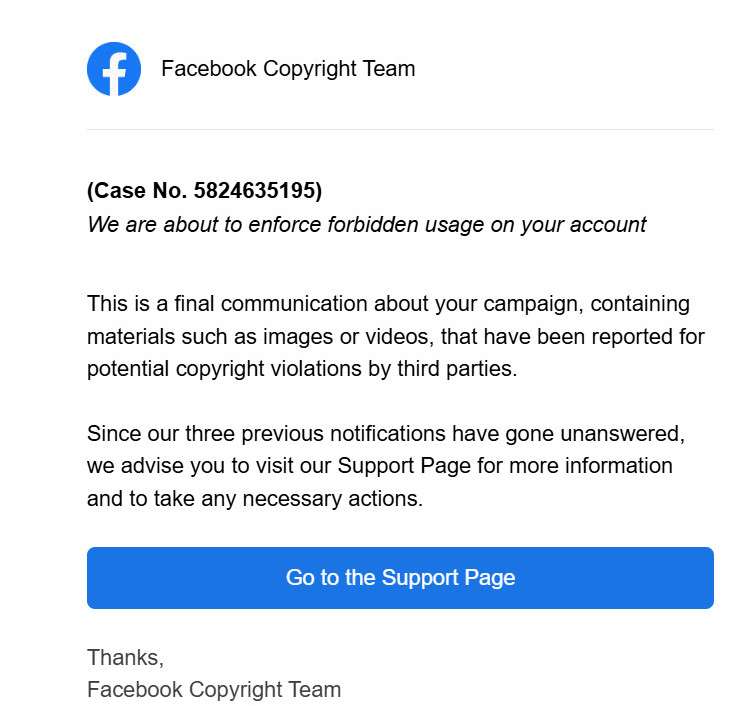
The “Notice of Intellectual Property Rights Infringement” scam is one of the most dangerous threats currently circulating social media. Disguised as an official communication from Facebook, these fraudulent messages aim to trick users into handing over their account credentials.
The scam typically arrives via email, Facebook Messenger, or even Instagram DMs. It warns the recipient about alleged intellectual property violations involving posted images, videos, or campaigns. The messages often carry a case number, stern language, and a looming threat of account suspension or termination.
Scammers design these emails to mimic real Facebook correspondence. They often include official-looking logos, legal jargon, and direct calls to action such as “Visit the Support Page” or “Resolve Now.” The emails typically originate from convincing but fake email addresses like “noreply@appsheet.com” or similar domains, not from the official Facebook domain.
The main objective? To push you into clicking on a “Support Page” link. That link leads to a fake Facebook login page crafted to steal your username, password, and sometimes even two-factor authentication (2FA) codes. Once they have this information, scammers can:
- Lock you out of your account
- Access your private messages, friends list, and photos
- Run additional scams using your identity
- Demand ransom to return your account
- Sell your account credentials on the dark web
Moreover, scammers often use compromised accounts to further spread the scam, creating a vicious cycle that traps even more victims.
Variants of the Scam
There are numerous versions of this scam, all sharing the same underlying tactics:
- Direct Messages on Instagram: A “Facebook Copyright” team member urgently messages you about copyright infringement.
- Emails Posing as Facebook Legal Team: With subject lines like “Final Warning: Copyright Violation” or “Account Suspension Notice.”
- Fake Support Pages: Some sophisticated scams even create realistic-looking support ticket systems to appear more credible.
Understanding these variants is crucial to recognizing and avoiding the trap.
Why This Scam Works So Well
This scam exploits two powerful emotions: fear and urgency. No one wants to lose access to their Facebook or Instagram account, especially those who rely on these platforms for business or personal connections. The urgent tone pressures victims into acting quickly, often without thinking critically.
Additionally, because Facebook’s real copyright violation warnings do look somewhat similar, it becomes even harder for the average user to differentiate between a legitimate notice and a scam.
How the Scam Works
Understanding the mechanics of this scam will equip you to recognize and avoid it. Here’s how it typically unfolds:
Step 1: Initial Contact
The scammer sends a well-crafted email or message, claiming to be from the “Facebook Copyright Team.” The message states that your account has violated intellectual property laws and will face action if not addressed immediately.
Step 2: Psychological Pressure
The communication uses threatening language and short deadlines. Phrases like “final warning,” “urgent action required,” and “account suspension imminent” are common.
Step 3: Clickbait Link
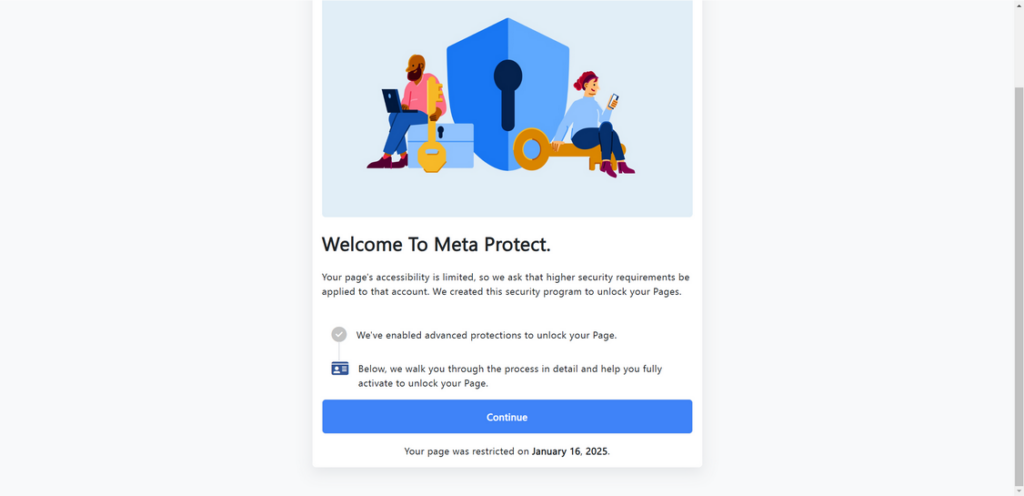
The email or message includes a button labeled something like “Go to the Support Page” or “Appeal Now.” Clicking on this link does not take you to Facebook; instead, it redirects you to a counterfeit website.
Step 4: Fake Login Page
This page looks almost identical to Facebook’s actual login page. The URL, however, is slightly off—perhaps “facebook-secure-login.com” or “fb-accounthelp.com.” Unsuspecting users input their email and password.
Step 5: Account Takeover
Once the scammer captures your login information, they immediately access your account. They may:
- Change your password
- Disable 2FA or reassign it to their own device
- Start messaging your friends or followers with scam links
- Download all your personal data
Step 6: Further Exploitation
Scammers often:
- Sell the account
- Use it to run additional phishing campaigns
- Blackmail the original owner for money
What to Do if You’ve Fallen Victim to the Scam
If you’ve already clicked the link and entered your login credentials, take the following steps immediately:
1. Change Your Facebook Password
First, change your password as quickly as possible. If you can still access your account, do this from the “Settings > Security and Login” section.
2. Enable Two-Factor Authentication (2FA)
Activate 2FA to add an extra layer of protection. Use an authentication app rather than SMS whenever possible.
3. Check for Unauthorized Activity
Review your recent login activity in your Facebook settings. Look for unknown devices or locations.
4. Revoke Suspicious Apps and Sessions
Remove any unfamiliar devices and apps connected to your Facebook account.
5. Report the Scam to Facebook
Use Facebook’s reporting tools to notify them about the phishing attempt. Facebook can investigate and take down the fraudulent site.
6. Warn Your Friends
If scammers gained access to your account, they might message your friends. Let your network know you were compromised and advise them not to click any suspicious links.
7. Scan Your Device for Malware
Sometimes phishing attacks include malware downloads. Run a full scan using reliable antivirus software.
8. Secure Your Email Account
If your Facebook is tied to your email, make sure that your email account is secure too. Update the password and enable 2FA.
9. File a Report with Your Local Cybercrime Authorities
In some regions, you can report scams to law enforcement or government cybersecurity agencies.
10. Stay Educated and Alert
Learn about phishing tactics and keep an eye out for new scam techniques.
FAQ About the Facebook “Notice of Intellectual Property Rights Infringement” Scam
What is the Facebook “Notice of Intellectual Property Rights Infringement” scam?
It is a phishing scam where cybercriminals send fake messages pretending to be from Facebook’s Copyright Team. They claim that your account has violated copyright laws and urge you to click a link to avoid penalties. The real goal is to steal your login credentials and gain control of your account.
How do scammers contact victims?
Scammers typically send emails, Facebook messages, or Instagram direct messages. These communications look official and often include case numbers, urgent language, and links to fake support pages designed to capture your login information.
What happens if I click on the link in the scam message?
Clicking the link usually redirects you to a fake Facebook login page. If you enter your credentials, the scammers immediately capture your username and password, gaining full control of your account. They can then lock you out and use your account for further scams.
How can I tell if a message is a scam?
Red flags include poor grammar, suspicious email addresses, generic greetings, urgent threats, and links that do not lead to an official Facebook domain. Always hover over links to check their true destination before clicking.
What should I do if I already clicked the link and entered my information?
Act quickly. Change your Facebook password immediately and enable two-factor authentication. If you cannot access your account, use Facebook’s account recovery process. Also, check any linked email accounts for suspicious activity and update your security settings.
Is it safe to report the scam?
Yes. Reporting phishing scams helps protect others. You can forward suspicious emails to Facebook at phish@fb.com and report messages directly through the Facebook platform.
How can I protect my account from scams like this?
Enable two-factor authentication, never click on suspicious links, regularly update your passwords, and always verify the sender’s information. Staying vigilant is the best defense against phishing attacks.
Does Facebook really send copyright violation notices via email?
Facebook may send notifications about content issues, but they will not threaten immediate enforcement without allowing you to review details within your Facebook account. Official communications typically direct you to log in securely through Facebook.com or the app itself, not through third-party links.
Why do scammers target Facebook and Instagram users?
Facebook and Instagram accounts often hold valuable personal information and have large follower networks. Scammers exploit these accounts to spread malware, run scams, or sell access to malicious groups.
What should I do if I receive a suspicious message claiming to be from Facebook?
Do not click any links. Instead, go directly to Facebook by typing the URL manually into your browser. Check your account notifications to see if there are any legitimate alerts. You can also use Facebook’s Help Center to verify any claims.
The Bottom Line
The “Notice of Intellectual Property Rights Infringement” scam is a cunning and dangerous threat that preys on fear and urgency to steal Facebook and Instagram accounts. Recognizing the signs and acting quickly can make all the difference.
Always double-check any communication claiming to be from Facebook. Avoid clicking on links in suspicious messages. And remember—legitimate companies will never ask for your password through email or direct message.
Staying informed and vigilant is your best defense. Share this article with friends and family so they can avoid falling into the same trap.

Join the discussion
0 commentsShare your experience or ask a question about this article.
Discussion
Start the conversation
Have a question or something useful to share? Add the first comment.