

The Facebook User Privacy Settlement has sparked a wave of curiosity and confusion across the United States. Millions of Facebook users have been receiving emails and updates about a class action settlement that promises cash payouts. For many, the first reaction is skepticism: is this real, or is it just another online scam?
The truth is, the Facebook User Privacy Settlement is legitimate. It stems from one of the largest data privacy lawsuits in U.S. history, and it directly affects millions of Americans who used Facebook between 2007 and 2022. With a total settlement fund of $725 million, the case represents a major moment in how tech giants are held accountable for their handling of user data.
In this article, we will explore everything you need to know about the Facebook privacy settlement: how it started, who is eligible, the payout amounts, important dates, how to claim, and most importantly, how to avoid scams. Whether you are waiting for your payout or still questioning if this settlement is worth your attention, this guide will provide all the answers in one place.
What is the Facebook User Privacy Settlement?
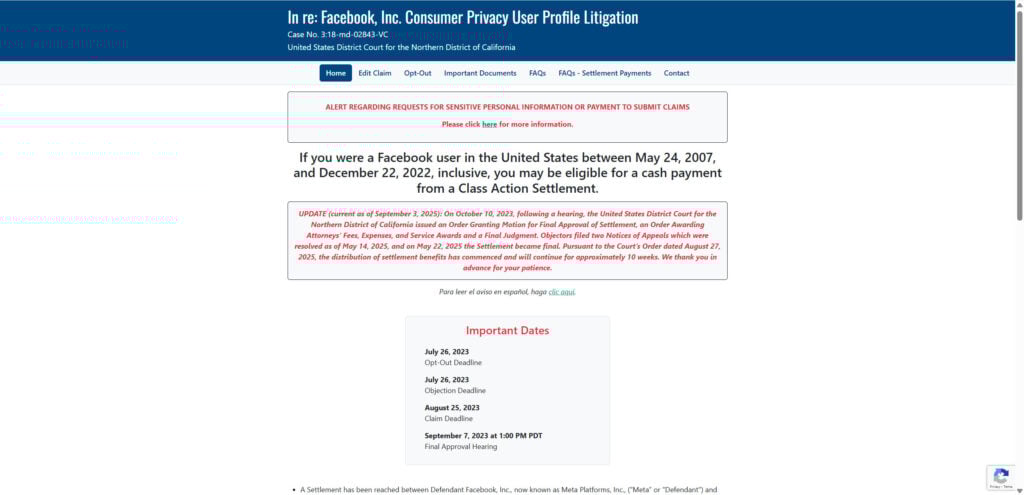
The settlement, formally titled In re: Facebook, Inc. Consumer Privacy User Profile Litigation, Case No. 3:18-md-02843-VC, is the result of a series of lawsuits filed against Facebook (now Meta Platforms, Inc.). These lawsuits alleged that the company improperly shared user data with third parties, including political consulting firm Cambridge Analytica, without adequate consent or oversight.
The most well-known event tied to this case was the 2018 Cambridge Analytica scandal, where it was revealed that millions of Facebook profiles had been harvested and used to influence political campaigns. But the settlement covers more than that. It spans alleged data misuse between May 24, 2007, and December 22, 2022.
While Meta has denied wrongdoing, the company agreed to pay $725 million to settle the claims and avoid further litigation. After attorney fees and administrative costs, roughly $541 million was left to distribute to users who submitted valid claims.
Is the Settlement Legitimate or a Scam?
One of the most common questions is whether the Facebook privacy settlement is real. The answer is clear: it is real, court-approved, and legally binding.
Here are key facts that prove its legitimacy:
- Court Oversight: The case was handled in the United States District Court for the Northern District of California, overseen by Judge Vince Chhabria.
- Final Approval: On October 10, 2023, the court granted final approval of the settlement. Legal objections and appeals were resolved by May 14, 2025, making the settlement fully final on May 22, 2025.
- Official Website: The only official site is facebookuserprivacysettlement.com. Any other site claiming to process payments or requiring extra personal details should be avoided.
- No Hidden Fees: Claimants were never asked to pay to participate. If you see requests for payment, it is a scam.
How to Identify Real vs Fake Settlement Communications
Because the settlement involves millions of people, scammers have attempted to trick users with fake emails. Here’s how to stay safe:
- Official emails come from the settlement administrator, not from Facebook itself.
- A real notice will not ask for your Social Security number, banking login, or password.
- The official website is always linked as facebookuserprivacysettlement.com. Be wary of typos or lookalike domains.
- Never download attachments from unknown sources.
Who Is Eligible for the Settlement?
Eligibility is broad. You are included in the settlement if:
- You lived in the United States.
- You had an active Facebook account between May 24, 2007, and December 22, 2022.
That means almost every U.S.-based Facebook user during that 15-year period qualified. However, eligibility alone wasn’t enough to guarantee payment. Users needed to file a claim before the August 25, 2023 deadline.
How Much Will You Get Paid?
The payout amount depends on how long you used Facebook during the eligibility period. Instead of a flat fee, the settlement uses a point system.
- Each month you had an active Facebook account between May 2007 and December 2022 counts as 1 point.
- At the end, the total settlement fund is divided by the total number of points across all claimants.
- The value of one point is then multiplied by the number of months you were active.
Example Calculation
- If you had a Facebook account for 12 years (144 months), and the final point value is about $0.20–$0.30 per month, you could expect between $28 and $43.
- Shorter-term users will receive less, while those who used Facebook for the entire period may receive more.
Average Payouts
Reports and settlement administrator updates suggest the average payment will be between $25 and $40, with some variation depending on activity length.
Key Dates and Timeline
Understanding the timeline is crucial. Here’s a breakdown of the most important settlement milestones:
- July 26, 2023: Deadline to opt out or object.
- August 25, 2023: Claim submission deadline.
- September 7, 2023: Final approval hearing.
- October 10, 2023: Court granted final approval.
- May 14, 2025: Appeals resolved.
- May 22, 2025: Settlement officially became final.
- August 2025 – November 2025: Payments distributed over a 10-week period.
That means if you filed a claim, you should receive your payout sometime in Fall 2025.
How to Claim Your Payout
The claims process was straightforward but time-sensitive.
- Complete the Claim Form: Users could file online at the settlement website or request a paper form.
- Provide Proof of Account: Claimants needed to confirm the Facebook account they used, including active dates.
- Choose a Payment Method: Options included:
- Direct deposit
- Prepaid Mastercard
- PayPal
- Venmo
- Zelle
- Paper check
Once approved, payments are sent based on the method you selected.
How Payments Are Distributed
Payments are being rolled out in waves over approximately 10 weeks. Claimants are notified via email three to four days before their payout arrives.
Distribution methods include:
- Digital payments: For those who selected PayPal, Venmo, or Zelle.
- Direct deposit or prepaid cards: Sent electronically.
- Paper checks: For those who opted for physical payment.
If you filed a valid claim but haven’t received a payment yet, you may be scheduled for a later wave.
Why Did Facebook Agree to Settle?
The lawsuits alleged that Facebook:
- Shared user data with third-party companies without consent.
- Failed to monitor or protect how that data was used.
- Allowed apps and advertisers to exploit private information.
While Facebook (Meta) denied any wrongdoing, the company chose to settle to avoid the risks and costs of prolonged litigation.
This settlement is notable because it is one of the largest ever related to digital privacy violations. It demonstrates how tech companies are increasingly being forced to reckon with their handling of personal data.
Broader Impact of the Settlement
The Facebook User Privacy Settlement is not just about payouts. It represents a larger shift in how digital privacy is being handled in the U.S.:
- Consumer Awareness: Millions of Americans became aware of how their data is used and the rights they have.
- Corporate Accountability: Meta and other tech companies face mounting pressure to handle user data responsibly.
- Legal Precedent: This settlement sets an example for future lawsuits involving digital privacy.
It also raises questions: Will future cases bring larger payouts? Will companies be forced to change how they operate?
Common Questions About the Settlement
1. What if I missed the claim deadline?
Unfortunately, if you did not submit a claim by August 25, 2023, you are not eligible to receive payment.
2. Will the settlement affect my Facebook account?
No. Your Facebook account remains unchanged. The settlement only impacts financial compensation.
3. Can I still sue Facebook individually?
If you did not opt out by July 26, 2023, you gave up your right to pursue individual legal action over the same issues.
4. How much did the lawyers get?
As part of the $725 million settlement, attorney fees, expenses, and administrative costs were deducted, leaving around $541 million for payouts.
5. Do I have to pay taxes on the settlement?
Generally, settlement payments may be considered taxable income. It is recommended to consult a tax professional for guidance.
How to Avoid Scams Related to the Settlement
With so many people involved, scammers are exploiting the confusion. Protect yourself with these tips:
- Do not share sensitive details: The settlement administrator will not ask for Social Security numbers or banking passwords.
- Check the website: Only trust facebookuserprivacysettlement.com.
- Look at the sender’s email: Scammers often use fake addresses. Always confirm legitimacy.
- Ignore attachments: Official communications won’t include downloadable files.
Why This Settlement Matters for the Future of Privacy
This case is about more than Facebook. It highlights the ongoing struggle between tech companies and consumer privacy rights. For over a decade, user data has been treated as a commodity, often with little transparency.
By holding Meta accountable, the settlement sends a clear signal: users are entitled to control over their personal information. It could inspire future lawsuits, stricter regulations, and better data protection practices across the tech industry.
Final Thoughts
The Facebook User Privacy Settlement is real, and millions of U.S. users who filed claims will soon see payments. While the payout amounts are modest—typically between $25 and $40—the settlement represents one of the most significant steps in holding a tech company accountable for data misuse.
If you filed your claim before the deadline, your payment should arrive sometime between August and November 2025. If you missed the deadline, while you won’t receive compensation, you can still take lessons from this case: be cautious with your data, stay informed about your rights, and watch for opportunities to participate in similar settlements in the future.
This is not just about a one-time payout. It is about recognizing the value of privacy in a world where data is power. The Facebook User Privacy Settlement is a reminder that users’ voices matter, and accountability is possible even when facing the largest corporations.








