

Did you receive an email claiming you are getting another Facebook settlement payment? You are not alone. Emails about the Facebook User Privacy Settlement have been circulating again, and some of them are legitimate. But because the settlement involves money, PayPal, claim IDs, and a recognizable brand name, it is also the perfect setup for phishing scams.
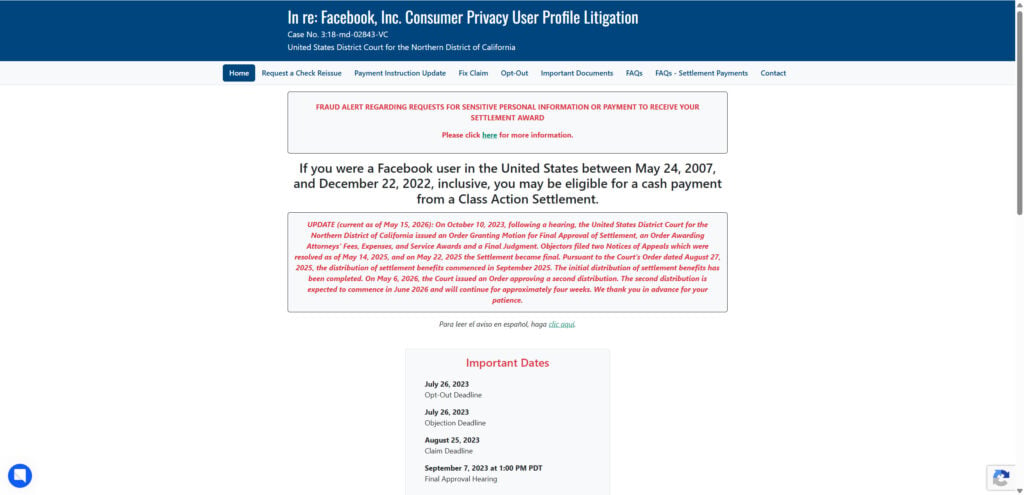
The important answer is this: the Facebook User Privacy Settlement is real, and facebookuserprivacysettlement.com is the official settlement domain. Law firms involved in the case direct users to that settlement website, and the case was approved as a $725 million settlement tied to Facebook privacy claims.
However, that does not mean every email using the words “Facebook settlement” is safe. Scammers can copy the wording, spoof sender names, fake logos, and create nearly identical domains to trick people into giving up personal or financial information.
Why People Are Getting Facebook Settlement Emails Again
The settlement relates to In re: Facebook, Inc. Consumer Privacy User Profile Litigation, a major privacy lawsuit involving claims that Facebook improperly allowed third parties to access user information. Meta denied wrongdoing, but the settlement moved forward and became effective in 2025.
The first round of settlement payments began in 2025. In 2026, a second distribution was approved using money from uncashed payments from the first round. According to CBS News, this second payment is for eligible claimants who successfully cashed their original payment, and the administrator has been sending email notices before issuing the extra payment.
That is why an email saying your “initial payment was successful” and that an “additional settlement payment” is coming may be legitimate — if it actually came from the real settlement administrator.
What a Real Facebook Settlement Email May Look Like
A legitimate email may include details such as:
- A claim ID
- A confirmation code
- The case name: In re: Facebook, Inc. Consumer Privacy User Profile Litigation
- A reference to your original payment method, such as PayPal, Venmo, ACH, Zelle, prepaid card, or check
- A notice that another payment will be issued in a few business days
- Contact information for the settlement administrator
CBS News previously reported that approved claimants received emails from Facebook User Privacy Settlement Administrator, with the sender address donotreply@facebookuserprivacysettlement.com.
For the second distribution, CBS also reported that the subject line may mention “Settlement and Second Distribution Status Update,” and that users can contact the administrator at info@facebookuserprivacysettlement.com if they are unsure about their payment status.
Is the Email in the Screenshot Legit?
The email shown in the screenshot has several details that match known legitimate settlement notices: it references the correct case, includes a claim ID, mentions a successful initial payment, says an additional payment is being issued, lists PayPal as the selected payment method, and points to the official settlement domain.
That said, a screenshot alone cannot prove the message is safe. The visible text may look real, but phishing emails can copy legitimate wording almost perfectly. The real test is the sender address, the hidden link destination, and whether the email asks you to do anything risky.
How to Verify the Email Before Clicking Anything
First, check the sender carefully. The official sender reported for settlement notices is donotreply@facebookuserprivacysettlement.com. Watch for small spelling changes, extra words, strange subdomains, or lookalike characters. Microsoft warns that mismatched or subtly misspelled domains are common signs of phishing.
Second, do not click the link immediately. Hover over the link on desktop, or long-press it on mobile, to preview the real destination. If the visible text says one thing but the link goes somewhere else, treat it as suspicious. Microsoft recommends checking the real link destination before opening suspicious messages.
Third, go to the settlement site manually. Instead of clicking from the email, open a browser and type the official domain yourself, or search for the official Facebook User Privacy Settlement page. This avoids being redirected through a fake link.
Fourth, compare the email with your own history. The second payment is not for everyone. It is tied to people who had an approved claim and successfully received or cashed the first settlement payment.
Fifth, check your payment account directly. If the email says PayPal, open PayPal yourself — not through the email link — and look for a payment from the settlement. The same applies to Venmo, Zelle, ACH, or any other payment method.
Red Flags That Mean It Is Probably a Scam
Be suspicious if the email asks you to:
- Log in to Facebook or PayPal through a link
- Enter your Facebook password
- Provide your Social Security number
- Pay a “processing fee,” “tax,” or “release fee”
- Re-enter your debit card or bank login
- Download an attachment
- Act immediately or lose your payment
- Send a verification code
- Provide cryptocurrency wallet information
The FTC warns that phishing messages often claim there is a problem with your account, ask you to confirm personal or financial information, or push you to click a link. The FTC also notes that legitimate companies do not email or text people with links to update payment information.
A real settlement payment should not require you to pay money to receive money. The FTC says it will never demand money, make threats, or tell consumers to transfer funds in connection with refunds.
Can You Still File a New Facebook Settlement Claim?
No. The claim deadline has already passed. The settlement website previously listed the claim form deadline as August 25, 2023, and law firm Keller Rohrback states that the deadlines for filing a claim, opting out, or objecting have passed.
That matters because scammers may send fake messages saying you can still “claim your Facebook settlement money” if you fill out a new form. That is a major warning sign. The current emails are about payments to already-approved claimants, not a new open claim process.
What to Do If You Already Clicked
If you clicked the email but did not enter any information, close the page and avoid interacting with it further. Then run a security scan if anything downloaded.
If you entered a password, change it immediately from the real website or app. Turn on two-factor authentication for Facebook, PayPal, email, and banking accounts.
If you gave financial information, contact your bank or payment provider immediately. If you provided sensitive identity information, use IdentityTheft.gov for recovery steps. The FTC recommends reporting phishing attempts and taking action quickly if a scammer may have received your information.
Bottom Line
The Facebook User Privacy Settlement is real. The domain facebookuserprivacysettlement[.]com is the official settlement site. Emails about a second payment may also be real, especially if you previously received and cashed your first settlement payment.
But treat every settlement email with caution. Verify the sender, inspect the links, avoid entering sensitive information, and go to the official site manually instead of trusting links inside the message. A real settlement notice should inform you about a payment — it should not pressure you into handing over passwords, bank logins, fees, or personal data.
FAQ Section
Is the Facebook User Privacy Settlement real?
Yes. The Facebook User Privacy Settlement is real, and the official settlement site is facebookuserprivacysettlement[.]com. The site says the court approved a second distribution on May 6, 2026, with payments expected to begin in June 2026.
Is an email from facebookuserprivacysettlement[.]com legitimate?
It can be legitimate, but you still need to verify it. A real email may reference your claim ID, confirmation code, payment method, and the Facebook User Privacy Settlement. But scammers can copy real wording, spoof sender names, and use lookalike domains.
Why did I get an “additional settlement payment” email?
Some eligible users are receiving a second payment because uncashed funds from the first distribution are being redistributed. NBC Chicago reported that the second distribution is for settlement class members who successfully cashed their initial payment.
Who qualifies for the second Facebook settlement payment?
The second payment is not for everyone. It is intended for users who had an approved claim and successfully cashed or received their first settlement payment. Payments are being sent in batches over about four weeks.
Does the email mean Facebook owes me new money?
Not exactly. It usually means there may be an additional payment from the existing settlement fund, not a brand-new Facebook lawsuit or a new claim opportunity.
Can I still file a new Facebook settlement claim?
No. The original claim deadline has already passed. Be very cautious of any email or website claiming you can still submit a new Facebook privacy settlement claim.
Should I click the link in the email?
Do not click immediately. First check the sender address, hover over the link to see the real destination, and go to the official settlement site manually instead of trusting the email link. The FTC warns that phishing emails often try to make people click links, confirm personal information, or update payment details.
What are the biggest red flags of a fake Facebook settlement email?
Red flags include requests for your Facebook password, PayPal login, Social Security number, bank login, debit card details, verification codes, or any “fee” to release the payment. A real settlement payment should not require you to pay money first.
What if the email says the payment will be sent through PayPal?
That can be normal if PayPal was the payment method you selected. But check PayPal by opening the app or website directly. Do not log in through a link inside the email.
What should I do if I already clicked a fake settlement link?
If you entered login details, change your password immediately and enable two-factor authentication. If you entered banking or identity information, contact your bank and report the incident. The FTC recommends reporting phishing emails and taking action quickly if scammers may have received your information.








