

The post says the drop is live. $Qubit. Early adopters. Limited time. One button that says Claim $Qubit. That is how the airdrop arrives in a feed, not as a contract you can read, but as a window you are already late for.
The page is not handing out tokens. Claim $Qubit opens a wallet connection. Approve that connection and a drainer can empty the wallet, often in seconds. Blockchain transfers do not come with an undo button. Free $Qubit is the costume. The wallet is the prize.
A ticker spelled QUBIT has shown up on public price pages, and older DeFi pages have used the same word. This article is not a review of those tokens or of any company that used the name. The trap is the fake claim page that asks you to connect a wallet. That is the only door this write-up is about.
Overview
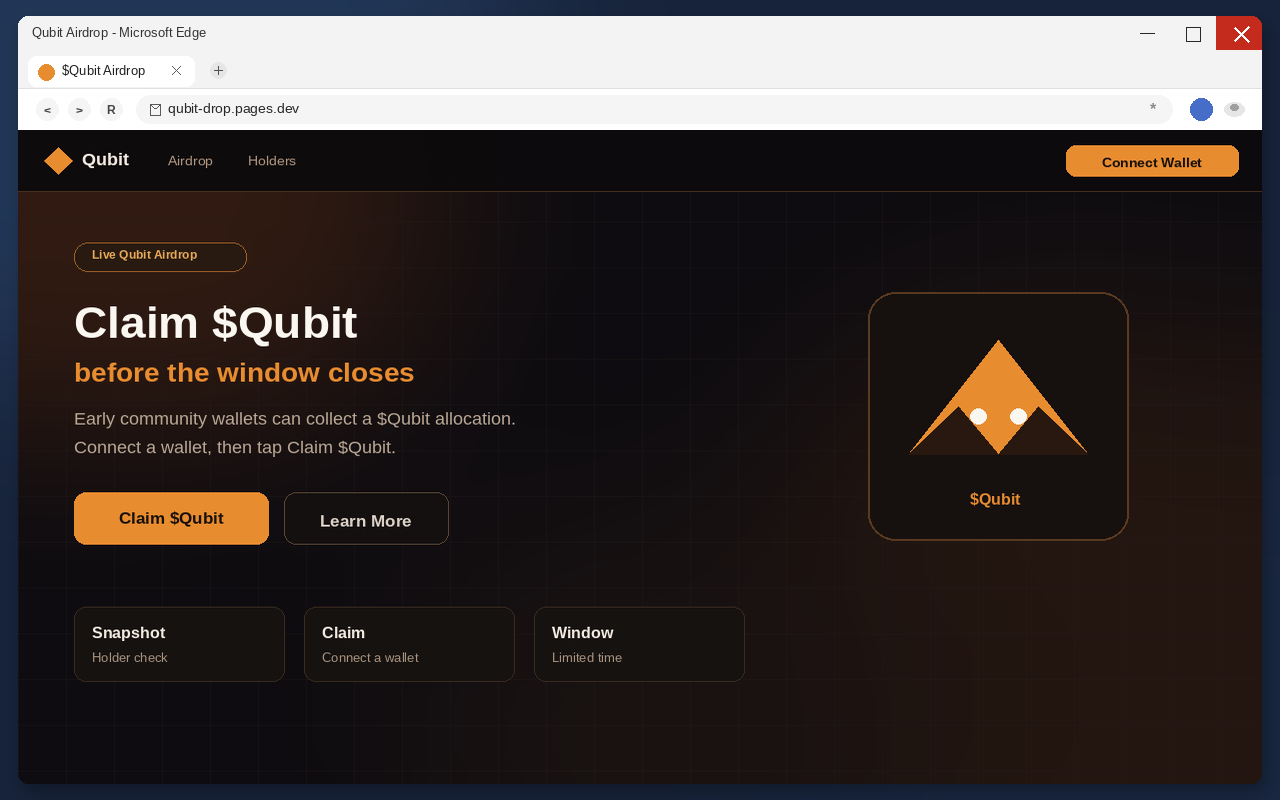
The $Qubit airdrop scam is a fake meme and DeFi pitch built to steal cryptocurrency. It presents a live, limited-time distribution of free $Qubit tokens for early adopters, active community members, and people who already hold something on Solana. The only action that matters is Connect Wallet. That click is not an eligibility check. It is the handoff to a drainer.
One current example in this wave is claim-qubit.pages.dev. Treat that address as a snapshot, not the story. The operators stand up throwaway claim hosts, push them for a few days, then move. The next page will not keep the same name. The tell is the claim-and-connect pattern, not the hostname you happened to see first.
Once a wallet is connected, a malicious approval can move assets to an attacker-controlled address. The transfer is public, fast, and final. Closing the tab does not claw the coins back. Changing a browser password does not either. If you already tapped Connect, treat that wallet as burned and work the recovery steps below before you do anything else.
Free $Qubit is the bait, not a balance
Read the headline the way a tired person reads it between two other tabs. Live Qubit Airdrop. Claim Tokens. Limited time opportunity. Early adopters. Active community members. Revolutionary DeFi project. Every line is doing the same job. It makes a stranger’s button feel like a reward you already earned.
A real airdrop, when one exists, is boring on purpose. A snapshot. A published contract. A claim that happens on a site the project has used for months, or inside an exchange account you already log into. Nobody who is actually sending you tokens needs you to panic about missing a live window in the next five minutes.
These claim pages lean on the opposite feeling. Exclusive. Live. Limited. Revolutionary. Free is the word that shuts down the part of your brain that asks who signed the contract. Free also hides the price. You are not paying in dollars. You are paying with whatever is already sitting in the wallet you connect.
That is why the pitch works on people who would never wire $500 to a stranger. Connecting a wallet feels like logging in, not like signing a check. The page never has to name a dollar amount. It only has to make Claim $Qubit feel like collecting a coupon. The drainer names the amount later, on-chain, after the permission is already granted.
Meme culture makes that coupon feel urgent. The people who brag about catching a ticker in the first hour train everyone else to fear being late. $Qubit borrows that reflex, sometimes dressed as Qubit Inu, sometimes as a faceless DeFi drop. The page does not need you to believe in a mascot. It needs you to believe that waiting is how you miss an allocation.
The Claim button is the handoff
Claim $Qubit does not mint anything. Claim Tokens does not either. Those labels exist so the next window looks like a product step instead of a permission request. You have used Claim buttons on real apps. The muscle memory is the exploit.
The button is doing one job. It opens a wallet connection. After that, the page can ask for a signature, a token approval, a permit, or a spending permission dressed as a claim. None of those actions drops $Qubit into your balance. All of them can let a script spend what you already hold.
Do not open a claim page to “just look.” On a phone the address bar is easy to ignore, and looking is how a Claim tap becomes a connected wallet. If a friend forwarded the link, tell them the same thing. The page is the attack, not a preview of an attack.
A second, quieter control often sits next to the filled button. Learn More. Docs. Whitepaper. Tokenomics. Those labels are layout. They make the filled button look like the serious choice, the way a real launch site has a docs link beside a start button. Clicking them does not make the host official. The official part was supposed to exist before anyone asked you to connect.
Connect Wallet is the drain
The connection window looks like the one you have seen on real DeFi sites, which is the point. Familiar names lower the pulse. Your usual wallet app is in the list so you do not bounce. Choosing it is not a verification of $Qubit. It is you handing the page a live session with the account that holds your coins.
Hardware wallets are not magic here. A device still signs what you tell it to sign. If the prompt is a drain approval dressed as a claim, the device will do the harm you authorize. The metal box protects the key from malware on the computer. It does not protect you from saying yes to the wrong contract.
People stall at this step because the names look right. Wallet connection flows are everywhere in 2026. The presence of a known brand in a list is not the same as that brand endorsing the site. Your wallet vendor did not send you $Qubit. The claim page borrowed the logo the way a fake invoice borrows a bank’s.
If the dialog asks for a signature, a token approval, a permit, or a setApprovalForAll style permission, that is not a gasless hello. That is the drain being armed. Decline it. Disconnect. Leave. There is no $Qubit allocation waiting on the other side of a yes.
The hostname will change
These claim pages live on throwaway hosts because throwaway hosts are cheap to replace. A pages.dev name, a lookalike domain, a fresh subdomain, a paste of the same pitch under a new ticker. When one address gets reported, the next one is already in a draft folder. Bookmarking yesterday’s host does not keep you safe tomorrow.
That is why this write-up is not a tour of one landing page. The operators will change the art, the badge, and the URL. They will not change the funnel. Free $Qubit, or a cousin ticker, for early adopters. A Claim button. A Connect Wallet window. A permission that can empty the account.
Learn the pattern, not the spelling. If a stranger’s page needs your wallet to “check eligibility” for a limited meme drop, you are not late to a launch. You are early to a drain. The next host will hope you only remember the old URL and not the sequence that emptied the last wallet.
A QUBIT line on a price site does not baptize a random claim host. If a real token or an older protocol used a similar name, its holders still should not connect a wallet to a page that showed up in a reply, a DM, or an ad. Official channels do not hide on a disposable claim URL built for a one-week costume.
How The Scam Works
The $Qubit drain is a short funnel. A social or ad lure. A claim page that looks like a live meme launch. A wallet connect that feels like logging in. A drainer that spends the approval. Each stage exists to make the next one feel small.
The lure rides a live drop
These pages do not wait for you to type $Qubit into a search bar. They arrive as a post, a reply, a quote-tweet, a Telegram forward, a Discord “alpha” ping, or a paid ad that looks like coverage. The account may be stolen. It may be brand new with a coin avatar and a few thousand fake followers. It may be a compromised influencer handle posting a claim link under a thread about some other meme.
The Federal Trade Commission has already mapped that habit in broader crypto fraud. In its analysis of reports from January 2021 through March 2022, consumers reported losing over $1 billion in cryptocurrency to scams, about one out of every four dollars reported lost to fraud. Nearly half of the people who reported a crypto-related scam said it started with an ad, post, or message on social media. $Qubit is one more costume on that road, not a new invention.
The copy in those posts is always the same shape even when the ticker changes. Live now. Last hours. Early supporters only. Claim before the snapshot. A screenshot of a dark site and a green button. You are not being invited to read a white paper. You are being invited to tap before someone else does.
Rogue ads and pop-ups do the same work for people who never open crypto Twitter. A shady download site, a fake “your wallet is eligible” interstitial, a push notification from a page you should never have allowed to alert you. The destination is still a claim page. The story is still that $Qubit is live and you are late.
Group chats make the lure travel farther than the first account. One person pastes a link with “this is live.” The next person trusts the first person more than the URL. By the time the fifth forward lands, nobody remembers who found it. That is by design. The claim page does not need a famous domain if it can borrow a friend’s name.
The page copies a launch, not a project
When the link lands, the visitor sees a launch, not a warning. A live badge. A ticker. A countdown feeling even when no clock is printed. Large type that says the $Qubit airdrop is happening now. Under it, the limited-time line for early adopters and community members. A filled Claim button where the eye already expects a reward.
What is missing is the boring proof a real listing would drown you in. No audited contract address you can paste into an explorer and match to a known deployment. No official verification from a channel you already follow. No team page that survives a search. No rules for who is eligible and who is not. The page asks you to believe the drop is live because the badge says live.
That emptiness is easy to miss after the word free. Meme launches train people to move fast. The page spends that training. It does not need a white paper you would actually read. It needs enough chrome to survive a three-second glance on a phone. Three seconds is enough to tap Claim. Three seconds is not enough to notice there is no project behind the costume.
Social icons sit where a real community would sit. That is not verification. Icons are cheap. A Telegram logo does not mean the project has a Telegram. An X logo does not mean the account in the post is official. If you follow those icons, you often land on a second lure, not on a company.
The same costume works for other meme and DeFi tickers. Swap $Qubit for another name and the funnel still stands. This article stays on $Qubit because that is the bait in front of you. The drain class is older than this ticker and it will outlive this host.
Eligibility is theater
Some $Qubit pages add a homework list so the drop feels gated. Be an active Solana user. Hold some tokens already. Follow the project on Twitter. Join a community. Those lines are not a filter. They are a story about why you, specifically, should tap Claim before the window closes.
A real snapshot can be checked without handing a stranger a live wallet session. If a page cannot tell you that you qualified until you connect, it is not reading a published list. It is asking for the keys to the list. The Solana line is there because Solana wallets are common, fast, and full of meme balances that drainers already know how to spend.
Following an account does not mint $Qubit. Holding a random token does not either. Those chores exist so the Claim button feels like the last step of work you already did. You followed. You held. You showed up. Now collect. The collection step is the only step that can empty the account.
If a later prompt says you are eligible for a larger share if you approve one more contract, stop. That is a second bite. The first connection already told the page which assets you hold. The next signature is how those assets leave.
Claim is not a mint
On a real distribution, claim means the project already decided you are owed tokens and is letting you collect them. On these pages, claim means start the wallet session. The word is doing sales work. It sounds like you are picking up a package that is already yours.
Nothing is already yours. There is no allocation waiting behind the button. There is no snapshot of your address from last month. There is no contract quietly holding $Qubit for early supporters. The page needs you to believe that sentence so you do not read the permission the wallet is about to show.
Some visitors hesitate and look for a “check eligibility” step, hoping the site will say they do not qualify and leave them alone. That step, when it appears, is still a connect. Eligibility is the excuse. The wallet is the target. A page that cannot see your address without a connection is not checking a list. It is asking for the keys to the list.
If a later prompt says the claim failed, or that you need to “unlock” the drop, or that gas must be paid from a token you do not hold, stop. Those lines are second bites. They exist to push another signature after the first one already opened the door. Close the tab. Do not try to finish a claim that was never a claim.
The connect dialog is the permission
Tap Claim and the wallet picker appears. It is the same family of connection UI used across legitimate apps, which is why it feels safe. You have connected wallets to real sites before. The habit is useful on a project you already trust. It is dangerous on a page that showed up this morning.
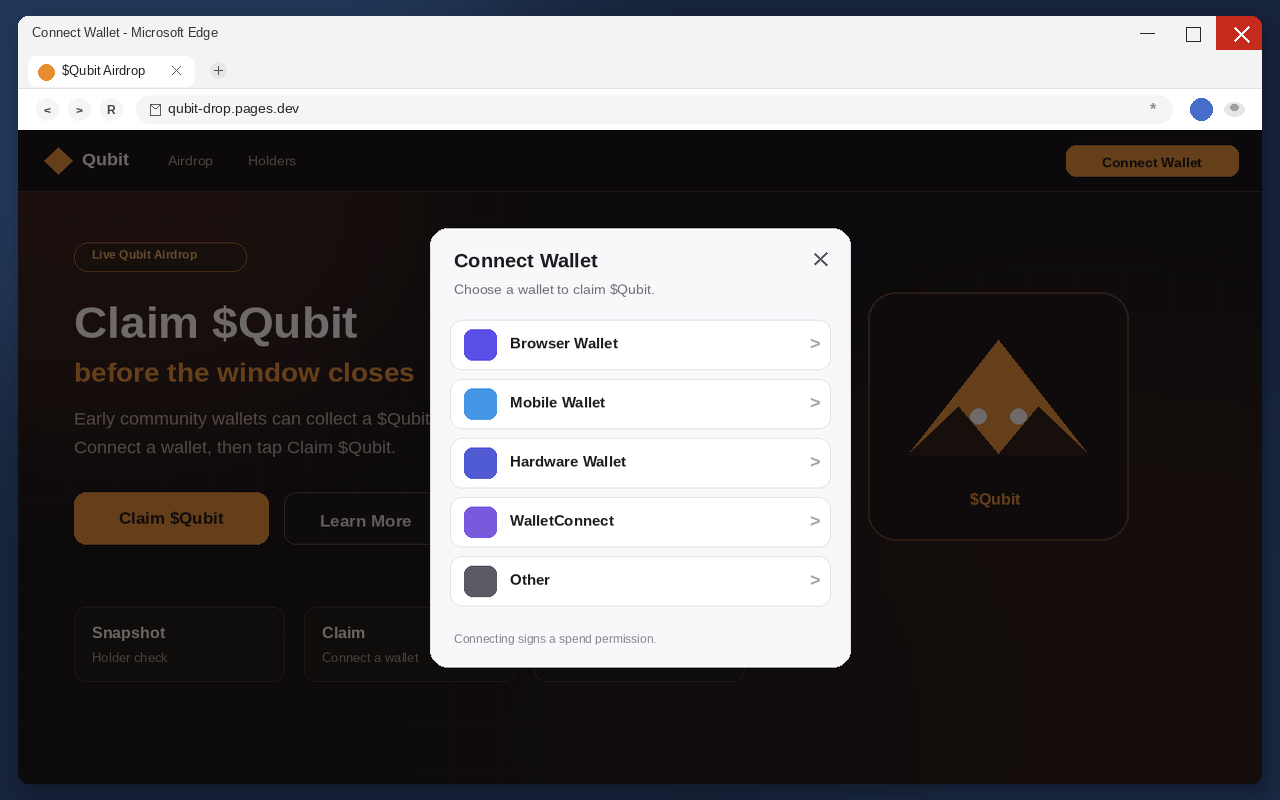
The list is often long on purpose. Ethereum wallets, Solana wallets, hardware wallets, mobile wallets. A genuine community drop for one ticker does not need to greet every ecosystem in one breath. A drainer does. The operator does not care which chain you use. The operator cares that you approve something.
Read the prompt the way you would read a bank transfer. What is being spent. Which contract is asking. Whether the permission is unlimited. Whether the action is a simple sign-in or a token approval. If you cannot answer those questions in one sentence, the answer is no. $Qubit will not expire while you decline.
People lose coins here because the window feels like a login wall. Login walls are supposed to be boring. Drain approvals are not. A site that needs a signature to “prove you own the wallet” can also use that signature to move the wallet. Treat every prompt as a spending decision, even when the button says Claim.
The drainer is the product
After the connection, the page’s only remaining job is to empty the wallet. Drainers are built for this exact moment. They look for liquid balances, approvals they can spend, and assets they can transfer in one burst. The user still thinks they are waiting for a claim to populate. The attacker is already broadcasting.
Speed is part of the design. Seconds, not hours. If you watch the wallet after a connect and see outbound transactions you did not build, that is not a glitch in the airdrop. That is the theft completing. Native coin, stablecoins, meme tokens, NFTs with open approvals, whatever the script can reach. The mix depends on what you held, not on what $Qubit pretended to be.
Because confirmations are irreversible, the operator does not need you to stay on the page. You can close the laptop. You can reboot. You can delete the site from history. The chain does not care. The new owner of those coins is the address the drainer specified, and there is no Qubit support desk that can freeze it.
Some drains leave a little dust so the wallet still looks alive. That leftover is not kindness. It is a hook for a second sweep, or for a recovery pitch that asks you to send more to “unlock” the rest. Do not feed the old address. Do not treat leftover dust as proof the first transfer was a mistake.
This is the same family of fake airdrop drains that has already worn other tickers and other throwaway hosts. The costume changes. The connect-and-empty step does not. $Qubit is not a new kind of crime. It is a meme sticker on a funnel that already works, which is why the recovery advice below is the same advice you should follow for any wallet you connected to a stranger’s claim button.
The coins do not come back
There is no disputes team on a public chain. There is no chargeback. There is no “Qubit support” that can reverse a confirmed transfer. Once the network includes the transaction, the coins belong to the new address. Closing the claim tab after that moment is hygiene, not recovery.
That finality is why the lure has to be free. If the page asked you to wire $2,000 to a stranger, more people would stop. If it asks you to claim $Qubit, the cost is hidden until the explorer updates. The $ figure appears after the permission, not before it. By then the argument is over.
Exchanges can sometimes freeze funds that later land in a custodial account they control. That is a maybe, not a plan. It depends on speed, on the path the coins took, and on whether anyone can see that path from the hashes. It does not depend on a helper in DMs who wants a seed phrase. Save the transaction IDs first. Then file the reports. Then stop talking to strangers about the wallet.
A second crew hunts the same wallet
After a drain, the DMs arrive fast. People offering to trace the funds for a small fee. People who need you to share the seed so they can deploy a recovery contract. People who want a USDT prepayment to unlock a case ID. People posing as exchange staff, law firms, or Qubit support.
They are hunting the same wallet a second time. A drained address is a lead. It proves you will click, you held enough to steal, and you are now desperate. The recovery pitch is cheaper to run than the first claim page because you already did the hard part. You already connected once.
Nobody legitimate needs your recovery phrase. Nobody legitimate needs you to send more crypto to get the first batch back. A real investigator asks for transaction hashes you already have, through a form you typed yourself, not through a reply under the $Qubit post. Block the helpers. Do not argue. The report you file is the only official path.
What To Do If You Have Fallen Victim to This Scam
If you connected a wallet to a fake $Qubit claim page, assume the attacker can still spend what is left. Work in this order. Do not send more coins to the same address to unlock a claim. Do not paste a seed phrase into any site that offers to reverse the drain. Those are second scams that feed on the first.
- Disconnect and close the tab. In the wallet app, disconnect the site session. Revoke the connected dapp if the app has a connected-sites list. Then close the browser tab. This does not move coins back. It stops you from signing a second approval while you are still rattled. Stay off the claim page. Do not reload it to see if the airdrop went through.
- Create a brand-new wallet. Generate a fresh recovery phrase on a device you trust, write it down offline, and never type those words into a website. The old wallet’s seed is still yours, but any dapp it approved may still be able to pull from the old address. A new wallet means a new seed. Do not import the compromised phrase into a clean app and call that a migration. Importing copies the risk.
- Revoke approvals on the old wallet. Use the official explorer tools for the chains that wallet used. On Ethereum-style networks, open the address in a block explorer and review token approvals. Revoke anything you do not recognize, anything granted today, and anything tied to a claim or airdrop spender. On Solana, revoke unknown token delegations in the wallet or a reputable revoke tool you typed yourself, not a link from a helper in DMs. Hardware wallet users should still revoke. The device does not cancel an approval you already signed.
- Move remaining assets to the new wallet. After you revoke what you can, send what is left to the new address. Do this while you can. Drainers sometimes leave dust or a second sweep for later. Do not leave a little bit on the old address as a test. If an NFT or a staked position cannot move until an unlock date, document it, revoke related spenders, and treat that position as still at risk until it can be migrated. Never fund the old wallet again.
- Preserve transaction IDs and screenshots. Copy every outbound hash from the time of the connect. Save the from address, the to address, the token, and the time. Screenshot the claim page URL only if you already visited it. Do not return to capture a prettier picture. Export the wallet activity if the app allows it. Those records are what an exchange, an investigator, or a report form can actually use. A vibe that Qubit stole my coins is not a record.
- Report the theft. File at the FTC fraud report form if you are in the United States, and at the FBI Internet Crime Complaint Center. Add the TXIDs. If the coins passed through a centralized exchange you can identify from the explorer, use that exchange’s theft-report path with the same hashes. Tell your wallet vendor through its official support page, not through a reply guy under the $Qubit post. Local police reports help some insurance and tax records even when the coins cannot be frozen.
- Ignore recovery agents. After a drain, the DMs arrive fast. People offering to trace the funds for a small fee. People who need you to share the seed so they can deploy a recovery contract. People who want a USDT prepayment to unlock a case ID. People posing as exchange staff, law firms, or Qubit support. They are hunting the same wallet a second time. Nobody legitimate needs your recovery phrase. Nobody legitimate needs you to send more crypto to get the first batch back. Block them. Do not argue. The report you already filed is the only official path.
If you signed nothing and only opened the page, disconnect any preview connection the wallet created and leave it there. Curiosity is not a crime, but it is how the next tap happens. If you shared the link in a group chat, go back and warn the thread. One quiet edit is worth more than a later apology.
Tax and recordkeeping are unglamorous and still worth a calendar reminder. Stolen crypto is still a transaction history you may need. Keep the TXIDs with the date you connected. If you use an accountant, send that packet once rather than piecing it together from memory in April. Do not pay anyone who promises to turn the hashes into a refund.
Going forward, keep airdrop hunting off the wallet that holds your rent. A burner address with a tiny balance can survive a bad click. The main wallet cannot. Official claims, when they are real, will wait for you on a site you already use. They will not need you to connect a stranger’s page because a $Qubit ticker said the window was closing.
The Bottom Line
The $Qubit airdrop on a throwaway claim page is not a live DeFi launch. It is a wallet drain wearing a meme ticker, a live badge, and a Claim button. Free tokens for early adopters is the story. Connect Wallet is the product. Once that connection is approved, the coins can leave in seconds, and the chain will not give them back.
A QUBIT ticker on a price site does not make a random claim host official. An older protocol that used the same word does not either. Official claims do not need you to panic-click Claim $Qubit on a disposable URL. The hostname will rotate. The pattern will not. If you already connected, disconnect, open a new seed, revoke, move what is left, save the hashes, file the reports, and hang up on anyone selling a recovery. The drop was never yours. The wallet still can be.








