

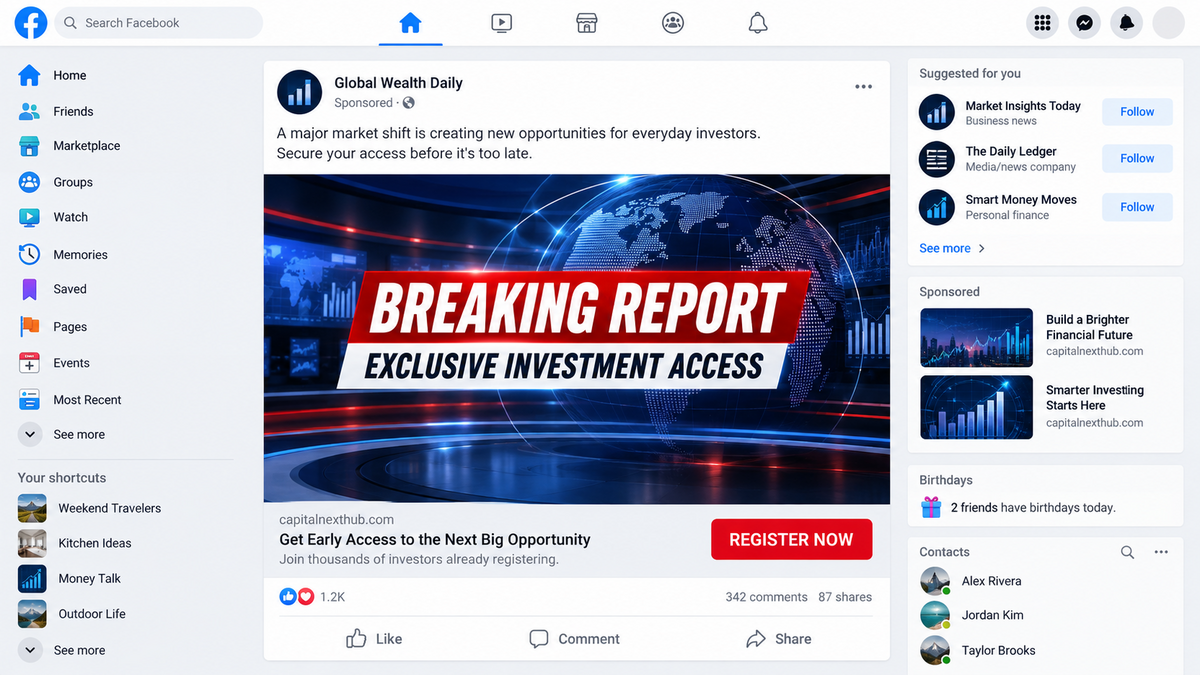
The ad looks like a news clip that was never meant to disappear. A familiar face appears to reveal a secret investment opportunity, and the caption promises that viewers can still get in before everyone else notices.
It feels like a piece of breaking news, not a sales pitch. That is why people stop scrolling, watch the short video, and follow the link before asking who actually paid for the promotion.
Behind the scandal, the “exclusive” interview, and the dramatic headline is a carefully repeated path that ends somewhere very different from a newsroom.
Overview
The sponsored post borrows the emotion of real news
Bitdefender Labs documented a coordinated ecosystem that used Facebook advertising to push fabricated scandals, fake interviews, and supposed revelations involving recognizable people. The campaigns were not ordinary opinion posts. They were paid ads designed to send users into an investment funnel.
One version presents a dramatic studio confrontation. Another claims that a celebrity has revealed a final will or a hidden financial secret. Other versions describe a national investment platform that supposedly gives ordinary people access to a breakthrough opportunity.
The names, languages, and headlines change by country, but the emotional sequence remains familiar. First comes shock. Then comes curiosity. Finally, the viewer is told to register before the opportunity is removed.
The ad is only the first layer of the funnel
The Facebook post may appear to point to a respected broadcaster or a familiar news brand. Bitdefender found campaigns that abused trusted-looking previews, copied media pages, fake domains, and redirect chains. The first click is meant to reassure the visitor long enough for the next page to load.
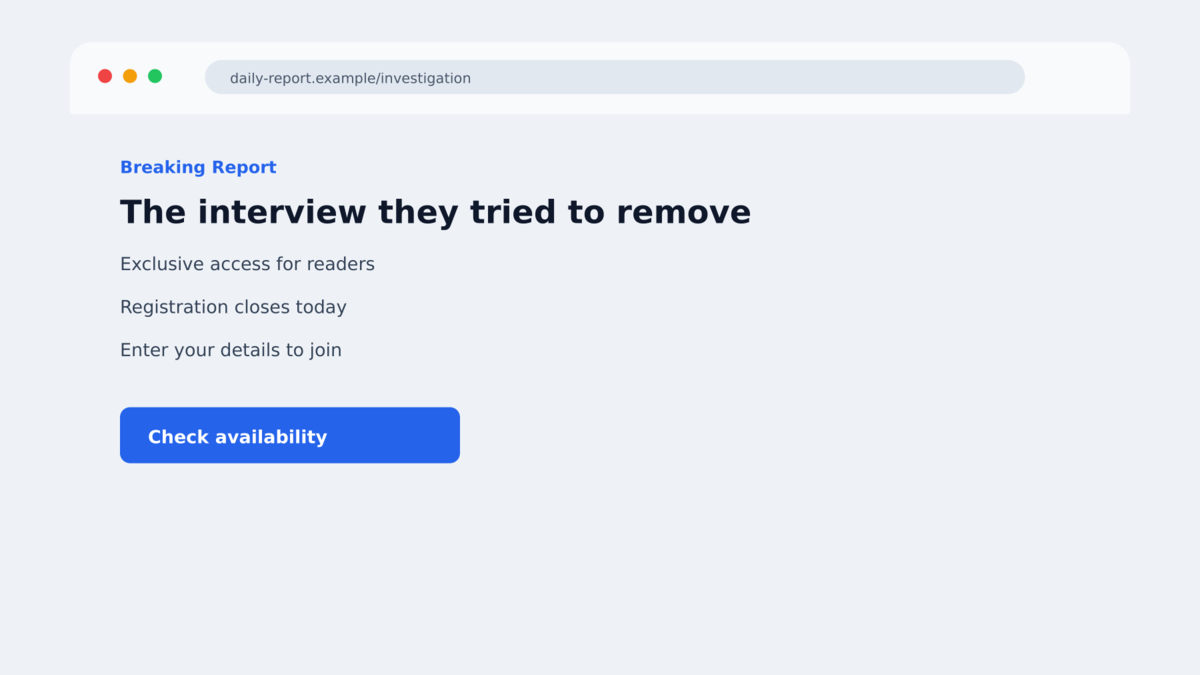
The destination can look like a news article, a live interview transcript, or an investigation. It may include a large photograph, a fake publication date, comments from supposed readers, and a registration box below the story.
In reality, the page is a sales bridge. It collects a name, email address, and phone number, then sends the lead to a person or platform that can apply pressure by phone or messaging app.
The documented network is broad and modular
Between February 9 and March 5, 2026, Bitdefender analyzed 310 malvertising campaigns and more than 26,000 ad sightings across at least 25 countries and more than 15 languages. The researchers described several sub-campaigns that appeared to share infrastructure, tracking signals, and a common operating playbook.
That does not mean every ad uses the same operator or promises the same platform. It means the pieces are easy to swap. A local celebrity can replace an international one, a new domain can replace a blocked domain, and a new deposit page can be connected to the same lead-generation machinery.
- The entry point is a paid Facebook ad, often framed as a scandal or deleted interview.
- The ad borrows the name, image, or visual style of a real media outlet.
- A redirect can move the visitor through several domains before the final page appears.
- The fake article turns curiosity into a promise of fast financial gains.
- The registration form collects contact details for follow-up calls.
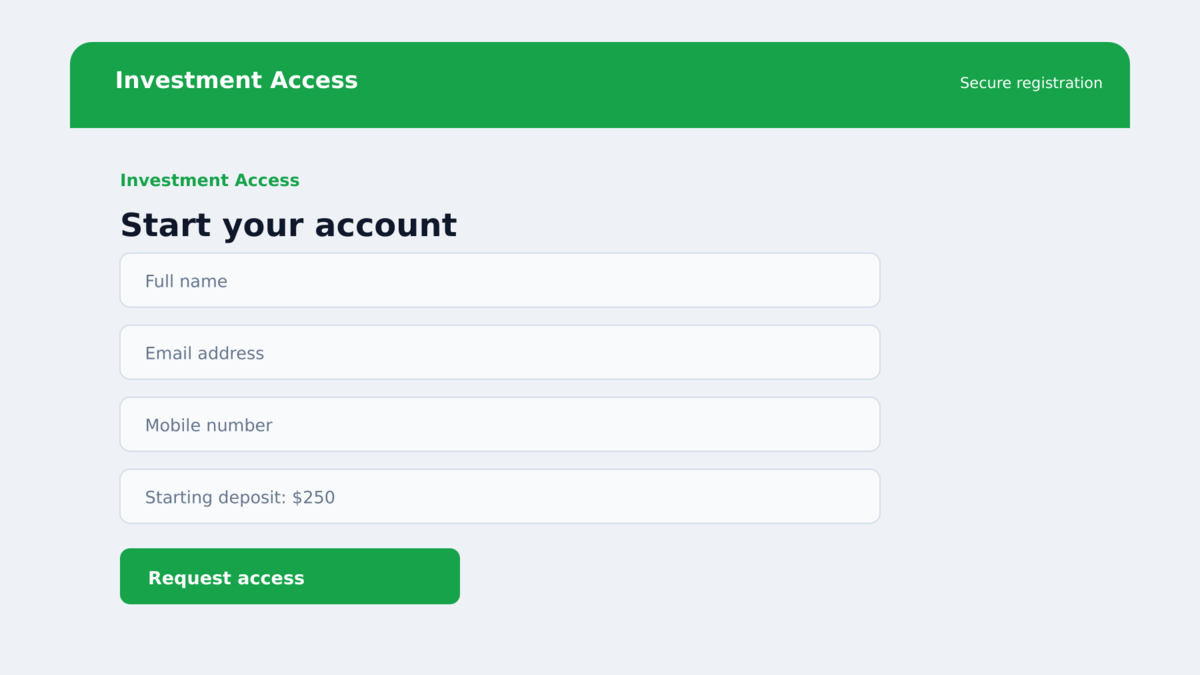
- The final platform asks for a deposit, frequently presenting a small starting amount.
- Operators can rotate names, celebrities, languages, and domains without changing the script.
- Bitdefender found no evidence that the real people shown in the stories endorsed the offers.
Why the Fake Scandal Story Works
A familiar face lowers the reader’s guard
People are trained to treat a recognizable presenter, banker, celebrity, or public official as a shortcut for credibility. The scam does not need to prove the whole investment platform is legitimate if the first thirty seconds make the viewer feel that a trusted person has already done that work.
The ad also uses an incomplete story. It hints that a broadcaster tried to remove an interview, that a guest was silenced, or that a hidden discovery is being kept from the public. Unfinished stories make readers click because they want the missing part.
Fake urgency turns checking into a missed opportunity
Registration pages often display a countdown, a limited number of places, or a claim that the offer is available only to people who saw the report. These details do not establish a legal offer or a real investment service. They are there to make independent checking feel expensive.
A cautious reader may want to search the company, inspect the regulator’s records, or ask the supposed celebrity about the endorsement. The timer is designed to make that careful step feel like a reason to lose the chance.
Localized language makes a global script feel personal
The campaigns were translated and adapted for different markets. That can include local currencies, television brands, familiar public figures, and references to national economic concerns. Localization is not proof that a local authority approved the platform.
Shared tracking parameters and overlapping technical infrastructure helped researchers connect versions that looked unrelated to ordinary users. The public sees different headlines. The operators see a reusable system.
Company and Checkout Checks
The ad is not a real endorsement
A paid social post is purchased distribution, not editorial coverage. Real news organizations do not turn an alleged on-air argument into a deposit form hidden behind a chain of unrelated domains. If the page asks for a phone number before explaining who operates the service, the story is functioning as a lead form.
The address is a web funnel, not a regulated office
Investment sites in this ecosystem can switch domains quickly. A polished logo, a local-language privacy page, or a padlock does not identify a regulated company. The meaningful questions are whether the operator appears in the relevant financial register, whether the legal entity matches the website, and whether the address can be independently verified.
The support number may be the next stage of the scam
After a visitor submits a number, a so-called account manager may call with a friendly introduction and a promise to guide the first deposit. The caller can use the details from the form to sound informed. A polite voice is not proof of a license, a trading record, or a recoverable payment.
The money trail is difficult to trace after a deposit
A real investment provider should explain custody, withdrawal rules, fees, risk disclosures, and the legal entity receiving the money before asking for a deposit. In a scam funnel, those details are often hidden behind sales calls, vague terms, or a dashboard that shows invented profits.
How the Facebook Scandal Ad Scam Works
Step 1: A paid ad creates a breaking-news moment
The campaign buys placement in the Facebook feed. The creative may show a studio argument, an emotional reaction, or a famous person appearing to reveal a financial secret. The caption uses words such as deleted, exposed, banned, or leaked to make a routine ad feel like a story the platform is trying to suppress.
Because the ad is distributed through a familiar feed, the viewer may remember the surrounding posts more than the advertiser name. That is useful to the operator. The emotional hook survives even when the page and account are removed.
Step 2: The click passes through a trusted-looking preview
The first link may open a legitimate hosting service, a copied news page, or a domain with a familiar word in its address. Redirects can check the visitor’s country, device, and referral source before choosing the next page.
This filtering helps the campaign stay visible. Researchers and automated scanners may see a harmless page, while a person coming from the sponsored ad is sent to the fabricated article and registration form.
Step 3: The fake article supplies the missing context
The page tells the viewer why the story supposedly matters. It may describe an argument on live television, a secret financial formula, or an official platform that was hidden from the public. Stock images, copied logos, fake comments, and a publication date make the page look complete.
The article usually avoids a clear company history. Its job is not to let readers evaluate a business. Its job is to make the next click feel like the obvious way to see what happened.
Step 4: The form converts curiosity into a lead
The visitor is asked for a name, email address, and telephone number. Some versions describe the form as a reservation, eligibility check, or early-access list. The language is deliberately softer than the deposit request that comes later.
Submitting the form confirms that a real person is reachable. That information can be shared with a call center or used in a second wave of messages. A visitor who only wanted to read a story can become a qualified sales lead.
Step 5: A caller pushes the first payment
The caller may promise a personal account manager, a simple setup, or a small trial deposit. The initial amount is meant to feel safer than a large investment. If the victim hesitates, the operator may point back to the video, the fake news story, or the supposed public figure.
Some victims are shown a dashboard that reports gains before a withdrawal is requested. A later fee, tax, verification payment, or minimum balance then becomes the reason more money is needed.
Step 6: The withdrawal problem becomes the second scam
When a victim asks for money back, the platform may demand additional payments or documents. A new representative can claim to be a recovery specialist and offer to help for another fee. These requests do not prove that a balance exists.
Stop contact instead of paying to unlock, verify, or recover an account. A second payment normally gives the same operator more information and less leverage for the victim.
Warning Signs in a Facebook Investment Ad
- The video promises a secret that a real broadcaster supposedly tried to delete.
- A public figure appears to endorse a platform but the person’s verified accounts say nothing about it.
- The link leaves the social platform and passes through several unrelated domains.
- The article uses a news layout but has no newsroom contact, corrections policy, or real reporter.
- A countdown says that registration closes before you can check the company.
- The first form requests a phone number before showing fees, risks, or licensing details.
- A caller insists that a small deposit must be made immediately.
- The platform displays profit figures but makes withdrawals depend on another payment.
- The advertiser’s page is new, renamed, or filled with unrelated promotions.
What to Do if You Have Fallen Victim to This Scam
- Stop the conversation. Do not keep replying to the caller or return to the registration page to argue. Block the number and preserve the messages first.
- Contact the card issuer or bank. Use the number on the card or the official banking app. Explain that the payment was induced by an investment scam and ask about a block, replacement, and dispute.
- Do not pay a release or recovery fee. A request for tax, insurance, validation, or withdrawal money is another demand, not proof that funds are waiting.
- Secure the email account you submitted. Change its password from a trusted device, enable two-factor authentication, and review recovery addresses and active sessions.
- Watch for follow-up impersonation. Scammers may know your name, phone number, and the amount you deposited. Treat recovery offers and legal threats as suspicious.
- Save evidence safely. Keep the ad, URLs, screenshots, emails, payment receipts, phone numbers, wallet addresses, and chat history without revisiting the scam page.
- Scan any device involved. Malwarebytes can check for unwanted software if the page caused a download or remote-support request. AdGuard can reduce malicious ads and known scam redirects, but neither can undo data already submitted.
- Report the ad and the payment. Use Facebook’s report controls, notify the financial provider, and file a report with the relevant national fraud authority.
- Tell someone you trust. A second person can help stop further payments when a caller is using pressure or shame to keep the victim isolated.
Frequently Asked Questions
Are the Facebook scandal videos real?
Bitdefender documented fabricated media narratives and impersonated outlets in a large investment-scam ecosystem. A video appearing in a sponsored feed is not evidence that the event occurred or that the people shown approved an investment service.
Why does the ad use a celebrity or banker?
Familiar names provide instant authority. The scam uses the person’s identity as a shortcut so viewers spend less time checking the company behind the deposit form.
Can a padlock prove that the investment site is safe?
No. HTTPS protects the connection to the site you opened. It does not verify who owns the domain, whether the company is licensed, or whether the balance shown on the page is real.
What if I only entered my phone number?
Expect follow-up calls and messages. Block unsolicited contacts, secure your email, and never provide an OTP, remote-access code, or additional payment to someone who refers to the original form.
Can a fake platform show real-looking profits?
Yes. A dashboard is software controlled by the operator. Profit figures become meaningful only when money can be withdrawn through a verified, regulated service without extra payments.
Can I recover cryptocurrency sent to the platform?
Recovery is difficult, but act quickly. Save wallet addresses and transaction IDs, contact the exchange or payment provider, and ignore anyone who guarantees recovery after an upfront fee.
The Bottom Line
The Facebook scandal ad scam dresses a deposit request in the language of breaking news. A copied studio, a famous name, and a dramatic claim are used to make a criminal investment funnel feel like a public revelation.
Do not judge the opportunity by the video. Verify the company, regulator, legal entity, withdrawal rules, and payment destination independently before sharing contact details or money.
If the story tries to rush you, close it. The fastest way out of this funnel is to stop before the registration form, and to stop paying if you have already entered it.

Join the discussion
0 commentsShare your experience or ask a question about this article.
Discussion
Start the conversation
Have a question or something useful to share? Add the first comment.