


A search result promises a side of TikTok you haven’t seen before. The page has a video preview, but the picture is blurred and playback is locked.
One more step is supposedly all that’s needed. Before you follow it, look at what the page is actually offering.
Overview
The preview is a promise, not proof of a playable video
Fake Adult TikTok sites borrow a familiar platform’s name to advertise supposed hidden or age-restricted videos on an unrelated website.
The page encourages you to unlock something already waiting behind the blur. That framing makes the next request feel like a minor access requirement.
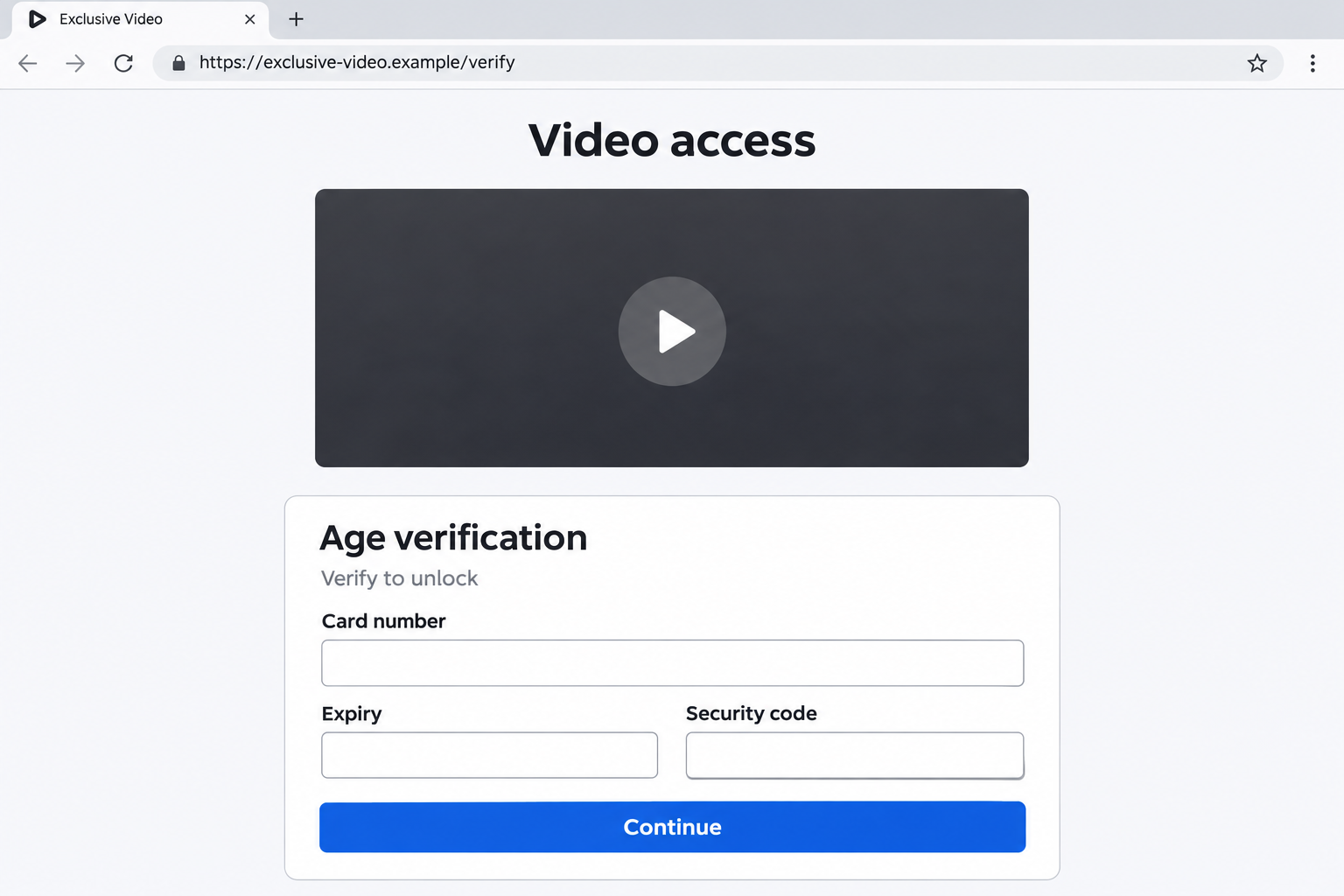
But a picture of a player can be just a picture. A play button and blurred thumbnail don’t demonstrate that the promised video exists.
The documented pages lead away from the promised content
An investigation of these web funnels and found misleading pages routing visitors into redirects, signups, downloads, or card-based verification rather than the advertised TikTok content.
Different versions use different paths. You shouldn’t assume every page takes a card, installs malware, or charges the same subscription price.
The pages sell access to content they don’t deliver. What happens to your money or device depends on what you do next.
The questions a blurred preview doesn’t answer
Before supplying information, establish what organization operates the site and what you would actually authorize by continuing.
- Is the page genuinely connected to the platform it invokes?
- Does the next page describe the same service that attracted you?
- Are you opening a video, joining an unrelated site, or authorizing a payment?
- Can you read the full terms before providing card details?
The illustration above uses a fictional example address and empty fields. It demonstrates the request without reproducing a real checkout or showing adult material.
Why the Locked Player Is Such an Effective Hook
A locked preview presents the decision as whether to continue, rather than whether to trust a new business. You feel halfway through a simple task.
That framing can hide the actual change in the offer. Finding a video and enrolling in an unrelated service are very different actions.
The blur also withholds the detail that would let you judge the promise. You’re asked to provide something before you can establish what you’ll receive.
A familiar platform name fills that gap with borrowed recognition. It can suggest that the page belongs to an existing service when the address says otherwise.
Curiosity does the rest. The page doesn’t need to explain its operator if you’re concentrating on what might appear after the next button.
Pause at the first change of website or request. That is where you can reassess the transaction before surrendering personal or payment information.
You don’t owe a page another click because you’ve already spent time searching. Leaving an unverified offer is a complete decision.
How the Fake Adult TikTok Scam Works
Step 1: Search traffic reaches an unofficial content page
The entry point targets people searching for adult or exclusive versions of familiar short-video content. The result presents an access offer around that interest.
An appearance in search results doesn’t establish a relationship with TikTok. Check the actual website rather than assuming the title identifies the operator.
The same applies when a link arrives through a social post or advertisement. The place where you found it isn’t proof of what lies behind it.
Step 2: A blurred thumbnail creates an unfinished task
The landing page places something that resembles a video player in front of you. A start or unlock control invites you to complete the process.
The missing content becomes the incentive for following instructions. You may start treating every new request as an obstacle rather than a different offer.
Ask what evidence you have that this is a playable video. A static preview cannot authenticate the page’s relationship with the platform or its promised content.
You don’t need to investigate by supplying a real card. If the operator and offer are unclear, the missing explanation is already enough reason to leave.
Step 3: The access button sends you somewhere else
Instead of delivering playback, the path can open another page, advertisement, registration form, or promotional offer.
A redirect isn’t automatically malicious. What matters here is that the new destination doesn’t fulfill the specific promise that brought you there.
Watch for the service name changing while the page continues to talk about verification. You may now be looking at a completely different purchase.
Don’t assume that a new tab is still part of TikTok because it opened after a TikTok-themed button.
Step 4: Verification becomes the reason to collect information
Some versions ask for an email address or a new account. Others request payment-card details under an age-check or access explanation.
Read the surrounding offer before entering anything. A form can be enrolling you in a service rather than merely checking a fact about you.
If the page says access is free, that still leaves important questions: what is the card for, what merchant receives it, and can any later charge occur?
Don’t let the verification label answer those questions on the operator’s behalf. The actual terms and consent process need to explain them.
Step 5: The visitor bears the consequences of the detour
You can end up with an unwanted signup or payment exposure while the original video remains absent. The final outcome depends on the path you followed.
An app download creates a different issue from entering an email address. Record what happened instead of assuming every visitor experienced every possible harm.
If you reached an unrelated paid service, retain its name and terms. Those details help you cancel or dispute the actual transaction.
The false preview is the starting deception. The next steps determine what practical response you need.
Real Age Checks Exist, and That Doesn’t Authenticate This Offer
It would be misleading to say that every card-based age check is fraudulent. Legitimate age-assurance systems can use several methods, depending on the service and jurisdiction.
For example, Ofcom describes credit-card checks among possible age-assurance methods.
That doesn’t make an anonymous video-unlock page trustworthy. A legitimate technique can be invoked as an excuse inside a deceptive offer.
The relevant questions concern the provider, the purpose of the check, the data collected, and the consent attached to any payment.
If the page won’t clearly identify those things, don’t provide the card. You’re not required to prove a technical flaw before rejecting an unexplained request.
Similarly, the presence of age restrictions doesn’t establish a TikTok affiliation. A website can apply its own controls while misleading visitors about the content behind them.
Avoid trying to bypass age controls or searching for a replacement unlock tool. Neither resolves the identity or billing problem presented by the original page.
The sensible response is to leave the misleading offer and use services whose operator, content, and terms you can actually establish.
Read the Next Page as a New Offer
Before any signup, look at the name beside the terms and privacy links. Does it describe the website you thought you were visiting?
Then identify the action the button performs. Joining, verifying, starting a trial, and authorizing a payment are not interchangeable just because the design looks similar.
If a price appears, note its currency and billing interval. A daily, monthly, or one-time amount can have very different consequences.
Don’t assume that a small initial amount is the entire cost. Equally, don’t invent a recurring charge if the terms and transaction record don’t show one.
Check whether you can find the cancellation process before enrolling. An offer that won’t tell you how to stop doesn’t deserve your financial details.
A site may also use testimonials or security graphics. Those visuals don’t resolve an unexplained change from a video promise to a paid service.
You can save the address and visible terms without completing the form. There is no reason to create a real subscription as an authenticity test.
If you’ve already submitted information, stop and make a factual list: email, password, card, approval code, download, installation, or permission.
That list is more useful than deciding everything is either harmless or a total device compromise. Your next steps should match the actual exposure.
What to Do if You Have Fallen Victim to This Scam
- Leave the funnel without completing more tasks. Close its tabs and decline further requests to unlock, verify, install, or pay.
Don’t return to see whether a different button produces the video. Use the records you already have rather than creating another exposure.
- If you entered card details, contact the issuer promptly. Explain the misleading access page and say whether you also approved a payment or received a confirmation.
Ask what protection, replacement, or transaction review is appropriate. A card submission and a completed charge are different events; describe both accurately.
- Identify any actual charge or enrollment. Look for a receipt, merchant name, amount, billing interval, and terms connected with the final signup.
Preserve those records privately. Don’t assume the first website name will match the merchant description on your statement.
- Cancel an unwanted enrollment through a verified route. Find the genuine support or account process for the service shown on the receipt, and keep written confirmation.
Tell your issuer about continuing charges or an unreachable cancellation process. Ask separately about disputing prior transactions and stopping future ones.
- Change an exposed or reused password. If you created an account using a password from another service, replace it on that genuine service immediately.
Use a distinct password for each account. Review account alerts if you entered credentials that weren’t supposed to be shared with the new site.
- Handle downloads according to what actually happened. A downloaded file isn’t the same as an installed application with permissions.
Don’t open a file just to identify it. If you installed something or granted sensitive access, obtain trusted device-specific assistance and mention the source.
- Keep a short, private record of the route. Save the initial address, subsequent destinations you can identify, signup confirmation, and relevant payment records.
Avoid saving or sharing intimate content to prove the case. The false offer and transaction details are usually the practical starting points.
- Report through legitimate provider and fraud channels. The FTC’s recovery guidance explains contacting payment providers and protecting accounts after deception.
Use official routes you open independently. Don’t accept a repair or refund service advertised by another stranger who contacts you afterward.
If You Only Opened the Page
Merely seeing the misleading player doesn’t establish that money was taken or an app was installed. Don’t let the page’s own warnings convince you otherwise.
Close it and consider the actions you completed. Did you submit a form, approve a browser permission, download a file, or authorize a transaction?
If none occurred, there may be no account or payment issue to resolve. Continue watching for unexpected activity without inventing an infection from the page’s appearance.
If you permitted notifications, remove that site’s permission through your browser settings. A notification arriving later doesn’t prove that the underlying warning is genuine.
If you aren’t sure whether an application was installed, ask someone trustworthy to help check the device. Don’t use support details supplied by the suspicious page.
An alarming popup can turn uncertainty into a second sales pitch. You should not need to buy an advertised fix to leave the original website.
If You’re Worried About the Privacy of a Complaint
It can feel embarrassing to explain what search brought you to a page. You can start with the deceptive promise and the information requested.
For a financial complaint, the issuer needs to know what you authorized, what was represented, and which merchant or recipient appears in the transaction.
You don’t need to publish the search history on social media. Give necessary evidence privately through the organization’s legitimate support process.
Retain an unedited copy of important records and make a separate redacted copy when asking a trusted person for help.
If a receipt arrives later, add it to the same timeline. It may identify the actual service more clearly than the original landing page did.
Most importantly, don’t let embarrassment keep an unwanted enrollment running. A concise, factual cancellation or dispute request is enough to begin.
Frequently Asked Questions
Is Adult TikTok an official service offered by these pages?
The misleading web pages described here aren’t authenticated TikTok services. Borrowed branding and a blurred preview don’t establish a platform affiliation.
Does a play button prove there is a video behind it?
No. A page can display a player-like image while sending every click to an unrelated offer. Judge the actual destination and service.
Is every age-verification card request a scam?
No. Legitimate age checks exist. The issue here is a misleading content promise followed by an unexplained signup, payment, or data request.
Will every visitor be charged a subscription?
No. Routes and terms vary. Check the actual enrollment and receipts rather than assuming a universal price, interval, or charge.
Does this mean my phone has Rokarolla malware?
No. These web funnels don’t establish a particular infection. An installed malicious Android app is a separate case requiring device-specific assessment.
Should I enter a card and cancel immediately afterward?
No. Don’t expose payment details to test an unverified offer. Leave the page; investigate any information already submitted through the relevant legitimate provider.
The Bottom Line
Do not enter card details or install software to unlock videos through these misleading Adult TikTok pages. The promised content isn’t a reason to trust an unrelated offer.
If you already signed up or paid, identify the actual merchant, contact your issuer, and cancel unwanted enrollment. Address device exposure only if your actions created one.

Join the discussion
0 commentsShare your experience or ask a question about this article.
Discussion
Start the conversation
Have a question or something useful to share? Add the first comment.