

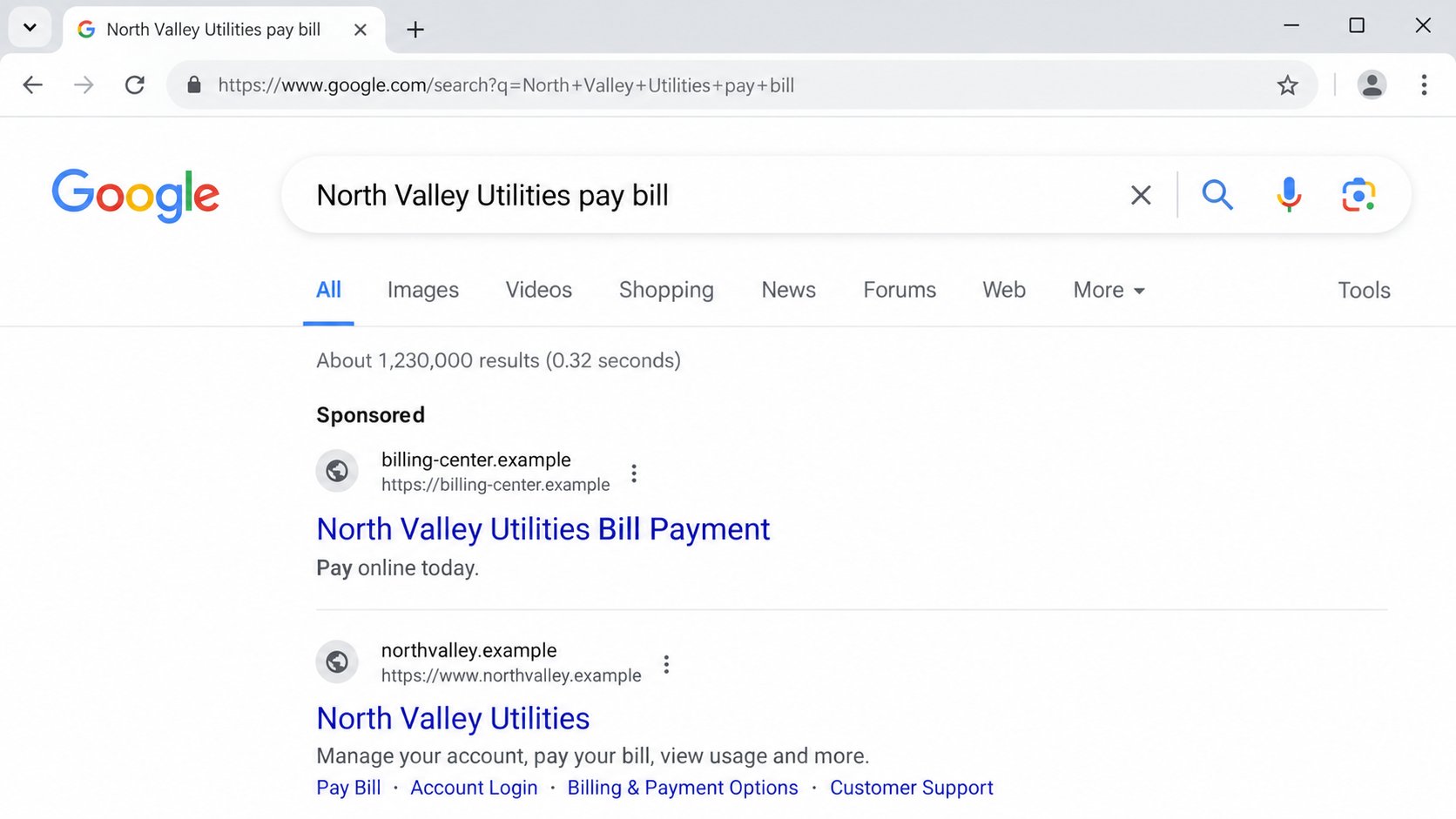
Fake bill pay search ads can look remarkably ordinary. You search for a utility’s payment page, click the first result, and see the biller’s name.
Then a fee appears, or the biller says it never received the payment. The first clue was often visible before the click.
Overview
The search result that looks official
Fake bill pay search ads and misleading third-party payment ads appear when someone searches for a utility, insurer, lab, lender, or toll agency.
A paid result may use the biller’s name in its headline while sending the user to a different company’s site. The destination can resemble a normal payment portal.
Some destinations are outright phishing pages. Others are functioning intermediaries whose costs, affiliation, or delivery methods are not obvious at first glance.
The FTC’s current warning
In August 2026 guidance, the FTC warned consumers that dishonest companies can use paid search ads to intercept bill payments.
The agency illustrated the problem with its Doxo case. The FTC alleged that Doxo’s ads and landing pages made a third-party service seem affiliated with billers.
Doxo is a real payment business, not a nonexistent website. The legal record needs to be described accurately rather than reducing every disputed practice to “fake site.”
What the Doxo case actually established
The FTC announced a $2.1 million settlement in August 2026 over allegations involving misleading ads, add-on fees, and subscription practices.
A federal court found Doxo violated the Restore Online Shoppers’ Confidence Act by failing to clearly disclose subscription terms and obtain consent for charges.
The court did not find that Doxo violated the FTC Act through deceptive ads. The settlement addresses allegations and imposes restrictions. It does not prove every transaction is fraudulent.
- The consumer may be paying an intermediary rather than the biller directly.
- Extra service or delivery fees may change the real total.
- A paid bill may not reach the biller’s ledger immediately.
- A subscription option requires special attention at checkout.
Why a Third-Party Payment Can Be So Confusing
Most people are not researching a company when they pay a routine bill. They want the task finished quickly, often near a due date.
Search engines place sponsored results above ordinary results. The word “Sponsored” may be small, while the biller’s name appears large in the headline.
A destination can then repeat the company name and show a familiar-looking form. The customer assumes the payment is going directly to the original biller.
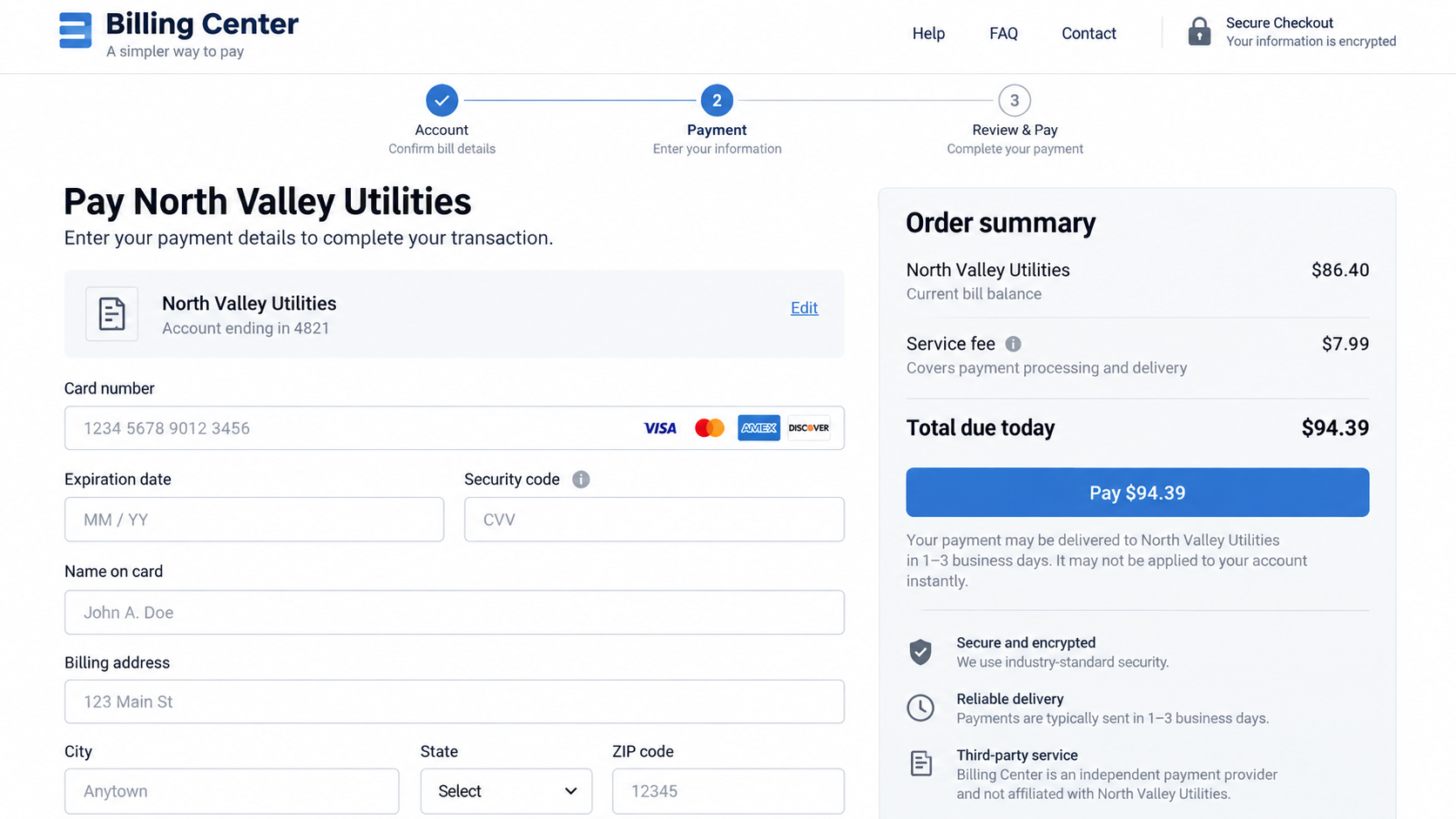
But a third-party service may collect the money first and deliver it later through another method. The timing matters if service can be disconnected or coverage can lapse.
The FTC’s 2024 complaint alleged that Doxo sometimes mailed paper checks after charging the consumer, causing payments to arrive later than users expected.
That is an allegation about historical practices, not a statement that every Doxo payment today follows the same route. Check the actual delivery estimate displayed now.
The case also shows why biller affiliation is a separate question from payment processing. An intermediary can forward money without being the biller’s official payment partner.
The safest path is to use the biller’s own website, app, or published phone number. If an intermediary is chosen intentionally, read its total and timing first.
How Fake Bill Pay Search Ads Work
Step 1: The consumer searches for a routine payment
A person types a phrase such as “pay my electric bill” plus the provider’s name. They expect the first useful result to belong to that provider.
Paid placements can appear above the biller’s own page. Search position is bought advertising space, not a certification of corporate affiliation.
A scammer can exploit the same placement more aggressively than a legitimate intermediary, using a lookalike domain to collect passwords or card details.
Step 2: The ad borrows the biller’s name
The headline may include the exact provider name and “pay now.” The destination URL can be shortened or visually de-emphasized beside the bigger headline.
The FTC alleged that some Doxo ads featured billers’ names without clearly showing Doxo. Doxo has disputed aspects of the government’s case.
For a reader, the lesson is not that every sponsored result is criminal. It is that the headline is insufficient to identify who takes your payment.
Step 3: The landing page repeats familiar branding
The page may present the biller’s name, a logo, and a form for account information. A consumer can mistake the page for an authorized portal.
Look for the legal operator in the footer and terms. If it is different from the biller, ask whether the intermediary is authorized and whether you need it.
Do not enter a utility password into a site that merely claims to route payments. That could turn an overpriced payment into account compromise.
Step 4: The total changes near checkout
An extra delivery, convenience, or service fee can appear after the user has entered account information. That late reveal may make abandoning the form feel inconvenient.
The FTC alleged that Doxo’s fees were not clearly disclosed in the challenged flow. The settlement restricts misrepresentations about costs and fees.
Compare the full total with the biller’s own site before authorizing payment. A $7.99 example fee in an illustration is not a verified charge for any real customer.
Step 5: A subscription option may be bundled into the flow
A recurring plan can be presented as a way to avoid future fees. The critical questions are price, billing interval, consent, cancellation, and whether fees truly disappear.
The court found Doxo had failed to make subscription terms clear and obtain informed consent for charges under ROSCA. That finding is narrower than declaring the whole platform fictitious.
Inspect the final screen and confirmation email. A checkbox or “continue” button can have consequences beyond the one bill you meant to pay.
Step 6: The biller’s account may update later
Payment to an intermediary is not necessarily payment posted by the biller. A bank charge proves money left your account, not that the utility credited yours.
The FTC alleged some payments reached billers by mailed check after delay. Such delay can create late fees or interruptions if a due date is close.
Check the biller’s own account after the stated delivery window. If the credit is missing, contact both the intermediary and the biller promptly.
Four Checks Before Paying Through a Search Result
Identify the company accepting your money
Read the domain, checkout operator, privacy policy, and receipt. The name of the biller in a page heading may not be the merchant charging your card.
In the Doxo matter, the FTC distinguished the third-party platform from the underlying billers. Doxo remains a real operating company; affiliation is the disputed point.
If the legal operator is unclear, pause. A genuine bill can be paid through the biller’s own published channel instead.
Check whether the address is a billing office
A business address on a third-party site does not make it the biller’s office. It may be a corporate office, mailbox, or payment-processing location.
Verify the biller’s payment address directly from a prior bill or its official site. Never infer authorization from a street address alone.
For a fake portal, the absence of a verifiable operator or address is an even stronger warning. Save the page before it changes.
Call the biller, not just the intermediary
Use the phone number printed on a known bill or the provider’s official website. Ask whether it recognizes the payment platform and when a payment posts.
The intermediary may accurately explain its own service but cannot replace confirmation from the company that is owed the money.
If support cannot state whether your transaction was sent, pending, or returned, keep records and escalate through your card issuer when appropriate.
Trace fees, subscriptions, and delivery
Before final submission, note the bill amount, every extra charge, any recurring plan, the delivery method, and the expected posting date.
Capture the entire checkout, not just the first pricing card. A small disclosure at the last step may be the only place a recurring charge is described.
After paying, monitor both your card and the biller’s account. Those two records answer different questions.
What the Settlement Means, and What It Does Not
The FTC said Doxo would pay $2.1 million for consumer redress under a proposed stipulated order. Its case page listed the matter as pending when reviewed.
The proposed order would restrict misleading affiliation claims, fee misrepresentations, and subscription charges without informed consent. The precise operative status should be checked on the FTC case page.
Doxo’s own public statement said it remained operational and emphasized that the court made no deception finding under Section 5 of the FTC Act.
Both facts can be true: the FTC alleged deceptive advertising, and the court’s specific pre-settlement finding concerned subscription disclosure and consent.
Do not assume a settlement proves a current ad is misleading. Examine the ad and checkout in front of you, and compare them with the biller’s direct option.
Equally, do not ignore a clear third-party disclosure merely because the service has a real corporate name. A lawful company can still be a poor choice for an urgent bill.
A Better Payment Routine for Bills That Cannot Wait
Keep the provider’s official app or payment page bookmarked after verifying it once. That removes the search-results step from the next month’s routine.
When a paper bill arrives, use the payment information printed on it, but confirm any unexpected changes through the provider’s longstanding contact number.
If you receive an email about a new payment portal, do not use its button immediately. Open the provider’s known app or type its address yourself.
Near a deadline, compare processing time as carefully as the fee. “Payment accepted” and “payment posted” can refer to different moments.
Use the biller’s own confirmation number when possible. If an intermediary issues only its own receipt, ask when the biller will recognize the payment.
Keep a screenshot of the final total before authorizing the charge. This makes it easier to explain a discrepancy to support or a card issuer.
Review the next statement for a monthly membership you did not intend to buy. A single bill payment should not quietly become a recurring service.
If the site asks for a login you normally use with the biller, stop. An independent payment processor should explain exactly why that access is needed.
Households sharing bills should agree on one official payment route. Otherwise, one person may pay through an ad while another waits for a direct-account credit.
For older relatives, consider making a written list of official biller domains and phone numbers. It can be more useful than telling them to “be careful online.”
A few deliberate checks take less time than resolving an unposted bill, an unexpected fee, or a subscription that nobody remembers authorizing.
What to Do if You Have Fallen Victim to This Scam
- Check the biller’s account first. Confirm whether the payment posted. A confirmation from the intermediary is not the same as a credit on the bill.
- Save the entire payment trail. Keep the ad screenshot, destination URL, checkout total, receipt, terms, card statement, and delivery estimate.
- Contact the intermediary in writing. Ask for payment status, delivery method, fee explanation, and cancellation of any recurring service. Keep its reply.
- Call the biller through its official channel. Explain the payment date and ask about late fees, service interruption, or alternate payment arrangements.
- Contact your card issuer if charges are unauthorized or misrepresented. Ask about disputes, recurring-payment controls, and whether your card should be replaced.
- Secure accounts if you used a fake portal. Change passwords from the biller’s own site and watch for account changes. Scan with Malwarebytes if you downloaded a file.
- Reduce future exposure. Bookmark the biller’s official payment page. AdGuard can help block known malicious ads, though it cannot determine whether an intermediary is authorized.
- Report a deceptive ad or business practice. Send the evidence to ReportFraud.ftc.gov and the search platform. A fake portal also warrants a bank fraud report.
A late fee or missed posting needs immediate attention even if a refund dispute is underway. Protect the underlying service while the payment issue is investigated.
Frequently Asked Questions
Is Doxo a fake website?
No. Doxo is a real third-party bill payment company. The FTC case concerned alleged misleading ads and fees, plus a court finding about subscription consent.
Did the court rule that all Doxo ads were deceptive?
No. The court found ROSCA violations concerning subscription disclosures and consent, while the broader ad-deception allegations were addressed through settlement.
Does a card charge mean my bill was paid?
Not necessarily. Check the biller’s account for a posted credit and compare it with the intermediary’s delivery estimate.
Can a paid search result belong to a legitimate intermediary?
Yes. The risk is confusing that intermediary with the biller or missing its fees, subscription terms, and payment timing.
What if I paid on a completely fake portal?
Call your bank immediately, change any exposed biller password, preserve the URL and screenshots, and report the site.
How do I find the biller’s real payment page?
Use a previous bill, the provider’s app, or its official site typed directly into the browser. Confirm the domain before entering financial data.
The Bottom Line
Fake bill pay search ads and ambiguous third-party portals exploit a routine task. The first result is not necessarily the company that sent your bill.
Verify who accepts the payment, what it costs, and when it posts. When the due date matters, the biller’s own channel is the clearest place to start.

Join the discussion
0 commentsShare your experience or ask a question about this article.
Discussion
Start the conversation
Have a question or something useful to share? Add the first comment.