


An invitation arrives under the name of the specialist’s office you already visit. It looks like a clinic celebration, and you can view it right from your phone.
You tap the link and see the browser begin to open. A moment later, the page is gone.
Overview
The message seemed to come from a familiar medical office
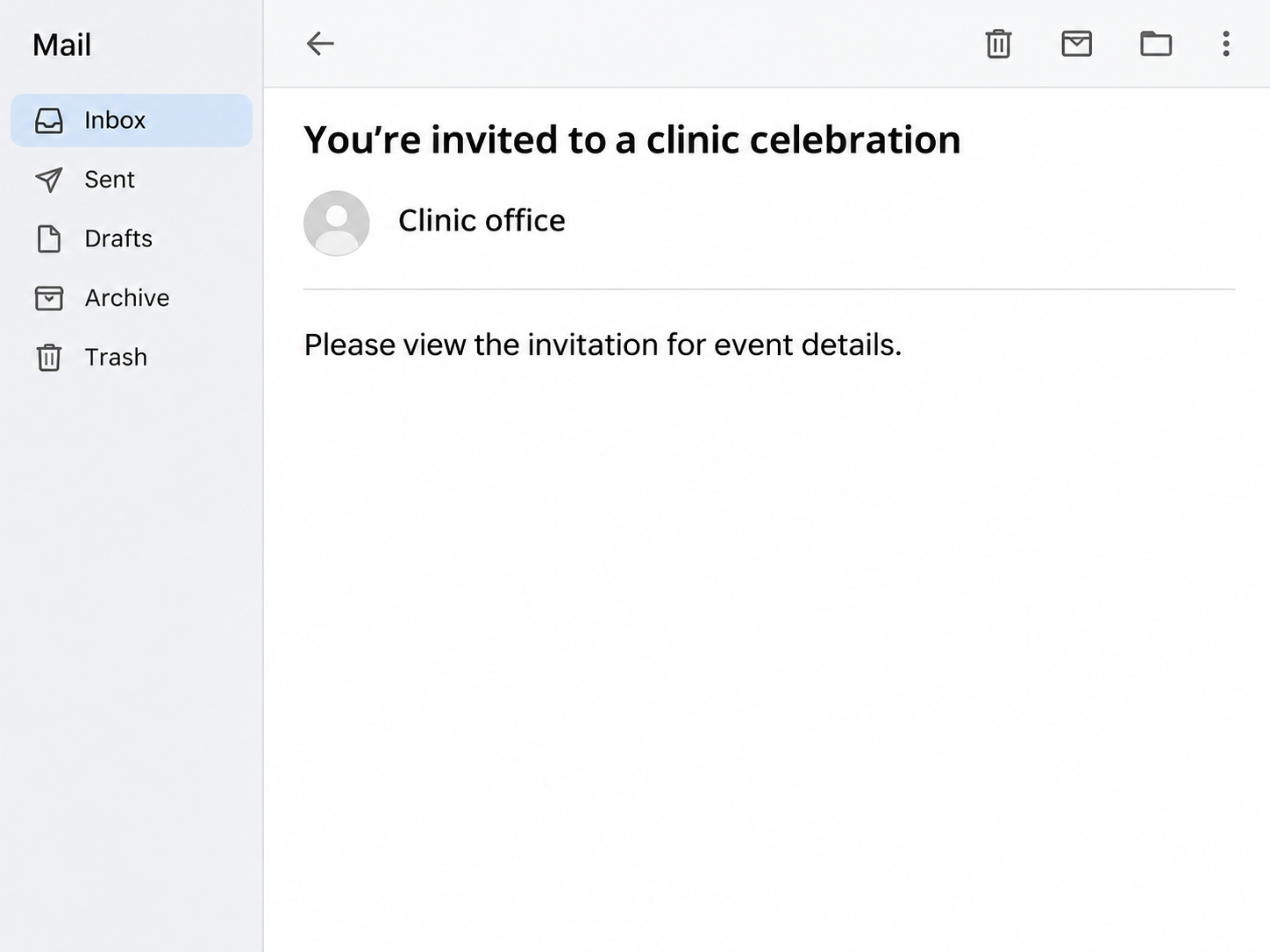
A Canadian patient received an email that appeared to come from a specialist’s office. It offered a choice between viewing and downloading a clinic celebration invitation.
The patient tapped the view option on an iPhone. They recalled a tab appearing briefly and believed they might have seen a warning before the page closed.
They did not choose the download option, enter credentials or type a code. The public account does not identify the destination or establish what the page would have shown.
The image illustrates the invitation as described by the recipient. It uses a generic clinic name and leaves out the original sender and any link.
Staff knew about other messages and were looking into them
The patient phoned the office directly and said staff were unaware of any invitations going out. Staff had heard from other recipients and were investigating what had happened.
That is a better test of the invitation than the sender’s display name. The staff could answer whether the clinic was holding the event independently of anything in the email.
Those reports leave open how the email was sent or whether anyone accessed the clinic’s mailbox. You can stop using the link while the office investigates.
Keep these details if an unexpected invitation appears:
- The subject, sender address and date of the email.
- What event the message claimed the clinic was holding.
- Whether you viewed the page, downloaded anything or entered information.
- Which browser warning you actually saw, if you can identify it.
- What the clinic confirmed when you reached it directly.
Fake invitations are a documented way to steal account access
The Federal Trade Commission’s invitation scam alert describes fake invitations that ask people for an email password or one-time code. Some messages name a host the recipient already knows.
The Canadian patient did not report seeing such a form. The documented examples explain what to look out for without claiming that this particular link performed the same action.
A browser tab that disappears cannot tell you what happened by itself. Start with what you actually did and check whether the device shows any download or setting you changed.
How the Fake Clinic Invitation Scam Works
Step 1: The sender chooses a reason you might want to open
A clinic celebration feels different from a bill or prescription update. The message appears friendly and gives a patient a reason to open it without expecting a security decision.
The real office’s name lends credibility. Email apps often show a short sender name first, so the message can look familiar before you see the address.
Look up the invitation through the clinic rather than responding to the sender. The reception desk can tell you if there is an event or whether staff received similar reports.
If someone asks which specialist you visit, keep that information private unless you have verified the organization. A phishing report rarely needs treatment information.
Step 2: The invitation offers a view or download option
A view option can open a page in the browser. A download option may deliver a file, which gives the sender another opportunity to ask you to open something.
The recipient in the reported case chose to view the invitation. They did not report opening a file, installing anything or interacting with a sign-in form.
If you already tapped a link, leave it closed while you check with the office. Reopening it to reproduce a fleeting warning adds exposure without improving the clinic’s answer.
If someone forwards the invitation to you, check through your own trusted contact. A forwarded message shows that someone else received it rather than proving they verified it.
Step 3: The page can ask you to identify yourself
The FTC warns that some invitation scams ask recipients to sign in to see event details. Other examples ask for a code supposed to confirm an RSVP.
A sign-in request can sound reasonable when it mentions guest privacy. Verify that the event exists before entering a password through any invitation link.
A one-time code authorizes whatever the service describes in the original message. The page requesting the code may describe it as something entirely different.
The clinic report stopped before any prompt like this was seen. If you receive a follow-up, judge the information request by what it does and who asked for it.
Step 4: An exposed inbox can put other contacts at risk
If someone gains access to an email account, they may send similar messages to people who already recognize that address. The FTC names that as a consequence of invitation phishing.
That can explain why a suspicious invitation may appear in a familiar conversation. It does not establish a clinic breach in the Canadian example.
If you shared credentials, sign in through the actual email provider and review active sessions. Check recovery details and mail rules if something appears to have changed.
If you only clicked, look for evidence such as an unexpected download, prompt or account notice. Tailor your next steps to what you can actually establish.
How to Check a Clinic Invitation and Protect Your Accounts
Contact the office from paperwork you already trust
Use the number on an appointment summary or the clinic’s official website. Ask whether the office sent invitations and what sender details it normally uses.
You can give staff the subject and date without forwarding the message to everyone. If they need a sample, ask for the secure route they use for suspicious email.
If the office tells you it has reported similar messages, write down what it confirmed. A later message claiming the issue was resolved still deserves an independent check.
Allow the clinic to investigate how its name was used. You can take action on the suspicious message without deciding how a sender obtained your address.
Check for downloads without reopening the email link
Look at your browser downloads or the device’s file list for something created around the time you clicked. Note its name if you find one, and leave it unopened.
If a prompt to install an app or configuration profile appeared, record whether you agreed to anything. That helps a trusted support provider recommend the appropriate next step.
Update your browser and operating system through the device settings. Follow your organization’s reporting instructions if the link was opened on a work or managed device.
A short-lived tab has several possible explanations. Tell support what you observed without assuming the page sent credentials or that a security feature blocked every action.
Secure whichever account the page asked you to use
If you supplied an email password, change it on the provider’s real site and replace that password wherever you reused it. Start with accounts that can reset other passwords.
Check for changes to recovery email addresses, phone numbers or signed-in devices. Remove changes you did not make using the provider’s own security settings.
If someone asked for a code, read the original code notification. Tell the provider which sign-in, password reset or other action that notification described.
Keep using the official sign-in route even if your account shows no unexpected activity. Another fake alert can arrive after the first invitation.
Watch for follow-up messages about medical information
Someone could reuse a clinic name in a fake appointment, payment or insurance message. Open the clinic’s patient portal or call the office for any claim about existing care.
If an email asks for a health card number or a copy of identification, verify who needs it before sending anything. Ask the clinic which secure method it actually uses.
Keep diagnoses, treatment details and appointment documents out of public reports. A screenshot of the deceptive wording with private details removed can still help a platform investigate.
If other people received the same invitation, suggest that they contact the clinic themselves. Forwarding their details or the active link can create more exposure.
Tell the reporting service whether you only clicked
Record which part of the email you tapped and the approximate time. If the link disappeared, say what you saw rather than trying to recreate the event.
A report about viewing a page differs from a report about supplying a password or downloading a file. Those details help the recipient decide which account or device to check.
Save the original email if you can do so without reopening its links. A mail provider may need its sender details for phishing review.
If a work address received the invite, use your employer’s reporting route before deleting it. Their support team can investigate similar messages sent to coworkers.
If you later find an unexpected transaction, tell the bank which payment details you entered and where. Keep that report separate from any questions about your email password.
Distinguish an event invitation from the clinic’s other messages
Think about what you normally receive from the office. An appointment reminder, bill or test result should have a route you can already locate without the new email.
Check the next scheduled appointment through the portal if you use one. A message about a social event cannot alter that booking simply because it has the clinic’s name.
If the email mentions a real clinician, call the office’s main number instead of replying directly. Ask the person you reach to confirm the ordinary way to hear about events.
Avoid using patient information to test who sent the message. The office can compare its own outgoing notices with the subject and date you already have.
Check a browser notification or file after tapping
If you allowed the page to send notifications, review which websites have permission in your browser settings. Remove permission for an unfamiliar site through those settings.
If a download is present and you have not opened it, keep it closed. Ask the device provider or your organization’s support team how to handle it.
If no file appears and you entered nothing, describe exactly that when you report it. A clean download list cannot tell you what the link originally tried to display.
What to Do if You Have Fallen Victim to This Scam
-
Close the invitation and contact the clinic directly. Give staff the subject and date, then ask whether it has a genuine event or a known impersonation report.
-
Report the email through your provider’s phishing option and preserve a copy if the clinic requests it securely. Avoid forwarding a live link to other patients.
-
Check for an unexpected download or device change without opening the file again. Get trusted help if you already ran something or approved installation.
-
Change an exposed password through the genuine provider and review account activity and recovery settings. Tell the provider if you also supplied a code.
-
Call the bank immediately if you entered payment details and explain what you submitted. Ask it to check unfamiliar authorizations and tell you what protections apply.
-
Report the attempt through the Canadian Anti-Fraud Centre if you are in Canada. Save the reference with your messages and any account or payment records.
The reported patient stopped after tapping the link. If you are in the same position, check for unexpected files or changes and verify anything else through the real clinic.
Frequently Asked Questions
Can the sender copy the name of my specialist’s office?
A sender can present a familiar display name, and legitimate accounts can also be misused. Call the office through the number you already know to verify the event.
Does a brief browser warning prove the page was blocked?
A warning you could not fully read is hard to interpret. Check whether a file or prompt appeared and avoid visiting the page again just to reproduce it.
Does clicking mean somebody has my email password?
Clicking alone does not show that you gave away a password. Secure the account promptly if you entered one or see unfamiliar sign-ins or recovery changes.
What if the invite asks me to sign in with Microsoft?
Verify the event with the clinic first. Use the normal Microsoft sign-in page for your account and avoid entering credentials through an unexpected invitation.
Should I open the attachment so I can send proof?
Leave the file unopened and report the sender, subject and date. Ask the clinic or mail provider whether it needs the original email through a secure channel.
Does this report show that the clinic was breached?
The patient described an invitation the office was unaware of. Its source and the method used to send it remain unverified.
The Bottom Line
Leave an unexpected clinic invitation unopened until the office confirms the event through a contact you already trust. Verify the event before entering a password or opening a file.
If you already acted on the message, identify exactly what you shared or approved. Use the real account provider, clinic or bank to deal with that specific exposure.

Join the discussion
0 commentsShare your experience or ask a question about this article.
Community experiences
Did this happen to you?
Your experience could help someone recognize the same scam. Submit a private report for our team to review.
I experienced this tooReports are reviewed before publication. Sharing publicly is always your choice.
Discussion
Start the conversation
Have a question or something useful to share? Add the first comment.