


A familiar financial voice promising surprisingly cheap car insurance can feel more trustworthy than another anonymous comparison advertisement.
That trust is exactly what an unauthorized Dave Ramsey-style campaign exploits before sending drivers into a Quotza insurance lead form.
Overview
The celebrity endorsement is the deceptive part
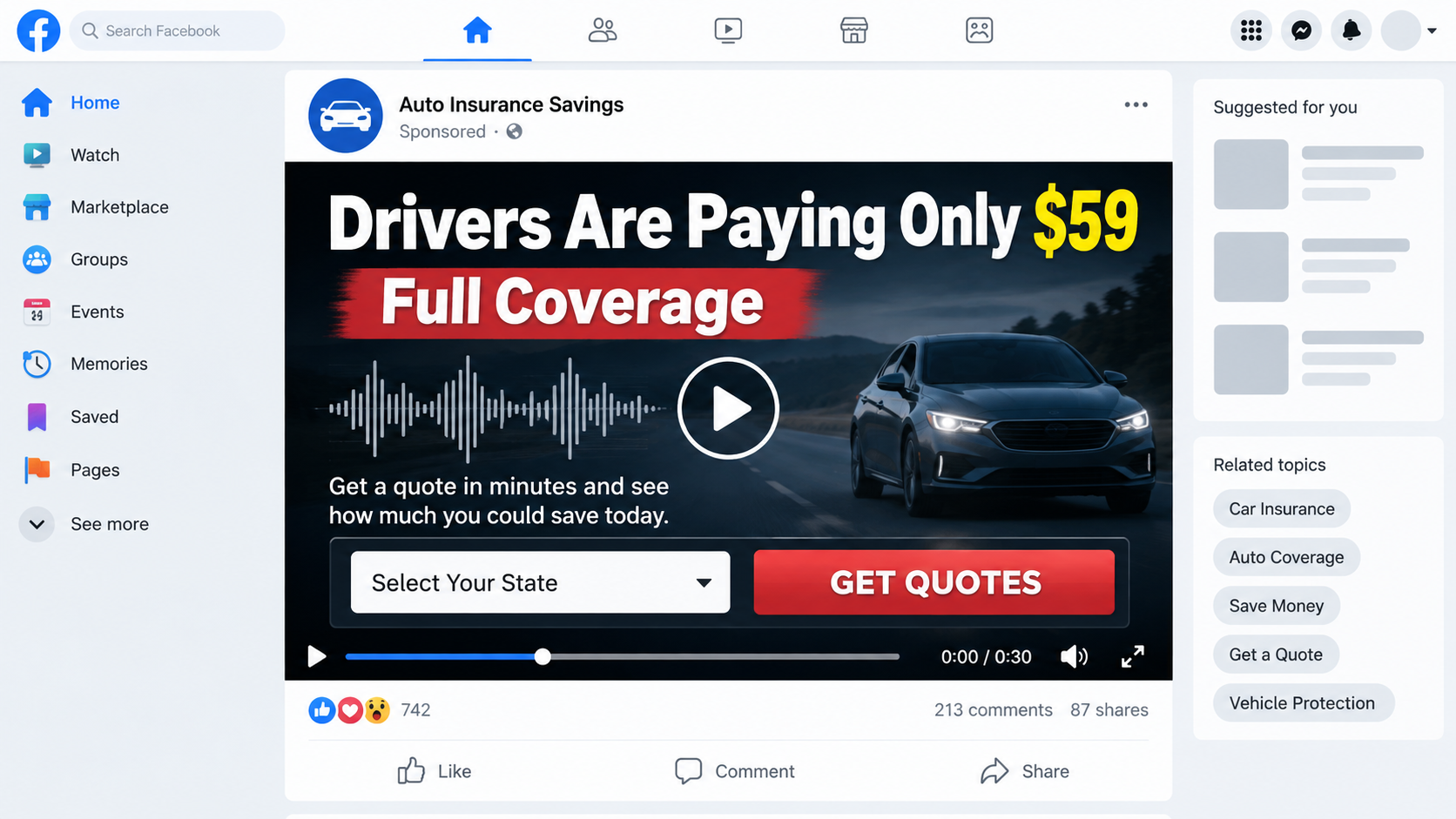
Paid social advertisements have used synthetic or manipulated audio resembling Dave Ramsey to discuss car insurance prices as low as $59 or $65 monthly.
We found no evidence that Dave Ramsey created, approved, narrated, or endorsed those Quotza-related advertisements. A recognizable voice is not proof of participation.
The video may avoid naming Quotza until after the click. That separation helps the advertisement borrow celebrity trust while shielding the destination from immediate scrutiny.
Quotza is a lead-generation website, not an insurer
Quotza operates a form that gathers driver, vehicle, contact, and address information, then connects the consumer with insurance agents or marketing partners.
Its own website disclosure says it is not a licensed agency or insurer and does not itself provide insurance quotes or represent one specific carrier.
Lead generation can be legitimate when advertising, consent, data sharing, and contact expectations are clear. A deepfake endorsement and unrealistic price framing corrupt that consent.
Submitting the form can trigger widespread contact
The consent language authorizes marketing calls, texts, prerecorded messages, and automated dialing, even when the supplied number appears on a Do Not Call list.
The visitor may believe one form will reveal an immediate personalized rate. Instead, the information can become a lead distributed among several commercial contacts.
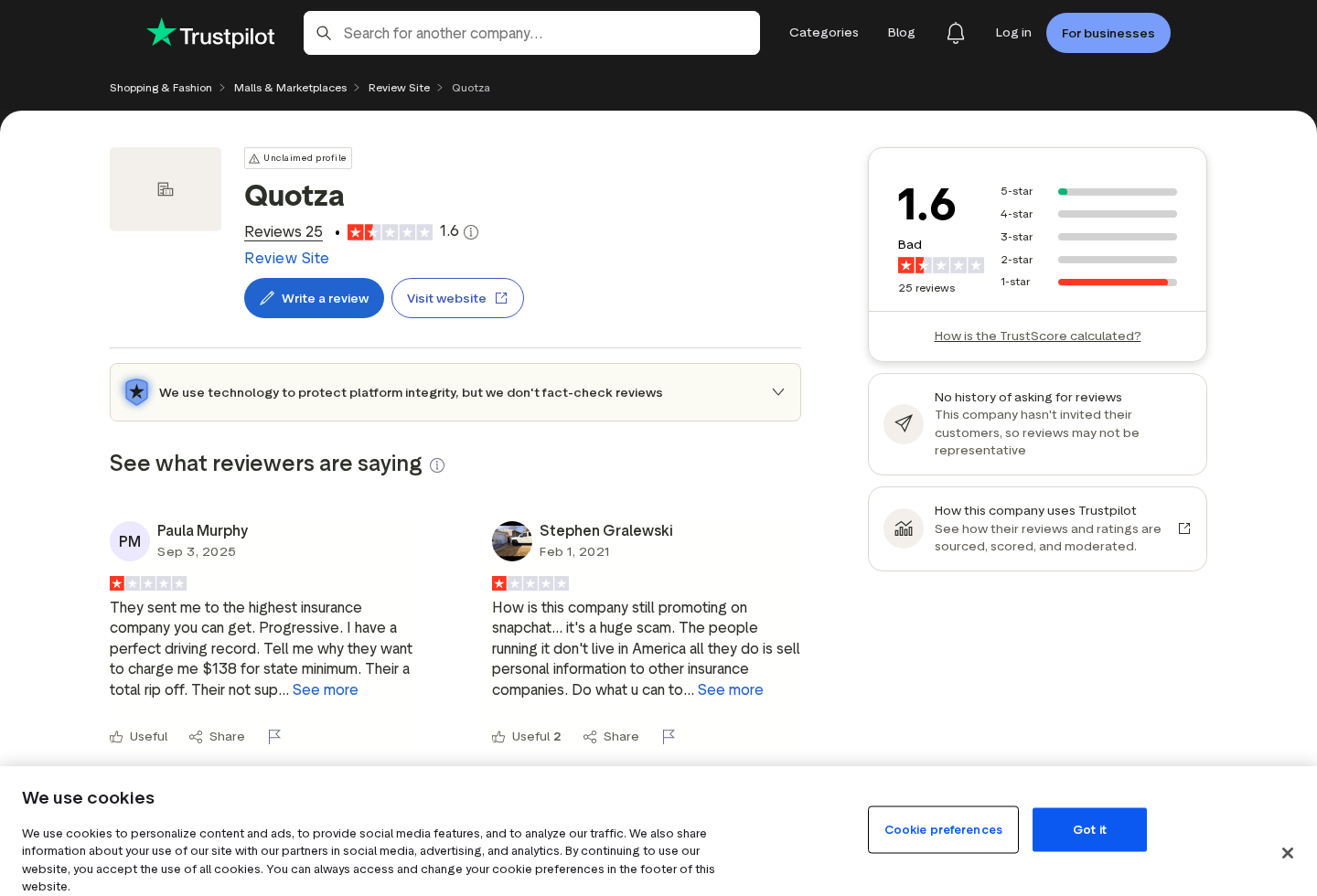
Independent reviewers describe repeated calls, texts, or irrelevant matches. Those are allegations, but they align with the disclosed lead-generation business model.
- The social advertisement uses an unauthorized celebrity-style voice to create credibility.
- The promised $59 or $65 price is not a guaranteed policy for every driver.
- Quotza is a comparison and lead-generation service, not an insurance carrier.
- The form collects identifying, contact, address, vehicle, and driving information.
- Consent can permit marketing by telephone, SMS, artificial voice, and prerecorded messages.
- Rates remain subject to location, driving history, vehicle, coverage, eligibility, and insurer underwriting.
- The correct warning concerns deceptive advertising and data transfer, not a claim that every insurance agent contacting the lead is fraudulent.
Why the $59 Full-Coverage Claim Is Misleading
Auto insurance cannot be priced responsibly from a celebrity sound bite. Premiums reflect location, age, driving record, vehicle, mileage, credit factors where permitted, and chosen coverage.
Full coverage is also not one standardized product. People often use the phrase for liability plus collision and comprehensive insurance, with different limits and deductibles.
A low advertised rate may apply only to a narrow profile, state-minimum protection, a large deductible, special discounts, or coverage that excludes important risks.
Without a named carrier, sample driver, location, limits, deductible, term, fees, and effective date, a monthly figure is promotional bait rather than a usable quote.
The synthetic conversation makes the claim feel independently discussed. Listeners hear what resembles a trusted host challenging or confirming a surprisingly low price.
That format is more persuasive than a banner because it simulates skepticism. The fake exchange appears to answer objections before the viewer has raised them.
Voice cloning no longer requires studio-quality recordings. Public speeches, shows, podcasts, and social clips can supply enough material to imitate tone and cadence.
Subtle errors may remain, including unnatural emphasis, clipped breaths, inconsistent room sound, blurred mouth movement, or phrases that do not fit the person’s established advice.
Those clues help, but perfect audio is possible. Verification should focus on the celebrity’s official channels and the advertiser’s documented relationship.
If an endorsement appears only in paid social placements and never on the person’s website or verified accounts, treat it as unauthorized until proven otherwise.
What Quotza Says It Actually Does
The current form asks users to select vehicle details and progress through multiple questions. Location-specific headings promise competitive rates in minutes.
A disclosure associated with the service states that Quotza connects visitors to licensed agents. It does not bind coverage, underwrite policies, or guarantee a particular insurer.
The value exchange is therefore information for contact. The consumer provides a detailed lead, and participating agents may receive an opportunity to sell insurance.
That model can save research time when the consumer knowingly requests calls. It becomes harmful when the advertisement disguises the destination as a celebrity recommendation or guaranteed benefit.
The form’s most important terms appear near the submission button. Visitors should read that small text before providing a phone number, not after calls begin.
Consent language can cover automated systems, artificial or prerecorded voices, SMS messages, and contact despite registry status. That permission is broader than one requested quote.
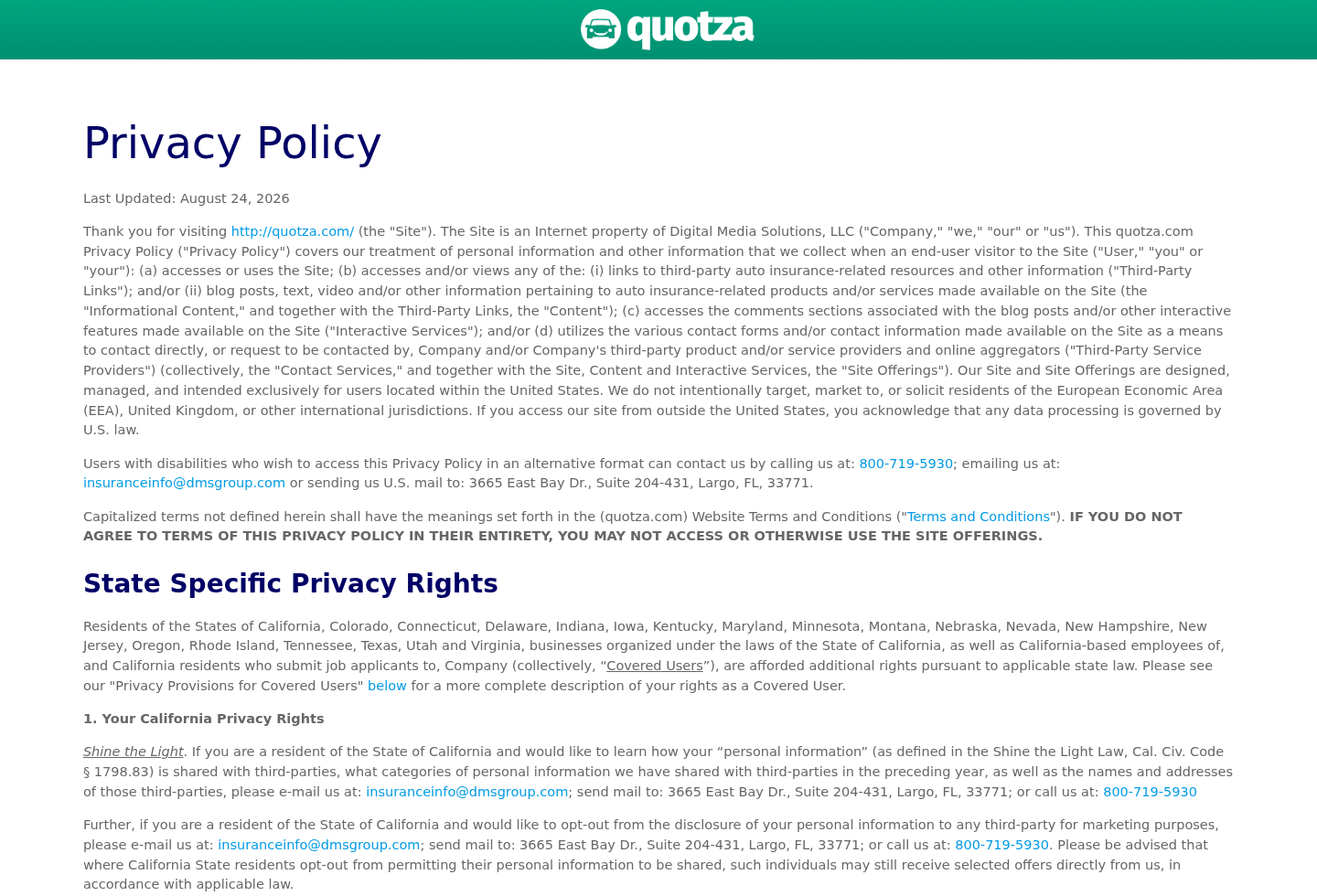
A privacy policy updated in August 2026 identifies Digital Media Solutions, LLC as the company operating the site and lists contact information in Largo, Florida.
Public bankruptcy records have referenced Quotza-related assets within Digital Media Solutions proceedings. That history matters for ownership context, though it does not make every current contact fraudulent.
Consumers should evaluate what entity currently controls the data, which partners receive it, retention duration, deletion rights, and whether information is sold or shared.
The word partner can include a long marketing chain. Each recipient may maintain its own systems, vendors, privacy practices, and suppression process.
How the Fake Dave Ramsey Quotza Ad Scam Works
Step 1: A synthetic celebrity voice stops the scroll
The advertisement uses the sound or appearance of a well-known financial personality. Familiarity lowers suspicion before the insurance claim receives any examination.
The clip may be framed as advice, a radio exchange, an interview, or an argument about overpriced coverage. That editorial style hides the commercial purpose.
Viewers trust the supposed speaker’s reputation, not the unknown advertising page paying to distribute the video.
Step 2: An implausibly low rate creates curiosity
A figure such as $59 full coverage is concrete, memorable, and emotionally attractive. The advertisement omits the underwriting details needed to reproduce it.
The message implies that ordinary insurers or agents kept a cheaper option hidden. Clicking becomes an act of discovering savings rather than entering a marketing funnel.
No legitimate platform can guarantee that price before learning the driver’s state, record, vehicle, limits, and eligibility.
Step 3: The landing page begins with harmless questions
The form first requests vehicle year, make, model, or ZIP code. Easy questions create momentum and make abandoning the process feel wasteful.
Progress bars and friendly prompts imply that a personalized result sits moments away. The commercial consent remains less visually prominent than the next button.
Each answer increases the value of the lead by helping marketers identify likely coverage needs and customer characteristics.
Step 4: Personal contact details complete the lead
Name, email, telephone number, mailing address, driver history, and vehicle data may follow. Combined information can reveal identity, household, assets, and purchasing intent.
The visitor expects a quote. The operator receives a marketable insurance inquiry that can be routed to agents, call centers, or comparison partners.
Never enter invented details using another person’s number. That transfers unwanted calls to someone who never consented.
Step 5: Broad consent authorizes automated outreach
The submission language allows contact for marketing purposes through calls, texts, artificial voices, prerecorded messages, and automated telephone systems.
It also warns that contact may occur despite federal, state, or company Do Not Call registration. Clicking therefore has consequences beyond displaying a webpage.
Consent may be revocable, but suppressing one partner does not automatically notify every organization that previously received the lead.
Step 6: Several agents compete for the same shopper
After submission, different businesses can call or text quickly. Repeated contact feels like spam when the user expected one neutral comparison result.
Some agents may be properly licensed and offer genuine policies. Others may misunderstand the lead source or use aggressive sales scripts.
Verify every caller independently through the state insurance regulator and the carrier’s official website before sharing more information or making payment.
Step 7: The misleading ad can vanish
Social advertisements can rotate accounts, pages, voices, prices, and destination links. Once removed, the original endorsement claim becomes difficult to prove.
Save the page name, advertiser transparency record, video, destination, consent wording, and date before reporting it.
The Quotza domain may remain operational even after one deceptive affiliate advertisement disappears. Investigate the advertisement and the destination as connected but distinct actors.
Company, Address, and Fulfillment Checks
The current privacy policy names an operator
Quotza’s privacy policy identifies Digital Media Solutions, LLC and supplies insuranceinfo@dmsgroup.com plus 800-719-5930 for certain privacy communications.
That identification is more concrete than an anonymous landing page. It does not validate the unauthorized celebrity creative used by an advertiser or affiliate.
Ask the operator which campaign collected the lead, when consent occurred, and every category of partner that received the record.
The listed address resembles a suite or mailbox format
The policy displays 3665 East Bay Drive, Suite 204-431, Largo, Florida 33771. Earlier research located another small mailbox-style address in Safety Harbor.
A suite address can serve legitimate administrative mail. It should not be assumed to host call-center staff, insurance agents, or company leadership.
Use state registrations and formal privacy contacts to understand the entity. Do not judge legitimacy from a map pin alone.
The support trail concerns data, not a physical shipment
There is no parcel fulfillment in this funnel. The valuable item transferred is the consumer’s personal information and demonstrated interest in insurance.
Phone and email support should explain access, deletion, correction, sharing, opt-out, and suppression rights. Save requests and record the response deadline under applicable law.
If an agent cannot identify the source of the lead, ask for the vendor name, timestamp, landing page, and consent certificate.
The advertising partner may differ from the website operator
A social page, affiliate network, media buyer, comparison site, call center, and licensed agent can all participate in one customer journey.
Responsibility for the false Dave Ramsey presentation may sit with the ad creator rather than every downstream agency. Evidence should preserve that distinction.
Report the ad account and creative to the platform while directing privacy requests to the company that collected and distributed the form data.
Why This Is Not Simply an Insurance Quote
A traditional quote begins with a named insurer or broker explaining required data, coverages, price assumptions, and licensing. The consumer knows who will respond.
A lead marketplace instead gathers demand and routes it. The initial website may never produce, verify, or compare all premiums itself.
The distinction matters because a comparison label can imply neutrality. Compensation and partner availability may influence who receives the lead or appears first.
Quotza’s disclosure says rates vary and may not be available to every consumer. That caveat directly conflicts with a simplistic celebrity video promising one low rate.
The form should be judged by informed consent. Can the visitor understand who collects data, why, how broadly it travels, and what contact will follow?
When an AI impersonation supplies the initial trust, the visitor’s decision begins with false information. Fine print later cannot restore the endorsement that never existed.
This does not mean a policy offered by a licensed recipient is automatically invalid. It means the acquisition method deserves reporting and the policy requires separate verification.
Never cancel existing insurance until replacement coverage is bound, paid, documented, and effective. A form completion or agent promise is not active protection.
Warning Signs in Celebrity Insurance Ads
- A financial celebrity appears in a paid advertisement that cannot be found on official channels.
- The voice sounds familiar, but the lip movement, timing, breathing, or phrasing seems slightly unnatural.
- One extremely low monthly rate is presented without a state, driver profile, carrier, limits, or deductible.
- The video never clearly names the company collecting personal information.
- The landing page begins with easy vehicle questions while consent terms appear only near submission.
- Fine print authorizes multiple marketing contacts, automated dialing, artificial voice, prerecorded messages, or SMS.
- The website identifies itself as a marketplace rather than an insurer, agency, or broker.
- Independent reviewers repeatedly mention unwanted calls, texts, or disappointment with the matches.
- The advertiser’s social page has limited history, recently changed names, or unrelated earlier content.
- The promised benefit disappears when the shopper asks for a written carrier quote with exact coverage.
The safest response is not merely to mute the video. Find insurers through official websites, licensed brokers, or your state regulator’s directory.
Request comparable limits and deductibles from each source. A cheaper premium may reflect reduced coverage rather than a hidden discount.
Never give a Social Security number, driver’s license image, bank login, or remote-device access to an unsolicited caller claiming to finish the quote.
What to Do if You Have Fallen Victim to This Scam
- Save the deceptive advertisement. Record the supposed celebrity, promised rate, social page, advertiser details, destination URL, date, and every screen displayed before the form.
- Identify the data supplied. List your name, address, email, phone, vehicle, driver history, birth information, and anything more sensitive. This determines the necessary protection.
- Withdraw marketing consent in writing. Contact Quotza or the identified operator and request suppression from calls, texts, artificial voices, prerecorded messages, and further partner distribution.
- Ask who received your lead. Request access, correction, deletion, and partner-disclosure information available under your state’s privacy law. Keep the request and delivery proof.
- Tell each caller to stop. Record the business name, telephone number, date, and request. Do not confirm additional personal details merely to unsubscribe.
- Verify any real insurance offer independently. Check the agent’s license with the state regulator and call the insurer through its official website before paying or canceling current coverage.
- Protect exposed identity information. If highly sensitive data was shared, consider a credit freeze, fraud alert, account monitoring, and changed security questions.
- Check the device for follow-on threats. Run Malwarebytes after suspicious redirects or downloads. AdGuard can reduce malicious advertising and tracking while browser permissions are reviewed.
- Report the impersonation. Notify the social platform, the impersonated person’s official organization, the FTC, and your state insurance regulator with preserved evidence.
- Do not pay a recovery caller. Lead exposure can attract secondary scams. Anyone promising guaranteed removal, compensation, or exclusive rates for an advance fee deserves independent verification.
Is Your Device Infected? Run a Free Malware Scan
Slow performance, constant pop-ups, or strange behavior? These are classic signs of a malware infection. A quick way to check is to scan your device with Malwarebytes Free, one of the most trusted malware removal tools available. If you only visited a scam page and didn’t download or install anything, this scan is optional.
The free version detects and removes the most common threats, including:
- Adware — the cause of those annoying pop-ups
- Browser hijackers — unwanted redirects and changed homepages
- Trojans and spyware — hidden programs stealing your data
- Potentially unwanted programs (PUPs) — software you never asked for
👉 Select your device below — Windows, Mac, or Android — then follow the simple steps to download Malwarebytes, scan your system, and remove any threats it finds. The scan usually takes 5 to 20 minutes.
Run a Malware Scan with Malwarebytes for Windows
Malwarebytes is one of the most popular and trusted anti-malware tools for Windows — and it’s completely free for removing infections. It catches threats that many antivirus programs miss, including adware, browser hijackers, and trojans. Follow the steps below to scan your PC and remove what Malwarebytes finds.
Download Malwarebytes
Click the button below to download the latest version of Malwarebytes for Windows from the official source. The free version is all you need — it will scan your computer and remove adware, browser hijackers, and other malicious software at no cost.
Download MalwarebytesOfficial installer for Windows 11 and 10. Your download starts right away.Want real-time protection? See Malwarebytes Premium Malwarebytes Free for WindowsScans and removes malware at no cost
-
Install Malwarebytes
When the download finishes, open your Downloads folder and double-click the MBSetup file. If Windows shows a User Account Control pop-up, click “Yes” to allow the installation.

Follow the On-Screen Prompts to Install Malwarebytes
The setup wizard will walk you through a few quick screens:
-
Choose where you’re installing the program — “Personal Computer” or “Work Computer” — then click Next.

-
Malwarebytes will now install on your device. This usually takes under a minute.

-
When installation is complete, the “Welcome to Malwarebytes” screen will open automatically.

-
On the final screen, click Open Malwarebytes to launch the program.

-
Optional: Check for rootkits with a Custom Scan
You don’t need to change any settings for a normal scan. The standard Threat Scan in the next step is enough for most problems, so you can go straight to it.
If you also want to check for rootkits, use a Custom Scan. In current versions of Malwarebytes, rootkit scanning is only available there:
- On the Scanner tile, click the three-dot menu and select Advanced Scan.
- Choose Custom Scan. In its options, check Scan for rootkits.
- Select your system drive (usually C:\) as the location to scan, then start the scan. It takes longer than a Threat Scan.
- When it finishes, review and quarantine the results as described in the steps below.
Rootkit scanning isn’t available on Windows devices with ARM processors.
Start the Scan
Click the blue Scan button. Malwarebytes will automatically update its virus database and start checking your computer for malware.

-
Wait for the Scan to Finish
The scan checks your entire system for browser hijackers and other malicious programs, so it can take 5 to 20 minutes depending on your computer. Feel free to do something else — just check back occasionally to see the progress.

-
Quarantine the Detected Threats
When the scan is done, you’ll see a list of everything Malwarebytes found — malware, adware, and potentially unwanted programs. Click the “Quarantine” button to remove all of them at once.

Malwarebytes will now remove the malicious files and registry entries and move them safely into quarantine.

-
Restart Your Computer
Some threats can only be fully removed after a reboot. If Malwarebytes asks you to restart, click Yes. Once you’re logged back in, Malwarebytes has finished removing the threats it found.

When the scan is done, check whether the problems you noticed have stopped. If they continue, see the options below.
If you are still having problems with your computer after completing these instructions, then please follow one of the steps:
- Run a computer scan with ESET Online Scanner
- Ask for help in our Windows Malware Removal Help & Support forum.
Run a Malware Scan with Malwarebytes for Mac
Malwarebytes for Mac is a free on-demand scanner that removes the malware other security software tends to miss — adware, browser hijackers, and unwanted programs included. Cleaning an infected Mac with Malwarebytes has always been completely free, and it’s our go-to recommendation. Follow the steps below to scan your Mac and remove what Malwarebytes finds.
-
Download Malwarebytes for Mac
Click the button below to download the latest version of Malwarebytes for Mac.
Download MalwarebytesOfficial installer for macOS. Your download starts right away.Want real-time protection? See Malwarebytes PremiumMalwarebytes Free for MacScans and removes malware at no cost -
Open the Malwarebytes setup file
When the download finishes, open your Downloads folder and double-click the setup file to begin the installation.

-
Follow the On-Screen Prompts to Install Malwarebytes
The Malwarebytes for Mac Installer will guide you through a few quick screens. Click “Continue” and keep following the prompts until the installation completes.



When the installation is complete, Malwarebytes opens to the Welcome to Malwarebytes screen. Click “Get started“.
Malwarebytes needs Full Disk Access to check your whole Mac. When it asks, open System Settings > Privacy & Security > Full Disk Access, turn on Malwarebytes (it may be listed as Malwarebytes Protection), and confirm with your password or Touch ID. Then return to Malwarebytes. On macOS Monterey and earlier, this setting is in System Preferences > Security & Privacy > Privacy.
-
Select “Personal Computer” or “Work Computer”
Malwarebytes will ask what type of computer you’re installing it on. Click either Personal Computer or Work Computer, whichever applies.

-
Start the Scan
Click the “Scan” button. Malwarebytes will automatically update its detection database and begin checking your Mac for malware.

-
Wait for the Scan to Finish
Malwarebytes will scan your Mac for adware, browser hijackers, and other malicious programs. This can take a few minutes, so feel free to do something else — just check back occasionally to see the progress.

-
Quarantine the Detected Threats
When the scan is done, you’ll see a list of everything Malwarebytes found. Click the “Quarantine” button to remove all the threats at once.

-
Restart Your Mac
Malwarebytes will now remove all the malicious files it found. Some threats can only be fully removed after a reboot — if Malwarebytes asks you to restart, allow it. Once you’re logged back in, check whether the problems you noticed have stopped. If they come back, save the scan report and ask for help in our forum.

If the problems you noticed continue after the scan, see the options below.
If you are still experiencing problems while trying to remove a malicious program from your computer, please ask for help in our Mac Malware Removal Help & Support forum.
Run a Malware Scan with Malwarebytes for Android
Malwarebytes for Android scans your phone or tablet for malware, adware, and potentially unwanted apps. The free version scans only when you start a scan. Real-time protection, which checks apps automatically, is part of the paid Premium version.
-
Download Malwarebytes for Android.
You can download Malwarebytes for Android by clicking the link below.
Get Malwarebytes for AndroidOpens Google Play in a new tab.Want real-time protection? See Malwarebytes Premium for AndroidMalwarebytes for AndroidScans your phone and removes malware at no cost -
Install Malwarebytes for Android on your phone.
In the Google Play Store, tap “Install” to install Malwarebytes for Android on your device.

When the installation process has finished, tap “Open” to begin using Malwarebytes for Android. You can also open Malwarebytes by tapping on its icon in your phone menu or home screen.

-
Follow the on-screen prompts to complete the setup process
When Malwarebytes opens, it walks you through a short setup. Tap Get started and follow the prompts. If you see an offer for a trial or a paid plan, read it before you accept. You can skip it and keep using the free scanner.
Malwarebytes will ask for permission to access the files on your phone so it can scan them. Tap Allow, or turn on the permission in the Android screen that opens, then return to Malwarebytes.
-
Run a scan with Malwarebytes for Android
On the main screen, tap Scan now. In some versions, you open the menu, tap Scanner, and then tap Run a scan.
-
Wait for the Malwarebytes scan to complete.
Malwarebytes will now start scanning your phone for adware and other malicious apps. This process can take a few minutes, so we suggest you do something else and periodically check on the status of the scan to see when it is finished.

-
Remove the detected apps.
When the scan has been completed, you will see a list of the threats that Malwarebytes for Android has detected. Next to each detected item, tap the menu icon (three dots), then choose to uninstall the app or delete the file. Android then asks you to confirm. Tap OK or Uninstall to remove the app.
-
Restart your phone.
When the detected apps are removed, restart your phone if Malwarebytes asks you to. Then check whether the problems you noticed have stopped.
If the problems you noticed continue after the scan, see the options below.
If you are still having problems with your phone after completing these instructions, then please follow one of the steps:
- Ask for help in our Mobile Malware Removal Help & Support forum.
- Only as a last resort, reset your phone to factory settings. Read the warning below first.
- Back up your photos, videos, files, and messages, for example to your Google account or a computer.
- Make sure you know your Google account email and password. The phone asks for them after the reset. If you changed the password recently, Google recommends waiting 24 hours before you reset.
- On a Samsung phone, also make sure you know your Samsung account password.
- If you use an authenticator app for two-step verification, move your accounts to another device or save your backup codes first.
Stay Protected: Block Ads and Malicious Sites
No scan can prove a device is completely clean, so it helps to block threats before they reach you. Most infections start with a malicious ad or a fake download button — so blocking them at the source is your best defense.
We recommend AdGuard, which blocks malicious ads, phishing pages, and dangerous redirects before they can reach you.
👉 Download AdGuard and browse safely
Frequently Asked Questions
Did Dave Ramsey endorse the Quotza insurance offer?
We found no evidence of an authorized endorsement. The advertisement used a synthetic or manipulated celebrity-style presentation to promote low-rate claims.
Is Quotza an insurance company?
No. Its disclosures describe a marketplace connecting consumers with licensed agents or insurers. Quotza does not itself underwrite, bind, or issue policies.
Will every driver qualify for $59 full coverage?
No. Premiums depend on many underwriting factors, while full coverage varies by limits and deductibles. A universal price without those details is misleading.
Why did multiple companies call me?
The submission consent permits marketing contact, and the lead can be routed to partners. One request may therefore produce calls or texts from several organizations.
Are all agents who receive Quotza leads scammers?
No. Some may be properly licensed professionals. Verify each identity and policy independently because the deceptive advertisement does not validate or invalidate every recipient.
Can I make the calls stop?
Revoke consent, request suppression, block persistent numbers, use carrier filtering, and document violations. Privacy and telemarketing rights vary by jurisdiction.
The Bottom Line
The fake Dave Ramsey car-insurance advertisement uses AI impersonation and an implausibly simple price to send drivers into a broad commercial lead-generation process.
Quotza is a real data-collection marketplace rather than the insurer implied by a quick quote pitch. Its disclosures do not make the unauthorized celebrity message acceptable.
Skip the ad, compare coverage through verified licensed sources, and read every contact-consent sentence before trading detailed personal information for a promised rate.

Join the discussion
0 commentsShare your experience or ask a question about this article.
Discussion
Start the conversation
Have a question or something useful to share? Add the first comment.