


A proposal lands in your inbox, followed by a download that seems connected to reviewing the documents. Nothing about the task sounds unusual.
Then a support tool appears on your computer. Someone removes it, yet hours later it comes back. The missing piece is what happened before that installation.
Overview
The proposal hides a much bigger permission request
The fake DocuSign proposal scam turns a business document request into an opportunity to put a Windows computer under someone else’s management.
You expect a file to read or sign. What arrives instead can install software that accepts administrative instructions from an outside organization.
Removing the support app you can see may leave the software that installed it. That earlier management connection needs its own investigation.
Incident responders traced the returning access to device management
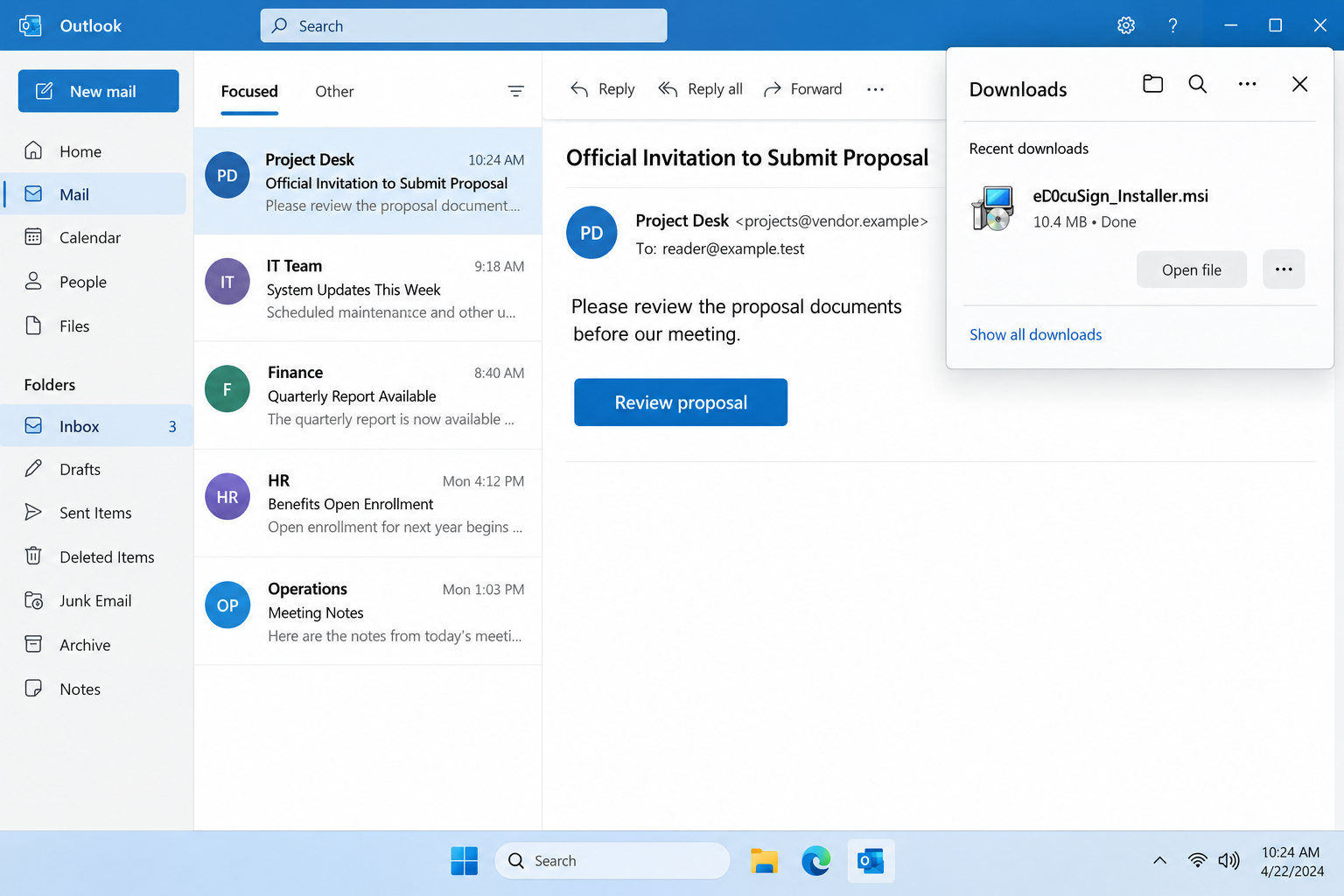
Huntress documented proposal emails delivering eD0cuSign_Installer.msi, a misleadingly named package that installed Hexnode management components.
ScreenConnect remote access subsequently appeared, was removed, and returned. The management software gave the attacker a way to install it again.
DocuSign, Hexnode, and ScreenConnect are legitimate products. The deception concerns the invitation, disguised package, and unauthorized use of those tools.
The important question is who controls the computer
Receiving the message is different from running its installer. If you stopped before opening the package, tell your IT team exactly where you stopped.
- A proposal should not quietly turn your computer into a device managed by an unfamiliar organization.
- A recognizable software publisher cannot authenticate the customer or tenant directing that software.
- Remote access that returns after removal needs investigation beyond the visible support application.
- For a work computer, containment and management checks belong with your real IT team.
Why a Document Request Can Become an Installation
Business inboxes contain genuine bids, contracts, and meeting requests. Attackers place their request among those ordinary tasks, where downloading something feels like making progress.
The recipient may be busy, expecting work from several partners, and reluctant to delay a promising inquiry over what appears to be a routine viewer.
A file with an installer extension changes that situation. An MSI is a Windows installation package, capable of adding programs and configuration to the machine.
It is not simply another format for displaying a proposal. Its name may mention a document service while the software inside serves another purpose.
That makes the moment before execution valuable. Ask why reviewing this specific proposal requires new software and whether your organization approved that installation.
You don’t need to accuse a business contact. A separate call or message through an established channel can confirm what they intended to send.
The lead illustration uses fictional correspondence and an example address. It demonstrates the document-to-installer switch rather than reproducing a received email.
How the Fake DocuSign Proposal Scam Works
Step 1: An expected business task supplies the reason to click
The lure offers something the recipient normally handles: a proposal requiring attention. The surrounding business context can make an unexpected link seem relevant.
Instead of asking whether the email is generally professional, ask what specific project it concerns and whether someone already introduced the work.
A vague request can still reach the right employee by chance. Relevance to your job does not mean the sender knows your actual business arrangements.
If the message names an existing partner, check through contact details you already hold. Avoid asking the same unverified email thread to prove its own authenticity.
Step 2: The link offers a package wearing a document-service name
In the documented case, the link led to a download at webdocusign.viewportal[.]es. The resulting filename borrowed the appearance of a DocuSign-related installer.
Neither the brand word inside a hostname nor a familiar icon determines who controls the destination. The actual registered domain matters.
For readers, the simpler stopping point is the requested action: you came to review a proposal and are now being asked to install software.
Do not run the package to discover whether it eventually displays the document. That experiment grants the very access you need to evaluate first.
Step 3: Device management establishes a separate control channel
Management software helps real employers configure devices, apply policies, and distribute approved applications. Its usefulness comes from the authority it receives over those devices.
When someone tricks you into installing a management agent for their environment, the software’s ordinary capabilities can serve their instructions instead.
This is why a legitimate signature does not answer the whole safety question. It identifies the software publisher, not the organization managing your computer.
The right check includes the management service, its enrolled organization, and whether your real administrator authorized the connection. A product name alone is insufficient.
Step 4: Remote support arrives through the management channel
The attacker can use the established management relationship to distribute another application. The victim may notice that second program before noticing the first relationship.
A remote support agent may allow screen access and commands, depending on its configuration. It should connect only to support infrastructure your organization recognizes.
Don’t accept a caller’s explanation that every support tool is safe because well-known companies use it. Authorization depends on this particular installation and controller.
If you see an unexpected support session, leave sensitive work alone and notify IT through a separate trusted device. Avoid discussing new credentials on the affected computer.
Step 5: Removing the second program leaves the first route open
Deleting a remote agent can stop one instance while leaving the system that deployed it untouched. That system may issue another installation instruction.
The returning application is therefore a useful clue, not evidence that cleanup is impossible. The investigation needs to move back through the installation chain.
Ask what created the program, which management service remains, and whether other devices received similar instructions. Repeatedly uninstalling the same app misses those questions.
Changing your email password is still worthwhile if exposed, but it does not automatically remove a device from an unauthorized management environment.
A Related Meeting Invitation Uses the Same Administrative Shortcut
Huntress also described a separate tax-planning inquiry followed by a fake Teams calendar route, Rippling enrollment activity, and subsequent ScreenConnect installation.
The public account doesn’t establish every interaction that occurred during enrollment. Treat it as a related incident, not proof that viewing any meeting link enrolls Windows.
The practical lesson applies across document and meeting themes: an invitation can introduce a request to trust a new organization with device administration.
A calendar page, a software signature, and an employer’s real management portal each establish different things. None should substitute for checking who requested this change.
For a receptionist, bookkeeper, or sales employee, arranging a meeting should not require guessing about administrative permissions. Send unexpected enrollment requests to your own support team.
Likewise, don’t remove a genuine employer’s management agent merely because its name appears in a warning. Legitimate deployments need to be distinguished from unauthorized ones.
What to Ask Before Opening a Proposal Download
Is this the document you were actually expecting?
Confirm the project, contact, and delivery method together. A familiar company name beside an unfamiliar download still leaves the most important connection unverified.
If someone says their usual portal is temporarily broken, ask them to confirm through the contact route your company already uses. Don’t troubleshoot their workaround first.
Keep any genuine bid deadline visible while you verify. Your manager can arrange an alternative submission without requiring an employee to bypass installation controls.
Does the requested access fit the task?
A document viewer and a device-management enrollment have very different consequences. Read the installer and permission prompts instead of treating every confirmation as paperwork.
A request to let an organization manage the computer is a security decision. It deserves independent approval even when the proposed software itself is reputable.
If you can’t explain the new permission in relation to the proposal, stop there. Ask IT before approving it or trying another download.
Can your own support team identify the controller?
Real IT staff should be able to compare the management tenant, approved software inventory, and remote-support destinations with what appeared on your device.
Keep the package’s filename and the original message for them. Avoid posting private relay addresses, device identifiers, or company screenshots in a public discussion.
A phone number supplied by the proposal page cannot provide independent reassurance. Use your employer’s directory or a previously established help-desk contact.
What to Do if You Have Fallen Victim to This Scam
-
Separate the affected computer from sensitive activity. If the installer ran or unexpected remote control appeared, disconnect Wi-Fi or Ethernet and contact your legitimate IT team.
Use another device for that conversation. Tell responders whether the computer remains powered on and follow their evidence-preservation instructions before restarting or cleaning it.
If you only downloaded the package, don’t open it. Record that distinction; responders need the actual actions taken, not an assumption that every recipient was infected.
-
Give IT a short sequence of events. Include the email subject, sender, download address, package name, time of execution, and any prompts you accepted.
Preserve the original email with headers using your organization’s reporting process. Don’t forward an active installer to coworkers or reopen it to take a better screenshot.
Describe any recurring applications and when they returned. The interval between removal and reappearance can help responders connect deployment activity with the management service.
-
Investigate enrollment before declaring the device clean. Administrators should identify unfamiliar management tenants, agents, deployment jobs, and remote-support controllers.
They may need to remove unauthorized enrollment and revoke the attacker’s management access as well as remove remote agents. Closing one session is only an immediate interruption.
Do not disconnect legitimate workplace management yourself. Removing the wrong relationship can disrupt access, security controls, and the evidence needed to establish what happened.
-
Check the Windows system using a controlled cleanup plan. A scanner can help find malicious components, but legitimate management software may require separate authorization checks.
For a personal Windows computer, Malwarebytes offers scanning options. Obtain it through the verified route rather than another support caller’s download.
In current Malwarebytes, open Scanner’s three-dot menu, choose Advanced Scan, then Custom Scan. Select the relevant drives or folders and start the scan.
Follow detection and quarantine instructions, saving the results. A paid prevention plan is separate from a free scan; purchasing one does not terminate outside management.
On managed equipment, let IT approve scanning and removal first. Their investigation may require logs or files that an immediate cleanup could change.
-
Secure accounts from a trusted system. Identify accounts used while unauthorized access was possible, prioritizing work email, administrator accounts, financial services, and password managers.
Reset exposed passwords, revoke active sessions, and review unfamiliar authentication methods or connected applications. Your administrator can determine whether additional service credentials need rotation.
Keep replacement credentials out of the affected computer until its trust is restored. A successful password change cannot protect a secret immediately typed into ongoing remote access.
-
Review business changes made during the exposure. Check payment instructions, shared files, outgoing proposals, and messages that could have been sent using your identity.
If someone altered a bank destination, contact the finance team and payment provider promptly. Verify any correction with the genuine partner through a separately established contact.
A compromise investigation should also identify other recipients of the same lure. Warning them with a safe summary avoids circulating another live download.
-
Restore trust before returning the computer to work. If responders cannot establish its integrity, a carefully planned rebuild may be necessary.
Back up required documents under their direction. Reinstallation can erase data, and restoring unexamined management settings or installers can recreate the original problem.
Confirm that authorized management is correct, remote access stays removed, and security monitoring is functioning. Keep the incident record for later suspicious activity.
Frequently Asked Questions
Is DocuSign sending this management installer?
The documented package used a document-service disguise. The warning concerns impersonation and unauthorized deployment, not a claim that DocuSign operates the scam.
Why can ScreenConnect return after someone removes it?
An earlier management agent can deploy another copy. Removing the visible remote application does not necessarily remove the administrative route used to install it.
Does having Hexnode or Rippling prove a computer was compromised?
No. Both serve legitimate management needs. Check the organization controlling the installation and whether your actual administrator approved it.
Can opening the proposal email alone establish this access?
The main reported chain involved running a disguised installation package. Report what you actually opened, installed, or approved rather than assuming email viewing completed it.
Will an antivirus scan remove every management relationship?
Not necessarily. Reputable administrative software may remain outside malware detections. Enrollment, controller, and deployment settings require their own review.
Should I uninstall my employer’s support tools as a precaution?
No. Contact your real IT team to identify authorized installations. Removing genuine management can interrupt protection and complicate the investigation.
The Bottom Line
Don’t run a proposal’s supposed DocuSign installer to reach its documents. An unrelated management deployment can give the sender continuing control over the computer.
If the package ran, isolate the device and involve trusted IT support. Investigate the management connection and account exposure before treating a removed remote agent as the finish.

Join the discussion
0 commentsShare your experience or ask a question about this article.
Discussion
Start the conversation
Have a question or something useful to share? Add the first comment.