


A website looks like a federal payment portal and asks for a notice number, your name, and a card. If you reached it while trying to settle an official-looking violation, the page can feel like the fastest way to put the problem behind you.
The fake federal violation notice payment scam exploits that exact moment. A U.S. District Court has warned that a counterfeit website is impersonating the online payment process.
Overview
A federal court posted a direct scam warning
On September 9, 2026, the U.S. District Court for the Northern District of Florida published a notice about an online violation-payment scam.
The court’s announcement says a fake website is impersonating the process for paying a U.S. District Court Violation Notice online. The warning is also displayed prominently on the court’s official homepage.
That official statement is the basis for calling the site a scam. This is not a dispute over a legitimate fine or a complaint about a real court service.
The dangerous moment begins before card entry
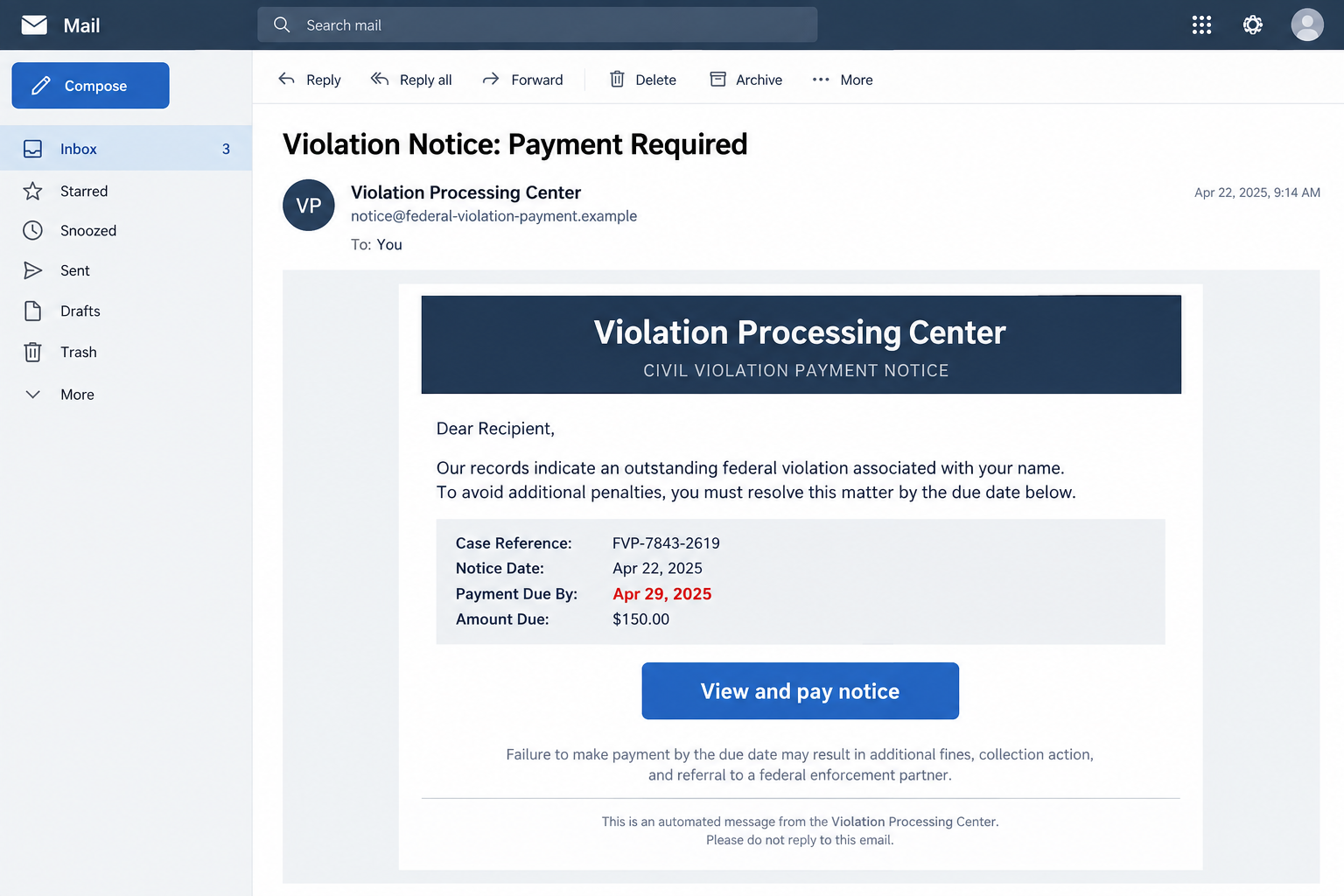
A victim may arrive through an email, text, search result, advertisement, or mistyped address. The court confirms the fake website, but its public summary does not establish one universal delivery message.
That distinction protects readers from false certainty. Do not assume you are safe merely because your email wording differs from an example. The decisive question is whether the payment destination is official.
A counterfeit form may collect personal data before showing the card fields. Even closing the page before payment does not undo information already submitted.
Authority and urgency make the page persuasive
A violation notice carries consequences. Words such as federal, district court, penalty, and enforcement can make people hurry even when the page contains warning signs.
The scammer may add a short deadline, an amount due, and a case-like reference. Those details can be generated automatically. A number displayed by the site does not prove it exists in a court system.
- The message or search result leads to a commercial-looking domain.
- The page uses federal language but provides no independently verifiable record.
- A deadline appears immediately and discourages further checking.
- The form requests card data before you confirm the notice elsewhere.
- Navigation links are broken or return to the same payment form.
Why a Fake Court Payment Page Can Look Real
Government web design is easy to imitate. A navy header, a seal-like circle, formal typography, and a privacy link can be assembled without any government access.
HTTPS does not solve that problem. The padlock shows that the connection to the website is encrypted. It does not certify that a court owns the site.
The page may also copy accurate public information, such as agency names or general payment instructions. Criminals can combine real facts with a fraudulent form.
A convincing layout should therefore trigger a domain check, not end one. Read the complete address and compare it with a link you obtained from an official .gov court page.
If you cannot establish who operates the portal, do not enter a notice number or personal detail as a “test.” A fake site can save partial entries.
What the Fake Payment Form Wants
Card number, expiration date, security code, billing address, and phone number allow direct payment fraud. A name and notice reference can also support a more believable follow-up call.
Some sites may ask for a Social Security number, driver’s license, or date of birth under the excuse of matching the notice. The Florida court’s public summary does not say every one of those fields appeared on the reported site.
Others may redirect to a second form that requests an email password or one-time code. Treat each new request as a separate risk. Completing the first screen never obligates you to finish the rest.
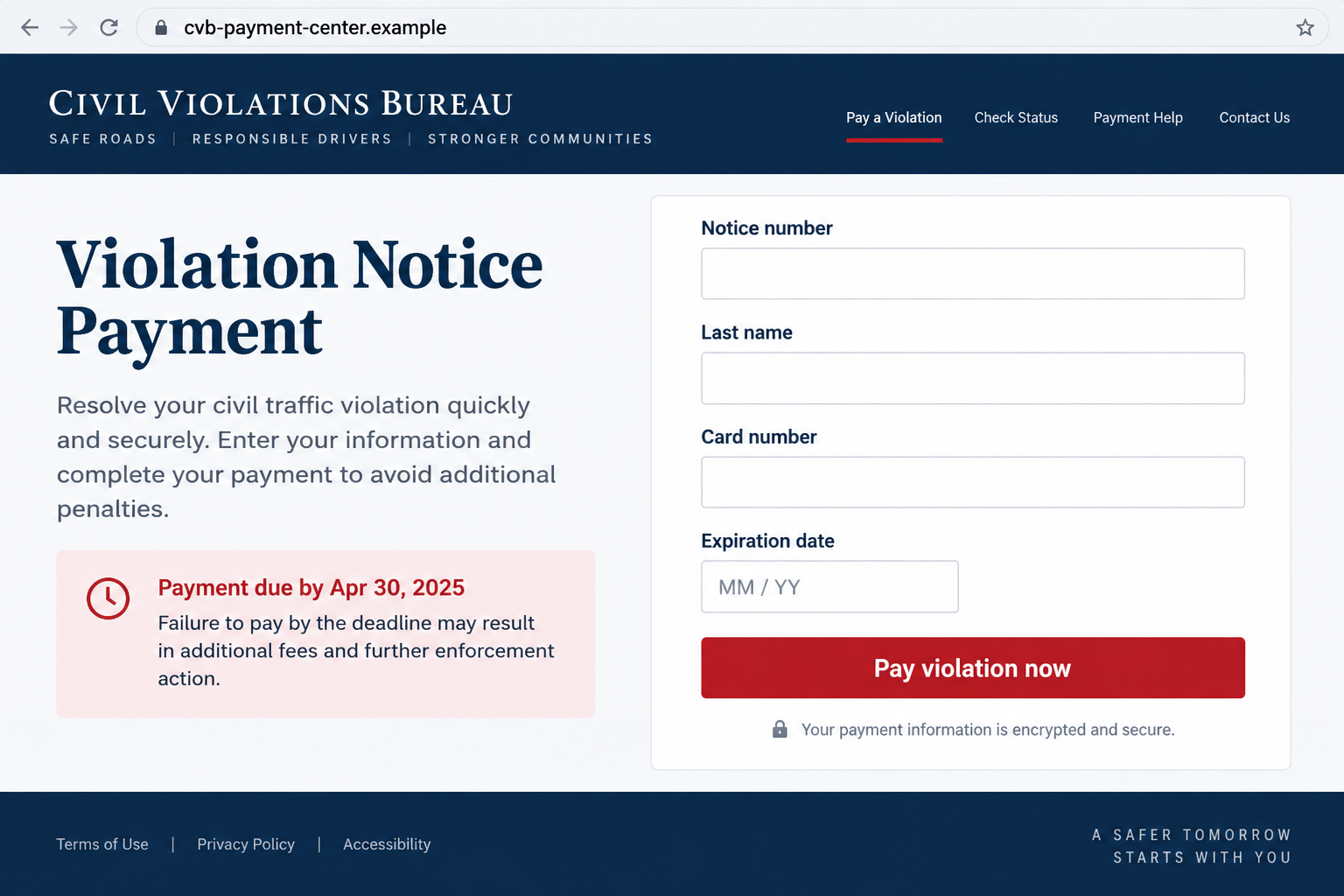
The reconstruction below uses a fictional .example domain and invented details. It shows how ordinary a card-stealing page can look without reproducing an active scam site.
How the Fake Federal Violation Notice Payment Scam Works
Step 1: The victim is given a reason to expect a penalty
A message may claim that a traffic, park, property, or other federal violation remains unpaid. It can be vague enough to apply to many recipients.
Alternatively, someone already holding a real notice may search for the payment site and encounter a fraudulent result. In that case, the violation is real but the destination is not.
Never let a genuine obligation authenticate the webpage in front of you. Verify the website separately.
Step 2: A deadline turns checking into delay
The page may warn about late fees, collections, court action, or enforcement. The exact threat can change according to the audience.
Urgency narrows attention to the payment button. It also makes calling an official clerk feel like an unnecessary complication.
A short pause is cheaper than giving a criminal your card. Close the page and locate the court or agency through a known government directory.
Step 3: Official visual cues replace real verification
The fake site uses a government-sounding title, formal colors, and case terminology. A footer may contain links labeled accessibility, privacy, or contact.
Clicking those links is not a safe investigation method. They can be copied, broken, or designed to send you back to the payment form.
Check ownership through the official court site instead. A logo is decoration; a confirmed government route is evidence.
Step 4: The form collects notice and identity details
The first fields may request a notice number and last name. That feels like a normal lookup, but it can also give the scammer structured information about the victim.
The page may show a result even when random details are entered. A generated balance is not a match against an official database.
Do not continue just to see whether the amount looks right. The site controls every response on the screen.
Step 5: Card entry turns fear into a transaction
The final form requests payment data and may show a timer or red deadline. After submission, the site can display a receipt while the criminal retains the card details.
A small initial charge does not prove the notice was paid. It may be a test before larger unauthorized transactions.
Contact the card issuer through the number on the card or official app if you submitted the information, even when no charge is visible yet.
Step 6: Follow-up contact extends the fraud
The scammer now has the victim’s contact details and knows the violation story was effective. A caller may claim that payment failed or that another fee is required.
A supposed fraud investigator may offer a refund while asking for an authentication code. That is another attempt to gain access.
End contact and use only independently verified court and bank channels.
Company and Website Checks for a Violation Notice
Start with the court named on the document
Find the court through the official U.S. Courts directory or a known .gov page. Do not type a web address printed in a suspicious email until you have compared it with an official source.
Call the clerk using the number on that verified site when the payment route or notice itself is unclear.
Read the registered domain, not the page title
A scammer can place “federal,” “court,” or “violation” anywhere in a domain. Those words do not convert a commercial domain into a government site.
Check the address again after every redirect. The destination that receives your card data matters more than the first link you clicked.
Match the notice through an independent channel
Ask the official court or issuing agency whether the reference exists and which payment methods are authorized. Do not use a phone number displayed only on the questionable page.
A mismatch means you should stop. A match means only that the notice is real; you still need the genuine payment route.
Demand a traceable receipt in the real system
A receipt generated by the suspected website proves only that the site can display a confirmation page. Verify the payment through the issuing authority and your card provider.
Save any reference number, but do not send more money because the fake portal claims the first attempt failed.
How to Pay a Real Notice Without Following a Scam Link
Begin with the paper notice or official court page, then navigate from there. If you received only an electronic message, independently locate the agency before treating the notice as genuine.
Search advertisements can resemble ordinary results. Look for the government domain label and avoid sponsored payment sites that are not clearly connected to the issuing authority.
When the instructions conflict, stop and call. A clerk can confirm the proper route without requiring your complete card number or an email password.
Keep the real notice and official receipt together. That record helps distinguish an unpaid obligation from money lost to a counterfeit portal.
Check the notice for the issuing office, location, and date before searching. Those details help you reach the correct court rather than a generic payment page.
When calling, read only the information needed to locate the record. A clerk should not need your email password, bank login, or one-time authentication code.
If the official office cannot find the notice, ask how it wants the suspicious document reported. Do not return to the sender for clarification.
Use a credit-card statement or bank app to confirm where a payment actually went. A merchant descriptor unrelated to the court is another reason to call the issuer immediately.
Do not assume a low amount makes the portal harmless or low risk. A small payment can test whether the card works, collect billing details, and identify a victim who responds to very similar future government-themed demands.
A real payment route remains official even when you take time to verify it.
What to Do if You Have Fallen Victim to This Scam
-
Stop using the site and save the evidence. Record the complete address, the route that brought you there, the time, and screenshots of the form or receipt.
Do not revisit the site or submit a second payment. Preserve the original email or text if one was involved.
-
Call the card issuer or bank immediately. Use the number on the card, statement, or official app. Explain that payment data was entered into a site impersonating a federal violation portal.
Ask about replacing the card, blocking pending activity, and disputing unauthorized charges. Follow the provider’s instructions rather than a number on the fake receipt.
-
List every piece of information you entered. Separate card data from identity details, account passwords, and one-time codes. Each exposure needs a different response.
Change exposed passwords from a trusted device and remove reuse. If a one-time code was shared, tell the affected provider what action it may have approved.
-
Verify the real notice with the issuing authority. Reach the court or agency through an official government site. Ask whether the notice exists and whether any legitimate balance remains.
Money sent to the scammer does not settle a real violation. Avoid late consequences by handling the genuine obligation through the confirmed route.
-
Report the counterfeit site. File reports with the appropriate court, your financial provider, the FTC at ReportFraud.ftc.gov, and IC3 when the incident involved online fraud.
Provide the URL and screenshots, but remove full card numbers and sensitive identifiers from copies sent through ordinary email.
-
Check for malware only if the site caused a download. Entering card data is a financial and identity exposure. Downloading a file or installing software adds a device concern.
Malwarebytes can help scan a supported personal device. AdGuard can block some known malicious sites and deceptive ads, but neither product cancels a card or pays a real notice.
Frequently Asked Questions
Did a federal court confirm the fake website?
Yes. The Northern District of Florida posted a September 9, 2026 alert saying a fake website was impersonating online U.S. District Court Violation Notice payments.
Does HTTPS mean the payment portal is official?
No. HTTPS encrypts your connection to the site. Criminal sites can obtain certificates too. Confirm the domain through an official court page.
What if I have a real violation notice?
A real notice does not make every payment site legitimate. Verify the authorized route with the issuing authority before entering payment data.
Can the fake site charge my card later?
Yes. Submitted card data can be retained and used after the page shows a receipt or error. Contact the issuer promptly.
Should I test the site with a fake notice number?
No. Visiting and interacting further adds risk and may disclose technical or contact information. Preserve what you already have and report the URL.
Are the images in this article the actual fake site?
No. They are non-functional reconstructions with fictional .example domains. They illustrate the confirmed scam without directing readers to an active fraudulent page.
The Bottom Line
The fake federal violation notice payment scam does not need to invent an unbelievable story. It waits for fear, a real-looking form, or even a genuine notice to make the wrong website feel official.
Start from the court’s verified page, confirm the notice independently, and call your card issuer immediately if you entered payment details on a suspicious portal.

Join the discussion
0 commentsShare your experience or ask a question about this article.
Discussion
Start the conversation
Have a question or something useful to share? Add the first comment.