

An email saying your mailbox is about to be deleted can make even an experienced user react before thinking. Losing years of messages sounds too serious to ignore.
The Account Violation Notice Email Scam weaponizes that fear. Its red warning and urgent validation button lead toward a counterfeit Gmail sign-in form made to steal credentials.
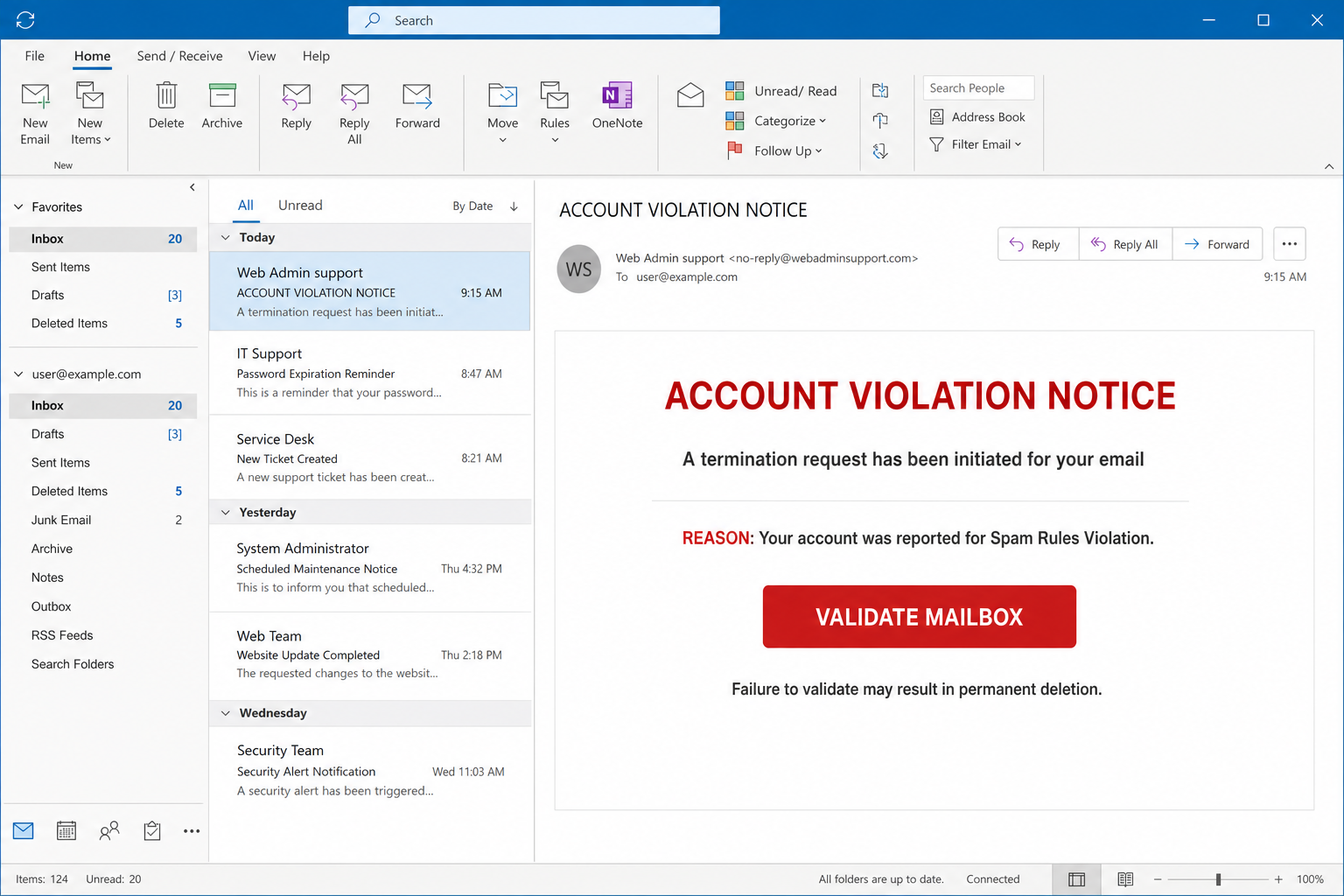
The observed message used the subject ACCOUNT VIOLATION NOTICE and claimed a termination request had started because the mailbox was reported for violating spam rules.
A large VALIDATE MAILBOX button offered the supposed solution. The sender called itself Web Admin support, a vague label that can sound relevant to almost any workplace.
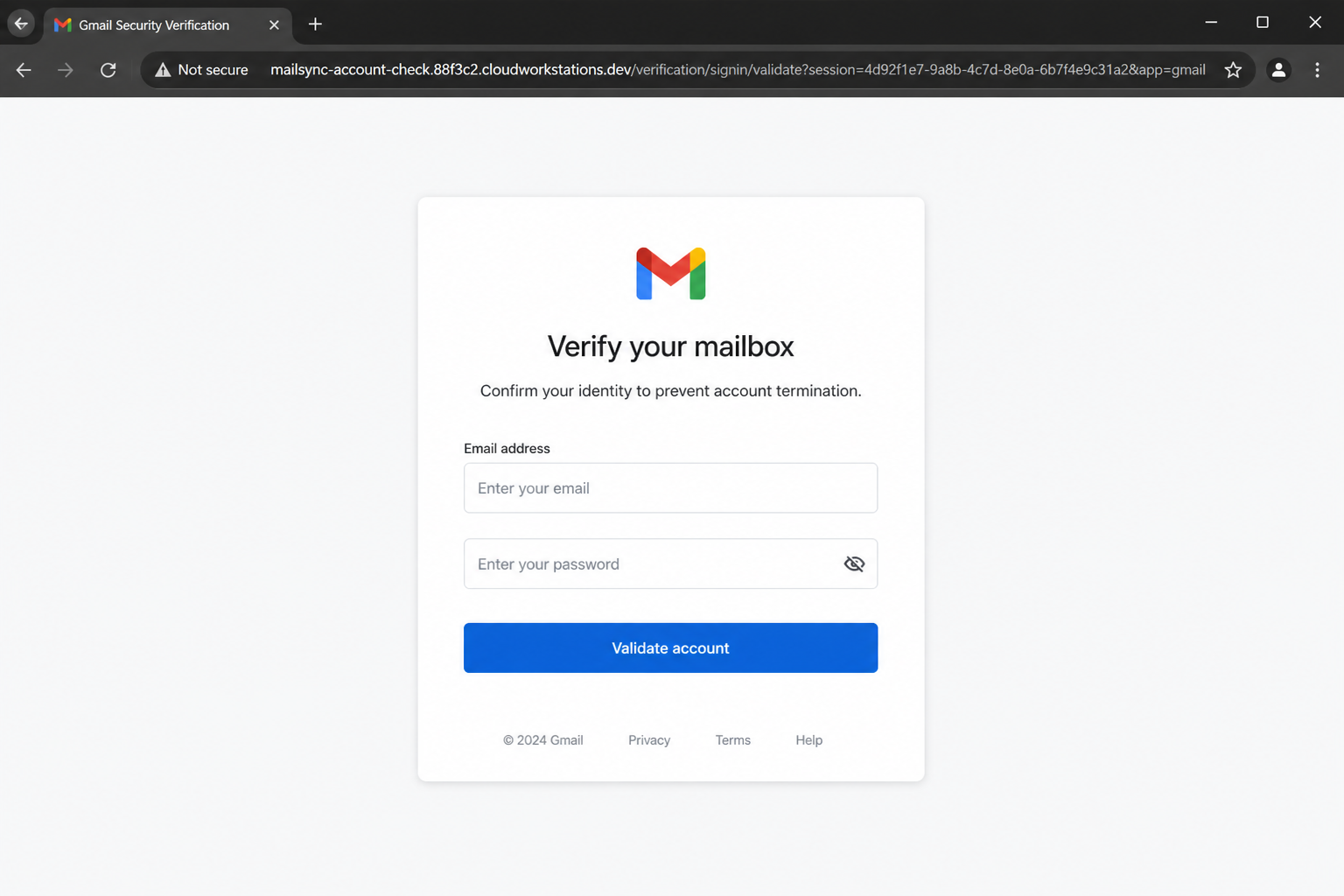
The link opened a Gmail-themed page on an unrelated cloudworkstations[.]dev address. Submitted details would reach phishers, not Google.
Overview
The warning invents an account emergency
The email does not document an actual complaint, message, policy case, or administrator. It simply announces a severe consequence and gives the reader one immediate button.
That structure is deliberate. A frightened recipient is more likely to focus on preventing deletion than checking who sent the notice or where the link goes.
- The subject is written in capital letters to demand attention.
- A supposed spam-rule violation creates shame and uncertainty.
- Permanent deletion is presented as the consequence of inaction.
- Mailbox validation is framed as the only way to stop termination.
The linked page imitates Gmail but uses the wrong host
The credential page places a Google-style sign-in panel over a familiar Gmail background. A recognizable interface can distract from the address displayed above it.
In this campaign, the page was served from a long Google Cloud Workstations hostname. Access to a Google service does not make customer-created content an official Gmail form.
- The hostname does not end with google.com or accounts.google.com.
- The form is reached through an unsolicited termination notice.
- The page asks for a password to resolve an unspecified complaint.
- A legitimate Google sign-in flow should remain on a clearly recognized Google domain.
Stolen email credentials can unlock far more than messages
A mailbox often controls password resets for banking, shopping, social, cloud, and workplace accounts. One captured password can therefore become the starting point for wider compromise.
Criminals also search messages for invoices, identity documents, customer lists, and ongoing payment conversations. They can impersonate the victim from inside a trusted thread.
- Saved mail may reveal financial and personal information.
- Password reset links can help attackers seize connected services.
- Existing conversations support convincing business email compromise.
- Contact lists can be reused for new phishing messages sent from the real account.
Why the Account Violation Story Creates Panic
The accusation is serious but deliberately vague
Most people do not know whether their address was reported or whether an automated rule could suspend it. The absence of detail leaves room for the reader’s imagination.
A genuine enforcement notice should identify the provider, affected account, policy context, and a safe review path. Vagueness helps one phishing template fit many recipients.
Email deletion threatens irreplaceable information
Messages can contain family records, receipts, contracts, photographs, and years of business history. The fear of losing them makes urgent instructions unusually persuasive.
Scammers depend on that emotional value. They want the reader to click while imagining the loss, not while calmly examining the sender and destination.
A red validation button appears to restore control
After creating anxiety, the email offers a simple action that seems to fix everything. One click feels easier than contacting support or investigating account activity.
The button label avoids the word password. The credential demand appears only after the recipient has already accepted the story and entered the fake portal.
What Criminals Can Do With a Compromised Mailbox
They can reset other account passwords
Many services treat email access as proof of identity. An intruder can request reset messages, open them, change passwords, and delete the evidence from the inbox.
Accounts without strong multi-factor authentication are particularly exposed. Reused passwords can give the criminal additional access without needing resets.
They can study real payment conversations
An attacker may quietly monitor invoices and vendor discussions until a transfer is expected. A reply from the genuine mailbox can then substitute fraudulent banking details.
Because the message stays inside an established thread, the recipient may overlook changes in tone, attachment format, or payment destination.
They can hide their continued access
Mailbox rules may forward selected messages, move security alerts, or delete replies. The account owner might change a password but miss a malicious forwarding configuration.
Session cookies and application passwords may work independently. Review sessions, connected applications, delegates, rules, and recovery information.
How the Account Violation Notice Email Scam Works
Step 1: The campaign sends a generic termination warning
Attackers distribute the same notice to personal and business addresses. Generic branding lets the message avoid naming a provider that would be obviously wrong for some recipients.
The sender identity may be spoofed or registered solely for phishing. A friendly display name such as Web Admin support does not verify the underlying address.
Step 2: The message claims a spam-policy report
The recipient is told the mailbox broke spam rules and faces termination. No offending message, report number, or policy excerpt is supplied for independent review.
The accusation exploits uncertainty about bulk mail and spam rules. A reader may wonder whether an ordinary action triggered enforcement.
- The notice uses authoritative formatting without naming a responsible organization.
- It offers no safe route to inspect the alleged violation inside account settings.
- The punishment is described more clearly than the supposed evidence.
Step 3: The recipient is urged to validate the mailbox
A large button promises to prevent deletion. The phrase sounds administrative, but validating a mailbox is not a standard reason to submit its current password on a linked page.
Desktop users can hover over the button to preview its destination. Mobile users should hold the link cautiously or inspect it without opening when their mail application allows.
Step 4: The browser opens an unrelated hosted application
The destination used a lengthy cloudworkstations[.]dev subdomain. Legitimate development services can still host customer-created deceptive content.
This is an important distinction. A familiar provider somewhere in a hostname does not mean Gmail, Google support, or the recipient’s administrator created the page.
Step 5: A counterfeit Gmail form collects the password
The fake portal may prefill an address taken from the phishing link, making it appear personalized. It asks for the mailbox password under the pretext of confirming ownership.
Submitting the form sends the information to the campaign operator. The page may show an error and request the password again so the criminal captures multiple attempts.
- A copied Gmail logo is only an image and provides no security.
- The address bar remains more reliable than the page’s visual design.
- Unexpected password prompts should be abandoned and checked through a fresh browser tab.
Step 6: The operator tests the credentials and security controls
Automated tools or a human can attempt a login soon after submission. If multi-factor authentication is enabled, the attacker may trigger prompts or ask for a one-time code.
Repeated approval notifications can become an MFA-fatigue attack. Never approve a sign-in you did not start, even if the notification appears moments after the phishing form.
Step 7: The stolen account supports further fraud
After gaining access, the intruder can search for valuable services, active invoices, and trusted correspondents. New phishing messages may then come from the victim’s authentic address.
The original violation notice can disappear while the compromise continues. Quiet forwarding rules and persistent sessions make delayed discovery possible.
Company, Address, and Fulfillment Checks
Gmail and Google are being impersonated
The fake sign-in design borrows familiar Google elements, but the observed form was not hosted on the normal Google Accounts domain. Appearance is not provider authentication.
Google advises users to open account security information directly and avoid entering passwords after following suspicious message links. The company is not responsible for the copied page.
Web Admin support is not a verifiable identity
The display name describes a role rather than an organization. It does not tell the reader which provider, employer, or administrator supposedly initiated the termination.
Compare the complete From and Reply-To addresses with previous legitimate notices. Even a matching address can be spoofed, so the link destination still requires examination.
The cloudworkstations address is customer-controlled
The fraudulent form used infrastructure associated with a legitimate cloud development product. Online platforms can host user projects without endorsing or reviewing every page in advance.
The relevant question is whether the exact hostname belongs to the service you intended to visit. An unrelated development subdomain is not an acceptable Gmail login destination.
A real administrator can be contacted separately
Work users should call the internal help desk through a known number or open the established support portal. Personal users can type the provider’s account address directly.
Do not reply to the suspicious email for confirmation. Replies may reach the same operator who created the warning and will naturally insist that the request is genuine.
Warning Signs in the Account Violation Email
The threat arrives before any useful evidence
The message jumps from a vague spam allegation to permanent deletion. It does not identify a disputed email or let the recipient inspect a case within normal account settings.
Real providers may send security notices, but important actions should remain available after independently signing in. A linked form should never be the sole path.
- A generic sender claims authority over an unnamed email service.
- Capital letters and red text amplify panic instead of explaining the issue.
- The button’s destination is unrelated to the provider’s normal login domain.
- The page asks for a current password to prevent an invented deletion.
The login origin contradicts the Gmail design
A website can display the Gmail logo from anywhere. Only the browser’s hostname identifies the server receiving the information entered into its form.
Long subdomains are often used to push the important registered domain out of view. Expand the address bar and inspect the ending before typing anything.
How to Verify a Real Mailbox Security Alert
Open the account dashboard yourself
Close the email and start a new browser session. Use a saved bookmark, official application, or manually typed provider address to review security events and policy notices.
If no warning appears in the account, do not return to the message. Report it through the mail client’s phishing control and remove it from shared inboxes.
Check recent sign-ins and recovery details
A genuine security dashboard shows device, location, time, and session information. Review those details rather than trusting a generic statement delivered by email.
Confirm that recovery addresses, telephone numbers, application passwords, and authorized devices remain yours. Unexpected changes require immediate containment.
Ask a known administrator when the mailbox is managed
Company and school accounts may have local policies that differ from consumer Gmail. Contact the responsible team through a directory or previously used support channel.
Forward the suspicious message as an attachment if requested. That preserves technical headers that can help administrators block related deliveries.
How to Protect Email Accounts From Similar Phishing
Use unique credentials and phishing-resistant authentication
A password manager can create a unique password and refuse to autofill it on the wrong hostname. That behavior is a valuable warning during a convincing imitation.
Security keys and passkeys provide stronger phishing resistance than typed one-time codes. Enable the strongest option your provider and recovery process support.
Treat unexpected validation links as hostile
Mailbox providers already know which account is signed in. An unsolicited request to re-enter its password deserves independent verification every time.
Report suspicious examples promptly so domain administrators can block the sender and warn other users before more credentials are submitted.
What to Do if You Have Fallen Victim to This Scam
- Open the real email provider through a bookmark or manually typed address and change the password immediately. Choose a unique replacement that is not used on any other service.
- Sign out unfamiliar devices and, when available, invalidate all existing sessions. A password change may not automatically terminate every stolen browser token or application session.
- Review multi-factor methods, recovery contacts, forwarding addresses, delegates, application passwords, mail rules, filters, and connected applications. Remove every entry you did not create.
- If the old password was reused, change it on each affected account, beginning with financial, cloud, social, and domain-management services. Never make a predictable variation.
- Warn workplace administrators and close contacts if the mailbox sent messages after compromise. Ask recipients to ignore links, attachments, payment changes, or password-reset requests.
- Preserve the original email, full headers, phishing URL, screenshots, login-alert times, and any fraudulent sent mail. Report the incident to the provider and relevant cybercrime authority.
- Run a full Malwarebytes scan if you downloaded a file, installed an extension, or entered credentials on a device that now behaves unexpectedly. Update software before resuming sensitive work.
- Use AdGuard or another trustworthy blocker to reduce known phishing pages and malicious advertising. Continue checking domains because no filtering system catches every newly created site.
Is Your Device Infected? Run a Free Malware Scan
Slow performance, constant pop-ups, or strange behavior? These are classic signs of a malware infection. The fastest way to find out is to scan your device with Malwarebytes Free — one of the most trusted malware removal tools available.
The free version detects and removes the most common threats, including:
- Adware — the cause of those annoying pop-ups
- Browser hijackers — unwanted redirects and changed homepages
- Trojans and spyware — hidden programs stealing your data
- Potentially unwanted programs (PUPs) — software you never asked for
👉 Select your device below — Windows, Mac, or Android — then follow the simple steps to download Malwarebytes, scan your system, and remove any threats it finds. The scan usually takes 5 to 20 minutes.
Run a Malware Scan with Malwarebytes for Windows
Malwarebytes is one of the most popular and trusted anti-malware tools for Windows — and it’s completely free for removing infections. It catches threats that many antivirus programs miss, including adware, browser hijackers, and trojans. Follow the steps below to scan and clean your PC in just a few minutes.
Download Malwarebytes
Click the button below to download the latest version of Malwarebytes for Windows from the official source. The free version is all you need — it will scan your computer and remove adware, browser hijackers, and other malicious software at no cost.
Download MalwarebytesOfficial installer for Windows 11 and 10. Your download starts right away.Want real-time protection? See Malwarebytes Premium Malwarebytes Free for WindowsScans and removes malware at no cost
-
Install Malwarebytes
When the download finishes, open your Downloads folder and double-click the MBSetup file. If Windows shows a User Account Control pop-up, click “Yes” to allow the installation.

Follow the On-Screen Prompts to Install Malwarebytes
The setup wizard will walk you through a few quick screens:
-
Choose where you’re installing the program — “Personal Computer” or “Work Computer” — then click Next.

-
Malwarebytes will now install on your device. This usually takes under a minute.

-
When installation is complete, the “Welcome to Malwarebytes” screen will open automatically.

-
On the final screen, click Open Malwarebytes to launch the program.

-
Enable “Scan for Rootkits”
Before scanning, turn on rootkit detection so Malwarebytes can find even the most hidden threats. Click the Settings gear icon on the left side of the screen.

In the settings menu, find “Scan for rootkits” and click the toggle so it turns blue.

Done? Click “Dashboard” in the left pane to return to the main screen.
Start the Scan
Click the blue Scan button. Malwarebytes will automatically update its virus database and start checking your computer for malware.

-
Wait for the Scan to Finish
The scan checks your entire system for browser hijackers and other malicious programs, so it can take 5 to 20 minutes depending on your computer. Feel free to do something else — just check back occasionally to see the progress.

-
Quarantine the Detected Threats
When the scan is done, you’ll see a list of everything Malwarebytes found — malware, adware, and potentially unwanted programs. Click the “Quarantine” button to remove all of them at once.

Malwarebytes will now remove the malicious files and registry entries and move them safely into quarantine.

-
Restart Your Computer
Some threats can only be fully removed after a reboot. If Malwarebytes asks you to restart, click Yes. Once you’re logged back in, Malwarebytes has finished removing the threats it found.

That’s it — your Windows PC is now clean of trojans, adware, and other malware, and should be back to running smoothly.
If you are still having problems with your computer after completing these instructions, then please follow one of the steps:
- Run a computer scan with ESET Online Scanner
- Ask for help in our Windows Malware Removal Help & Support forum.
Run a Malware Scan with Malwarebytes for Mac
Malwarebytes for Mac is a free on-demand scanner that removes the malware other security software tends to miss — adware, browser hijackers, and unwanted programs included. Cleaning an infected Mac with Malwarebytes has always been completely free, and it’s our go-to recommendation. Follow the steps below to scan and clean your Mac in just a few minutes.
-
Download Malwarebytes for Mac
Click the button below to download the latest version of Malwarebytes for Mac.
Download MalwarebytesOfficial installer for macOS. Your download starts right away.Want real-time protection? See Malwarebytes PremiumMalwarebytes Free for MacScans and removes malware at no cost -
Open the Malwarebytes setup file
When the download finishes, open your Downloads folder and double-click the setup file to begin the installation.

-
Follow the On-Screen Prompts to Install Malwarebytes
The Malwarebytes for Mac Installer will guide you through a few quick screens. Click “Continue” and keep following the prompts until the installation completes.



When the installation is complete, Malwarebytes opens to the Welcome to Malwarebytes screen. Click “Get started“.
-
Select “Personal Computer” or “Work Computer”
Malwarebytes will ask what type of computer you’re installing it on. Click either Personal Computer or Work Computer, whichever applies.

-
Start the Scan
Click the “Scan” button. Malwarebytes will automatically update its detection database and begin checking your Mac for malware.

-
Wait for the Scan to Finish
Malwarebytes will scan your Mac for adware, browser hijackers, and other malicious programs. This can take a few minutes, so feel free to do something else — just check back occasionally to see the progress.

-
Quarantine the Detected Threats
When the scan is done, you’ll see a list of everything Malwarebytes found. Click the “Quarantine” button to remove all the threats at once.

-
Restart Your Mac
Malwarebytes will now remove all the malicious files it found. Some threats can only be fully removed after a reboot — if Malwarebytes asks you to restart, allow it. Once you’re logged back in, your Mac is clean.

That’s it — your Mac is now free of adware, rogue browser extensions, and other potentially harmful software.
If you are still experiencing problems while trying to remove a malicious program from your computer, please ask for help in our Mac Malware Removal Help & Support forum.
Run a Malware Scan with Malwarebytes for Android
Malwarebytes for Android automatically detects and removes dangerous threats like malware and ransomware so you don’t have to worry about your most-used device being compromised. Aggressive detection of adware and potentially unwanted programs keeps your Android phone or tablet running smooth.
-
Download Malwarebytes for Android.
You can download Malwarebytes for Android by clicking the link below.
Get Malwarebytes for AndroidOpens Google Play in a new tab.Want real-time protection? See Malwarebytes Premium for AndroidMalwarebytes for AndroidScans your phone and removes malware at no cost -
Install Malwarebytes for Android on your phone.
In the Google Play Store, tap “Install” to install Malwarebytes for Android on your device.

When the installation process has finished, tap “Open” to begin using Malwarebytes for Android. You can also open Malwarebytes by tapping on its icon in your phone menu or home screen.

-
Follow the on-screen prompts to complete the setup process
When Malwarebytes will open, you will see the Malwarebytes Setup Wizard which will guide you through a series of permissions and other setup options.
This is the first of two screens that explain the difference between the Premium and Free versions. Swipe this screen to continue.
Tap on “Got it” to proceed to the next step.
Malwarebytes for Android will now ask for a set of permissions that are required to scan your device and protect it from malware. Tap on “Give permission” to continue.
Tap on “Allow” to permit Malwarebytes to access the files on your phone.
-
Update database and run a scan with Malwarebytes for Android
You will now be prompted to update the Malwarebytes database and run a full system scan.

Click on “Update database” to update the Malwarebytes for Android definitions to the latest version, then click on “Run full scan” to perform a system scan.

-
Wait for the Malwarebytes scan to complete.
Malwarebytes will now start scanning your phone for adware and other malicious apps. This process can take a few minutes, so we suggest you do something else and periodically check on the status of the scan to see when it is finished.

-
Click on “Remove Selected”.
When the scan has been completed, you will be presented with a screen showing the malware infections that Malwarebytes for Android has detected. To remove the malicious apps that Malwarebytes has found, tap on the “Remove Selected” button.

-
Restart your phone.
Malwarebytes for Android will now remove all the malicious apps that it has found. To complete the malware removal process, Malwarebytes may ask you to restart your device.
That’s it — your Android phone is now clean — no more malicious apps, adware, or browser redirects.
If you are still having problems with your phone after completing these instructions, then please follow one of the steps:
- Restore your phone to factory settings by going to Settings > General management > Reset > Factory data reset.
- Ask for help in our Mobile Malware Removal Help & Support forum.
Stay Protected: Block Ads and Malicious Sites
Now that your device is clean, keep it that way. Most infections start with a malicious ad or a fake download button — so blocking them at the source is your best defense.
We recommend AdGuard, which blocks malicious ads, phishing pages, and dangerous redirects before they can reach you.
👉 Download AdGuard and browse safely
Frequently Asked Questions
Is the Account Violation Notice a real Gmail warning?
The observed message is phishing. Its generic sender, unsupported termination claim, and unrelated hosted login page do not establish a legitimate Gmail action.
Why does the fake page look like Google?
Brand assets and login layouts are easy to copy. The browser hostname, not a familiar logo or background image, identifies where credentials are submitted.
Is cloudworkstations[.]dev itself a phishing company?
No. It is associated with a legitimate cloud development service, but user-controlled infrastructure can be abused. The observed subdomain was not a proper Gmail login origin.
What if I entered my email but not my password?
Risk is lower, but the address may receive more targeted phishing. Close the page, enable strong authentication, and watch for unexpected sign-in prompts.
What if I approved an unexpected authentication prompt?
Use the official security dashboard immediately, change the password, revoke sessions, inspect account settings, and notify your administrator if the mailbox is managed.
Can a provider delete an account for spam violations?
Providers can enforce policies, but any case should be reviewed through the official account portal or known support route, never solely through an unsolicited login link.
The Bottom Line
The Account Violation Notice Email Scam creates a frightening mailbox emergency and then supplies a counterfeit Gmail form as the cure. The unrelated hostname exposes the deception.
Do not use the validation button. Sign in through the provider’s recognized address, report the message, and secure the account immediately if any credentials were submitted.

Join the discussion
0 commentsShare your experience or ask a question about this article.
Discussion
Start the conversation
Have a question or something useful to share? Add the first comment.