


A familiar mascot can make a link in a trading chat feel like it belongs there. If you’ve used a bot before, you might recognize its artwork before its address.
The page in this case used the Hypurr Fun name and looked like a shortcut for traders. The thing to check is what kind of shortcut it offered.
Overview
The fake page offered a share of $500,000 in HFUN
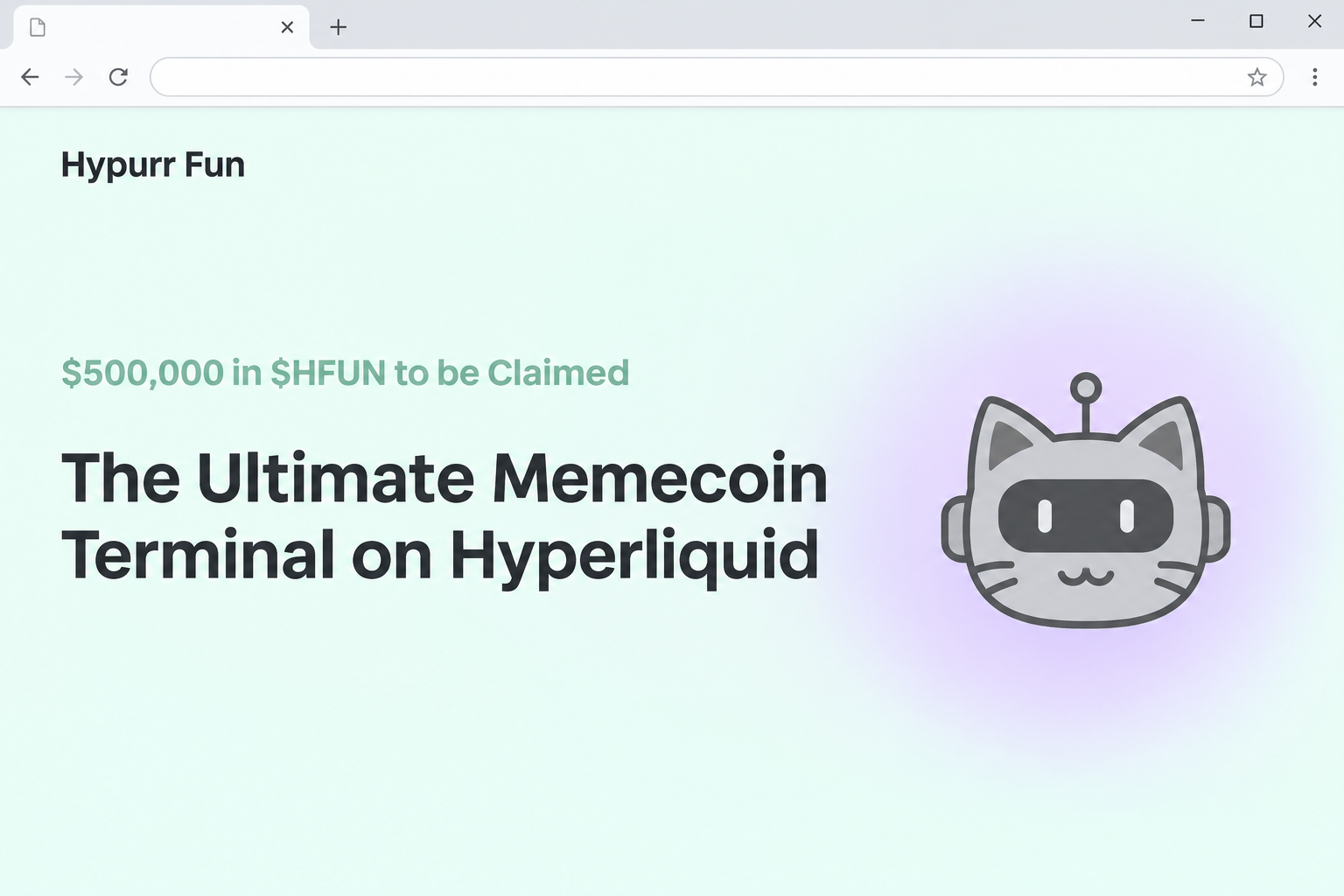
The fake Hypurr Fun allocation page appeared at hypurrfun[.]app. It described itself as a memecoin terminal on Hyperliquid and claimed there was $500,000 in HFUN to be claimed.
That was the claim about the pool, not a balance shown for any individual. It came with a countdown and language suggesting that trading activity could establish eligibility.
A panel said it needed a Hyperliquid-compatible wallet to verify trading volume. The recorded screen then showed a wallet picker, not a volume result or a completed distribution.
Someone seeing the page could recognize the cat mascot and think they had reached the right place. The full address gave them better information than the artwork did.
The real service is organized around a Telegram trading bot
Hypurr Fun’s own website describes its Telegram bot as a way to launch and trade memecoins on Hyperliquid. The project site uses hypurr.fun, with a dot between the words.
The imitation had a separate .app address and displayed words referring to Telegram. The presence of those words did not establish that any visible link opened the genuine bot.
A group message about a bot and a page asking you to sign something are two separate interactions. Verify both before you trust either one.
The project name, real bot, and HFUN label explain why the lure makes sense to traders. They do not tell you who runs an allocation page on an unrelated address.
Trading history isn’t the same as permission to use your assets
The imitation framed the connection as a way to check volume. That makes it sound as though you are only letting somebody read a record of trades you already made.
A wallet can show different categories of requests, and those categories matter. Looking up an address is different from approving spending or authorizing an asset movement.
The archive stops at the chooser, so don’t assume every visitor approved something or lost funds. Your own response should be based on what happened in your wallet.
- Start at the real project site, rather than reaching the bot through a reward banner.
- Check which account actually traded before trusting any eligibility statement.
- A pool total doesn’t say what a particular trader could get.
- A countdown doesn’t settle questions about who published the request.
How the Fake Hypurr Fun Allocation Scam Works
Step 1: The page borrows a service you may already use
The name, mascot, and references to Hyperliquid make the offer feel like part of a familiar service. You don’t have to be looking for free tokens to recognize the page.
The promise of rewarding traders ties the allocation to something that seems measurable. If you’re active in a trading chat, you may assume the site is checking your actual record.
The capture does not identify which group or message sent visitors there. If somebody forwarded the link from a chat, verify its original source rather than trusting the latest sender.
Read the full address once before considering the reward. The genuine domain splits the brand at the dot; the captured claim squeezed the name together under a separate ending.
Step 2: The payout figure and timer make delay feel expensive
A large pool figure draws attention, while the countdown suggests you could miss your share. The two details direct your attention away from the question of who posted the offer.
The page did not show the amount assigned to an individual account. The number on the banner was visible before any confirmed identity or trading history appeared.
Ask what official program the timer describes. A real eligibility deadline should be tied to published terms, not merely to a changing counter on a site you don’t recognize.
If the supposed deadline passes while you’re verifying it, don’t search for a replacement claim link. Someone can post another copy with a timer that’s still running.
Step 3: A trading-volume check turns into a wallet decision
The prompt says you need to connect to verify your eligibility. The recorded visit shows a wallet selector overlay with familiar provider names.
That screen doesn’t prove the page was reading your trades, and familiar wallets can appear on an imitation. It’s important to check where the request originated.
A real trading bot you used in the past does not authorize a new browser link.
If you want to check your history, go to the place that actually recorded it.
Don’t let an unexpected prompt force you to choose among different wallets. You should know which account the offer refers to before it asks you to involve any of them.
Step 4: A later approval can do more than check trading volume
Connecting can reveal an address and allow a site to make additional requests. That doesn’t mean the site already has permission to move your assets.
If you approve a transaction or spending permission, the effects depend on what you approved. That is a separate decision from opening a chooser or completing a connection.
Read the request from the wallet itself, not the page promising a share. Decline anything that asks for an unexpected transfer or that you cannot connect to the legitimate program.
If you’re told the request is “just verification,” do not take that label as a description of the action.
A page can keep its story even when the wallet shows something else.
What to Do if You Have Fallen Victim to This Scam
-
Leave the claim page and reject any prompt it left open. Do not accept a second request saying the first one timed out or needs a final signature.
If you only saw the page, save the name of the group or thread where you found it. You don’t need to load the site again to report it.
-
Review the wallet you used for the claim. Check the account address and the relevant network, then remove the imitation from connected apps if it is listed.
The page referred to a Hyperliquid-compatible wallet, but the wallet activity is where you should confirm the actual network involved in a request.
Compare the time of the session with the time of any approvals or asset movements. Do not assume a connected wallet always generated a transaction.
-
If you approved a request, find out exactly what changed. Record any transaction identifier, token, amount, and recipient from your wallet’s own activity.
Follow your provider’s instructions to check outstanding permissions. A previously granted approval or an authorization can be different from a simple website connection.
MetaMask’s incident guidance explains how to inspect an unauthorized transaction and protect a compromised wallet.
-
Protect the wallet separately if you shared a key or phrase. If that happened, follow official recovery guidance from a trusted device and use new recovery information.
Keep any account you create under the exposed phrase out of the recovery plan. Ask the wallet provider how to handle assets you can’t simply transfer.
If you also disclosed a Telegram login code to someone, secure Telegram through its own account settings. A wallet password reset cannot repair a separate chat-account exposure.
-
Tell the community what the link actually claimed. Give moderators the date, the name of the offer, and the unsafe domain in non-clickable form.
A confirmed on-chain transfer may not be reversible. If an exchange was involved, contact it with the public transaction record through authenticated support.
The FTC’s crypto fraud guide lists U.S. reporting options. Ignore unsolicited rescue offers that ask you to reconnect or pay.
How to Verify a Reward Mentioned in a Trading Chat
Find the official bot from the project, not the forwarded post
If someone sends you a bot name, start at the project site and find the route it describes. Similar names can be easy to confuse in a crowded search result.
An old official message can be reposted with a different link underneath it. Read the actual announcement and the publication channel rather than relying on a familiar picture.
Don’t treat instructions from a private message as an update to the official process. If something genuinely changed, you should be able to find out through a separate, trusted channel.
Use the account that actually generated the activity
A claim based on trades should describe which trading activity counts. Your usual browser wallet may not be the account you used for a prior session.
Open the official records you already have, rather than expecting a new third-party page to reconstruct them. Compare the dates, account identifier, and platform separately.
If you can’t find a real program, stop there. Changing accounts in the imitation won’t establish that it is entitled to ask for a connection.
Separate what your chat knows from what your wallet can do
A message can name a public wallet or a trade it saw without showing that its author operates the protocol. That partial knowledge can still make the request sound personal.
Your wallet should not be asked to confirm a request merely because somebody in a chat said it is next in the process. Check the origin and proposed action yourself.
Remember that people in the same group may face different risks. One person may have forwarded the link, while another may have approved an action or shared a code.
Compare what the bot does with what the browser claims
The real service presents itself as a way to use Telegram for trading.
The imitation put the same trading language around a different task: checking whether you could claim a reward.
That change matters if you already use the bot. A new browser window does not inherit the authority of a conversation or trade you completed through a different route.
Use direct messages carefully when checking the story. A newly created account using the project name can offer instructions without establishing that it belongs to the project.
If someone describes the reward as reimbursement for fees or compensation for a failed trade, ask where that policy was published. The language of eligibility doesn’t prove a real refund.
Save the link text when reporting the post, but do not promote another destination someone adds in the replies. Find the actual help channel through the established site.
If there are several versions of the same message, record which one you followed.
The advertised amount can help identify the lure without telling you which domain a button actually opened.
Frequently Asked Questions
Is hypurrfun.app the official Hypurr Fun allocation page?
The captured .app address was the imitation in this case.
Hypurr Fun’s established site uses hypurr.fun and describes a Telegram trading bot, not the offer shown at the other host.
Don’t access a claim through the imitation to check old trading activity. Start with the genuine service or records you already have.
Did the page prove it had $500,000 in HFUN to distribute?
No, the amount appeared in the promotional copy. It did not verify that a pool existed, that anyone funded it, or that your account was eligible.
Look for an independently confirmed announcement with a matching destination. You don’t have to accept the stated figure in order to report the link.
Does trading on Hyperliquid make me eligible?
The imitation suggested that trade volume mattered, but it did not authenticate an official program. Using the actual exchange doesn’t validate a reward offer on another domain.
Look up the specific terms from the project that purportedly runs the promotion. Don’t let the wallet chooser provide the only answer.
Was the Telegram button enough to prove the site was genuine?
A label referring to a real bot does not verify the surrounding site. Someone can copy a button without reproducing a legitimate relationship.
Find the bot independently from an established project source. Use the chat system you already trust rather than switching providers because a claim page says to.
Does opening the wallet menu spend my HFUN?
Seeing the menu is not evidence of spending. Check whether you completed the connection, authorized a separate request, or typed or uploaded anything confidential.
If you don’t recognize an action, look at the transaction history and permissions using your own wallet. Don’t click the claim again to see what it did.
What should I say when reporting a link in a group?
Tell the moderators what amount and brand the promotion used, when it appeared, and where it sent people. Give the address as plain defanged text.
Avoid circulating a live claim button as a screenshot with a link attached. Make it obvious that you’re warning people, not encouraging them to try it.
The Bottom Line
Don’t use the Hypurr Fun allocation lookalike. Its pool figure and countdown did not make it part of the actual trading bot or an authorized reward.
If you already interacted, check what your wallet recorded and respond to that action. For anything involving the genuine bot, begin at the project site rather than a forwarded claim.

Join the discussion
0 commentsShare your experience or ask a question about this article.
Community experiences
Did this happen to you?
Your experience could help someone recognize the same scam. Submit a private report for our team to review.
I experienced this tooReports are reviewed before publication. Sharing publicly is always your choice.
Discussion
Start the conversation
Have a question or something useful to share? Add the first comment.