


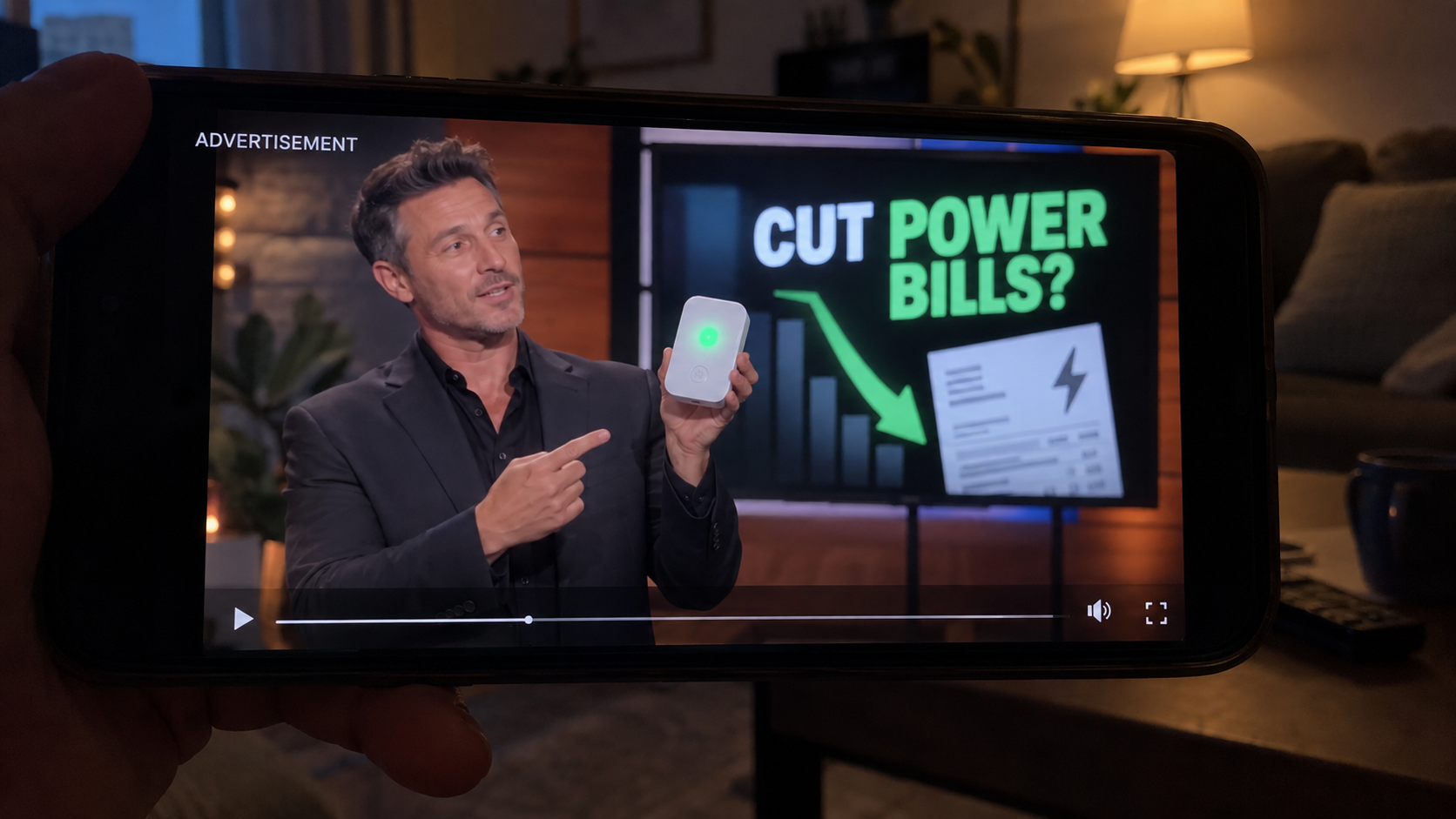
A polished television pitch shows a tiny plug-in box beside falling utility bills. The scene looks familiar enough to stop almost anyone scrolling.
Then the presentation adds investors, an electrician, and a limited discount. Each detail feels reassuring until the pieces are checked outside the advertisement.
Overview
The Shark Tank episode was manufactured for the advertisement
The campaign presents a fictional entrepreneur pitching a home energy saver to investors on Shark Tank. No matching episode or authentic deal supports that story.
Some versions call the inventor Mark Reynolds. The name supplies a biography, a struggle, and a breakthrough without providing a verifiable company history.
AI-generated faces, altered dialogue, and copied studio imagery can make the sequence resemble television. Fast edits prevent viewers from studying any frame for long.
The supposed invention is a familiar plug-in box
The sales page may call the device Power Pro Genius, Power Plug Pro, StopWatt, or another newly created label.
Its casing, green indicator light, and promotional render resemble inexpensive power-factor boxes sold through wholesale marketplaces under many unrelated names.
A glowing LED proves only that the unit receives electricity. It does not demonstrate that household energy consumption or the billed kilowatt-hours have fallen.
The promotion sells a story, not measured savings
Residential bills mainly reflect real energy used over time. A small parallel device cannot make refrigerators, heaters, dryers, and air conditioners stop consuming that energy.
Power-factor correction can matter in certain industrial billing arrangements. Most homes are not charged the same way, making that explanation misleading for ordinary customers.
- The television episode cannot be verified through the real program.
- The celebrity investors did not publicly endorse the advertised box.
- The electrician testimonial is not reliable independent testing.
- Large savings claims appear without transparent laboratory methods.
- Multiple brand names can lead to nearly identical hardware.
The scheme combines fabricated authority with a cheap physical product. Receiving a parcel does not make the claims, endorsements, or promised savings genuine.
What the Fake Energy Saver Advertisement Claims
The opening claim is usually dramatic. Plug one box into a wall outlet, wait several weeks, and watch an electricity bill shrink by 30% or more.
Promoters may blame dirty electricity, unstable current, wasted reactive power, or utility-company greed. Technical language makes the problem sound both urgent and hidden.
A fictional inventor then says the idea began after a family member received an unaffordable bill. That emotional origin story replaces a documented engineering explanation.
The pitch often says large energy companies tried to suppress the device. This conspiracy explains why viewers have never heard about it from electricians or utilities.
Fake judges appear impressed by a demonstration. Lights dim, a meter slows, or a graph falls, although the test setup and measuring equipment remain unexplained.
Next comes a borrowed endorsement from a home-improvement creator or alleged licensed electrician. The copied face helps bridge the gap between entertainment and technical trust.
Finally, the page promises protection from surges, smoother voltage, longer appliance life, and immediate savings. These are separate claims requiring separate evidence.
The promotion rarely supplies accredited test reports, model-specific safety certification, internal component details, or results measured across representative homes.
Why a Plug-In Box Cannot Deliver the Promised Savings
Homes pay for work appliances actually perform
An electric heater converts power into heat. A refrigerator runs a compressor. A dryer rotates a drum and warms air. Those tasks require measurable energy.
Placing a small box in another outlet does not reduce the work each appliance performs. The meter still records the energy needed for that work.
Real savings come from using equipment less, improving efficiency, sealing leaks, adjusting controls, or replacing an inefficient appliance with a verified alternative.
Power factor is being removed from its proper context
Some devices contain a capacitor that can alter power factor locally. That does not automatically reduce the energy shown on a typical residential bill.
Large industrial customers may face charges related to reactive demand. Their correction equipment is engineered for measured loads, installed properly, and maintained professionally.
A universal household gadget cannot know every appliance, circuit, voltage condition, or tariff. One unexplained component cannot optimize an entire property safely.
A dramatic meter demonstration can be staged
Advertisements may show a clamp meter reading dropping after the device is connected. A lower current reading alone does not prove lower billed energy.
The promoter may switch loads, change measurement points, display apparent power, or hide the instrument setting. Viewers never receive enough information to reproduce the test.
A credible demonstration would identify the meter, wiring, load, voltage, waveform, time period, measurement uncertainty, and independent tester.
Surge protection is not the same as energy reduction
A legitimate surge protector can help limit certain voltage spikes. Its protective rating, certification, replacement status, and installation requirements should be clearly disclosed.
Even effective surge protection does not erase ordinary energy consumption. Combining both ideas lets marketers borrow credibility from a real electrical function.
The FTC has previously challenged unsupported claims that plug-in electrical products create significant consumer bill savings. Dramatic energy claims require competent substantiation.
How the Fake Shark Tank Energy Saver Scam Works
Step 1: A synthetic television clip creates instant recognition
The ad begins mid-pitch, as though viewers discovered a viral moment from a real episode. Familiar lighting and camera angles lower skepticism.
Artificial voices assign enthusiastic statements to fictional judges. Reaction shots may come from unrelated footage, while generated frames connect the missing moments.
The video rarely provides a full episode number, broadcast date, or uninterrupted exchange. Those omissions protect the fabrication from simple verification.
Step 2: A personal hardship story makes the device feel necessary
The invented founder describes a relative choosing between food and electricity. The problem stops being technical and becomes a question of fairness and compassion.
Viewers are encouraged to identify with rising bills before asking whether the hardware can produce the claimed result.
That emotional sequence is deliberate. A person who feels understood is more likely to accept the solution offered immediately afterward.
Step 3: Borrowed experts appear to validate the pitch
A copied video may show a real creator, tradesperson, or reviewer holding another product. New narration falsely connects that footage to the energy saver.
In other versions, a completely artificial electrician explains dirty electricity. A uniform, workbench, and technical vocabulary create authority without a verifiable license.
Search the speaker’s verified channel for the exact product name. Silence there matters when every supposed endorsement appears only inside paid advertisements.

Step 4: The click opens a news-like advertorial
The landing page resembles a consumer report or breaking-news article. Its layout disguises a sales message as independent editorial coverage.
Logos may be altered just enough to avoid direct copying. Navigation links often do nothing, and every prominent button leads toward the same order page.
Countdown clocks, low-stock notices, and location messages create artificial urgency. Refreshing the page may reset the timer or restore inventory.
Step 5: The same hardware receives a fresh brand name
Once complaints accumulate, marketers can replace the label, domain, bottle-style render, and fictional inventor while preserving the central video script.
Power Pro Genius is one advertised destination, not the entire scheme. Searching only that name misses copies using another energy-themed brand.
Compare casing seams, LED placement, plug shape, and promotional photographs. Identical details across unrelated stores often reveal a generic source product.
Step 6: The checkout steers buyers toward multiple units
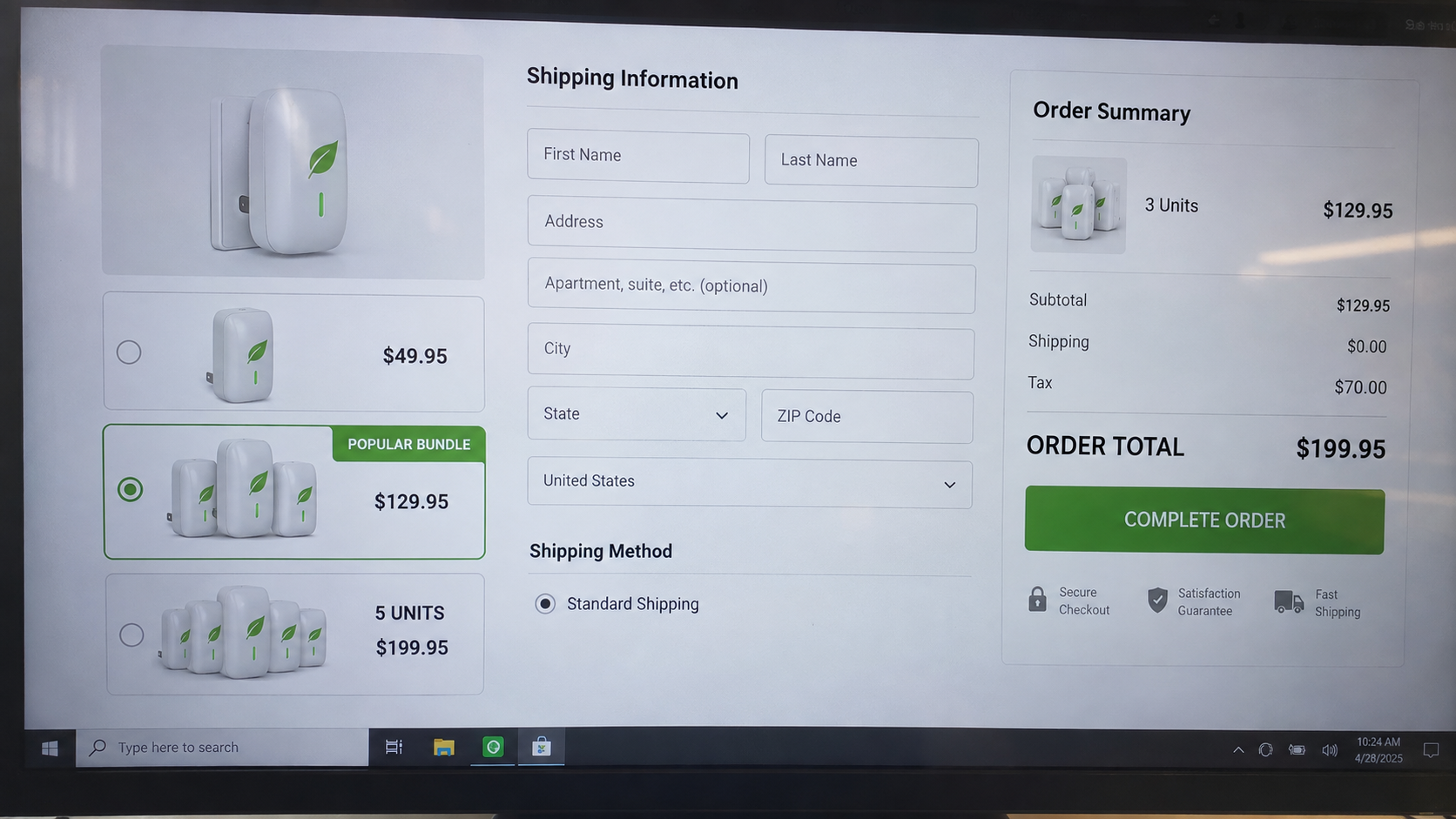
The first page emphasizes a low per-unit price. The checkout highlights three-box or five-box packages as the most popular household coverage.
Some sellers claim one device is needed for every floor or major appliance. That unsupported instruction turns a questionable purchase into a much larger order.
Shipping, handling, warranty plans, or expedited processing can raise the total. Read the complete amount before submitting payment.
Step 7: Returns lead to a different company trail
The confirmation email may identify a merchant that never appeared in the advertisement. The card statement can use another descriptor entirely.
Support may offer a partial refund, demand tracked international postage, or require every box to remain unopened.
By the time a parcel arrives, the advertising domain may be offline. A returns warehouse can receive packages without representing the actual seller.
How to Verify an Energy-Saving Device Before Buying
Start with the exact legal seller, not the product logo. Locate the entity named in the checkout terms, privacy policy, receipt, and card descriptor.
Search the television program’s official episode archive. A real nationally broadcast investment should have independent coverage beyond pages containing order buttons.
Request the model number and recognized electrical certification. Verify a certification through the testing organization’s own database rather than trusting a printed badge.
Ask for the complete test protocol behind any savings figure. A chart without methods, baseline consumption, sample size, and independent authors proves little.
Call your electricity provider using the number on the bill. Ask whether the described power-factor device would reduce charges under your residential tariff.
Compare the item with wholesale listings by physical details, not marketing names. Large markups are easier to recognize when the same casing appears elsewhere.
Use a credit card if you proceed despite the risks. Avoid bank transfers, payment apps, cryptocurrency, or debit methods that offer weaker dispute options.
What Real Household Energy Savings Look Like
Measure the largest loads before buying anything
Heating, cooling, water heating, drying, and refrigeration usually matter more than phone chargers or standby lights.
Review several bills across comparable seasons. A single unusually mild month can create apparent savings unrelated to any gadget.
Plug-in energy monitors can measure individual appliances within their rated limits. Whole-home monitors require suitable equipment and, sometimes, professional installation.
Record baseline use before changing behavior. Without a baseline, a seller can claim credit for weather, occupancy, or tariff differences.
Efficiency improvements have explainable mechanisms
LED lighting reduces consumption because it produces similar illumination with less electrical input than older incandescent lamps.
Air sealing and insulation reduce heat transfer. Efficient appliances perform the same useful task while drawing less energy under standardized tests.
Thermostat schedules save power by reducing heating or cooling demand during appropriate periods. The relationship between action and result is observable.
A mysterious wall box offers no comparable mechanism for eliminating real kilowatt-hour consumption throughout unrelated circuits.
Utilities can help separate savings from sales claims
Many providers offer usage charts, rate explanations, audits, rebates, or appliance programs. Access those resources through the number printed on your bill.
Ask whether time-of-use pricing changes when expensive appliances should run. Moving consumption can lower cost without pretending the energy disappeared.
An electrician can investigate abnormal loads, damaged equipment, poor connections, or incorrectly operating appliances. Those problems need diagnosis, not a universal accessory.
Compare any proposal with recognized efficiency labels and documented payback calculations. Credible vendors explain assumptions, limitations, installation, and maintenance.
Beware before-and-after bills that omit dates and weather. Different rate periods, estimated readings, or occupancy changes can distort comparisons.
A reliable trial should isolate one change while tracking consistent conditions. Promotional testimonials rarely control those variables.
Never open an unknown mains-powered box to inspect it. Internal capacitors and exposed conductors can retain dangerous voltage.
If an outlet, plug, or faceplate becomes discolored or hot, stop use and ask a qualified electrician to inspect the circuit.
Company, Address, and Fulfillment Checks
The brand name may not identify the seller
A glossy logo can be created overnight. The important name is the legal entity taking payment and accepting responsibility for refunds.
If the terms identify a different business, save that page. Conflicting names complicate disputes and suggest the storefront may be disposable.
The listed address may be only a mailbox
Look up every contact address independently. It may point to a virtual office, residential property, shipping depot, or unrelated tenant.
A fulfillment center proves only that packages can move through that building. It does not confirm engineering staff, manufacturing operations, or customer support.
Silent support channels are a serious warning
Call before ordering and ask about the exact model, complete total, return location, and recurring charges. Vague answers should stop the purchase.
Disposable email addresses, disconnected numbers, and scripted agents leave buyers without a workable remedy once a domain disappears.
Unknown electrical hardware deserves extra caution
Cheap electronics may lack traceable safety testing, reliable components, or clear manufacturer information. Poor construction can create heat, fire, or shock hazards.
Do not assume a product is safe because it arrived from a domestic warehouse. Goods mass-produced overseas can be relabeled after import.
What to Do if You Have Fallen Victim to This Scam
- Disconnect the device. If the box becomes warm, smells unusual, buzzes, sparks, or shows damage, stop using it and keep it away from combustible materials.
- Preserve the complete sales trail. Save the advertisement, URL, checkout, order confirmation, package label, merchant descriptor, support messages, and photographs of every unit received.
- Contact the seller in writing. Request cancellation and a full refund, quote the advertised claims, and set a reasonable response deadline.
- Dispute unauthorized or misrepresented charges. Tell your card issuer what was promised, what arrived, and whether the quantity or total differed from your approval.
- Watch for continuing billing. Review statements for unfamiliar merchant names and ask the issuer about blocking future charges connected with the seller.
- Report the advertisement. Use the social platform’s fraud tools, then file reports with the FTC, IC3, your state attorney general, and the appropriate product-safety agency.
- Secure devices used during purchase. Scan the computer or phone with Malwarebytes if downloads, browser extensions, or suspicious redirects appeared during checkout.
- Reduce repeat exposure. AdGuard can block many malicious advertisements and tracking pages, but continue verifying sellers because no filter catches every campaign.
Is Your Device Infected? Run a Free Malware Scan
Slow performance, constant pop-ups, or strange behavior? These are classic signs of a malware infection. The fastest way to find out is to scan your device with Malwarebytes Free — one of the most trusted malware removal tools available.
The free version detects and removes the most common threats, including:
- Adware — the cause of those annoying pop-ups
- Browser hijackers — unwanted redirects and changed homepages
- Trojans and spyware — hidden programs stealing your data
- Potentially unwanted programs (PUPs) — software you never asked for
👉 Select your device below — Windows, Mac, or Android — then follow the simple steps to download Malwarebytes, scan your system, and remove any threats it finds. The scan usually takes 5 to 20 minutes.
Run a Malware Scan with Malwarebytes for Windows
Malwarebytes is one of the most popular and trusted anti-malware tools for Windows — and it’s completely free for removing infections. It catches threats that many antivirus programs miss, including adware, browser hijackers, and trojans. Follow the steps below to scan and clean your PC in just a few minutes.
Download Malwarebytes
Click the button below to download the latest version of Malwarebytes for Windows from the official source. The free version is all you need — it will scan your computer and remove adware, browser hijackers, and other malicious software at no cost.
Download MalwarebytesOfficial installer for Windows 11 and 10. Your download starts right away.Want real-time protection? See Malwarebytes Premium Malwarebytes Free for WindowsScans and removes malware at no cost
-
Install Malwarebytes
When the download finishes, open your Downloads folder and double-click the MBSetup file. If Windows shows a User Account Control pop-up, click “Yes” to allow the installation.

Follow the On-Screen Prompts to Install Malwarebytes
The setup wizard will walk you through a few quick screens:
-
Choose where you’re installing the program — “Personal Computer” or “Work Computer” — then click Next.

-
Malwarebytes will now install on your device. This usually takes under a minute.

-
When installation is complete, the “Welcome to Malwarebytes” screen will open automatically.

-
On the final screen, click Open Malwarebytes to launch the program.

-
Enable “Scan for Rootkits”
Before scanning, turn on rootkit detection so Malwarebytes can find even the most hidden threats. Click the Settings gear icon on the left side of the screen.

In the settings menu, find “Scan for rootkits” and click the toggle so it turns blue.

Done? Click “Dashboard” in the left pane to return to the main screen.
Start the Scan
Click the blue Scan button. Malwarebytes will automatically update its virus database and start checking your computer for malware.

-
Wait for the Scan to Finish
The scan checks your entire system for browser hijackers and other malicious programs, so it can take 5 to 20 minutes depending on your computer. Feel free to do something else — just check back occasionally to see the progress.

-
Quarantine the Detected Threats
When the scan is done, you’ll see a list of everything Malwarebytes found — malware, adware, and potentially unwanted programs. Click the “Quarantine” button to remove all of them at once.

Malwarebytes will now remove the malicious files and registry entries and move them safely into quarantine.

-
Restart Your Computer
Some threats can only be fully removed after a reboot. If Malwarebytes asks you to restart, click Yes. Once you’re logged back in, Malwarebytes has finished removing the threats it found.

That’s it — your Windows PC is now clean of trojans, adware, and other malware, and should be back to running smoothly.
If you are still having problems with your computer after completing these instructions, then please follow one of the steps:
- Run a computer scan with ESET Online Scanner
- Ask for help in our Windows Malware Removal Help & Support forum.
Run a Malware Scan with Malwarebytes for Mac
Malwarebytes for Mac is a free on-demand scanner that removes the malware other security software tends to miss — adware, browser hijackers, and unwanted programs included. Cleaning an infected Mac with Malwarebytes has always been completely free, and it’s our go-to recommendation. Follow the steps below to scan and clean your Mac in just a few minutes.
-
Download Malwarebytes for Mac
Click the button below to download the latest version of Malwarebytes for Mac.
Download MalwarebytesOfficial installer for macOS. Your download starts right away.Want real-time protection? See Malwarebytes PremiumMalwarebytes Free for MacScans and removes malware at no cost -
Open the Malwarebytes setup file
When the download finishes, open your Downloads folder and double-click the setup file to begin the installation.

-
Follow the On-Screen Prompts to Install Malwarebytes
The Malwarebytes for Mac Installer will guide you through a few quick screens. Click “Continue” and keep following the prompts until the installation completes.



When the installation is complete, Malwarebytes opens to the Welcome to Malwarebytes screen. Click “Get started“.
-
Select “Personal Computer” or “Work Computer”
Malwarebytes will ask what type of computer you’re installing it on. Click either Personal Computer or Work Computer, whichever applies.

-
Start the Scan
Click the “Scan” button. Malwarebytes will automatically update its detection database and begin checking your Mac for malware.

-
Wait for the Scan to Finish
Malwarebytes will scan your Mac for adware, browser hijackers, and other malicious programs. This can take a few minutes, so feel free to do something else — just check back occasionally to see the progress.

-
Quarantine the Detected Threats
When the scan is done, you’ll see a list of everything Malwarebytes found. Click the “Quarantine” button to remove all the threats at once.

-
Restart Your Mac
Malwarebytes will now remove all the malicious files it found. Some threats can only be fully removed after a reboot — if Malwarebytes asks you to restart, allow it. Once you’re logged back in, your Mac is clean.

That’s it — your Mac is now free of adware, rogue browser extensions, and other potentially harmful software.
If you are still experiencing problems while trying to remove a malicious program from your computer, please ask for help in our Mac Malware Removal Help & Support forum.
Run a Malware Scan with Malwarebytes for Android
Malwarebytes for Android automatically detects and removes dangerous threats like malware and ransomware so you don’t have to worry about your most-used device being compromised. Aggressive detection of adware and potentially unwanted programs keeps your Android phone or tablet running smooth.
-
Download Malwarebytes for Android.
You can download Malwarebytes for Android by clicking the link below.
Get Malwarebytes for AndroidOpens Google Play in a new tab.Want real-time protection? See Malwarebytes Premium for AndroidMalwarebytes for AndroidScans your phone and removes malware at no cost -
Install Malwarebytes for Android on your phone.
In the Google Play Store, tap “Install” to install Malwarebytes for Android on your device.

When the installation process has finished, tap “Open” to begin using Malwarebytes for Android. You can also open Malwarebytes by tapping on its icon in your phone menu or home screen.

-
Follow the on-screen prompts to complete the setup process
When Malwarebytes will open, you will see the Malwarebytes Setup Wizard which will guide you through a series of permissions and other setup options.
This is the first of two screens that explain the difference between the Premium and Free versions. Swipe this screen to continue.
Tap on “Got it” to proceed to the next step.
Malwarebytes for Android will now ask for a set of permissions that are required to scan your device and protect it from malware. Tap on “Give permission” to continue.
Tap on “Allow” to permit Malwarebytes to access the files on your phone.
-
Update database and run a scan with Malwarebytes for Android
You will now be prompted to update the Malwarebytes database and run a full system scan.

Click on “Update database” to update the Malwarebytes for Android definitions to the latest version, then click on “Run full scan” to perform a system scan.

-
Wait for the Malwarebytes scan to complete.
Malwarebytes will now start scanning your phone for adware and other malicious apps. This process can take a few minutes, so we suggest you do something else and periodically check on the status of the scan to see when it is finished.

-
Click on “Remove Selected”.
When the scan has been completed, you will be presented with a screen showing the malware infections that Malwarebytes for Android has detected. To remove the malicious apps that Malwarebytes has found, tap on the “Remove Selected” button.

-
Restart your phone.
Malwarebytes for Android will now remove all the malicious apps that it has found. To complete the malware removal process, Malwarebytes may ask you to restart your device.
That’s it — your Android phone is now clean — no more malicious apps, adware, or browser redirects.
If you are still having problems with your phone after completing these instructions, then please follow one of the steps:
- Restore your phone to factory settings by going to Settings > General management > Reset > Factory data reset.
- Ask for help in our Mobile Malware Removal Help & Support forum.
Stay Protected: Block Ads and Malicious Sites
Now that your device is clean, keep it that way. Most infections start with a malicious ad or a fake download button — so blocking them at the source is your best defense.
We recommend AdGuard, which blocks malicious ads, phishing pages, and dangerous redirects before they can reach you.
👉 Download AdGuard and browse safely
Frequently Asked Questions
Was Power Pro Genius really featured on Shark Tank?
No reliable episode record supports the advertised pitch. The circulating scenes use fabricated or altered material to create a television endorsement.
Can a plug-in power saver lower a household bill by 30%?
That result is not credible without property-specific measurements and independent testing. A small box cannot eliminate the real energy appliances consume.
Does the green light show the device is working?
It shows that electricity reaches the indicator. It does not measure bill reduction, surge protection, voltage correction, or appliance efficiency.
Why do these boxes have so many different names?
Generic hardware can be relabeled quickly. New brands help promoters restart advertising after reviews, complaints, and domain takedowns expose an older name.
Should I return a suspicious electrical device?
First obtain written instructions and confirm the address. Use tracked shipping only if the likely refund justifies the cost and your issuer recommends returning it.
What is the safest way to reduce electricity costs?
Use verified efficiency measures, compare appliance consumption, improve insulation, adjust settings, and seek guidance from your utility or a qualified electrician.
The Bottom Line
The fake Shark Tank energy saver campaign turns an ordinary plug-in box into a television breakthrough through AI scenes, borrowed authority, and unsupported technical claims.
Ignore the rotating brand name. Verify the episode, seller, evidence, certification, and final total before paying for any device promising effortless bill reductions.

Join the discussion
0 commentsShare your experience or ask a question about this article.
Discussion
Start the conversation
Have a question or something useful to share? Add the first comment.