

The website looks like a neighborhood florist. It has a menu, a welcoming offer, and the familiar polish of a small business trying to win customers.
Then a different link under the same address asks for things no florist could need. The change is easy to miss when you are trying to solve a problem.
Overview
What the visitor sees
A link appears to lead to online banking. Its main domain, however, can look like the website of a florist, restaurant, veterinarian, or another ordinary local business.
One example presented itself as Ivy Glen Florist in Louisville. Its public pages had a navigation menu, service descriptions, an order button, and a welcome offer.
Other sites used different business names and cities. Their apparent purpose was not selling flowers or booking appointments. The public-facing sites provided cover for hidden banking pages.
What investigators verified
Allure Security’s investigation documented dozens of fabricated small-business websites linked to phishing pages on subdomains. The pages impersonated at least two dozen financial institutions.
The researchers observed forms for usernames, passwords, and one-time passcodes. They also found a mechanism that let an operator guide a victim through the login sequence in real time.
The business names were invented for the operation, according to the investigation. The legitimate banks and credit unions being copied were targets of impersonation, not participants in it.
What remains unknown
The researchers confirmed at least one victim reached a matching path associated with a Microsoft click identifier. They did not directly observe a search advertisement for every site.
They also did not recover a public database of stolen credentials or publish a total victim count. Those gaps matter when describing the campaign’s scale and outcomes.
Here is the practical distinction:
- The ordinary-looking business site was camouflage.
- The banking page on a related subdomain was the theft attempt.
- A real bank login or verification code was what the operator wanted.
- The legitimate bank was being copied, not running the page.
- A polished website or HTTPS padlock did not establish ownership.
Why a Florist Website Belongs in a Banking Scam
Most people know to question a banking URL that obviously misspells a bank’s name. This operation takes a different route. Its parent domain does not announce itself as banking.
A visitor checking the main address might find a plausible local business. An automated scanner could see those harmless pages and miss a bank form on a hidden path.
The scam site did not rely on a single fake storefront. Allure found many invented businesses with variations in names, locations, colors, phone numbers, and page categories.
That variety can make each site look independent. Yet repeated text, identical welcome offers, and reused page structures tied the sites together in the research.
Some copy was clumsy. One wedding page described helping customers who needed guidance on “florist,” a word that did not fit naturally into the sentence.
That mistake was useful to investigators, but it is not a detection method readers should depend on. A future version could correct the awkward wording.
The important clue is the mismatch between the claimed bank and the domain serving the form. Begin a real banking session inside the bank’s app or known address.
How the Fake Small-Business Bank Phishing Scam Works
Step 1: The attacker builds a believable public business
The first layer is a complete-looking website. It can include a homepage, service pages, a local-sounding phone number, a privacy link, and a cookie notice.
Those details do not prove a business exists. In this campaign, the sites made a suspicious domain appear ordinary when someone inspected only the homepage.
The public site is not necessarily where a victim begins. It is a credibility shield for the address used by the phishing pages underneath it.
Step 2: A hidden address shows a copied bank sign-in
The malicious pages lived on subdomains and appeared only at particular paths. The researchers observed a verification path and another route that referenced a Microsoft click parameter.
That parameter does not prove every victim came from a paid Microsoft advertisement. It does show that at least one confirmed victim path passed through that kind of click reference.
At the right address, the visitor saw a banking interface copied from a real platform and rebranded for a bank, credit union, or investment firm.
The copied styling is part of the deception. A page can borrow fonts, colors, and layout from a legitimate institution while being controlled by someone else.
Step 3: The page collects the first login details
The victim types a username and password into the lookalike form. The details go to the phishing operation, not to the institution displayed on the page.
That first theft may not be enough to enter a protected account. Many financial institutions require a second factor or additional identity challenge.
The operation was built to handle that obstacle instead of stopping at a password form. Its next screen asks how the customer receives a passcode.
Step 4: A real passcode is turned into the attacker’s passcode
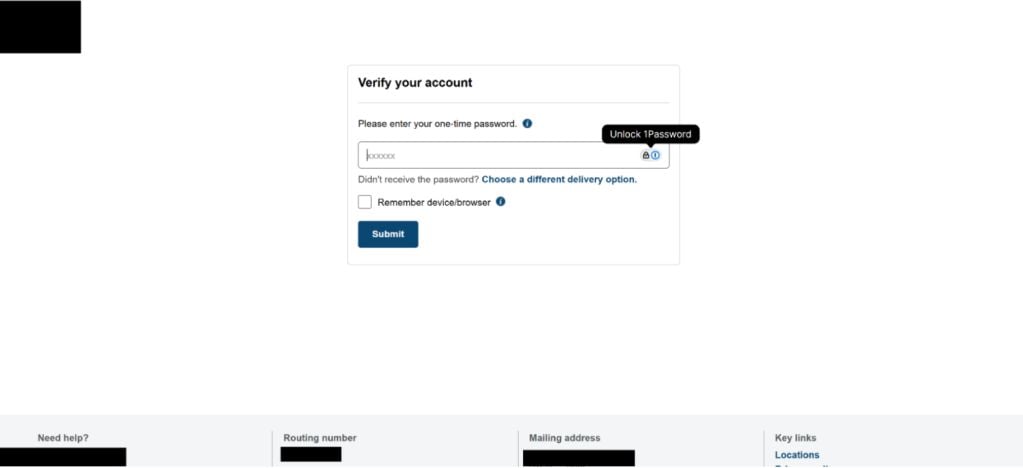
According to Allure’s technical analysis, the operator can enter the stolen credentials at the real institution while the victim waits at the fake page.
When the bank sends a genuine one-time code, the fake page prompts the victim to type that code into the attacker’s form.
That is why the message from the bank may be real even though the website requesting the code is fraudulent. The code was triggered by an attempted login.
Use of a real verification message can reassure a worried customer. It should instead prompt a question: Who initiated this login, and where am I entering the code?
Step 5: The operator moves the victim through the form
The researchers found a page component that checked for instructions about once per second. That let a human operator show an error or advance the form.
If a code expired, the page could ask again. If the bank offered a different verification channel, the page could present another choice.
To the victim, those changes might resemble a sluggish but functioning login. In reality, the operator was trying to keep the person engaged during a live takeover attempt.
This is more than a static password trap. The live exchange can bypass the protection people expect from a one-time code.
Step 6: The victim is sent to the real site
After the collection stages, the phishing page could redirect to the legitimate institution. A real homepage appearing at the end can make the earlier form look like a temporary glitch.
It does not erase what was entered before the redirect. A person who supplied a password and code should treat the account as potentially compromised.
The research did not establish how many accounts were entered successfully. It did establish a mechanism capable of collecting the information needed for account access.
The Evidence Is Strong, but the Numbers Need Care
The campaign involved many fake businesses and many institution templates. That supports describing it as a coordinated phishing operation rather than an isolated complaint.
It does not support claiming that every fake business had thousands of visitors. No trustworthy public total for successful thefts appeared in the investigation.
Allure traced form submissions to an endpoint that accepted different stages of data, including credentials, the passcode delivery choice, and the passcode itself.
The team could not retrieve the stolen records from a public leak. That limitation narrows the outcome claim but does not undermine the observed phishing forms.
One especially revealing detail was reuse. Names from other institutions remained in some page code after the template was changed for a new target.
That is evidence of a multi-brand kit, not evidence that every bank named in the code had confirmed victims. Keep that distinction in mind.
How to Check a Banking Link Without Opening the Trap
A message can also come from an account you recognize. If that person’s account was compromised, familiar sender details still do not authenticate the banking page.
Search results have their own trap. A matching business name in search does not mean a bank link under that domain is official.
Watch the address as the page changes. A redirect to a real bank after you submit information is not proof the earlier page was legitimate.
If your browser saved a password for the wrong domain, review the password manager entry. A saved login can make a return visit look routine.
Some password managers refuse to fill on mismatched domains. Treat that refusal as a warning, not a reason to paste the password manually.
The safest check is independent navigation. It removes the attacker’s chosen link from the decision, which is more reliable than guessing from visual design.
Do not decide based on the padlock alone. HTTPS tells you a connection is encrypted. It does not tell you the organization on the page owns the site.
Read the actual domain after the last dot before the first slash. A banking-looking subdomain attached to a florist domain is not a bank domain.
Beware of a familiar logo inside an unfamiliar address. A copied logo is easier to create than a legitimate banking relationship.
Open your financial institution’s app yourself. If you need a browser, type a saved, verified address or use a bookmark you created earlier.
If the message claims your account needs verification, look for the same notice after signing in through that independent route. Do not use the supplied link as the test.
When uncertain, call the number on your physical card or a statement you already trust. Avoid phone numbers presented on the suspicious page.
A business site’s existence does not validate a banking subdomain. The legitimate florist, restaurant, or clinic you see might even be unrelated to the hidden page.
In this particular campaign, researchers concluded the small businesses themselves were invented. Other campaigns may abuse real sites, so focus on the banking destination.
What to Do if You Have Fallen Victim to This Scam
- Stop using the page. Close it without entering another code. Do not accept a request to retry with a different card or account.
- Contact the institution through a trusted channel. Use its app, statement, or card number. Tell fraud support that you entered credentials on a lookalike page.
- Change the affected password. Do this from the real website or app. Replace reused passwords on other accounts with unique ones.
- Disclose any verification code you entered. Tell the bank whether you supplied an SMS, email, app, or phone code. This changes the urgency of its response.
- Ask for an account review. Check sign-ins, linked devices, transfer recipients, contact details, and any security setting changed without your approval.
- Protect payment information. If a card number was entered, ask the issuer whether it should be blocked or replaced and dispute unauthorized charges promptly.
- Keep evidence. Save the message, URL, screenshots, and timestamps. Do not return to the live phishing page just to collect more material.
- Scan if you downloaded anything. A password form alone does not prove malware, but an unexpected download warrants a reputable security scan, including Malwarebytes.
- Reduce future link exposure. A reputable browser or network filter, such as AdGuard, can help block known malicious destinations. It cannot replace direct verification.
- Report the attempt. Send it to your institution and the platform that delivered the link. In the United States, report fraud at ReportFraud.ftc.gov.
If money has already moved, say so immediately when you call the bank. Ask for its fraud and recovery team, not general customer service.
Be wary of anyone who later promises to retrieve funds or reverse a bank transfer for an upfront fee. That can be a second scam targeting the same person.
Frequently Asked Questions
Was Ivy Glen Florist a real business involved in bank fraud?
Allure Security described it as one of the invented sites in this campaign. The public florist pages served as cover for hidden phishing infrastructure.
Did the banks and credit unions create these sign-in pages?
No. The campaign copied their appearance and login flow. Treat the legitimate institution as the organization to contact for help, not as the operator of the fake page.
Does a real verification text mean the banking page is safe?
No. The attacker may have triggered that text by trying your credentials at the real bank while you were on a fraudulent page.
Did investigators prove the links came from search ads?
They saw a Microsoft click-related path and confirmed one victim path associated with it. They did not directly observe an advertisement for every fake business.
Can I be harmed by only viewing the fake business homepage?
The documented theft stages required interaction with a hidden banking page. Viewing the homepage alone is not the same as submitting credentials or a code.
What if I entered a password but not the one-time code?
Change the password through the real bank immediately and tell its fraud team. A stolen password may still be useful for account probing or reuse elsewhere.
The Bottom Line
This scam hides a bank-login trap behind websites that look unrelated to banking. The false storefront is the disguise; the credential and passcode forms are the danger.
Do not judge a banking request by a polished page or an encrypted connection. Start the session in your bank’s own app or verified address, especially after an unexpected link.

Join the discussion
0 commentsShare your experience or ask a question about this article.
Discussion
Start the conversation
Have a question or something useful to share? Add the first comment.