

You need a browser, driver, or utility, so you open what looks like the vendor’s download page. The logo is familiar and the button says Download now.
That ordinary task can turn into a dangerous shortcut when the address belongs to someone else. The page can look right while delivering the wrong file.
Overview
The download lure
Attackers built counterfeit software pages that copied trusted vendors. The pages offered installers for browsers, device tools, security software, and other useful programs.
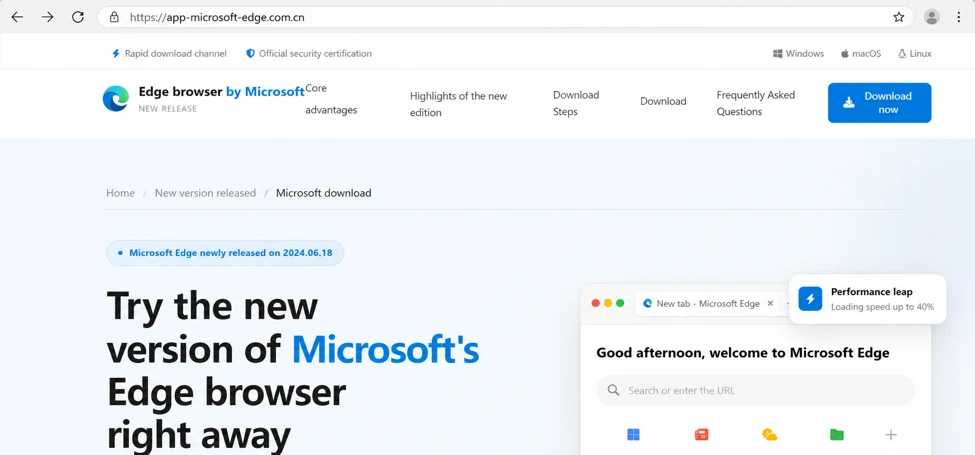
One captured page imitated Microsoft Edge. Another observed path imitated Razer software. The brands were victims of impersonation, not distributors of the malicious files.
A person searching for legitimate software could land on a page that looks convincing. The crucial difference is the web address and the archive it serves.
What Microsoft observed
Microsoft Security Research tracked an active campaign linking lookalike vendor pages to malicious installers and confirmed compromises across several organizations.
Observed targets were mainly China-based operations of multinational organizations and Chinese-speaking users. Affected sectors included healthcare, manufacturing, gaming, technology, logistics, government, and education.
The downloaded archives did not just contain an unwanted toolbar. Microsoft traced loaders, persistent payloads, and attempts to weaken security protections.
What is not established
The research did not show that every visitor arrived through a paid advertisement. It documented fraudulent download pages and the malicious files they served.
Microsoft assessed with moderate confidence that the activity was consistent with the Silver Fox fake-software campaign. That is not a certain attribution to one operator.
The confirmed reader risk is straightforward:
- A vendor-looking page may sit on a lookalike domain.
- The Download button may fetch an archive from another host.
- The archive can contain a malicious installer.
- Running it can create persistence and weaken defenses.
- The genuine software vendor did not authorize that route.
Why a Download Page Is an Effective Scam Surface
Most people expect a download page to provide a file. That makes a dangerous action look like the natural next step rather than an unusual request.
The pages in this campaign borrowed brand colors, product names, and prominent buttons. A quick glance might confirm what the visitor hoped to find.
The browser address was less familiar. Microsoft documented lookalike names using regional domain endings and extra words around the imitated brand.
A copied page can also carry an HTTPS padlock. Encryption protects the connection to that page, but it does not certify that the vendor owns it.
Multiple unrelated products led into shared delivery infrastructure. That is a strong sign of a coordinated operation rather than several independent vendor mistakes.
The exact domains are temporary indicators, not a complete list. A new domain can copy the same visual design and delivery process tomorrow.
For that reason, the safest decision is to begin at the vendor’s independently verified site rather than evaluate a download button in isolation.
How the Fake Software Download Scam Works
Step 1: The victim reaches a vendor lookalike
A person looking for a familiar program opens a page that resembles the vendor’s real download site. The page offers a prominent installer button.
Microsoft observed sites imitating Edge, Razer, Kaspersky, Calibre, and several other products. That variety let the same operation meet different search intentions.
The research established the fraudulent destinations, but not a single universal way people reached them. Avoid assuming every visitor clicked an ad.
Step 2: The button retrieves an archive elsewhere
In one observed case, a fake Razer page led to a ZIP archive from a separate delivery host. The file name looked like a routine setup package.
Microsoft’s telemetry tied the page that referred the download to the host that delivered it. That connection matters more than the archive’s harmless-looking name.
Two downloads with the same name were different inside. Microsoft observed content changing between requests, a sign the payload could be generated or rotated.
That rotation makes a simple “I checked this filename yesterday” rule unreliable. The behavior of the file and its source are the important facts.
Step 3: The user runs the wrapped installer
The downloaded archive contains a wrapper that launches another executable. Its name and folder can look random rather than matching the advertised software.
Microsoft traced the sequence from browser download to archive extraction to executable launch. A legitimate-looking download screen was the beginning, not the destination.
At this point the action has moved beyond a deceptive page. Running the installer gives the malicious code an opportunity to execute on the computer.
Step 4: The payload tries to stay and expand
The later stages created files in randomized directories and used scheduled execution. Those details allowed the malware to survive beyond the initial click.
Microsoft observed components that reached attacker-controlled infrastructure and retrieved more code. The attack was not limited to the first archive.
Some file metadata pretended to belong to unrelated legitimate software. A label inside an executable is not proof that the named company made it.
Step 5: Security protections are targeted
The investigation documented attempts to weaken defenses and interfere with recovery. That raises the stakes above a nuisance download.
A user may not see these actions happen. The first visible clue could be a security alert, unusual process, or trouble updating the computer.
Do not rely on a pop-up from the downloaded program to assess whether it is safe. A malicious installer can show reassuring screens while doing something else.
Step 6: The compromise may reach organizational systems
Microsoft observed compromised devices in several industries. A single workstation can become a starting point for further access or data theft within an organization.
The report did not claim every device reached the same final outcome. Its telemetry documented a common entry route and a set of malicious follow-on behaviors.
If this happened on a work computer, involve the security team immediately. Waiting for symptoms can make containment harder.
The Brands Were Copied, Not Caught Distributing Malware
Seeing Microsoft Edge, Razer, or another product name in the fake page does not mean its real vendor delivered the malicious file.
The attacker controlled the lookalike address and the separate download route. The copied brand supplied credibility because people already trusted it.
That distinction protects readers from a second mistake: avoiding legitimate updates altogether. Security updates remain important when obtained through trusted channels.
Use the product’s built-in updater when available. Otherwise, navigate directly from a verified vendor website, not an unsolicited link or unfamiliar search result.
For organizations, managed software deployment is safer than asking staff to find installers individually. A verified catalog reduces opportunities for lookalike pages.
Microsoft’s moderate-confidence Silver Fox assessment should also remain properly qualified. Similarity to a known campaign does not make every observed host definitively attributable.
How to Check a Software Download Before Running It
Look at the full domain first. Extra words, unusual regional endings, or swapped letters around a product name deserve a pause.
Do not treat a search ranking or advertisement placement as proof of ownership. Go through an app’s Help or Update menu when that option exists.
If the page sends a ZIP from a different domain, ask why. Vendors sometimes use content networks, but the mismatch should be verified independently.
Check the publisher of an installer, but do not rely on a display name alone. The campaign showed how file metadata can be made to look familiar.
On Windows, keep SmartScreen, antivirus protection, and updates enabled. Turning them off because an installer demands it is a serious warning.
If your workplace provides a software portal, use it. Do not bypass an administrator’s approval to install a program from an unknown page.
When a downloaded file is unexpected, do not open it to “see what happens.” Ask your IT team or the vendor through verified support.
Keep a copy of the page address if you need to report it, but never share a clickable malicious link without warning the recipient.
A Safer Route When You Need the Program Today
Urgency is not limited to threatening emails. Sometimes you urgently need a driver before a meeting or a browser update to open a required site.
That pressure can make the first plausible Download button seem like the fastest route. In this campaign, the shortcut was the entire trap.
Pause long enough to identify the actual publisher. Open an existing app’s update feature or find the vendor through a verified support page.
If you have never used the product, ask a colleague or IT administrator for the official link. Do not assume a name in search results is enough.
Compare the domain against the vendor’s published address, character by character. A hyphenated product name or extra geographic suffix may point somewhere else.
The fake Edge page in the first image is an authentic capture from the investigation. Its browser address is not the official Microsoft download site.
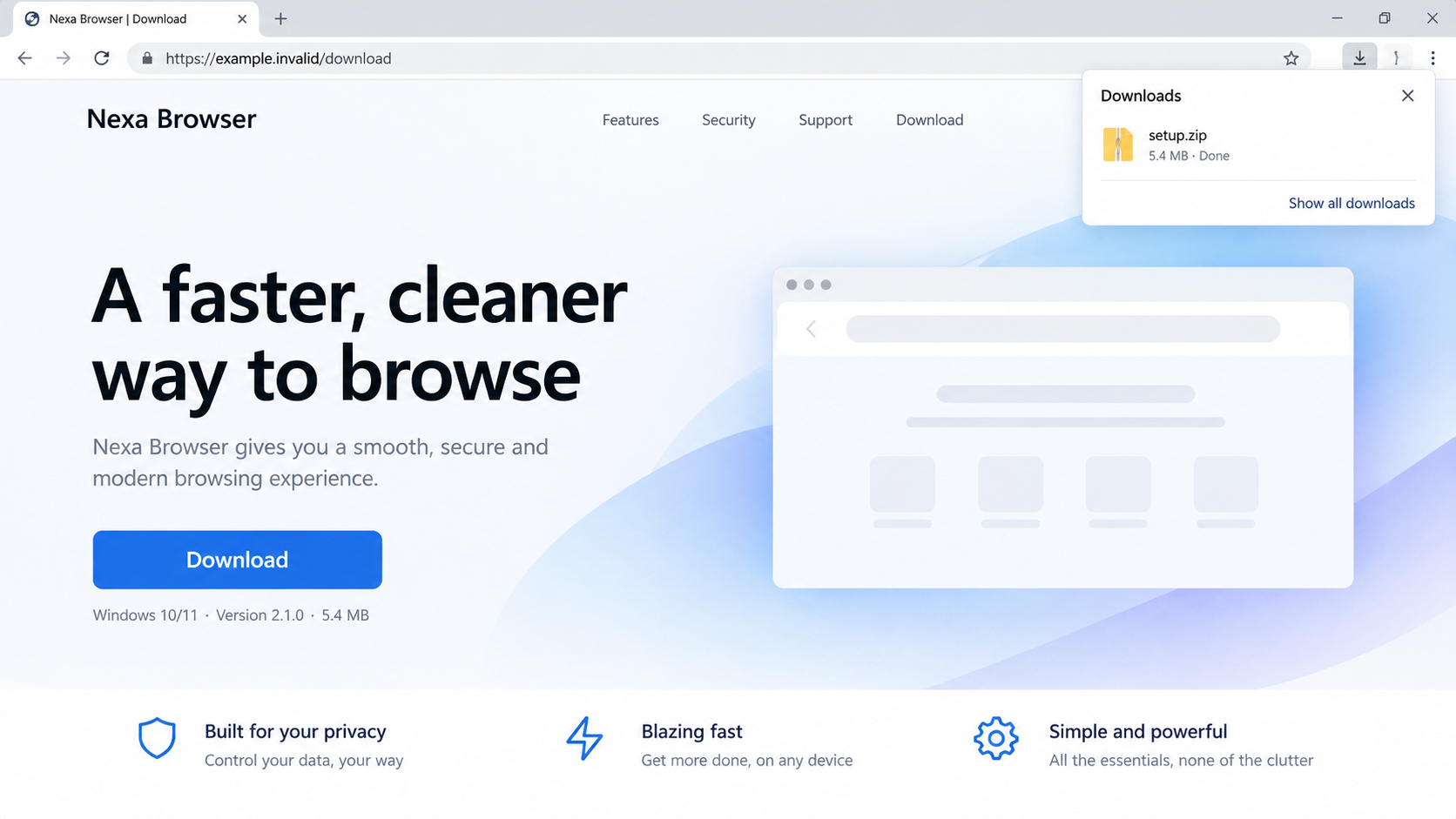
The second image is a non-functional reconstruction. It shows how a polished page can present an ordinary ZIP as though it were a trusted installer.
Do not use the illustration’s fictional vendor or reserved address as a real download route. It exists only to make the interface stage easier to recognize.
When a vendor normally offers a direct installer, an unexpected ZIP deserves scrutiny. Some legitimate vendors use archives, but a changed packaging route should be verified.
Likewise, a browser warning about an uncommon file should not be dismissed simply because the page looks familiar. Verify the source before overriding protection.
If setup asks you to disable antivirus or Windows updates, stop. That instruction is not a routine requirement for an ordinary browser or device driver.
After downloading from a trusted source, keep automatic updates active. Avoiding all software updates because of a counterfeit campaign creates a different risk.
For shared household computers, tell other users which download was suspicious. Someone else may have opened the same page from browser history.
For workplaces, one person’s quick installation can have a wider impact. Give IT the URL and file name instead of deleting evidence silently.
If the file ran, note the time before restarting. That timeline helps responders correlate process launches, network connections, and security alerts.
Do not try to inspect the installer by running it again in a normal session. A second execution can repeat or deepen the compromise.
A clean replacement installer does not automatically remove malware already installed. First contain and investigate the affected system, then install the genuine product.
The rule is simple but specific: verify the route to the download, not just the design of the page or the name printed on the archive.
What to Do if You Have Fallen Victim to This Scam
- If you only visited, stop there. Close the page and delete any downloaded archive without running it. Avoid returning to the link.
- If you ran the installer, disconnect the device. Pause its network access and contact your organization’s security team or a trusted technician.
- Do not use the affected computer for passwords. From a separate trusted device, change important credentials after the machine is being contained.
- Run a reputable security scan. Microsoft Defender and Malwarebytes can help identify threats, but a severe compromise may require expert cleanup or rebuilding.
- Preserve evidence. Note the URL, file name, download time, and any security alerts. Do not execute the file again for confirmation.
- Review sensitive accounts. Check email, banking, and workplace sign-ins for unfamiliar activity. Revoke sessions or tokens when advised by the provider.
- Tell IT if it was a work device. The organization may need to inspect other endpoints, block related domains, and investigate lateral access.
- Restore safely. Use verified installers and known-good backups only after the device is confirmed clean. Do not restore from an untrusted archive.
- Prevent repeat exposure. AdGuard can reduce encounters with malicious sites and ads, but verified vendor navigation remains the essential control.
If a security tool reports no detection after an installer ran, do not assume the machine is clean. New or tailored malware may require deeper investigation.
A company help desk can review device telemetry that a home user cannot see. Early reporting is useful even if you feel embarrassed about the click.
Frequently Asked Questions
Did Microsoft Edge or Razer distribute the malicious installer?
No. Attackers copied vendor branding on lookalike sites. The legitimate vendors were impersonated, not identified as the operators of the malicious downloads.
Were these all fake ads?
Microsoft documented the counterfeit sites and download chain. Its report did not establish a paid-ad route for every victim.
Why does the same ZIP name not mean the file is the same?
Microsoft observed archives with the same displayed name but different contents between downloads. File names are labels, not reliable file identities.
Is an HTTPS padlock enough to trust a download page?
No. HTTPS protects the connection to the site. It does not prove the site belongs to the software vendor displayed on the page.
What if I downloaded the archive but never opened it?
The documented compromise required execution. Delete the archive and use the vendor’s verified site. Scan if anything else ran unexpectedly.
Does the Silver Fox label identify the operator with certainty?
No. Microsoft said the activity was consistent with that campaign at moderate confidence. The deceptive pages and malicious installers were observed directly.
The Bottom Line
This campaign put malicious installers behind pages that looked like ordinary vendor downloads. The familiar brand was the lure, not the source of the file.
Use built-in updaters or verified vendor sites. If you ran a file from a lookalike page, treat the device as potentially compromised and get help quickly.

Join the discussion
0 commentsShare your experience or ask a question about this article.
Discussion
Start the conversation
Have a question or something useful to share? Add the first comment.