


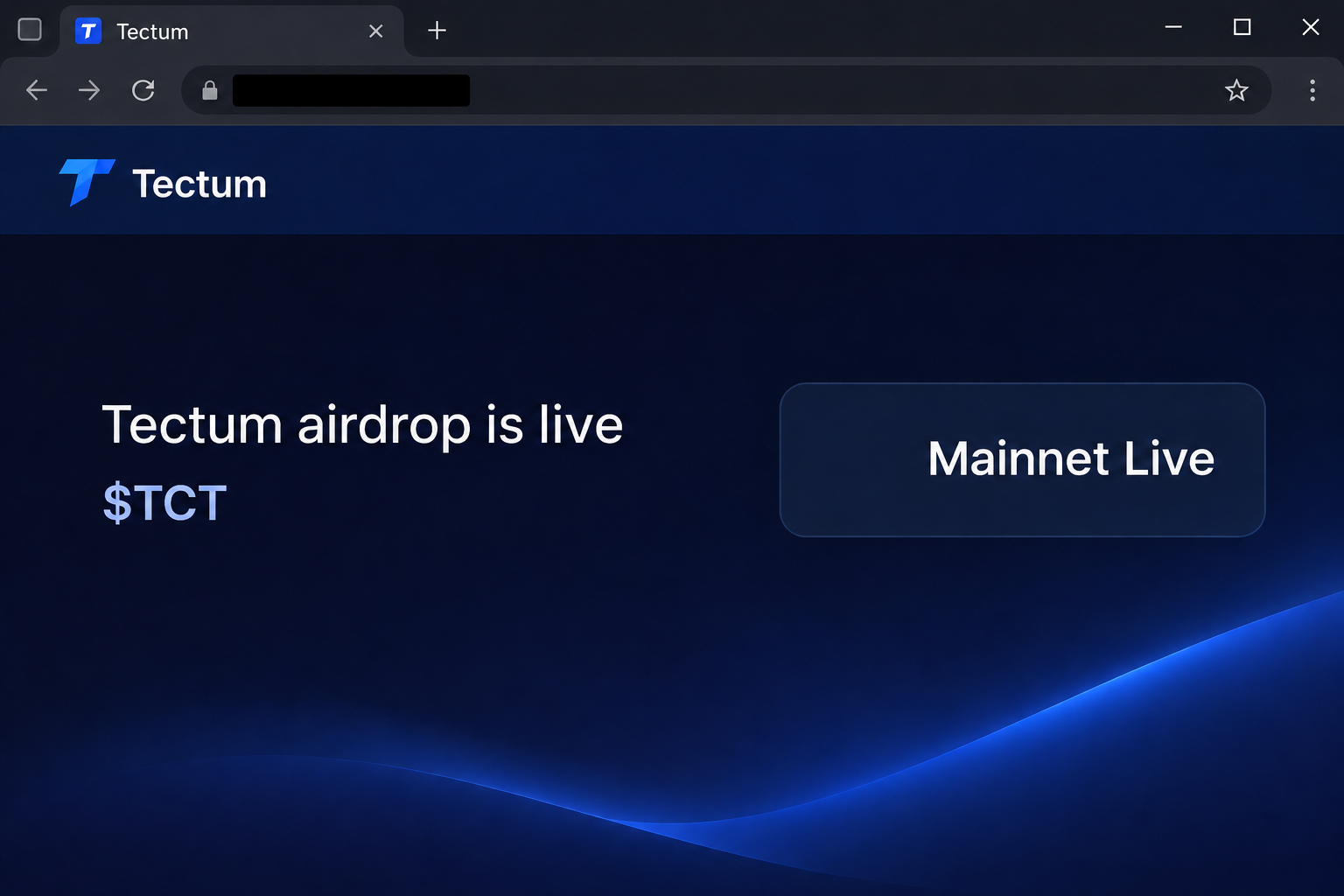
A page that looks like the Tectum blog says an airdrop is live. It names $TCT and places the offer alongside an announcement about the mainnet.
If you follow the project, both references might sound familiar. Start by checking whether the two announcements actually belong together.
Overview
The airdrop is advertised from a lookalike blog
The fake Tectum airdrop was documented at claim-tectum[.]org. The page copies parts of Tectum’s blog layout and presents a claim for $TCT.
It puts the invitation next to a Mainnet Live panel. This makes the page look like it has current project news and a bonus available in the same place.
The illustration recreates those two notices without wallet controls. It is not a screenshot of the real Tectum blog or a claim you can act on.
TCT is a real token name, separate from TET
Tectum’s ecosystem overview identifies TCT as a community and governance token. It describes TET separately as a token tied to the main network and SoftNote ecosystem.
Tectum’s TCT page also describes community rewards. That makes a reward claim plausible, but it does not establish that this particular .org domain was authorized.
The scam doesn’t depend on inventing a ticker. It uses a real one and lets the reader assume the site offering it belongs to the project.
The captured page asks for a wallet, not proof of eligibility
Selecting the claim action opened a wallet chooser in the recorded flow. The material doesn’t show a qualifying activity tied to a particular address or a real reward.
Keep the project, the token, and the claim route separate:
- The presence of TCT in project documentation establishes that the ticker exists.
- An apparent mainnet announcement does not confirm anyone earned a token distribution.
- A familiar SoftNote label can be copied without permission or access to a genuine account.
- A wallet provider on a list is not vouching for the page presenting it.
- The evidence of a completed transfer is in the relevant account or chain history.
Why the Mainnet Card Makes the Page Look More Credible
A mainnet is the network used for live activity, not a reward program. A project can announce one without opening a giveaway to anyone who sees the news.
The copy places those ideas side by side. A reader who recognizes an update may treat the adjacent call to connect as part of the same verified announcement.
Separate the claims as if they arrived in two different messages. Find the project announcement for the network, then look independently for terms of the exact distribution.
A real community token can have several uses over time. A mention of governance, access, or rewards doesn’t tell you that an unnamed campaign will pay your wallet today.
It’s also easy to miss one letter when comparing token names. TCT and TET describe different things; a reference to either does not authenticate a claim for the other.
If you saw a promotion labeled SoftNote, follow the project route for the exact product. A payment tool, a loyalty page, and a token claim aren’t interchangeable entry points.
Look for the route on a verified project page before comparing interface details. A copied layout can look nearly right even when its domain is completely different.
How the Fake Tectum TCT Airdrop Scam Works
Step 1: A project blog introduces an apparently current opportunity
The copy opens with a page that resembles a project blog. Navigation, product references, and the mainnet panel make the offer look like news rather than a random advertisement.
That placement can matter if a community member is already following launch updates. They may be looking for what changed since their last visit, not checking who owns the page.
The material came from an address unrelated to the normal project site. Don’t assume a copied page is a new campaign site because its contents look topical.
Step 2: The airdrop announcement borrows a genuine ticker
The headline offers $TCT, which is a real Tectum Community Token name. That choice is more persuasive than offering a token no one in the community recognizes.
The highlighted word “live” implies there is a current window. The page’s own statement alone can’t tell you whether the project published matching eligibility rules.
Check the exact thing the page wants you to do. A real mention of community rewards is different from permission to sign on whatever site offers the ticker.
Step 3: The reward action hands the decision to your wallet
The observed action opens a wallet menu. It moves the reader toward account interaction before establishing a verified allocation or reason to authorize anything.
Someone may pick the provider they already use, assuming that the next screen belongs to the project. The provider’s presence does not establish that relationship.
Close the flow if you cannot identify who requested it. There is no need to finish signing in just to find out whether you’re entitled to a token.
Step 4: A request can ask for more than the wording suggests
The document shows the flow up to wallet choices rather than the outcome of a signed action. Anything beyond that has to be reviewed from the wallet involved.
Check whether you shared a public address, signed a message, approved spending, or sent an asset. Each action has its own possible consequences.
If your wallet asks for a different network or asset from the verified program you expected, stop. The fake page’s headline doesn’t tell you what the wallet will authorize.
Step 5: The visible offer cannot resolve a missing balance
If funds seem to be missing, use your trusted wallet to identify the exact account and network. Don’t use the fake page’s view to tell you what happened.
Tectum’s token pages name more than one network and asset. A balance from one network doesn’t explain a transaction on another, even when a ticker looks identical.
For a known transfer, compare your records with the actual transaction. Note the amount and destination, then decide whether it belongs to your own activity.
How to Check Tectum Rewards Without the Lookalike
Look for a specific campaign rather than a generic reward reference
The official Tectum Loyalty site describes activities tied to its own program. Use that distinction instead of treating the word “loyalty” as an invitation to any external page.
You may have completed one activity without qualifying for a separate distribution. Find the original terms and see whether they explain if anything was credited, when, and where.
An older announcement about rewarding holders may describe eligibility different from a current campaign. Compare both dates and routes if someone says a new claim replaced the old one.
If you can’t find matching terms, don’t sign a request to learn what they were supposed to be. Ask the project using a contact you reached independently.
Check the asset identity rather than just the displayed letters
A token symbol is only a short label. Check the chain and asset identity through first-party information before treating a displayed $TCT balance as evidence of a payment.
If a new token arrived unsolicited, don’t follow a link it advertises to find out what it is worth. The receive event may be real without the offer being legitimate.
For a position you already know, use the account through which you originally obtained it. A third party shouldn’t need your wallet recovery phrase to see a public record.
Watch for a follow-up offering to convert the supposed reward into another asset. Verify the conversion source independently, especially if it asks for a fee or a new signature.
What to Do if You Have Fallen Victim to This Scam
-
Close the claim page if you haven’t approved anything. Keep the title and the time if you wish to report it, without reconnecting to take a screenshot.
Check for an authentic campaign using the project’s own pages. Do not follow a second link sent by the same person to “correct” the first.
-
Check the connection from inside your wallet. Remove the site if it appears as an unknown connected app and identify the address used.
Don’t assume a provider on the list has its own relationship to the claim. Your wallet can show whether you actually established a session.
-
Review the exact account if you signed something. On the affected network, check whether there is an unfamiliar transaction or continuing permission.
For a compatible network, MetaMask’s allowance guidance explains how spending approvals differ from an active site session. Use your provider’s verified way to address them.
-
Treat a lost secret as a wider problem than an approval. A person with your phrase or key may still act after you close the website.
Use a trusted device and follow the wallet provider’s instructions to protect remaining funds. Don’t share an old or new secret with anyone offering assistance.
-
Preserve any confirmed transaction and report the incident. Save its exact identifier, time, network, addresses and amount. Add any message that led you to the imitation.
Contact any exchange involved through its usual support route. The FBI’s cryptocurrency guidance describes the information useful for a US report.
-
Keep a later “unlock” request separate from the original incident. A promise to release or recover tokens is not a reason to pay another party.
Ask for help through the corresponding project, provider, or authority you can independently identify. Keep your legitimate TCT or TET records out of unsolicited conversations.
Questions to Ask About a Specific TCT Offer
Check whether it refers to a purchase, allocation, or existing balance
Tectum’s materials can mention buying TCT and receiving rewards in different places. Don’t assume that a listing or presale description tells you how an airdrop works.
If you bought something before seeing the message, start with your own receipt or trade. A separate landing page can’t authenticate the earlier purchase by showing the same ticker.
Check whether the published program explains the eligible activity and the delivery method. An invitation to connect first doesn’t answer either of those questions.
If the activity appears in a genuine loyalty account, check what the account identifies as your reward. An account credit doesn’t necessarily mean the token moved.
Confirm which address or account was supposed to receive it
The program may tie eligibility to an account, a wallet, or an activity completed on a specific network. Verify those details from the original instructions before changing anything.
If your balance comes from a prior purchase, its history may already show the account and asset. A claim page doesn’t need your wallet’s permissions to confirm that.
If the project lists versions of a token on multiple networks, verify which version you intended to use. Similar names don’t make the records of those networks interchangeable.
A public identity is enough for many basic checks. Never give a private key to an account that says it needs to validate a token name or community membership.
Check whether a warning belongs to a different program
Suppose a message says your rewards will be canceled unless you connect again. Find the program’s own status first and see whether its published instructions changed.
A copied screenshot can show a real network announcement without documenting an airdrop. Ask for a verified program reference rather than comparing the artwork or company colors.
If you tell someone else about the copy, name the unrelated domain in non-clickable form. That helps them distinguish the incident from a legitimate discussion of TCT or TET.
If you saved the project’s original campaign announcement, use it to verify the destination before connecting. A forwarded copy of the headline can leave out the link that matters.
Check the account’s records if a support request claims a second action is required. A documented transfer or credit is more reliable than a message saying you must try again.
Frequently Asked Questions
Is Tectum itself the subject of the fraud claim?
The warning concerns a site that imitates Tectum. The real project publishes the token and ecosystem pages on its own domain, separate from the reported copy.
Are TCT and TET the same token?
Tectum describes TCT as its community and governance token and TET as a separate ecosystem token. A message using one symbol doesn’t verify an offer for the other.
Does the mainnet being live prove a giveaway is live?
A network update and a token distribution are different announcements. Look for rules and a claim route tied to the exact reward program rather than relying on the panel.
Did a wallet connection mean I authorized a transfer?
A connection and a confirmed transfer are different actions. Check what your wallet saw and whether you accepted an additional request on the affected network.
Can a real TCT balance prove the claim site is official?
A real balance tells you something about an asset in an account. It does not establish who controls a separate website or where you acquired the token.
Do I need to reopen the imitation to get help?
Work from your wallet records, the saved message, and official support. If you didn’t keep a screenshot, that isn’t a reason to start the claim again.
The Bottom Line
Don’t use the Tectum lookalike to claim $TCT. A genuine ticker and a news panel can’t authenticate a separate domain that wants you to connect your wallet.
If you signed or submitted a secret, protect the specific account you used. Verify legitimate rewards from the relevant Tectum program, not from the imitation’s opening screen.

Join the discussion
0 commentsShare your experience or ask a question about this article.
Community experiences
Did this happen to you?
Your experience could help someone recognize the same scam. Submit a private report for our team to review.
I experienced this tooReports are reviewed before publication. Sharing publicly is always your choice.
Discussion
Start the conversation
Have a question or something useful to share? Add the first comment.