


InmatesSearcher puts two privacy requests on the same page. One limits how it shares personal information. The other is the one to use when a listing needs to disappear.
If you picked the first option, an on-screen confirmation can look like the job is done. It doesn’t tell you whether the site will still return your name.
Overview
Which option takes down the listing
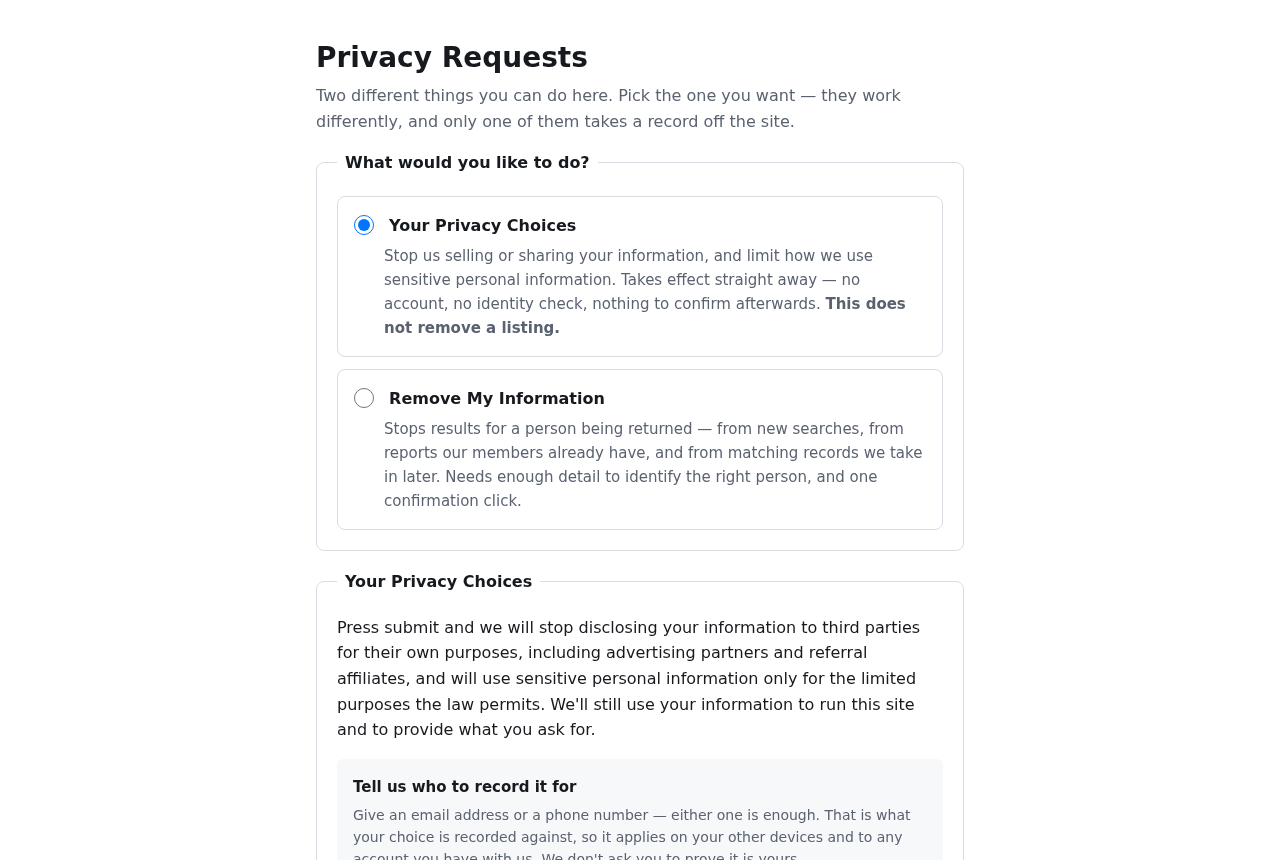
Select Remove My Information on the InmatesSearcher Privacy Requests page. The first radio button is selected in the image above; it’s not the one that removes a listing.
InmatesSearcher uses the information entered in the second form to match the person rather than simply attaching a privacy preference to an email address or phone number.
The form says the site won’t take the listing down until you click a confirmation sent to the inbox you specified. Treat that click as part of the request.
What Your Privacy Choices actually controls
The first option limits the operator’s sale or sharing of personal information and its use of sensitive information. The site accepts one email address or phone number for it.
The form records this choice when you submit it. The site says it applies the preference across its systems within 15 business days and doesn’t send a link to confirm.
If this was what you meant to do, you don’t have to file a removal request. They solve different problems, even though they sit beside each other on the form.
What the removed status covers
InmatesSearcher says confirmed requests stop it returning the person’s information in new searches, in reports members can still access on the site, and from matching records it receives later.
That is an explanation of what this site says it will do with its own results, not an undertaking by any court, corrections department, search engine, or competing site.
The form distinguishes reports stored inside the service from copies already downloaded. It says the latter can’t be recalled. Don’t interpret removal as proof that nobody saved the listing.
- Choose removal if the current listing itself is the problem.
- Choose the privacy preference if you want to limit sharing without touching the public results.
- Follow up on an original record separately if it is inaccurate.
What to Do to Complete an InmatesSearcher Opt-Out
- Open the official request page and switch the radio button to Remove My Information, not the default privacy preference.
- Enter the person’s identifying information carefully, paying particular attention to birth date and the city, ZIP code, and state used to distinguish the listing.
- Provide an email address you can open, and use the signed-authorization option only if you’re authorized and submitting for someone else.
- Save the date and any request reference, then click the verification link in the expected email from the service.
- Verify the result independently once the site has processed it, and contact the service if the link didn’t arrive or the listing keeps returning.
Before you enter any personal information
Start with the address above rather than a button in an ad, a notice in a forum, or a third party promising immediate removal for a fee.
If you reached the form from a search result, compare the domain in your address bar. The appearance of the page alone doesn’t tell you who will receive the details.
Someone who only wants to limit data sharing needn’t provide a birth date. Giving the full removal information to the wrong form or a look-alike site is unnecessary exposure.
Where it’s available without signing up, save the exact public listing URL privately. A note of the headline and the date you saw it can help if the address changes.
Don’t post a screenshot with your birth date, an old address, or a photo as proof on a public board. Keep the details you need out of new search results.
If you’re trying to help someone else, ask their permission before collecting identifiers. The removal request has a path for representatives; don’t submit it pretending you’re the person shown.
What the identity fields need to match
The form has separate inputs for first name, optional middle initial, last name, birth month, day and year, city, ZIP code, and state.
It instructs applicants to leave suffixes such as Jr. out of the last name field.
That matters when a parent and adult child have similar names and an old shared address.
A shared surname and city don’t establish a match. Check the record privately and use information that identifies the right person, not an identifier pulled from another search result.
If the site shows the right name against an address you’ve never used, don’t invent an address or submit separate requests for everybody with that name.
Explain the mismatch to the operator and ask what it needs to locate the record. A stale address is possible, but so is an unrelated person with similar details.
The operator says it keeps the identifying fields to maintain suppression. If your concern is about sending a date of birth, weigh that cost before choosing the personal listing route.
You can ask the operator how it would handle a particular mismatch before entering more information. An official request page can require data without making every extra field appropriate.
The inbox step is different from the record match
The form says the confirmation address doesn’t have to be the address of the person on the listing. It has to be one you can use to complete the request.
An authorized representative can use their own inbox for the confirmation. The form separately asks them for signed permission and accepts it as a PDF up to 10 MB.
Don’t fill in an old email just because it appears on the same broker page. You need a working inbox, not a second copy of a stale contact detail.
If you’re using an alias mailbox, check that it can receive ordinary confirmation links before submitting. You don’t want request processing to depend on a forwarding rule you’ve switched off.
After submission, look in spam or promotions if you can’t see the expected notice. Check whether you accidentally selected the first option, which sends no confirmation email.
Never give a mail password to “unlock” the confirmation. The email link belongs to the privacy request; it isn’t an invitation to sign in to your mailbox on another site.
If you receive a link you didn’t request, leave it alone. Use the contact details on the independently opened source page rather than asking an unknown sender to investigate.
Keep a useful timeline without a pile of personal data
Note when you pressed Submit and when you completed the email step. If you contact the site later, those are different points in the process.
The site states that the deadline starts when the request is submitted. It lists acknowledgment within 10 business days and completion within 45 calendar days for removal.
The same form says the listing won’t be removed before the confirmation click. Its deadline language isn’t a reason to ignore a missing confirmation email.
Save the completion notice, but don’t forward the live confirmation link or upload that notice to a public complaint page. Use a reference number when the service gives one.
If the link has become invalid, the current form directs you to submit again. If it never arrived or keeps failing, use the phone number on the request page.
There is no need to create a new account to check a public result.
If you’re already signed in somewhere, distinguish information you can see privately from a publicly accessible listing.
How to check whether the record is gone
Identify where the name is still visible
Start with the same site, spelling and state you used when you saw the listing. One changed search filter can make a record disappear from a particular results page.
Open the saved public address, if you have it, and compare the actual page with the search engine preview. A preview and the underlying page may not update together.
A search result can still display old wording after the destination has stopped returning the record. Confirm what’s present at the destination before concluding that the request failed.
If the live page is still displaying the same match, collect just enough detail for the operator to find it: the address, date you saw it, and request reference.
If the domain is not InmatesSearcher, ask that operator about its own removal process. Don’t assume that sites with similar names share databases or must honor a single request.
Avoid testing with another person’s birth date or buying a report on yourself. The public result and an inquiry to the operator are more relevant than a paid copy.
Compare the confirmation with what got submitted
If your receipt describes limits on selling or sharing and doesn’t mention a confirmation link, you likely used the preference form, rather than requesting suppression of the listing.
If you’re looking at an acknowledgment rather than completion, verify that the message arrived after you submitted and that you completed the matching email step.
You might also have confirmed the right request while the listing remained under slightly different details. Share the discrepancy with the operator instead of repeatedly filing with guessed identifiers.
If the operator says it already has a confirmed request, retain that reply. Give it the address of the actual result that still returns, not only a search engine’s thumbnail.
There is a separate question about a site continuing to hold data for suppression. The absence of a public match doesn’t establish that the operator has deleted every underlying identifier.
What to do about records and copies elsewhere
Removing a listing doesn’t correct the underlying record
If it’s a name collision, an incorrect status, or a record that should no longer display, keep the errors and requested changes separate in your own notes.
Ask the original record custodian how inaccuracies can be raised. That may be a court or government department, depending on the record. Use its verified public contact details.
You don’t have to prove your official record changed to understand whether a private listing is visible. Likewise, a missing private listing doesn’t change what’s in the original record.
When hiring, housing, or safety is at stake, look for individualized assistance from an appropriate local resource rather than using a people-search result as your official documentation.
Don’t infer that someone is currently in custody from a broker entry or image. The query can return old, ambiguous, or incorrectly matched material without supplying the context needed.
Limit how much the follow-up exposes
Keep direct links in a private note rather than creating a shareable complaint document full of identifiers. Access to that note should be limited to people helping with the request.
If you think a search result is now outdated, provide the specific public result to the search engine’s own removal or refresh process, when applicable.
The fact that a site removed a listing doesn’t guarantee that a search engine will remove a result. The search engine can still show a different matching page.
If someone is threatening or pursuing you using the information, preserve their message separately. Removing the listing may help with future discovery but won’t preserve evidence of what they sent.
Avoid engaging with an unsolicited service that offers original record cleanup in exchange for sensitive paperwork. Verify what it’s offering, and whether it has any authority to make that change.
Frequently Asked Questions
Do I have to choose both privacy options?
The site describes the two requests separately. Use removal for the listing and the sharing preference for limits on disclosure. One isn’t presented as a prerequisite for the other.
Choose both only if they match two outcomes you actually want. You don’t need to finish a first request to switch to the correct route for a listing.
Can I remove a listing without giving my birth date?
The public removal form requires a birth date as part of identifying the correct person. The privacy preference doesn’t ask for it, but it won’t take down the listing.
If you can’t provide it or have concerns about the match, contact the operator through the published request page before supplying other sensitive information.
What if I sent the request but can’t find the email?
Check spam, confirm you used the removal branch, and review whether the address was entered correctly. The site’s published number is the next route if it doesn’t arrive.
Don’t assume the request has finished just because you saw a confirmation that it was logged. That screen is not the confirmation click or evidence that a listing is gone.
Does a Global Privacy Control signal take my name down?
The current site says it recognizes the signal as a request not to sell or share personal information. It does not describe it as a listing removal request.
For that second outcome, follow the identifying form and inbox confirmation. A browser signal and a per-person match do different work on the site.
Can an authorized person file without using my email?
Yes, the removal form permits a representative to provide their own working email and asks for signed permission. The signature is separately required because the inbox doesn’t establish authorization.
Review what will be sent before a representative uploads anything. Avoid giving unrelated documents to an intermediary when only the form’s authorization is relevant to the request.
Can the site remove a report someone has already downloaded?
The operator explicitly says it can’t recall a downloaded copy. It distinguishes that copy from access to the report still provided inside the service.
If the problem is a copy posted elsewhere, look at where the copy is hosted. Contacting InmatesSearcher about its own result won’t remove a separate upload.
The Bottom Line
If the problem is a visible listing, use Remove My Information, match the right person and finish the email confirmation. Check the result on the site itself.
If you’ve only changed how information may be shared, don’t confuse that receipt with a completed takedown. Keep the two requests, their dates and their outcomes separate.

Join the discussion
0 commentsShare your experience or ask a question about this article.
Community experiences
Did this happen to you?
Your experience could help someone recognize the same scam. Submit a private report for our team to review.
I experienced this tooReports are reviewed before publication. Sharing publicly is always your choice.
Discussion
Start the conversation
Have a question or something useful to share? Add the first comment.