


PeopleConnect’s suppression tool can hide a TruthFinder background report. Deleting the account used to manage that setting is a separate action, and it can remove the suppression you just set.
If you’re trying to stay out of the results, decide what needs to disappear before deleting anything. An old phone number can make that decision harder.
Overview
What deletion can undo
The PeopleConnect Privacy Center says that deleting the user data associated with its suppression service also deletes the suppressions tied to that user.
The account at issue is the one managing suppression. Don’t treat the word “delete” on a separate TruthFinder billing, login, or privacy screen as proof it does the same thing.
That policy doesn’t say the report must reappear immediately. It means you shouldn’t count on a suppression surviving the removal of the account that manages it.
What report suppression is for
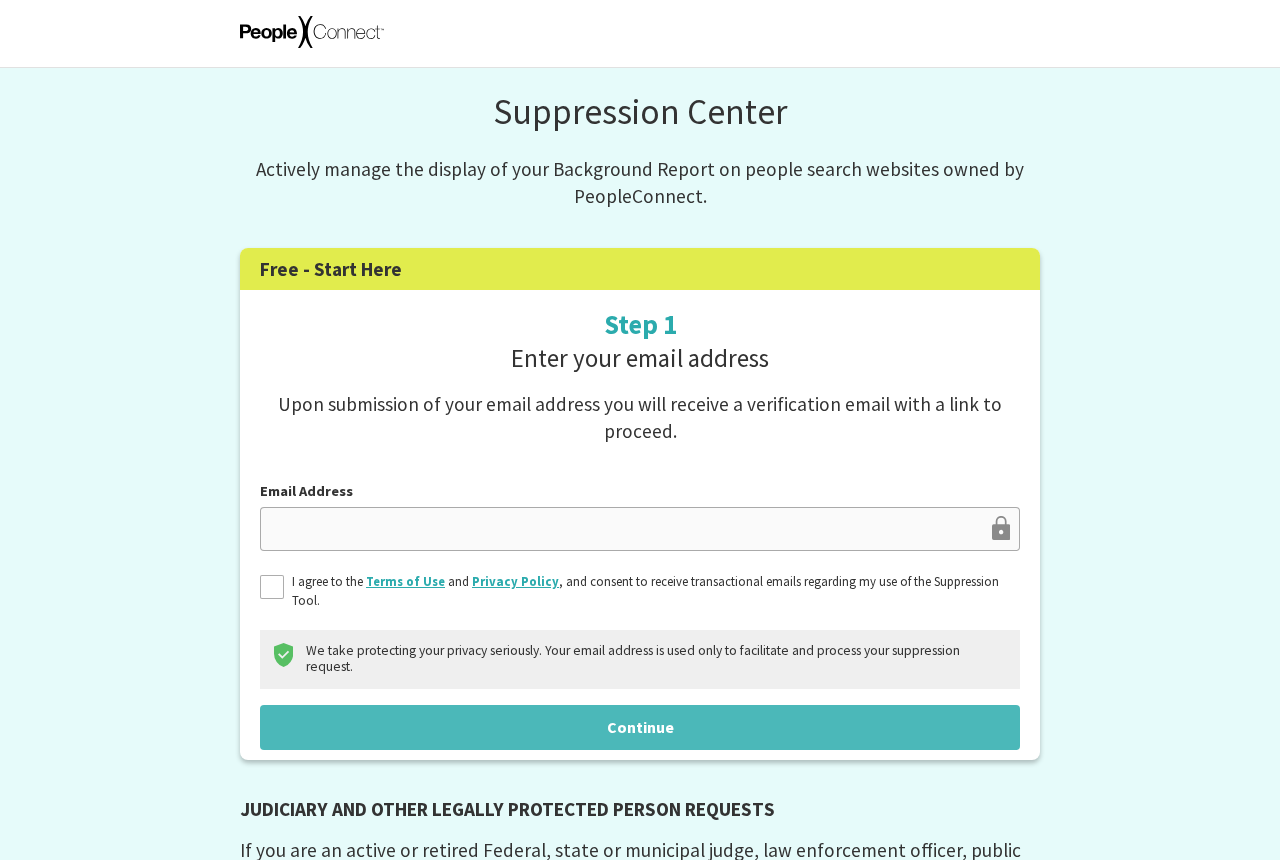
The Suppression Center is the operator’s free route for controlling display of background reports on its people-search websites. The first screen asks for an email address.
A verified inbox gets you into the request flow. It doesn’t by itself establish that the report you open is about you or let you suppress anyone with your name.
The center distinguishes the report from other lookups, including searches by phone, email or address. Don’t assume one setting will remove every mention connected to those details.
Why an old contact becomes a problem
PeopleConnect’s suppression terms describe verification involving at least one email address or phone number. The address you confirm at the start and the report match are separate checks.
A newer mailbox may receive the entry link while the relevant report still has contact details you last used years ago. Opening the confirmation doesn’t change what the report contains.
If you no longer control the option the tool presents, don’t send a code to somebody else’s inbox or a reassigned number. Ask the operator for help with the match.
- Use report suppression when you want a result to stop displaying.
- Use billing support when you need to find or stop a recurring charge.
- Review the suppression account’s deletion terms before taking an irreversible step.
What to Do to Keep a TruthFinder Report Suppressed
- Identify the exact report, save its public address privately if available, and decide whether you want to hide the listing, end billing, or delete a separate account.
- Start at the official free Suppression Center, use an inbox you can access, and open the email that arrived in response to your request.
- Locate your own report and use a verification method you control. If the tool only offers old details, stop and contact the service through the Privacy Center.
- Complete the display suppression, check the status for the correct report, and save a private note of the outcome and any reference or confirmation.
- Revisit the display setting before taking any account deletion action. Verify the listing from the outside, and handle any subscription or unrelated account through its separate controls.
Work out which account you’re looking at
If you once paid for a TruthFinder subscription, you may arrive at a customer account page. That page answers questions about what you bought, not necessarily what other users see.
The suppression service instead opens with the free access form in the screenshot above. It manages the display of a report, not whether a membership renews.
You might use the same email for both. Shared sign-in information doesn’t establish that a billing cancellation will touch suppression or that suppression will stop a subscription.
A third activity, deleting data associated with a suppression user, changes the record of privacy choices it has been managing. Check the policy attached to that particular option.
If a payment is your concern, save the charge amount, date and billing name. Leave your background report controls alone until you’ve identified the membership or transaction separately.
A request to take down a report isn’t a request to reverse past charges. Likewise, a subscription cancellation confirmation isn’t a status notice for a background report.
Verify the report without reusing an old contact
Two adults with similar names may return close matches, especially with shared family addresses. Compare the identifying details without collecting or uploading information about someone else.
An old email might be legitimate history while no longer being a safe place for a verification code. Reject an option you can’t open and control yourself.
Don’t ask a current holder of the number to read you a code. Even a willing recipient isn’t part of the service’s identity process or obliged to help.
If the only choice is an inaccessible number, note what the verification screen actually offers.
A short description can be enough to open a support ticket without handing over additional identifiers.
Use the contact channel listed in the official Privacy Center. Include the report link or reference if available and explain that the offered verification contact is out of date.
Ask how it can safely verify you without transmitting a code to that address or number.
Don’t assume it will accept a new email automatically or tell you how to bypass identity checks.
If it asks for more evidence, verify who is requesting it and whether there is a secure channel. Don’t send extra identification to an unsolicited address.
If you find two plausible matches, ask the service to confirm which report your request covers. Repeated guesses can lead to a request against the wrong person’s report.
What to check before deleting a suppression account
Decide whether deletion is actually your goal
If what bothers you is a neighbor finding the report, report visibility is the setting to check first. Deleting the management account may conflict with that aim.
If your priority is removing the profile used to administer requests, read the deletion wording and decide whether losing the associated suppressions is a consequence you’re prepared to accept.
Those goals may feel identical until you consider what the service has to remember. A suppression record is a saved instruction not to show information that could otherwise appear.
The Privacy Center’s description of deletion is the decisive detail here. It says the suppressions associated with the user data are deleted along with it.
This does not establish that every copy of management data gets erased from every system at once.
Read the operator’s retention notes instead of interpreting the button as a universal guarantee.
It also doesn’t promise that starting over later will be effortless. If verification is already difficult, secure an answer about your existing status before abandoning the account.
Save the right evidence before changing anything
Keep the date of your request, the website it concerned, the report reference if visible, and the last status shown. Save notices in an account you control.
A screenshot showing only the display setting and date is often more useful for support than a full capture of the report with relatives’ names and addresses.
If you manage requests for more than one entry, keep a list of which report each confirmation describes. An account-level deletion can affect more than the last one you viewed.
Check the public result again after the status is confirmed. A private dashboard is evidence of a setting, whereas the public address is evidence of the current display.
If you already deleted the account, look up the listing and contact the suppression service. Don’t assume a newly verified inbox can retrieve the former account’s preferences.
Keep your first and second requests distinct in the notes if you have to start over.
The date you first suppressed it might not be the date associated with a new submission.
Why some information might still show up
It might not be the same lookup
A name result can be a background report while a phone result can be a different feature. Record which search led to the remaining information before assuming suppression failed.
The official explanation does not present report suppression as removal of every phone, email or address lookup. A different result needs its own check and possibly a separate privacy request.
If a search engine result shows old text, open the underlying address and check whether the live report is present.
A stale snippet and accessible report are not the same finding.
If a second website still shows the details, confirm who runs the domain rather than presuming it’s covered by the same choice. Ask that operator about removal if needed.
The tool isn’t a means of erasing official government records or files already saved by someone else. If the issue is a mistake in the original record, contact its custodian.
What to ask support if the report stays visible
Give the operator the report address, the date, the status text and the type of search that still works.
Don’t put birth dates or full contact histories in an open ticket.
Ask whether the displayed result is the report the request matched or another lookup. If it’s another report, ask what the current process needs to identify it.
If the tool still shows an active suppression but the exact same public report opens, describe those two observations together. Don’t announce that the disappearance or reappearance was automatic.
Privacy and billing concerns may need separate conversations. The MalwareTips TruthFinder billing investigation addresses the company’s billing and enforcement history separately from this report display procedure.
A public broker result is not a substitute for a reliable official record. If the result is inaccurate, clearly separate factual correction from a request not to show it.
If the account is already gone
Before trying again, look for the email or reference associated with the original case. It may help support tell an old request from an unrelated public match.
If you never found your report again, don’t take that as proof that the old suppression still exists. Check the known address and report details without inventing new searches.
A support reply may identify a needed step that is different from creation of a new account.
Make the fresh request only when you know which record it will act on.
If more than one family member is affected, ask each person to handle their own report or confirm the operator’s authorized process. Don’t merge their records into your own request.
An example of getting the goal wrong
Imagine you can still receive the initial link at your current email, but the report match offers a mobile number you had before you moved.
Deleting your current suppression account wouldn’t update the old number in the report. It could remove other suppression decisions that were already attached to that account.
The useful move is to save what is already suppressed, contact the operator about the contact mismatch, and ask which record the next request would affect.
If you changed carriers but kept the same number, the issue may be different.
Try only a verification option you currently control, and don’t guess at the system’s reasons for rejecting it.
Once you’ve obtained the status you want, check the exact public result. That gives you something specific to compare later if the details appear to return.
Frequently Asked Questions
Can deleting my PeopleConnect suppression account undo a TruthFinder opt-out?
Yes, the Privacy Center says deleting the suppression user data deletes suppressions associated with it. That isn’t a statement that every once-hidden record will reappear immediately.
Check the active setting and the public listing before you delete the account. If staying suppressed is your priority, don’t assume deletion is that setting’s final step.
Will the starting email prove that I own the report?
The email step is how you begin the request. The service’s terms describe verifying identity in connection with the report through an email or phone match.
If only an old contact appears, finish neither a code request nor a deletion just to get past the screen. Ask the official support route about the mismatch.
Do I have to buy TruthFinder to suppress a report?
The PeopleConnect Suppression Center presents its process as free. It doesn’t require you to purchase a new paid membership to open the suppression form.
A page asking for a card in an offer may be the subscription product rather than the suppression tool. Return to the official center and check the address.
Can I still appear in an address or phone search?
Yes, report suppression doesn’t necessarily take the person out of separate phone, email, or address search features. Identify the type of result before treating it as a failed opt-out.
The public search route and the report URL give the operator two clues. A general screenshot with only your name may not show which control needs attention.
What if my existing suppression disappears after deletion?
Note which report you can actually open and whether the service will show an existing request. Contact the center or make a fresh request if needed.
Don’t assume a prior confirmation remains tied to a new suppression user. Save the old record of what happened and make sure any new request matches you.
Does suppressing a report cancel a membership or refund a charge?
No, suppressing the display doesn’t manage billing. Check the membership and payment route separately, and keep any billing confirmation distinct from the report status.
If you can’t identify the purchase, contact the business through verified account support or ask your payment provider about that specific charge. Don’t enter payment data into a suppression form.
The Bottom Line
Use the free Suppression Center to control the report’s display. Save and confirm the setting before making an account deletion decision that could undo it.
If an old contact blocks verification, use the official Privacy Center instead of trying the old number. A blocked match is not a reason to abandon existing protections.

Join the discussion
0 commentsShare your experience or ask a question about this article.
Community experiences
Did this happen to you?
Your experience could help someone recognize the same scam. Submit a private report for our team to review.
I experienced this tooReports are reviewed before publication. Sharing publicly is always your choice.
Discussion
Start the conversation
Have a question or something useful to share? Add the first comment.