

The FBI Online Agent MoneyPak Ransom is a computer virus, which will display a bogus notification, that pretends to be from Federal Bureau of Investigation and states that your computer has been blocked due to it being involved with the distribution of pornographic material, SPAM and copyrighted content.
The FBI Online Agent virus will lock you out of your computer and applications, so whenever you’ll try to log on into your Windows operating system or Safe Mode with Networking, it will display instead a lock screen asking you to pay $200 in the form of a MoneyPak code.
Furthermore, to make its alert seem more authentic, this virus will display a countdown timer, a bogus case number and FBI agent name,needless to say that all this details are fake and are only used, in an attempt to scare you into sending a MoneyPak code.
If your computer is infected with FBI Online Agent virus,then you are seeing the below notification:
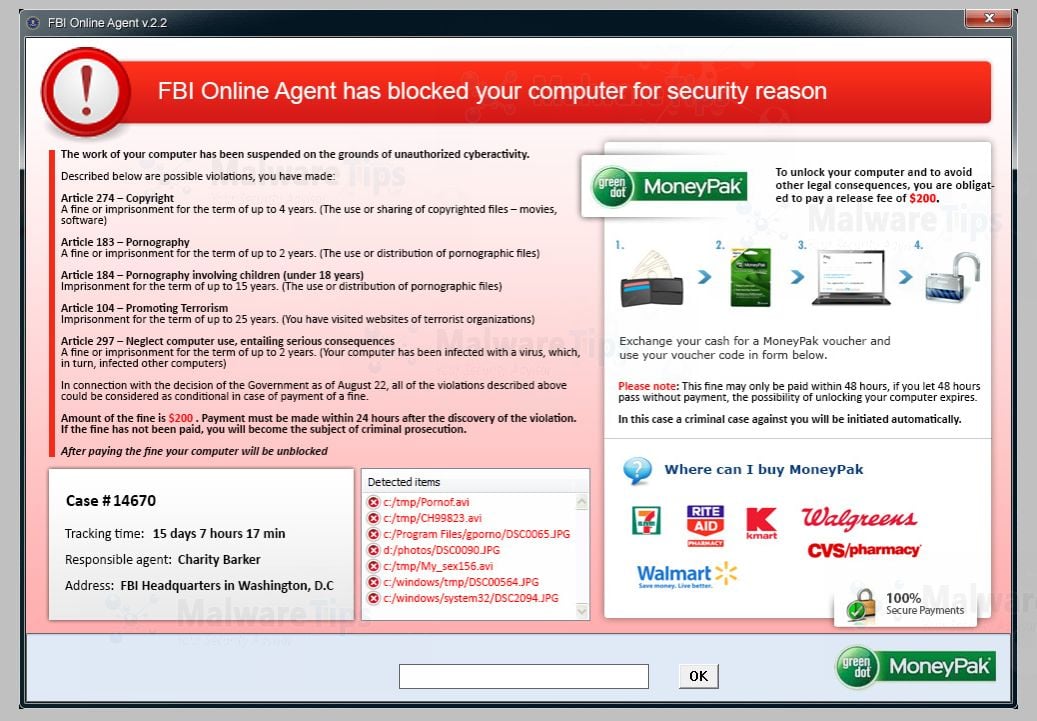
The FBI Online Agent Ransom will display the following bogus notification:
FBI Online Agent has blocked your computer for security reason
The work of your computer has been suspended on the grounds of unauthorized cyberactivity. Described below are possible violation, you have made.
Article 274 – Copyright
A fine or imprisonment for the term of up to 4 years. (The use or shanng of copyrighted files-movies, software)
Article 183 – Pornography
A fine or imprisonment for the term of up to 2 years (The use or distribution of pornographic Nes)
Article 184- Pornography involving children (under 18 years)
Imprisonment for the term of up to 15 years (The use or distribution of pornographic files)
Article 104- Promoting Terrorism
Imprisonment for the term of up to 15 years (You have visited websites of terrorist organization)
Article 297 – Neglect computer use, entailing serious consequences
A fine or imprisonment for the term of up to 2 years (Your computer has been infected with a virus, which, in turn, Infected other computers)
In connection with the decision of the Government as of August 12, all of the violations described above could be considered as conditional in case of payment of a fine.
Amount of the fine is $200. Payment must be made within 24 hours after the discovery of the violation. If the fine has not been paid, you will become the subject of criminal prosecution.
After paying the fine your computer will be unblocked
The FBI Online Agent Ransom is a scam and you should ignore any alert that this malicious software might generate and remove this trojan ransomware from your computer.
Under no circumstance should you send any money to this cyber criminals,as this could lead to identity theft,and if you have, you should contact your credit card company and dispute the charge stating that the program is a scam and a computer virus.
FBI Online Agent MoneyPak Ransomware – Virus Removal Guide
STEP 1: Remove FBI Online Agent lock screen from your computer
The FBI Online Agent MoneyPak Ransom has modified your Windows registry and added its malicious files to run at start-up, so whenever you’re trying to boot your computer it will launch instead its bogus notification.To remove this malicious changes,we can use any of the below methods :
Method 1: Start your computer in Safe Mode with Networking and scan for malware
Some variants of the FBI Online Agent virus will allow the users to start the infected computer in Safe Mode with Networking without displaying the bogus lock screen. In this first method, we will try to start the computer in Safe Mode with Networking and then scan for malware to remove the malicious files.
- Remove all floppy disks, CDs, and DVDs from your computer, and then restart your computer.
- Press and hold the F8 key as your computer restarts.Please keep in mind that you need to press the F8 key before the Windows start-up logo appears.
Note: With some computers, if you press and hold a key as the computer is booting you will get a stuck key message. If this occurs, instead of pressing and holding the “F8 key”, tap the “F8 key” continuously until you get the Advanced Boot Options screen. - On the Advanced Boot Options screen, use the arrow keys to highlight Safe Mode with Networking , and then press ENTER.
![[Image: Safe Mode with Networking]](//malwaretips.com/images/removalguide/safemode.jpg "Safe Mode with Networking screen")
- If you computer has started in Safe Mode with Networking, you’ll need to perform a system scan (as seen on STEP 2) with Malwarebytes Anti-Malware and HitmanPro to remove the malicious files from your machine.
![[Image: Safe Mode with Networking]](http://malwaretips.com/images/removalguide/safemode.jpg "Safe Mode with Networking screen")
IF the FBI Online Agent virus didn’t allow you to start the computer in Safe Mode with Networking,you’ll need to follow Method 2 to get rid its screen lock.
Method 2: Restore Windows to a previous state using System Restore
System Restore can return your computer system files and programs to a time when everything was working fine, so we will try to use this Windows feature to get rid of the FBI Online Agent lock screen.
- Restart your computer, and then press and hold F8 during the initial startup to start your computer in safe mode with a Command prompt.
Note: With some computers, if you press and hold a key as the computer is booting you will get a stuck key message. If this occurs, instead of pressing and holding the “F8 key”, tap the “F8 key” continuously until you get the Advanced Boot Options screen. - Use the arrow keys to select the Safe mode with a Command prompt option.
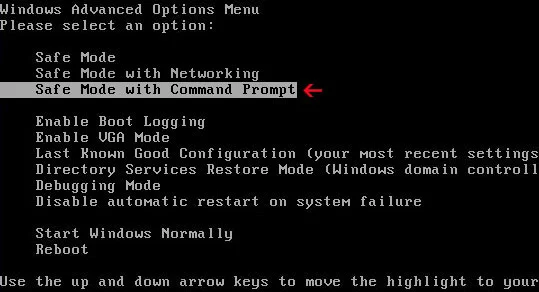
- At the command prompt, type cd restore, and then press ENTER.
Next,we will type rstrui.exe , and then press ENTER

- The System Restore window will start and you’ll need to select a restore point previous to this infection.
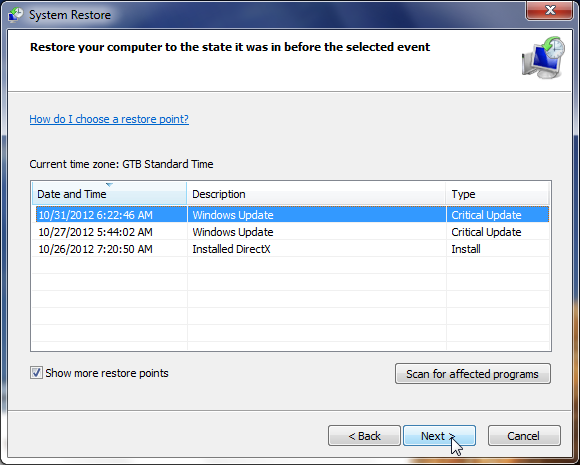
- After System Restore has completed its task,you should be able to boot in Windows normal mode,from there you’ll need to perform a system scan (as seen on STEP 2) with Malwarebytes Anti-Malware and HitmanPro to remove the malicious files from your machine.
IF the FBI Online Agent virus didn’t allow you to start the computer in Safe Mode with Command Prompt you’ll need to follow Method 3, to get rid its screen lock.
Method 3: Remove FBI Online Agent virus with HitmanPro Kickstart
IF you couldn’t boot into Safe Mode with Command Prompt or didn’t have a System Restore point on your machine, we can use HitmanPro Kickstart to bypass this infection and access your computer to scan it for malware.
- We will need to create a HitmanPro Kickstart USB flash drive,so while you are using a “clean” (non-infected) computer, download HitmanPro from the below link.
Download HitmanProOfficial Sophos download. Free scan, free 30-day trial to remove threats. - Insert your USB flash drive into your computer and follow the instructions from the below video:
- After you have create the HitmanPro Kickstart USB flash drive, you can insert this USB drive into the infected machine and start your computer.
- Once the computer starts, repeatedly tap the F11 key (on some machines its F10 or F2),which should bring up the Boot Menu, from there you can select to boot from your USB.
Next,you’ll need to perform a system scan with HitmanPro as see in the below video:
- After HitmanPro Kickstart has completed its task,you should be able to boot in Windows normal mode,from there you’ll need to perform a system scan (as seen on STEP 2) with Malwarebytes Anti-Malware and HitmanPro to remove the malicious files from your machine.
STEP 2: Remove FBI Online Agent malicious files from your computer
No matter what method did you use to get rid of the FBI Online Agent lock screen, we will need to remove its malicious files from your computer.Please download and run a scan with the following scan to completely remove the FBI Online Agent virus from your computer.
Run a computer scan with Malwarebytes Anti-Malware Free
- You can download Malwarebytes Anti-Malware Free from the below link,then double click on it to install this program.
Download MalwarebytesFree official installer. Your download starts right away. - When the installation begins, keep following the prompts in order to continue with the setup process.
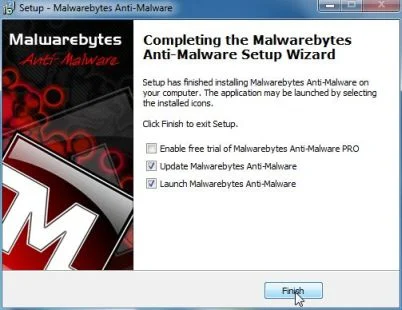
DO NOT make any changes to default settings and when the program has finished installing, make sure you leave both the Update Malwarebytes’ Anti-Malware and Launch Malwarebytes’ Anti-Malware checked,then click on the Finish button.
- On the Scanner tab,select Perform quick scan and then click on the Scan button to start scanning your computer.
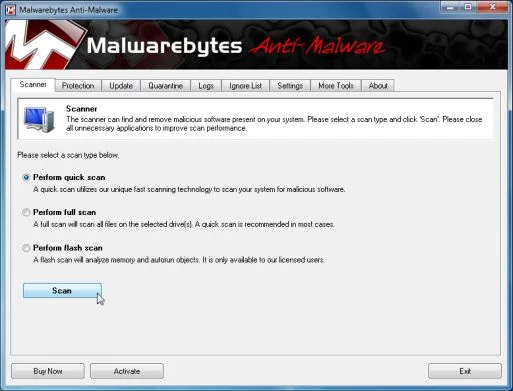
- Malwarebytes’ Anti-Malware will now start scanning your computer for FBI Online Agent malicious files as shown below.
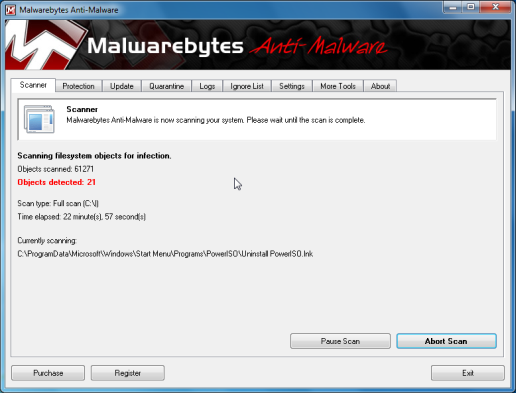
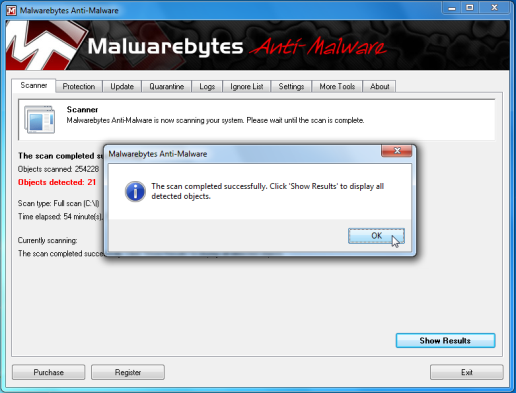
- When the Malwarebytes scan will be completed,click on Show Result.
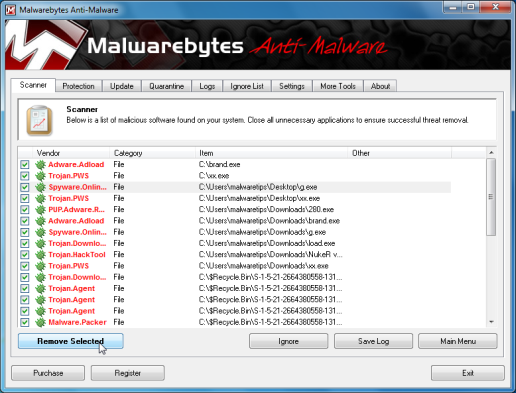
- You will now be presented with a screen showing you the malware infections that Malwarebytes’ Anti-Malware has detected.Please note that the infections found may be different than what is shown in the image.Make sure that everything is Checked (ticked) and click on the Remove Selected button.
- After your computer will restart, open Malwarebytes Anti-Malware and perform a Full System scan to verify that there are no remaining threats
Run a computer scan with HitmanPro
- Download HitmanPro from the below link,then double click on it to start this program.
Download HitmanProOfficial Sophos download. Free scan, free 30-day trial to remove threats.
IF you are experiencing problems while trying to start HitmanPro, you can use the Force Breach mode.To start HitmanPro in Force Breach mode, hold down the left CTRL-key when you start HitmanPro and all non-essential processes are terminated, including the malware process. (How to start HitmanPro in Force Breach mode – Video) - HitmanPro will start and you’ll need to follow the prompts (by clicking on the Next button) to start a system scan with this program.
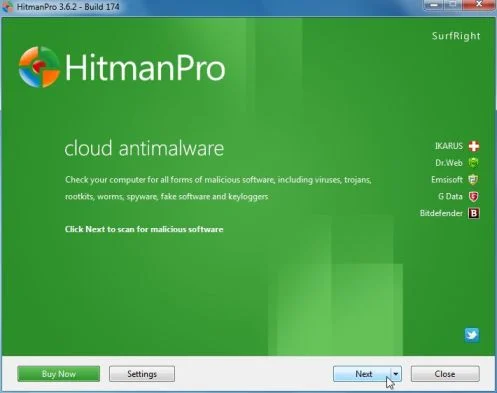
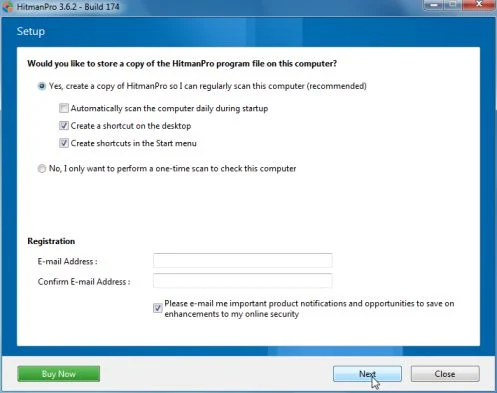
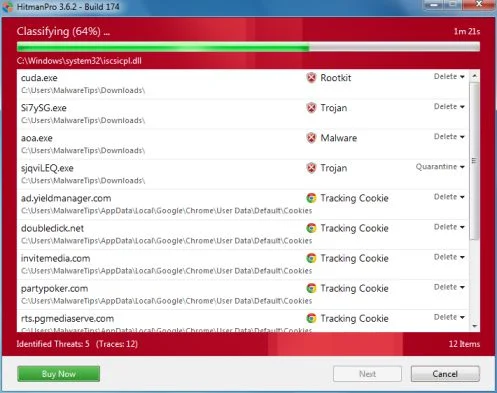
- HitmanPro will start scanning your computer for FBI Online Agent malicious files as seen in the image below.
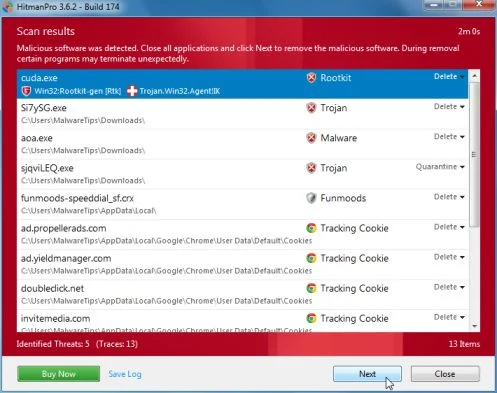
- Once the scan is complete,you’ll see a screen which will display all the infected files that this utility has detected, and you’ll need to click on Next to remove this malicious files.
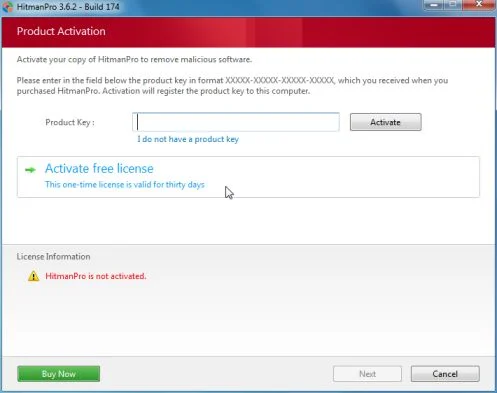
- Click Activate free license to start the free 30 days trial and remove all the malicious files from your computer.

Join the discussion
56 commentsShare your experience or ask a question about this article.
Your progress
Did these steps help?
Let us know how the guide worked for you.
Describe what you see and the step you reached. Keep passwords and other private information out.
Discussion
I have cm security on my phone and it removed it i dont know if it works on computers but i know it worked on my phone. Hope i helped.
Thanks for the help!!! 2nd time dealing with this scam, had to use the flashdrive solution this time and it worked after startup with the f12 key. Tried f8-f11 but f12 is the one that worked. Thanks again.
Thank you, I’m stress free
Hello, Stelian !
I got the virus through a music sharing blog! Norton help line, thru India tried valiantly to help, but after 2 hours offered me only a $200 advanced wipe which they said could lose settings and files. So, my search brought me here.
I could not do a safe boot of any kind, it was completely disabled, but your advice to make a Kaspersky Rescue CD at the link: http://malwaretips.com/blogs/remove-ukash-virus/ was absolutely the best, totally fixed the issue, and subsequent tests with other antivirus programs show that it is OK now!
thanks!!
By the way, I ran checkdisk after all was done and it corrected a couple of errors that may have happened as a result of the rescue disc. Everything running smoothly and no lost files or settings!
wow!! this was my first virus today scared the life out of me ended up at the police station thinking i was going to get locked up..this site was the first i clicked to see if i could fix it myself,, and you deserve a gold medal for your easy to understand top quality instructions..i fixed my pc its up and running all within an hour.. and i owe it all to you..thank you so much for sharing what you know with others i did not have the money to take my pc in to the shop and was in a real state of panic ..you are amazing and i wish i could squeeze you tight and give u a big hug..thanks a million for everything :) hope you have a very lovely day
I got this ransomware for the 2nd time. I don’t use any virus, malware, spyware equipment because I too am somewhat of a geek with my own equipment.
This time it’s different than the first, I scanned disk and it deleted my back up restore files. So long story short I just said to he’ll with it and did a factory restore.
It’s like the doomsday option hahaha, just wanna let anyone reading this know that it’s evolved.
Hi. My consern is that the hackers can obtain valuable information and used it. Can this happend?
In reply to y.c
Hello Y.c,
No, this type of malware should not contain any keyloggers or other spyware. Trojan:W32/Reveton is a ransomware application. It fraudulently claims to be from a legitimate law enforcement authority and prevents users from accessing their infected machine, demanding that a ‘fine’ must be paid to restore normal access.
In reply to Stelian Pilici
Thank you so much Mr. Pilici for your computerized repair skills and to freely help us individuals who thought they were in deep trouble! I recently got the virus and quickly rushed for a moneypak, however I believe it didn’t went through as I rechecked the balance on my Paypal. So, with the same concern with Y.c, there shouldn’t be any access to any information then. By the way, you are our Lifesaver!!! Much appreciation!
It’s really help! Thank you very much!
When I go into safe mode with command prompt how do you type in cd restore ? If I click on it it takes me to a black screen can’t remember what it say and I type it there and it does nothening am I suppose to right click not left click to be able to type next to safe mode command prompt . The way u have that worded sound like I have to type that right next to it and I can’t . I had already downloaded malware thing and did a scan in safety mode and tried to logged in without safe mode and it was still the the FBI message so I’m really wanting to try ur suggestion please help
In reply to Crystal Stevenson
Hello,
In the Command prompt,type in the following:
For Windows XP: C:\windows\system32\restore\rstrui.exe and press Enter
For Windows Vista/7/8 : C:\windows\system32\rstrui.exe and press Enter
If for some reason, it won’t go into the System Restore options, boot your computer in Safe Mode with Command Prompt, and type msconfig in the Command prompt. This should start the Windows System Configuration tool. Go to the Start-up tab, and search for any suspicious or unknonw entries (random numbers or letter, ctfmon.exe and other suspicious entries), and uncheck them from start-up. Next boot your computer in regular mode and perform a scan with HitmanPro and Malwarebytes as seen on the guide.
My question is what if the message is from department of justice can you still go through the instructions
In reply to lance
Hello Iance,
Yes,it’s basically the same scam but with another name… :) – http://malwaretips.com/blogs/department-of-justice-virus/
Thanks so much!!!!! I hadn’t even done any of the stuff they claimed I had and I don’t believe the FBI would make it so obvious that they were tracking your computer data so I just knew it had to be a virus, so I searched online and found this amazing website with simple enough instructions to follow. I have now completely fixed my computer, BUT I was wondering that instead of perhaps using the Malwarebytes Anti-Malware software and the Hitman Pro software, could I perhaps use the eset anti-virus protection I already have on my laptop to scan all of my computer hard drives? I don’t know if that would work efficiently and remove the virus, let alone, would it work at all?
In reply to Alex Cuthbertson
Hello Alex,
ESET is a good scanner and you can give it a go. If you are still having issues, then we recommend that you install and scan with Malwarebytes and HitmanPro.
Stay safe!
Thank you so very much for posting this! My daughter’s computer became infected with this virus, and I was at a loss as to what to do. I was able to start in “safe mode with networking”, and used the Malware link to clear out the 8 viruses found. Your explanation of the steps made it so very easy. Again, many thanks!
So I was able to get into the desktop screen after I went through the process of logging on with “safe mode” and I ran malaware twice. It came up as six virus removed. So is the virus completely out of my system
I get an error #5, Lock message when I attempt to create a kickstart USB drive. It starts the process ut then I get the error message.
In reply to Bill snider
Hello Bill,
This message is shown whenever another process is holding a lock on the USB flash drive. Most times this is because there is a window open which shows the contents of the flash drive. Sometimes Windows is configured to show the contents of a flash drive whenever a new one is inserted into the PC. These windows must be closed before the flash drive can be written. Also the failure can occur because of another AV program, inspecting the contents of the flash drive. In that case, waiting a few seconds and then trying to write again will succeed most of the times.
thank you very much for this support. i was so scared when i first saw that stupid virus. i was angry too because i’ve never done any of the three reasons it gave so why would fbi block my screen. then i googled moneypak from another pc and this thing was on top. but thanks a ton. it helped me to get back my pictures. i have a lot of pictures of my babies in my computer and i didn’t get the time to save those to my external drive. i thought i lost all the pictures. but this site helped me to get rid of that fbi scam. safe mode with networking didn’t work for me. it kept shutting down then i used safe mode with command prompt and it worked. thanks again for this great help. can’t thank you enough.
Nothing like a plan that kills these programs. You guys are top notch.
I tried to get into the safe mode but when i entered my password it wouldn’t let me download the information you recommended and the fake ” FBI” site keeps coming up. Any ideas on what I am doing wrong?
In reply to brandi
Hello Brandi,
Did you scan with HitmanPro Kickstart?
If it still doesn’t work,you’ll need to create a Kaspersky Rescue CD as seen HERE: http://malwaretips.com/blogs/remove-police-trojan/ , on Method 3.
If everything fails, then you’ll need to create an account on our forums and a member of the staff will help you (with more advanced tools) to remove this nasty virus: http://malwaretips.com/Forum-Malware-Removal-Assistance
Good Luck!
We might be okay now. Phew. Do I need to look for more malicious files on my hard drive, or should I be okay? Some sites had specific files names to look for.
In reply to brooke
Hello Brooke,
If you have run the HitmanPro and Malwarebytes scan, your computer should be ok!
Stay safe! :D
We’ve tried methods 1, 2 & 3. Can’t get to Safe Mode Screen and when we do get to Set-up Screen, then the Load from removable drives function won’t start! Help!! This is our business laptop and Sales Taxes are due in a few days!!
In reply to David Biggs
Hello Thomas,
You’ll need to create and perform a scan with a Kaspersky Rescue CD as seen HERE: http://malwaretips.com/blogs/remove-police-trojan/ , on Method 3.
If everything fails, then you’ll need to create an account on our forums and a member of the staff will help you (with more advanced tools) to remove this nasty virus: http://malwaretips.com/Forum-Malware-Removal-Assistance
Good Luck!
Worked for me. However Hitman Pro doesnt have the free 30 trial anymore. So, I wasnt able to use that portion of the fix. Thanks for the info!
In reply to Adam
Hello Adam,
HitmanPro offers a free 30 days trail for all the home users, however if you are using a laptop from work , then you won’t see the final activation screen.
Anyway, there are alternatives way to remove the malicious files,can you please run a scan with the following tools:
STEP 1: Run a scan with RogueKiller
RogueKiller Download Link (This link will automatically download RogueKiller on your computer)
STEP 2: Run a scan with ESET Online Scanner:
ESET Online Scanner Download Link (This link will automatically download ESET Online Scanner on your computer.)
Next,run a scan with HitmanPro.