


FindsForTech.com is being promoted through social media as the doorway to an unusually generous retail reward. Depending on when the page is viewed, visitors may see the branding of a major Australian retailer and a promise that hundreds of dollars are waiting to be claimed after a few simple steps.
The offer looks easy, the page looks polished, and the instructions make the reward sound almost guaranteed. However, the domain is not an official retailer website, and the path it creates is built around completing third-party offers rather than delivering the advertised prize.
What Is the FindsForTech.com Scam?
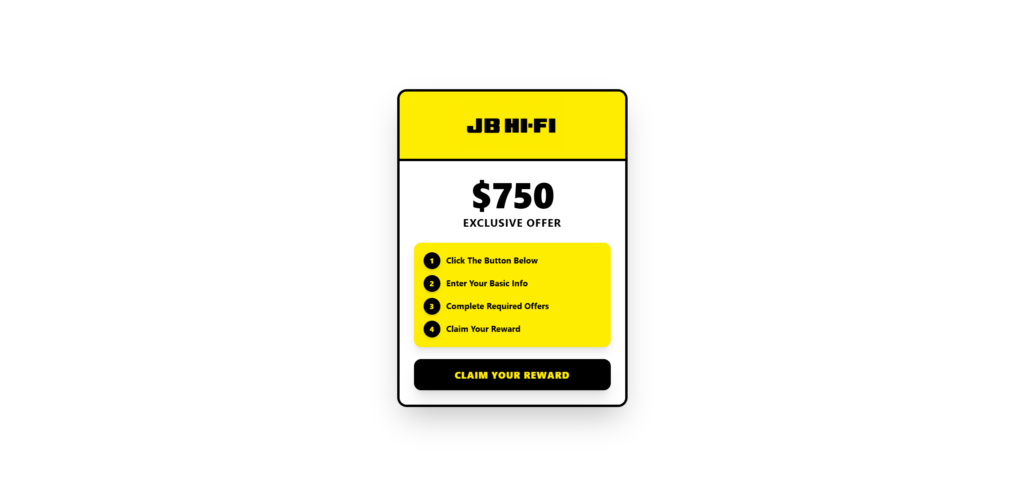
FindsForTech.com is a promotional landing page that has used the names and visual identities of well-known Australian retailers to advertise a supposed $750 “Exclusive Offer.” An indexed version of the page displayed the BIG W logo alongside the value $750, followed by four remarkably simple instructions:
- Click the button below.
- Enter your basic information.
- Complete required offers.
- Claim your reward.
The final button said “Claim Now,” but the language on the page revealed the real mechanism before the visitor even clicked. The $750 reward was not presented as a normal purchase promotion, an official competition with published rules, or a benefit issued directly by BIG W. It was tied to the completion of unspecified “required offers.”
More recently, automated scans recorded the title of the same domain as “JB HI-FI Landing Page.” Earlier records had identified it as “Big W Landing Page.” This change matters because it shows that FindsForTech is not a stable retailer service. The same domain can be repackaged around a different company while retaining the underlying reward funnel.
In other words, the brand is interchangeable. One version borrows trust from BIG W, another borrows it from JB Hi-Fi, and a future version could use a completely different retailer or product. The recognizable logo gets the visitor’s attention, but the affiliate funnel behind the page remains the real destination.
FindsForTech.com was registered on January 11, 2026, and its ownership details are hidden behind a privacy service. A young domain and private registration do not prove fraud by themselves, since legitimate businesses sometimes use both. Here, however, those facts sit beside far more significant evidence: rotating retailer identities, a reward claim on an unrelated domain, an explicit requirement to complete offers, and connections to an affiliate-tracking domain.
The most important point is simple: FindsForTech.com is not the official website of BIG W or JB Hi-Fi. BIG W’s official scam page specifically warns about social media survey scams that impersonate the retailer and promise free products for completing a survey or paying a nominal delivery fee. The company says these promotions are not legitimate BIG W offers and describes the linked pages as phishing sites designed to collect personal and financial information. You can read that warning on the official BIG W scam-alert page.
JB Hi-Fi runs genuine competitions through its own website, where visitors can see closing dates, eligibility requirements, promoter details, prize values, draw dates, and terms and conditions. A generic “$750 Exclusive Offer” on FindsForTech.com does not provide that level of accountability. JB Hi-Fi also gives consumers a dedicated way to report suspicious promotions through its official scam-enquiries support channel.
FindsForTech.com Scam: The Verdict
FindsForTech.com should not be trusted as a source of BIG W, JB Hi-Fi, or other retail rewards. The page uses the expectation of a $750 prize to push visitors toward third-party affiliate offers, and there is no credible evidence that completing those offers will produce the advertised reward.
The site’s own wording makes the commercial purpose difficult to miss. Visitors are not simply asked to enter an official retailer competition. They are instructed to complete “required offers,” a phrase commonly used in incentive funnels where participants must sign up for trials, download applications, join services, complete surveys, request quotes, or make purchases before they can supposedly qualify.
These tasks are not administrative steps added by BIG W or JB Hi-Fi. They are monetized actions. When a participant completes an eligible offer, an affiliate or publisher can receive a commission from the advertising network. The visitor takes on the work, cost, subscriptions, and data exposure, while the promoter benefits from the conversion.
The promised reward is what keeps people moving through the funnel, yet it may depend on complex conditions that are easy to miss and difficult to satisfy. Some offer walls require several separate deals, only count new customers, exclude certain devices or locations, demand that paid subscriptions remain active for a minimum period, or reject conversions if tracking fails. Even after a participant spends money, there may be no practical way to prove that every condition was fulfilled.
Calling this merely an advertisement would miss the core issue. Advertising tells people what is being sold and who benefits from the transaction. The FindsForTech funnel leads with an oversized retailer-branded reward, while the affiliate obligations appear as a step on the way to claiming it. That structure encourages visitors to act for a reason that is very different from the commercial reality.
How the FindsForTech.com Scam Works
1. A Social Media Ad Creates the Hook
The journey commonly begins with an ad, sponsored post, short video, or shared link on social media. It may claim that a retailer is giving away a $750 voucher, rewarding loyal customers, clearing promotional inventory, celebrating an anniversary, or offering a special benefit to a limited number of people.
The story can change without affecting the funnel. What matters is that the offer appears valuable, easy to obtain, and connected to a company the visitor already recognizes. A large retailer provides instant familiarity. People are less likely to question a form if the page carries a logo they have seen in stores for years.
Social media also gives the promotion momentum. An advertisement can be targeted by country, age, device, or interests, while new accounts and creatives can replace those that attract complaints. The landing-page domain does not need to resemble the retailer’s name because the advertisement has already established the association before the visitor arrives.
2. The Landing Page Borrows a Retailer’s Identity
On reaching FindsForTech.com, the visitor sees branding that makes the page feel like an extension of the advertised retailer. Yet the browser’s address bar still shows findsfortech.com, not the official BIG W or JB Hi-Fi domain.
That mismatch is one of the strongest warnings. A logo is just an image and can be copied in seconds. It does not prove that the retailer owns, approves, or even knows about the page. Genuine promotions normally live on an official corporate domain or are linked from an official, verified retailer page with clear terms identifying the promoter.
The FindsForTech name itself is deliberately vague. It does not correspond to the identity displayed on the landing page and gives visitors little information about the business supposedly issuing the reward. There is no obvious reason why a company called “Finds For Tech” would be responsible for distributing a BIG W or JB Hi-Fi benefit worth $750.
3. A Large Dollar Amount Makes the Funnel Feel Worth the Effort
The $750 figure is prominent because it changes how visitors evaluate everything that follows. A survey, trial, app installation, or small purchase may seem inconvenient on its own. When framed as the final obstacle between the visitor and $750, the same task can feel reasonable.
This is the central psychological trade. The visitor mentally values each action against the advertised reward rather than against the actual product or subscription being offered. Someone who would never independently sign up for several unfamiliar services may do so because they believe those registrations unlock a much larger prize.
The word “exclusive” reinforces the effect. It implies that the visitor has reached an opportunity unavailable to the general public, even though the page provides no meaningful explanation of who selected them or why they qualify.
4. “Enter Your Basic Info” Starts the Data Collection
The page’s second instruction asks the visitor to provide “basic” information. That description makes the request sound harmless, but even ordinary details can have considerable value when collected together.
A name, email address, phone number, age range, postal code, and home address can be used for telemarketing, targeted promotions, identity matching, or future phishing messages. Information may be submitted not only to the landing-page operator but also to the separate advertisers whose offers the visitor completes.
The data can become more sensitive as the visitor advances. A survey may request demographic information, a quote form may ask about household finances or insurance, and a trial can require payment details. The promise of a $750 reward makes each additional request feel like part of one continuous claim process, even when the visitor is actually moving between unrelated companies and agreements.
5. The Visitor Is Redirected Through an Affiliate Tracker
Technical scans of FindsForTech.com have identified trksy.org among the external hosts associated with the page. Publicly indexed links on that domain use parameters such as offer_id and aff_id, which are characteristic of performance-marketing tracking. These identifiers allow a network to determine which offer was selected and which affiliate should receive credit for a completed action.
This does not mean every advertiser shown after the redirect is fraudulent. Legitimate businesses sometimes buy leads or customers through affiliate networks and may have little visibility into every page used by individual publishers. The problem is the deceptive wrapper: visitors are sent to the offers because they believe the tasks will deliver a retailer-backed $750 reward.
Once the visitor leaves FindsForTech.com, the visible offer can vary. The tracker may choose campaigns based on the person’s location, device, browser, and the inventory available at that moment. Two people clicking the same button may therefore see different surveys, subscriptions, competitions, mobile applications, or paid deals.
6. “Complete Required Offers” Becomes the Real Transaction
This is the point where the supposed reward page becomes an affiliate acquisition funnel. The participant may be asked to complete one offer, but more commonly the process can involve several deals or multiple levels. A visible progress indicator may create the impression that the prize is getting closer after each conversion.
Some deals cost nothing upfront but collect valuable contact information. Others require a purchase, a paid trial, a credit check, a subscription, or a mobile number. A discounted trial can become a recurring charge if it is not canceled in time, and the conditions may be spread across the landing page, the offer wall, and the advertiser’s own terms.
Tracking creates another trap. Affiliate systems rely on cookies, browser settings, attribution windows, and strict eligibility rules. An ad blocker, an interrupted redirect, a previously created account, or a mismatch in submitted information may cause an otherwise completed task not to register. The visitor can spend money and still be told that the requirement remains unfinished.
7. The Reward Remains Just Out of Reach
After investing time or money, many people feel pressure to continue. Walking away now means admitting that the previous offers may have been completed for nothing. The funnel exploits that sunk-cost feeling by suggesting that only one more deal, verification, or waiting period stands between the participant and the promised reward.
Even where an incentive program has written qualification rules, the headline can create an expectation that does not match the effort and expense required. The advertised $750 may be conditional, may not be cash, may be available only to a tiny subset of users, or may require far more spending than the opening page suggests. In deceptive versions of the model, no usable reward arrives at all.
The result is predictable: the affiliate conversions are recorded immediately, while the benefit that motivated them remains uncertain, delayed, disputed, or nonexistent.
Evidence That FindsForTech Is Part of a Wider Affiliate Network
FindsForTech does not look like an isolated promotion created for one retailer. Its design and connections fit a wider ecosystem of disposable reward pages that reuse the same structure with different brands.
The first piece of evidence is the domain’s own shifting identity. Search records captured FindsForTech.com as a BIG W landing page offering $750. Later technical records identified it as a JB HI-FI landing page. A genuine retailer microsite does not normally switch from impersonating one unrelated national retailer to another.
The second piece is the affiliate-tracking infrastructure. The external trksy.org domain appears in the technical footprint of FindsForTech, and publicly visible tracker URLs use explicit affiliate and offer identifiers. That structure is built to route traffic, attribute actions, and rotate campaigns—not to administer a single retailer’s official competition.
The third piece is the appearance of closely related landing pages elsewhere. dailydealaccess.com, another recently created domain using the same hosting IP recorded for FindsForTech, has also been indexed with the title “Big W Landing Page.” Other reward pages connected to the same tracker have advertised a Costco $750 member reward, a Chipotle gift card, generic “exclusive member” rewards, Cash App promotions, and SHEIN offers.
These connections do not by themselves prove that every domain has the same legal owner. Affiliate ecosystems can involve template designers, landing-page publishers, tracking networks, lead buyers, and advertisers who are separate from one another. What the evidence does show is a repeatable network model: interchangeable brands on the front, tracking links in the middle, and commission-generating offers at the end.
The page can be rebuilt quickly, and the domain can be replaced just as quickly. That is why consumers should learn the pattern rather than memorizing one website name. If FindsForTech disappears, the same $750 promise can return tomorrow on a new domain with a different retailer’s logo.
Why Automated “Safe” Results Do Not Make the Offer Legitimate
Some automated website scanners may show that FindsForTech has a valid HTTPS certificate or is not currently included on major malware and phishing blacklists. Those results can sound reassuring, but they answer a narrower question than most consumers realize.
HTTPS means the connection between the browser and the website is encrypted. It does not verify that a reward is genuine, that a logo is used with permission, or that the website will deliver what its advertising implies. Scam operators can obtain basic encryption certificates just as easily as legitimate businesses.
A clean malware scan also does not validate the marketing claim. A page can be technically free of malicious software while still using misleading branding, manipulative advertising, or affiliate offers with unfavorable subscription terms. The danger may come from the information and payment details a visitor voluntarily supplies, not from code that secretly infects the device.
This explains why automated services can produce conflicting ratings for the same site. One system may flag its youth, hidden ownership, and suspicious connections, while another sees no malware detection and calls it “likely safe.” Neither score replaces a direct examination of what the page promises and what happens after the button is clicked.
The Main Risks of the FindsForTech.com Funnel
The first risk is financial. An offer described as free or inexpensive may include delivery charges, trial fees, minimum purchase requirements, or recurring subscriptions. Visitors who complete several deals can spend a meaningful amount before realizing that the $750 reward is not guaranteed.
The second risk is loss of privacy. Every survey, registration, and quote request can place personal information into another database. Once a phone number or email address has been categorized as responsive to rewards, it may attract aggressive marketing and further scam attempts.
The third risk is payment-card exposure. Scamwatch has documented retailer-branded survey promotions in which consumers were asked for card details to cover a small fee and later faced unauthorized transactions or undisclosed subscriptions. The official Australian guidance on fake gift-card offers specifically warns that scammers misuse brands such as JB Hi-Fi to collect banking details, passwords, and other personal information.
The fourth risk is unwanted software or permissions. Some affiliate tasks may encourage participants to install apps, browser extensions, or programs. Even when the advertised software is not malware, it may collect data, change settings, show additional advertising, or create a service the visitor never genuinely wanted.
Finally, the funnel can create a chain of follow-up deception. A person who submits information may later receive messages claiming that the reward is pending, that one final fee is required, or that a representative needs to verify their account. Those messages can be more convincing because the sender already knows which reward the person attempted to claim.
What To Do If You Used FindsForTech.com
- Stop completing offers. Do not sign up for another deal simply because the page says your reward is nearly complete. Additional conversions are unlikely to fix the underlying problem and may increase your costs.
- Write down exactly what you submitted. Make a list of every form, survey, application, trial, and purchase completed through the funnel. Record the company names, dates, prices, confirmation emails, and cancellation deadlines. Screenshots can be useful if a charge or subscription must later be disputed.
- Cancel trials and recurring services directly. Visit the official website of each service independently rather than returning through the affiliate link. Follow its cancellation procedure and keep proof. Deleting an app does not necessarily cancel the subscription attached to it.
- Contact your bank if card details were entered on a suspicious page. Use the phone number printed on the card or listed in the bank’s official application. Explain that the details may have been exposed through a misleading reward promotion, ask whether the card should be replaced, and review recent transactions carefully.
- Dispute unauthorized charges promptly. If an unfamiliar payment appears, report it to the card issuer immediately. Do not wait for a promised reward or refund from the promotion’s operator.
- Secure any reused passwords. If you created a password during the process and used the same or a similar password elsewhere, change it on those other accounts. Start with your email account, since it can be used to reset many additional passwords, and enable multifactor authentication wherever possible.
- Remove unwanted applications and browser extensions. Check what was installed on the day you completed the offers. Uninstall unfamiliar items, review browser notification permissions, and run a trusted security scan if anything behaves unexpectedly.
- Expect targeted spam and phishing. Treat unexpected messages about prizes, deliveries, refunds, account problems, or survey rewards with suspicion. Do not click their links or supply verification codes.
- Report the social media advertisement. Report the original post or ad as a scam, impersonation, or misleading promotion. Include screenshots and the FindsForTech.com address if the platform allows supporting details.
- Notify the impersonated retailer and Scamwatch. BIG W accepts suspicious messages at the address listed on its official scam page, while JB Hi-Fi provides an official scam-enquiry form. Australian consumers can also report the incident to Scamwatch.
Is Your Device Infected? Run a Free Malware Scan
Slow performance, constant pop-ups, or strange behavior? These are classic signs of a malware infection. A quick way to check is to scan your device with Malwarebytes Free, one of the most trusted malware removal tools available. If you only visited a scam page and didn’t download or install anything, this scan is optional.
The free version detects and removes the most common threats, including:
- Adware — the cause of those annoying pop-ups
- Browser hijackers — unwanted redirects and changed homepages
- Trojans and spyware — hidden programs stealing your data
- Potentially unwanted programs (PUPs) — software you never asked for
👉 Select your device below — Windows, Mac, or Android — then follow the simple steps to download Malwarebytes, scan your system, and remove any threats it finds. The scan usually takes 5 to 20 minutes.
Run a Malware Scan with Malwarebytes for Windows
Malwarebytes is one of the most popular and trusted anti-malware tools for Windows — and it’s completely free for removing infections. It catches threats that many antivirus programs miss, including adware, browser hijackers, and trojans. Follow the steps below to scan your PC and remove what Malwarebytes finds.
Download Malwarebytes
Click the button below to download the latest version of Malwarebytes for Windows from the official source. The free version is all you need — it will scan your computer and remove adware, browser hijackers, and other malicious software at no cost.
Download MalwarebytesOfficial installer for Windows 11 and 10. Your download starts right away.Want real-time protection? See Malwarebytes Premium Malwarebytes Free for WindowsScans and removes malware at no cost
-
Install Malwarebytes
When the download finishes, open your Downloads folder and double-click the MBSetup file. If Windows shows a User Account Control pop-up, click “Yes” to allow the installation.

Follow the On-Screen Prompts to Install Malwarebytes
The setup wizard will walk you through a few quick screens:
-
Choose where you’re installing the program — “Personal Computer” or “Work Computer” — then click Next.

-
Malwarebytes will now install on your device. This usually takes under a minute.

-
When installation is complete, the “Welcome to Malwarebytes” screen will open automatically.

-
On the final screen, click Open Malwarebytes to launch the program.

-
Optional: Check for rootkits with a Custom Scan
You don’t need to change any settings for a normal scan. The standard Threat Scan in the next step is enough for most problems, so you can go straight to it.
If you also want to check for rootkits, use a Custom Scan. In current versions of Malwarebytes, rootkit scanning is only available there:
- On the Scanner tile, click the three-dot menu and select Advanced Scan.
- Choose Custom Scan. In its options, check Scan for rootkits.
- Select your system drive (usually C:\) as the location to scan, then start the scan. It takes longer than a Threat Scan.
- When it finishes, review and quarantine the results as described in the steps below.
Rootkit scanning isn’t available on Windows devices with ARM processors.
Start the Scan
Click the blue Scan button. Malwarebytes will automatically update its virus database and start checking your computer for malware.

-
Wait for the Scan to Finish
The scan checks your entire system for browser hijackers and other malicious programs, so it can take 5 to 20 minutes depending on your computer. Feel free to do something else — just check back occasionally to see the progress.

-
Quarantine the Detected Threats
When the scan is done, you’ll see a list of everything Malwarebytes found — malware, adware, and potentially unwanted programs. Click the “Quarantine” button to remove all of them at once.

Malwarebytes will now remove the malicious files and registry entries and move them safely into quarantine.

-
Restart Your Computer
Some threats can only be fully removed after a reboot. If Malwarebytes asks you to restart, click Yes. Once you’re logged back in, Malwarebytes has finished removing the threats it found.

When the scan is done, check whether the problems you noticed have stopped. If they continue, see the options below.
If you are still having problems with your computer after completing these instructions, then please follow one of the steps:
- Run a computer scan with ESET Online Scanner
- Ask for help in our Windows Malware Removal Help & Support forum.
Run a Malware Scan with Malwarebytes for Mac
Malwarebytes for Mac is a free on-demand scanner that removes the malware other security software tends to miss — adware, browser hijackers, and unwanted programs included. Cleaning an infected Mac with Malwarebytes has always been completely free, and it’s our go-to recommendation. Follow the steps below to scan your Mac and remove what Malwarebytes finds.
-
Download Malwarebytes for Mac
Click the button below to download the latest version of Malwarebytes for Mac.
Download MalwarebytesOfficial installer for macOS. Your download starts right away.Want real-time protection? See Malwarebytes PremiumMalwarebytes Free for MacScans and removes malware at no cost -
Open the Malwarebytes setup file
When the download finishes, open your Downloads folder and double-click the setup file to begin the installation.

-
Follow the On-Screen Prompts to Install Malwarebytes
The Malwarebytes for Mac Installer will guide you through a few quick screens. Click “Continue” and keep following the prompts until the installation completes.



When the installation is complete, Malwarebytes opens to the Welcome to Malwarebytes screen. Click “Get started“.
Malwarebytes needs Full Disk Access to check your whole Mac. When it asks, open System Settings > Privacy & Security > Full Disk Access, turn on Malwarebytes (it may be listed as Malwarebytes Protection), and confirm with your password or Touch ID. Then return to Malwarebytes. On macOS Monterey and earlier, this setting is in System Preferences > Security & Privacy > Privacy.
-
Select “Personal Computer” or “Work Computer”
Malwarebytes will ask what type of computer you’re installing it on. Click either Personal Computer or Work Computer, whichever applies.

-
Start the Scan
Click the “Scan” button. Malwarebytes will automatically update its detection database and begin checking your Mac for malware.

-
Wait for the Scan to Finish
Malwarebytes will scan your Mac for adware, browser hijackers, and other malicious programs. This can take a few minutes, so feel free to do something else — just check back occasionally to see the progress.

-
Quarantine the Detected Threats
When the scan is done, you’ll see a list of everything Malwarebytes found. Click the “Quarantine” button to remove all the threats at once.

-
Restart Your Mac
Malwarebytes will now remove all the malicious files it found. Some threats can only be fully removed after a reboot — if Malwarebytes asks you to restart, allow it. Once you’re logged back in, check whether the problems you noticed have stopped. If they come back, save the scan report and ask for help in our forum.

If the problems you noticed continue after the scan, see the options below.
If you are still experiencing problems while trying to remove a malicious program from your computer, please ask for help in our Mac Malware Removal Help & Support forum.
Run a Malware Scan with Malwarebytes for Android
Malwarebytes for Android scans your phone or tablet for malware, adware, and potentially unwanted apps. The free version scans only when you start a scan. Real-time protection, which checks apps automatically, is part of the paid Premium version.
-
Download Malwarebytes for Android.
You can download Malwarebytes for Android by clicking the link below.
Get Malwarebytes for AndroidOpens Google Play in a new tab.Want real-time protection? See Malwarebytes Premium for AndroidMalwarebytes for AndroidScans your phone and removes malware at no cost -
Install Malwarebytes for Android on your phone.
In the Google Play Store, tap “Install” to install Malwarebytes for Android on your device.

When the installation process has finished, tap “Open” to begin using Malwarebytes for Android. You can also open Malwarebytes by tapping on its icon in your phone menu or home screen.

-
Follow the on-screen prompts to complete the setup process
When Malwarebytes opens, it walks you through a short setup. Tap Get started and follow the prompts. If you see an offer for a trial or a paid plan, read it before you accept. You can skip it and keep using the free scanner.
Malwarebytes will ask for permission to access the files on your phone so it can scan them. Tap Allow, or turn on the permission in the Android screen that opens, then return to Malwarebytes.
-
Run a scan with Malwarebytes for Android
On the main screen, tap Scan now. In some versions, you open the menu, tap Scanner, and then tap Run a scan.
-
Wait for the Malwarebytes scan to complete.
Malwarebytes will now start scanning your phone for adware and other malicious apps. This process can take a few minutes, so we suggest you do something else and periodically check on the status of the scan to see when it is finished.

-
Remove the detected apps.
When the scan has been completed, you will see a list of the threats that Malwarebytes for Android has detected. Next to each detected item, tap the menu icon (three dots), then choose to uninstall the app or delete the file. Android then asks you to confirm. Tap OK or Uninstall to remove the app.
-
Restart your phone.
When the detected apps are removed, restart your phone if Malwarebytes asks you to. Then check whether the problems you noticed have stopped.
If the problems you noticed continue after the scan, see the options below.
If you are still having problems with your phone after completing these instructions, then please follow one of the steps:
- Ask for help in our Mobile Malware Removal Help & Support forum.
- Only as a last resort, reset your phone to factory settings. Read the warning below first.
- Back up your photos, videos, files, and messages, for example to your Google account or a computer.
- Make sure you know your Google account email and password. The phone asks for them after the reset. If you changed the password recently, Google recommends waiting 24 hours before you reset.
- On a Samsung phone, also make sure you know your Samsung account password.
- If you use an authenticator app for two-step verification, move your accounts to another device or save your backup codes first.
Stay Protected: Block Ads and Malicious Sites
No scan can prove a device is completely clean, so it helps to block threats before they reach you. Most infections start with a malicious ad or a fake download button — so blocking them at the source is your best defense.
We recommend AdGuard, which blocks malicious ads, phishing pages, and dangerous redirects before they can reach you.
👉 Download AdGuard and browse safely
How to Recognize Similar Affiliate Reward Scams
A legitimate promotion should clearly identify the promoter, the eligibility rules, the prize pool, important dates, and the full conditions. The company named in the advertisement should acknowledge the promotion through its official website or verified social channels.
By contrast, deceptive affiliate reward funnels use vague phrases such as “exclusive offer,” “selected visitor,” or “claim now” while hiding the true cost behind required deals. The page may display a huge reward but say almost nothing about how many offers must be completed, what those offers cost, or how many participants actually receive the headline amount.
Pay close attention to the domain. A retailer logo does not matter if the web address belongs to an unrelated site. Also look for abrupt redirects to new domains containing tracking parameters such as aff_id, offer_id, sub, or clickid. Those parameters are not automatically malicious, but they confirm that the click is being attributed within an advertising system.
Most importantly, ask whether you would still want each offer if the $750 reward did not exist. If the answer is no, the promotion is influencing you to make commercial decisions you would not otherwise make. That is exactly why the headline reward is so prominent.
Frequently Asked Questions
Is FindsForTech.com legitimate?
FindsForTech.com should not be trusted as an official BIG W or JB Hi-Fi promotion. The domain has rotated between retailer-branded landing pages and directs visitors toward required third-party offers. There is no credible evidence that it is authorized to issue the advertised $750 reward.
Is FindsForTech.com affiliated with BIG W?
There is no evidence that BIG W owns or approves FindsForTech.com. BIG W warns that scammers use its branding in social media surveys and fake free-item offers. Official BIG W promotions should be verified through bigw.com.au.
Is FindsForTech.com affiliated with JB Hi-Fi?
There is no evidence of an official connection. Genuine JB Hi-Fi competitions appear on the retailer’s official website with terms, dates, promoter information, and eligibility rules. FindsForTech.com is an unrelated domain.
What does the site promise?
An indexed version promoted a $750 BIG W “Exclusive Offer” and told visitors to enter basic information, complete required offers, and then claim the reward. The same domain was later recorded under the title “JB HI-FI Landing Page,” showing that the front-facing retailer can change.
Why does the site require offers?
The offers appear to be the monetization mechanism. Completing a survey, trial, registration, download, or purchase can create an affiliate commission for the party that referred the visitor.
Will I really receive $750 after completing the offers?
You should not assume that you will. The opening page does not provide the transparency expected from an official $750 retailer promotion, and incentive funnels can involve extensive eligibility rules, paid deals, failed tracking, and additional requirements. The safest choice is not to participate.
Is affiliate marketing itself a scam?
No. Legitimate affiliate marketing openly recommends products or services and discloses that the publisher may earn a commission. The deception here comes from using a retailer-branded $750 reward to push visitors into offers without clearly presenting the true nature and difficulty of the arrangement.
Is trksy.org part of the funnel?
Technical scans have found trksy.org among the external hosts connected to FindsForTech. Public links on that tracker use affiliate and offer identifiers, consistent with routing and attributing advertising conversions.
Why did the site change from BIG W to JB Hi-Fi?
Rotating the brand allows the same landing-page infrastructure to support new advertisements and audiences. It is also a strong indication that FindsForTech is a reusable promotional shell rather than a genuine page operated for one retailer.
Is the site safe because it uses HTTPS?
No. HTTPS encrypts the connection, but it does not verify the truth of the reward claim. A misleading website can have a perfectly valid security certificate.
What if I entered only my email address?
An email address alone does not give someone access to your accounts, but it can lead to spam and targeted phishing. Be cautious with messages about rewards, deliveries, refunds, and urgent account problems. If you also created a reused password, change it everywhere it was used.
What if I entered my credit-card information?
Contact the card issuer immediately through an official number, explain the exposure, and follow its recommendations. Review transactions, cancel any subscriptions created through the funnel, and dispute charges you did not authorize.
The Bottom Line
FindsForTech.com is not a trustworthy doorway to a $750 BIG W or JB Hi-Fi reward. It is a rotating affiliate landing page that borrows the credibility of major retailers, directs visitors through a tracking system, and requires them to complete revenue-generating offers before they can supposedly claim the headline prize.
The shifting page titles expose the model. FindsForTech has been recorded first as a BIG W landing page and later as a JB HI-FI landing page. The retailer changes, but the structure does not: a large reward gets the click, “basic information” starts the data collection, and required offers turn the visitor into an affiliate conversion.
Avoid the promotion, do not enter payment information, and do not keep completing deals in the hope that the next one will finally release the reward. Official retailer competitions can be verified on official retailer domains. A $750 prize advertised on an unrelated, recently created website with rotating branding is not an exclusive opportunity; it is a warning sign.

Reviews & discussion
0 commentsShare a firsthand experience, or ask a question.
Community reviews
findsfortech.com
Moderated reader experiences, not an editorial verdict.
Start the conversation
Have a question or something useful to share? Add the first comment.