

That urgent-sounding text about unpaid Florida tolls is likely a scam designed to steal your identity. Scammers are sending Floridians fraudulent texts claiming their car has outstanding SunPass fees. The messages threaten additional fines if immediate payment isn’t made via the provided link. However, it’s all a phishing scam aiming to trick you into handing over valuable personal and financial data.
This in-depth article will uncover everything there is to know about how the FL SunPass scam texts work, how to spot them, and what to do if you shared your information.
An Overview of the FL SunPass Toll Services Scam
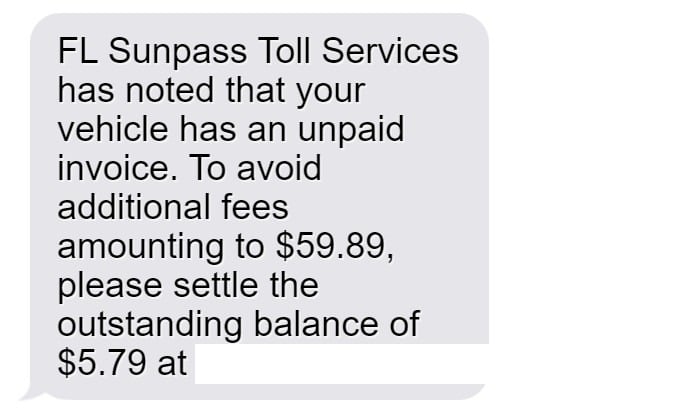
Many Florida drivers have recently reported receiving phishing text messages stating:
“FL Sunpass Toll Services has noted that your vehicle has an unpaid invoice. To avoid additional fees amounting to $59.89, please settle the outstanding balance of $5.79 at [fake website link].”
This is a sneaky scam text designed to deceive people into thinking they must pay delinquent toll road fees immediately. However, it was not sent by any official toll provider. Here’s why it’s fake:
- FL Sunpass Toll Services is a made up name, not a real entity.
- There are no such unpaid toll invoices linked to your vehicle.
- The website you’re directed to is a scam site to steal personal data.
- Scammers want your info for identity theft and credit card fraud.
Once you click the link, you’re taken to a convincing but fraudulent site asking for details like full legal name, date of birth, address, phone number, and credit card information to “settle” the phantom toll invoice. In reality, scammers steal this data to open fraudulent accounts and make unauthorized purchases in your name.
This Floridian toll scam has already affected thousands looking to avoid fictional late fees. But being able to recognize these scam texts prevents you from inadvertently handing over sensitive personal information to criminals.
How the FL SunPass Toll Services Scam Texts Work
Let’s break down step-by-step how these FL SunPass scam texts operate to steal peoples’ personal information:
Step 1: Victims Receive a Fraudulent Text
You’ll be going about your day when you get a text message claiming to be from FL SunPass Toll Services. It states that your vehicle has unpaid toll fees accumulating fines. If you don’t pay immediately, additional fees will be added.
Of course, the text is completely fabricated. But it sets the bait using an urgent threat.
Step 2: The Text Includes a Link to a Phishing Website
The scam FL SunPass text will direct victims to click a link to supposedly pay the toll invoice right away. But the site is a fake phishing site impersonating a legitimate toll payment portal.
The fraudulent site even uses an official-looking domain name and SunPass branding to trick users.
Step 3: Scammers Prompt Victims to Enter Personal Information
On the phishing site, victims are prompted to enter personal details like:
- Full legal name
- Home address
- Date of birth
- Phone number
- Email address
This data is needed supposedly to look up and pay their toll invoice. But in reality, it’s harvested to commit identity theft.
Step 4: The Site Asks for Credit Card Details to “Pay Tolls”
Pushing further, the phishing site will also ask victims to enter credit card information like:
- Card number
- Expiration date
- CVV code
But this is just more sensitive data the scammers want to steal for credit card fraud, not pay any toll fees.
Step 5: Scammers Capitalize on the Stolen Information
Armed with users’ names, birth dates, addresses, and credit card details, the scammers can then:
- Open fake accounts to commit identity theft
- Make unauthorized purchases with the stolen card info
- Access and take over the victim’s other online accounts
Victims often realize too late what happened after noticing fraudulent charges and opened accounts.
What to Do if You Get the FL SunPass Scam Text
If you receive a suspicious text about unpaid Florida SunPass tolls, here are some tips:
- Don’t click any links in the text
- Don’t provide any personal or financial information
- Forward the text to 7726 to report it as spam
- Block the phone number that sent it
- Contact SunPass to confirm legitimacy of any payment requests
- Monitor your credit reports and bank accounts for any fraudulent activity
Remember, real SunPass doesn’t demand payment for mystery toll invoices via text. Avoiding these scam texts keeps your identity and money protected.
What to Do if You Entered Information on the Fake Site
If you inadvertently entered any sensitive personal or financial information on one of the fraudulent FL SunPass phishing sites, take action right away to protect yourself. Doing so quickly can help minimize the potential damage from sharing your details on fake sites.
Step 1: Contact Your Credit Card Company
Your first call should be to your credit card issuer if you entered any credit card information on the phishing site. Immediately report that your card details may have been compromised. Request that they freeze or cancel your credit card so no additional fraudulent charges can be made.
Ask your provider to overnight you a new card with a different number. This deactivates the card data stolen by scammers. Monitor your account closely for any unauthorized transactions, and dispute any you find.
Step 2: Notify Your Bank
If you inputted any banking information like debit card numbers, account and routing numbers, or online banking passwords on the fake site, contact your bank right away. Alert them that your account credentials may have been compromised.
Request that they put an immediate hold on your account to block fraudulent access or transfers. Ask your bank to reset your online banking password and enable enhanced security measures like multi-factor authentication.
Closely track your account activity for any suspicious transactions and report any detected right away to your bank’s fraud department. A quick response can help you recover stolen funds faster.
Step 3: Place Fraud Alerts
Reach out to one of the three major credit reporting bureaus (Equifax, Experian, TransUnion) to place a 90-day initial fraud alert on your credit file. This requires creditors to verify your identity before opening new accounts in your name.
Request your free annual credit reports from all three bureaus. Comb through your reports to identify any unauthorized accounts opened in your name with your stolen personal information. Dispute any fraudulent accounts or inquiries.
Step 4: Reset All Account Passwords
If you entered any credentials for your existing online accounts (email, shopping sites, etc) on the phishing site, reset all passwords immediately. Choose strong new passwords and enable two-factor authentication wherever possible for enhanced security.
Updating passwords and enabling 2FA blocks criminals from accessing your other accounts using credentials harvested from the fake SunPass site. Routinely resetting passwords is also a smart general security practice.
Step 5: Sign Up for Identity Theft Protection
Consider signing up for an identity theft protection service to monitor your credit and personal information. Reputable companies like LifeLock actively watch for signs of fraud, alerting you to suspicious activity. This allows you to quickly respond to scammer attacks.
Identity theft protection can also help you recover from fraud, though costs vary. Comparison shop to find an affordable plan that fits your budget and needs.
Step 6: File Reports About the Scam
To help authorities stop these phishing scams, file a complaint with the Federal Trade Commission at reportfraud.ftc.gov detailing the fake FL SunPass site you encountered. You can also file local police reports about the scam.
Reporting helps notify officials about new scam tactics targeting Floridians. However, know that recovery of losses is challenging. The most important thing is protecting yourself after the fact.
Step 7: Educate Yourself on Spotting Scams
Use this costly mistake as motivation to better educate yourself on spotting and avoiding phishing scams. Learn to recognize red flags like spoofed identities, fake urgency tactics, prompting for sensitive details, suspicious links, typos, etc.
Knowing common phishing techniques makes you a harder target for scammers seeking personal information for identity theft and credit card fraud. Protect yourself and those you care about.
Step 8: Warn Others About New Scams
The more people informed about the latest phishing attempts, the less likely they are to succeed. Expose these fraudulent tactics by warning your family, friends, and broader social networks about new scams.
Post on social media, tell loved ones directly, and report scams to organizations battling fraud. An informed public is a protected public when it comes to phishing and identity theft.
By taking proactive steps following exposure of your information, you can contain the damage and prevent further misuse. While falling victim to clever phishing scams can happen to anyone, responding appropriately makes a big difference. Don’t let scammers capitalize further on stolen data.
Frequently Asked Questions About the FL SunPass Toll Services Scam
1. What exactly is the FL SunPass scam?
The FL SunPass scam involves receiving phishing text messages stating your vehicle has unpaid SunPass toll invoices requiring immediate payment. The texts threaten additional fees if you don’t pay promptly via the provided link. However, it is a fraudulent scam to trick people into handing over personal and financial data.
2. How can I recognize the scam texts?
The phishing texts often say: “FL Sunpass Toll Services shows your vehicle has an unpaid invoice. Pay now at [fake site link] to avoid fees of $59.89.” Fake company name, urgent threats of fines, and links to shady sites are red flags of a scam.
3. What information are the scammers after?
The phishing site prompts for personal information like your full legal name, home address, phone number, email address, and credit card details to supposedly look up and pay the toll invoice. In reality, this data is stolen for identity theft and financial fraud.
4. What do scammers do with my information?
Scammers use your stolen information to open fake accounts, make unauthorized purchases with your credit card details, steal money from your bank accounts, take over your existing accounts, and more. Watch for unauthorized charges and accounts opened in your name.
5. How can I avoid becoming a victim?
Never click links, provide information, or pay anything based on suspicious texts about unpaid tolls. Real SunPass doesn’t demand payment via text. Report scam texts, block the number, and monitor your credit if you shared information.
6. What if I already entered my details?
If you provided your information, immediately call your credit card company and banks to lock down your accounts. Place fraud alerts on your credit file, reset account passwords, and sign up for identity theft monitoring services. File an FTC complaint and police report.
7. Can I get my money back if I paid?
If you paid using a credit or debit card, you can contest the charges as fraudulent. Provide proof the texts are scams and the card companies will investigate. If confirmed fake, you won’t be liable for the charges and your funds will be refunded.
8. Where can I report the scam?
Forward scam texts to 7726. File complaints with the FCC, FTC, Florida Attorney General, and your local police department. This helps get scam phone numbers and sites shut down faster.
9. How can I avoid text scams generally?
Use caution with texts demanding urgent action or payment, especially from unfamiliar numbers. Verify legitimacy before providing info or payment. Never click links in strange texts. Block suspicious numbers. Enable two-factor authentication for accounts when possible.
10. How can I stay updated on new text scams?
Bookmark consumer protection sites like the FTC and FCC to stay on top of latest scam alerts. Follow reputable cybersecurity news sites reporting on new text scams. Knowing the newest scam tactics helps you recognize and avoid phishing attempts.
Don’t Become Another Victim of the FL SunPass Scam
This complex phishing scam starts with urgent texts about unpaid tolls requiring immediate payment. Then victims are directed to realistic but fraudulent websites prompting for sensitive personal and financial data.
Thousands of Floridians have had their credit cards maxed out, bank accounts drained, and entire identities stolen because of this deceptive SunPass scam.
But by recognizing these scam text warning signs, avoiding clicking links or entering information, and knowing how to report these phishing attempts, you can stay protected. Don’t hand over the keys to your identity and bank accounts to scammers over a fake $5 toll invoice.
Remain vigilant of suspicious texts you receive and any websites you’re directed to. Don’t provide information first without independently verifying the legitimacy of what you’re being told.
Spread awareness about this FL SunPass scam to help prevent others from being harmed. With knowledge of how these scams operate, we can stop them in their tracks rather than become unknowing victims.

Join the discussion
0 commentsShare your experience or ask a question about this article.
Discussion
Start the conversation
Have a question or something useful to share? Add the first comment.