

You’ve probably stumbled upon a flashy ad on TikTok, Instagram, or some sketchy blog post that promises a brand-new iPhone, PS5, or iPad for absolutely free. All you supposedly have to do is complete a few “simple tasks” through a platform called FlixReview.com or Dropshop. It sounds like a dream come true—an effortless side hustle. But when something looks too good to be true on the internet, it often is. This article takes a deep dive into the truth behind FlixReview (now Dropshop) and why experts, users, and watchdogs are raising red flags.
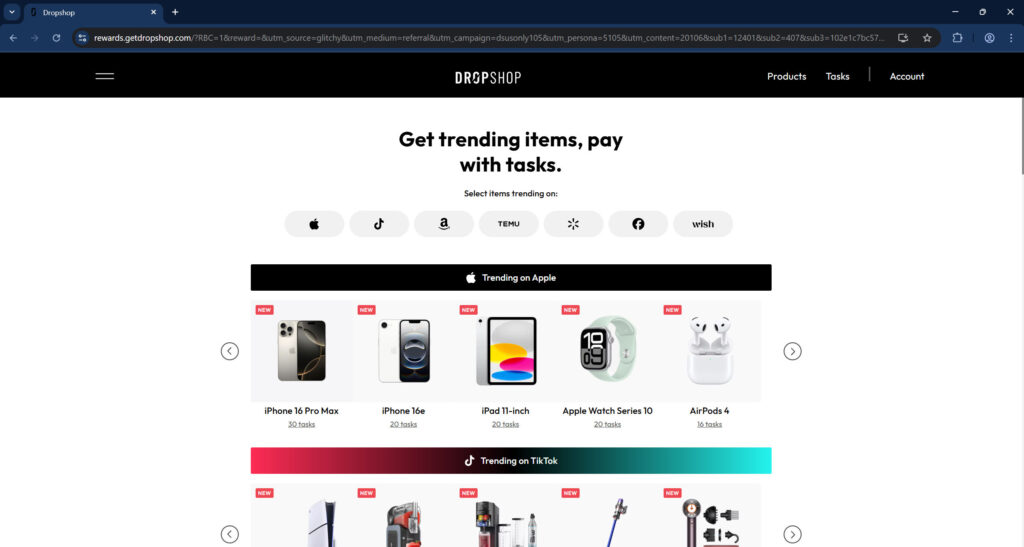
Scam Overview
FlixReview.com started as a platform claiming you could earn money by writing reviews for Netflix shows. This model already raised eyebrows, as it was unclear how such reviews would be monetized or used. However, as complaints and scam accusations piled up, FlixReview quietly rebranded into a new site: Dropshop. This was not a redesign—it was a full domain redirect with a completely different business model.
Now, Dropshop claims users can get high-ticket items like the iPhone 15, PlayStation 5, Apple Watch Series 10, and more by completing a set number of tasks. These tasks involve things like:
- Signing up for trials
- Subscribing to services
- Purchasing plans
- Sending money
Each action earns you a certain number of task credits. Collect enough, and you supposedly unlock your free item. The catch? These tasks aren’t really free, and there are numerous barriers between you and your reward.
Red Flags and User Complaints
1. Rebranding History
The original site, FlixReview.com, was associated with numerous user complaints on Reddit and scam-reporting forums. Once it began accumulating negative attention, it changed its name and branding to Dropshop. This is a well-documented scammer tactic called a domain switch, where they abandon the original site and resurface under a new identity to avoid detection.
2. Too-Good-To-Be-True Offers
Sites like Dropshop lure users with promises of expensive gadgets for $0. However, real users report spending $50-$300 on task completion without ever receiving the promised item.
3. No Real Contact Info
There is no verified business address, phone number, or even legitimate customer support. The operator, supposedly a company called “CloudStrong One LLC,” has no online presence or corporate registration records in most business databases.
4. Fake Media Mentions
Dropshop flaunts “As Seen On” badges like Digital Journal or Business Lend. These are press release syndication platforms that require no vetting. Anyone can pay to be mentioned.
5. Monetized Tasks
Every task you complete is tied to an affiliate link. The company profits every time you:
- Subscribe to a trial
- Send money through an app
- Buy a plan
Even if you cancel before being charged or request refunds, they already made their cut.
6. No Proof of Prize Fulfillment
There are no trustworthy, verified reviews showing anyone receiving their promised reward. Even screenshots can be faked.
How the Scam Works
Step 1: Viral Ads and FOMO Hooks
The process begins with ads on TikTok, Facebook, or Instagram that trigger FOMO (Fear Of Missing Out). These often feature:
- Fake testimonials
- Influencer endorsements (usually AI-generated or stolen)
- Timed countdowns or “limited spots”
Step 2: Sign-Up Process
You’re invited to create a Dropshop account and select your reward. The website promises something like:
Complete 20 tasks, get an iPad 11″ for $0.
It appears clean and modern, with a dashboard showing available tasks and a progress tracker. This instills a false sense of trust.
Step 3: Begin Tasks That Require Real Spending
Tasks are ranked by how many credits they give you. Most of the “quick” or “high-reward” tasks require:
- Spending $1 to $100
- Starting a subscription (some without easy cancellation)
- Sending money through financial apps
Example:
- Sign up for a Shopify trial ($1) = 3 credits
- Sign up for Remitly and send $100 = 1 credit
Step 4: Compounding Investment
You realize that to reach 20 credits, you might need to do:
- Four $1-$10 trials
- Two $49 plan purchases
- One $100 transfer
Suddenly, you’re out over $200, all while Dropshop is earning commissions.
Step 5: Task Verification Delays
Once tasks are complete, you have to wait for verification. This often takes days or weeks, if it happens at all. Many users report:
- Tasks marked as “incomplete” even when done correctly
- Sudden resets or progress rollbacks
- No ability to contact support
Step 6: Never Receive the Prize
Even if you make it through all tasks, Dropshop might claim:
- Your account is under review
- One task didn’t register properly
- You missed a step (terms buried in fine print)
Result: No prize. No refund. No accountability.
What To Do If You Fell for the FlixReview/Dropshop Scam
If you were tricked by FlixReview or Dropshop, act fast to limit the damage.
1. Cancel Subscriptions Immediately
Go through your bank or the original sites where you signed up (Shopify, Remitly, etc.). Cancel all free trials and paid plans to avoid recurring charges.
2. Contact Your Bank or Card Issuer
Report unauthorized or suspicious transactions. Request chargebacks for misleading purchases.
3. Scan Your Device for Malware
Some links may lead to shady trackers or install malware. Run a full scan using a trusted antivirus solution.
4. Report the Site
- FTC (reportfraud.ftc.gov)
- BBB Scam Tracker
- Internet Crime Complaint Center (IC3)
5. Warn Others
Share your experience on Reddit (e.g., r/scams), social media, and scam-tracking websites to prevent others from falling for it.
6. Check for Identity Theft
If you provided personal details like your name, address, or phone number, consider setting up fraud alerts or monitoring your credit.
The Bottom Line
FlixReview.com, now rebranded as Dropshop, is not a legitimate rewards program. It uses deceptive advertising, shady affiliate marketing tactics, and bait-and-switch techniques to lure in users with promises of expensive electronics for “free.”
But in reality, users are often:
- Spending their own money on tasks
- Never receiving the promised item
- Left without recourse or support
Dropshop doesn’t give you a side hustle. It gives you a financial trap dressed up in shiny marketing.
Stay informed. Stay skeptical. And remember—if it sounds too good to be true, it probably is.
Frequently Asked Questions (FAQ)
Is FlixReview.com a legit website?
No. FlixReview.com has rebranded into Dropshop and operates a deceptive task-based reward system that has been widely reported as a scam by users on Reddit and scam-tracking forums.
What is Dropshop and how does it relate to FlixReview?
Dropshop is the rebranded version of FlixReview. The company changed names and domain structure after receiving negative attention, which is a common tactic used by scam operations to avoid detection and accountability.
Do people actually receive the iPhones, PS5s, or other items?
There is no verifiable proof that anyone has received the promised rewards. Most users report spending money completing tasks but never getting the item. Support is usually unresponsive or claims the user failed to follow hidden fine print.
Why does Dropshop ask users to complete tasks?
Each task is an affiliate link or monetized action. When you sign up for a trial, buy a plan, or send money, Dropshop earns a commission. The reward is just a lure to get users to spend money and generate affiliate revenue for the platform.
Are the tasks really free?
No. While some tasks are labeled as “free,” many require payment—anywhere from $1 to over $100. Even supposedly “free trials” can result in charges if not canceled in time.
Can I get a refund if I don’t receive the product?
No refunds are issued by Dropshop. If you paid money as part of completing tasks, your best option is to contact your bank or the service provider directly and request a chargeback.
Is Dropshop affiliated with Apple, Sony, or other brands?
No. Dropshop has no verified affiliation with Apple, Sony, or any major electronics brand. Any implication that it is partnered with them is misleading.
What should I do if I already signed up and paid?
Immediately cancel all subscriptions, contact your bank, report the site to authorities (FTC, BBB, IC3), and warn others online. Monitor your credit and financial accounts for suspicious activity.
Why does the site look professional if it’s a scam?
Many scams today invest in clean, modern web design to look legitimate. They use professional branding to build trust and lower skepticism. This does not indicate that the site is trustworthy.
Is there a way to expose or take down Dropshop?
Reporting the scam to official agencies like the FTC and sharing your experience publicly on forums like Reddit or Trustpilot can help raise awareness and pressure platforms to investigate and deplatform the operation.

Reviews & discussion
0 commentsShare a firsthand experience, or ask a question.
Community reviews
flixreview.com
Moderated reader experiences, not an editorial verdict.
Start the conversation
Have a question or something useful to share? Add the first comment.