


Scroll back through your Fortnite locker and you might find the outfit from your first match. A price checker offers a different kind of nostalgia.
The promise is tempting if you’ve collected cosmetics for years. Before you look up what they’re supposedly worth, take a closer look at who’s offering to tell you.
Overview
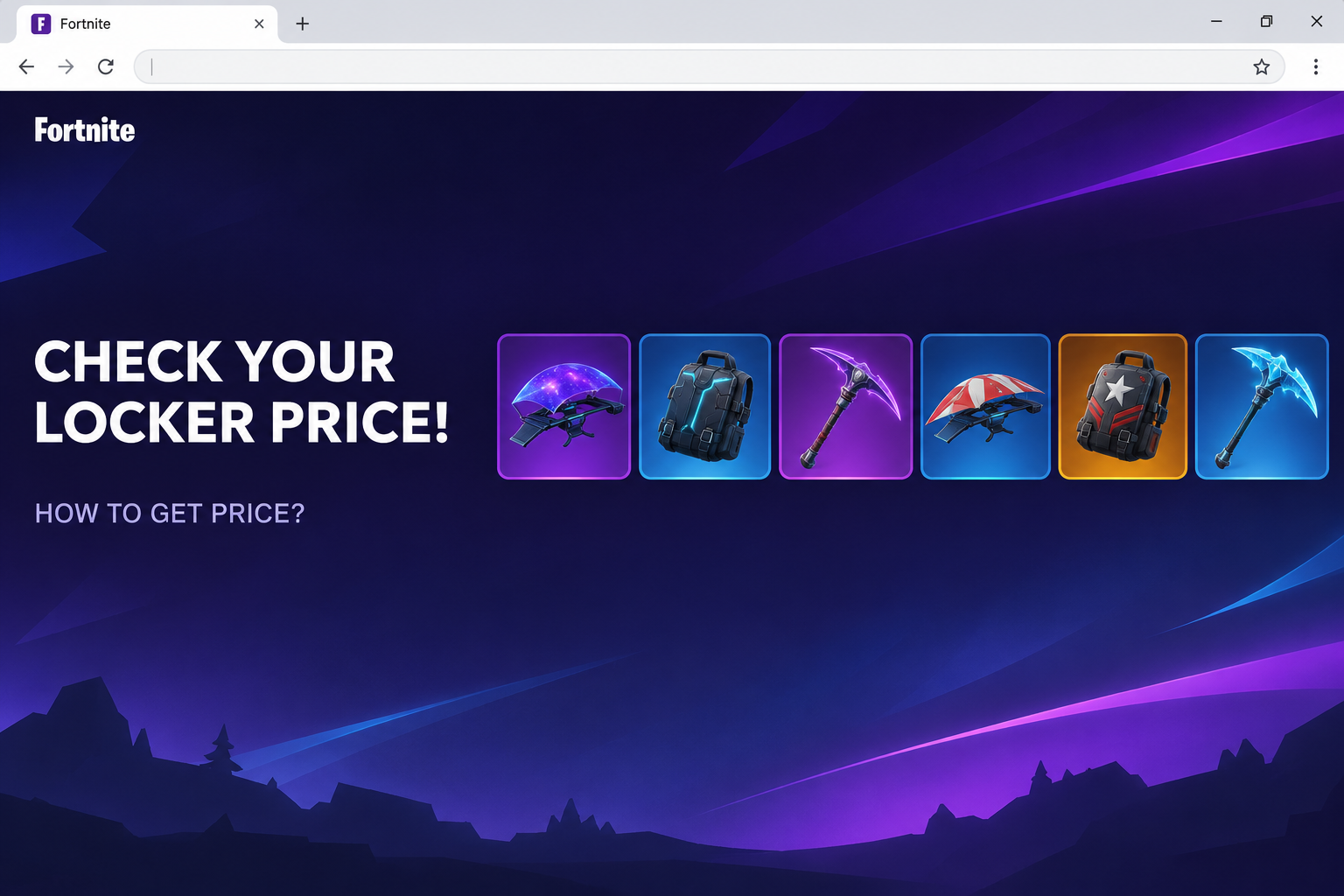
The fake checker puts price tags on Fortnite lockers
The Fortnite Inventory Price Checker scam used fort2026[.]com to advertise a quick valuation of a player’s locker.
The page promised a price for items such as outfits, gliders, and emotes.
Some tiles showed groups of cosmetics beneath precise-looking totals. One set was labeled $234.51, while another was labeled $1,047.04.
Neither was a verified sale price or a quotation for the visitor’s account. The numbers were part of the page advertising the tool, visible before you had identified yourself.
The top of the page resembled a game storefront. The Fortnite-style navigation and game imagery were there to make an unfamiliar address feel like somewhere you had been before.
The check changes into an Epic Games sign-in
The supposed inventory check opened a lookalike Epic Games sign-in page. It displayed email and password fields and tiles for other ways to sign in.
The main difference was visible without touching those fields. The browser was still on fort2026[.]com, not at an Epic Games sign-in address.
The form is the clearest clue to what the offer was after: access to a player’s account. There was no need to supply a real password to assess the risk.
The documented screen does not prove that every other sign-in tile worked, that a particular player lost an account, or that a download was installed.
A purchase history is not a resale valuation
Epic’s account policy prohibits buying, selling, and sharing accounts. A number on a third-party website does not change that rule.
You might be curious how much you spent, which cosmetics you own, or whether an old outfit has returned to the shop. Each question needs a different record.
To check what you own, start with the Locker inside the game. To check what you paid, look for legitimate Epic or console-store receipts.
No one needs your Epic credentials just to show you the advertised price of an outfit. Do not trade account access for an unsolicited locker valuation.
- An inventory shows which items are on the current account.
- A receipt shows what you bought and who charged you.
- A promotional price tag is not a buyer’s offer or evidence of an approved resale market.
- A cloned sign-in cannot establish the value of anything you own.
How the Fortnite Inventory Price Checker Scam Works
Step 1: The offer makes your own collection the attraction
The opening screen isn’t announcing a new item. It is suggesting that the outfits and gliders you already own might add up to more than you think.
That pitch can appeal even to people who have no intention of selling.
If someone else in a video or chat shows a big number, you might want yours for comparison.
The wording promises an answer in seconds. You are encouraged to jump from curiosity to a quick check without having to decide whether such a price would mean anything.
Look at when the sample figures appear. They are already on the promotional page, before it has looked at your Locker or gathered any information about your purchases.
Step 2: Familiar store design lowers your guard
The black page used recognizable wording and game art, with shop-style navigation above the valuation offer. Its appearance puts the suspicious feature near familiar parts of the Fortnite experience.
That layout does not make the feature part of Fortnite. An unrelated page can borrow imagery and wording just as easily as a social profile can copy a familiar picture.
Read the website address as a whole.
The number in fort2026[.]com does not make it the current version of a service, and a short brand-like name isn’t proof of ownership.
If you first saw the link from a creator, look at the description separately from the video.
A repost, pinned reply, or impersonated account can point somewhere the creator never endorsed.
Step 3: The price stays behind a familiar-looking form
Clicking the apparent inventory check opened the imitation Epic login. The headings and symbols looked familiar, but the place asking for the email and password had not changed to Epic.
Some legitimate services use a separate authorization screen. What matters here is that the suspected site itself presented the credential form on the same unrelated host.
Do not click through the other login choices to see whether one is real.
If you play through a console, start with that provider or the Epic site you ordinarily use.
When a password manager declines to fill a prompt, don’t override it simply because you recognize the sign-in design. Check whether the address matches where you normally enter your password.
Step 4: The information at risk is worth more than the estimate
An Epic password can be useful to someone trying to get into the account. The goal of this page was not to produce a useful price for your locker.
Someone who signs in as you may see account details, change settings, or send messages to friends.
The outcome depends on which access they actually obtain and what other protections are enabled.
An email reused with the same password matters beyond Fortnite.
A person with access to your email can intercept recovery messages, which makes it harder for you to get the account back.
Do not assume a single cosmetic can be lifted out of the locker and sold just because an article talks about account theft.
Check for actual account or purchase changes instead.
What to Do if You Have Fallen Victim to This Scam
-
Stop and work out which screen you reached. If you just saw the page or opened the sign-in form without typing anything, shut it and do not go back.
If you entered your display name alone, note what you shared. A display name is different from a password, a verification code, or approval of a connected app.
Report the post or message that brought you there. Let the moderator see a cropped picture or the non-clickable domain rather than inviting friends to try the checker.
-
If you shared a password, secure the linked email first. Open your email provider independently and update the password and two-factor protection if there’s any chance the mailbox was exposed.
Use a clean device and a unique password. Do not set the new email password to the same one you plan to use for Epic.
If you received an unexpected code or approved a request, include that detail when seeking help.
A verification message is useful evidence even if you no longer have the phishing tab.
-
Recover the Epic account from Epic, not from the checker. If the account email is still yours, follow Epic’s compromised-account instructions from a trusted device.
If the account email was replaced or you can’t get back in, submit Epic’s recovery request.
Keep information that identifies your account, such as an invoice ID or console display name.
Your receipts can help verify you are the owner. Do not give those receipts or redeemed card codes to somebody in a comment thread who promises to restore your locker.
-
End existing sessions and review linked accounts. After you regain access, follow Epic’s sign-out instructions so a password change is not the only measure you take.
Look for products and services you don’t recognize in Epic’s linked apps settings guidance. Revoke anything you can identify as unauthorized.
Don’t unlink your usual console account in a panic. If you aren’t sure which account holds your progress, get Epic’s help before removing familiar links.
-
Check purchases through whoever actually processed them. Review your Epic receipts and look separately at the payment history for your console account if you buy things there.
Keep any unfamiliar receipt with its time, amount, and order reference. Contact the platform that charged you and notify your payment provider if you see an unauthorized charge.
Warn friends through a separate channel if messages went out under your name. Ask them not to follow any inventory or gift link they received from your account.
-
Treat unexpected software as a different problem. The captured inventory checker asked for credentials, and the evidence does not establish that the page installed anything.
If you ran an installer, added an extension, or used a file offered by somebody claiming to help, tell support what you installed before signing in again on that device.
Keep that device out of the password reset process until you have dealt with the software concern. Using another device also keeps fresh credentials out of an unresolved situation.
What You Can Check Safely Without a Valuation Site
Make sure you have the right account first
If you usually play on a console, you might have signed in on the web using a different email than the one that goes with your console account.
That can make a nearly empty locker look like a stolen one. Check the display name and account identifier before assuming somebody has removed items.
Stay on the official platform while you do that. A third-party checker has no business telling you to fix a mismatch by linking another account to its site.
Use receipts for costs and the Locker for items
The price of a V-Bucks purchase and the number of V-Bucks spent on one item are not the same thing. Bundles, gifts, and promotional awards can complicate any comparison.
If you are checking family spending, use the real account’s receipts and the household’s payment records. They show actual charges rather than an estimate made by an unknown site.
If you are interested in one item, checking the Locker or the in-game shop gives you a more useful answer than a price assigned to your entire account.
Be careful with links that move between players
A message from a friend feels more reassuring than a random ad. If that friend’s account was compromised, the name on the message may be the only familiar part.
Ask them about the link elsewhere.
A quick check in a conversation you already have can prevent several people from following the same offer before the friend realizes something is wrong.
Tell younger players the useful rule, not just the name of this website. They should never enter a game password into a page promising to count, value, or unlock cosmetics.
Frequently Asked Questions
Is the Fortnite checker at fort2026 legitimate?
No, the documented page advertised an unofficial locker valuation and presented a fake Epic sign-in. Do not use it to look up cosmetics or enter any account details.
You can inspect your own items through the game. If you are deciding whether an account setting changed, go straight to Epic instead.
Can the checker really tell me how much my skins are worth?
The figures on the imitation were examples displayed in the promotion. They did not reflect a documented sale, an official Epic valuation, or a payment available to you.
A store receipt is evidence of a charge, not what another person might pay for your account. Epic prohibits account sales, even if someone quotes a price.
What if I use Xbox, PlayStation, or Nintendo to sign in?
If you entered credentials on a page that claimed to be your console provider, go straight to that provider and secure the account you used.
Also check the Epic account it is linked to.
Do not assume the two accounts are isolated, but don’t remove your main console connection until you know what that would affect.
Am I safe if I had two-factor authentication on?
Two-factor authentication helps, but it doesn’t make a password you shared private again. Change the password and review recent activity rather than trusting the fake site’s response.
Tell official support if you supplied a code or approved a sign-in request. That is more significant than simply receiving an unexpected message.
Did opening the price checker give someone my password?
Opening the page is not the same as submitting your account details. If you did not type credentials, approve anything, or install software, do not assume an account takeover occurred.
Report the page and check for unusual sign-ins if you’re worried. Leave the tab closed while you check.
Where should I report a missing Fortnite account?
Use Epic’s official recovery channel and tell them what happened before you lost access. Include the relevant display name, receipts, or account identifiers as requested.
Avoid anyone who charges to restore an account in a gaming chat. A stranger asking for a second verification code can make the situation worse.
The Bottom Line
Do not use the locker checker at fort2026[.]com. Its figures were part of the pitch, and the page asking for your password was not hosted by Epic.
If you already entered credentials, secure the email tied to the account and go directly to Epic for recovery. For a simple inventory check, open the Locker inside Fortnite.

Join the discussion
0 commentsShare your experience or ask a question about this article.
Community experiences
Did this happen to you?
Your experience could help someone recognize the same scam. Submit a private report for our team to review.
I experienced this tooReports are reviewed before publication. Sharing publicly is always your choice.
Discussion
Start the conversation
Have a question or something useful to share? Add the first comment.