


You were looking for the staking tab, and there it is. The familiar token names and a row of rates give you something to compare right away.
Look at what the page says each row represents before you decide which one to open. On this Raydium lookalike, the table is the first clue.
Overview
A Raydium imitation disguised as a regular staking dashboard
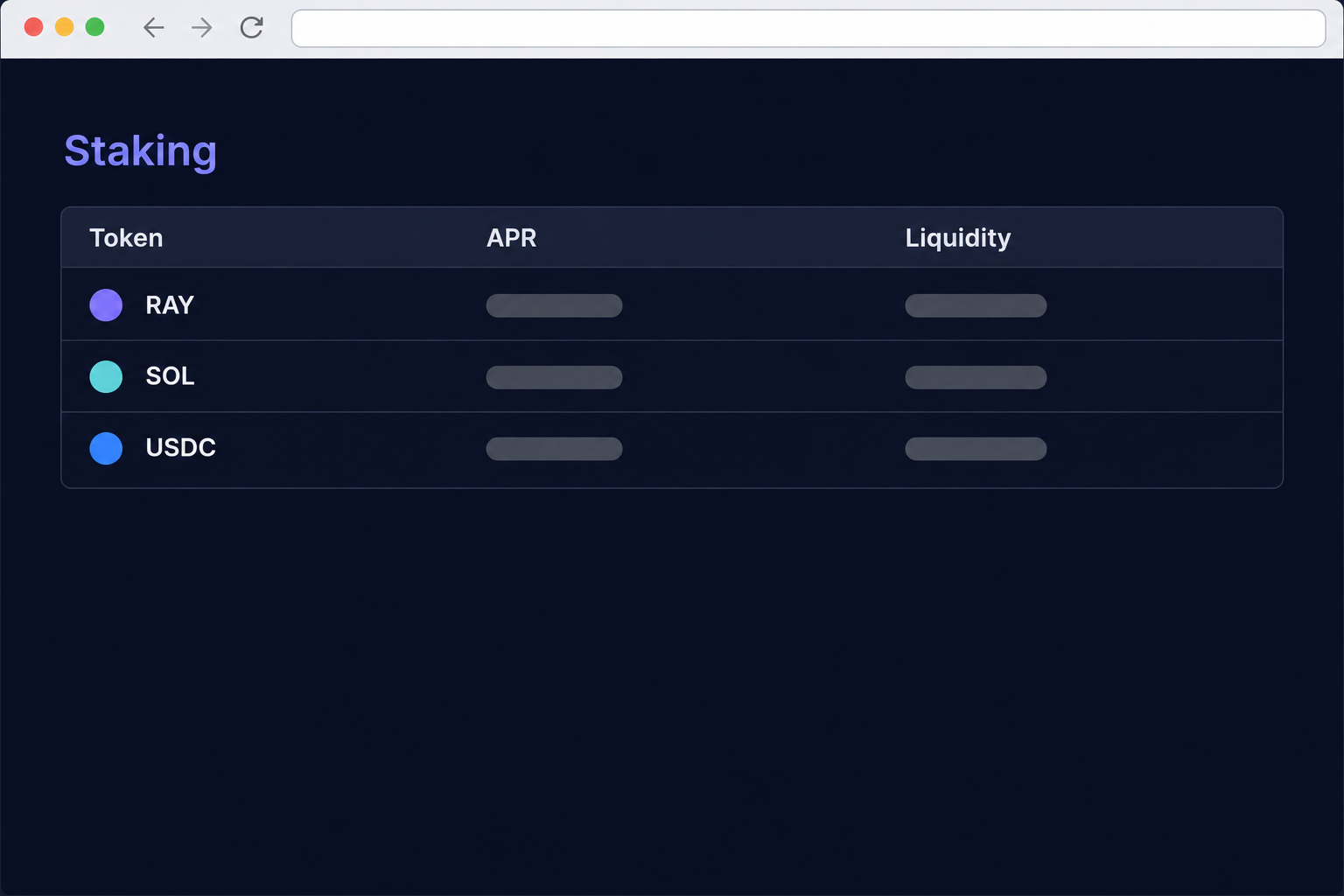
The fake Raydium staking website appeared on a subdomain of ray-dium[.]sale. It copied the look of Raydium and presented a table of assets with staking figures and controls.
The table listed RAY, SOL, USDC, USDT, and JUP in separate rows. It showed a rate of 178.92% for SOL and labeled the figures as annual percentage rates.
Those were claims shown by the imitation, not verified returns. The offer stood out partly because it made so many different kinds of assets look like identical staking choices.
The recorded flow opened a wallet picker.
It did not show that a deposit reached a real staking program or that the displayed rates had any basis in an actual position.
The real staking page and the fake table tell different stories
Raydium is a decentralized exchange on Solana. Its official staking interface is on raydium.io, and the authentic interface in the comparison centered on staking RAY for RAY rewards.
Raydium has also described farming and liquidity products separately from staking. A project can have several ways for users to earn rewards without every token becoming a single-asset staking product.
For native SOL staking, Solana’s documentation describes delegating stake to validators. That isn’t the same operation as choosing an unverified SOL row on a Raydium-branded site.
USDC and USDT in the list did not turn the offer into a savings account.
A web table does not tell you where assets go or how a return is generated.
What should make you stop before staking
The address differed in more than its suffix. The extra hyphen in ray-dium[.]sale and the unfamiliar subdomain put the entire request outside the real project’s website.
The figures deserved their own check.
The most attractive number isn’t necessarily the best offer, especially when you cannot verify the program or even what kind of deposit is being described.
This particular imitation relies on looking like normal staking rather than a free $RAY airdrop. Someone clicking it might already expect to move assets, which changes what warning signs matter.
- Verify where the staking interface is published before signing in or connecting.
- Check the asset and the kind of position the interface claims it will create.
- Treat rates and liquidity figures on the imitation as unverified.
- Read the wallet’s action and look for an expected staking record, not merely an outgoing movement.
How the Fake Raydium Staking Website Scam Works
Step 1: The page meets you while you’re looking for somewhere to stake
There is no need to convince you that a giveaway just opened. The page only has to look like the staking tab you meant to visit.
Its list of token names looks practical rather than promotional. You can imagine opening a row to see how much you’ll earn on assets already in your wallet.
The capture doesn’t identify which link brought individual visitors there.
If you find a similar page through a search result or message, don’t trust the link’s display name to identify it.
Start at the project’s main site or a bookmark you made from it. Let the known site tell you which staking and farming interfaces actually belong to Raydium.
Step 2: The table makes the advertised opportunities seem measurable
Columns for staked amounts, pending rewards, rates, and liquidity make this look like a working product. They also give you several numbers to consider before looking at the domain.
Notice how the layout treats RAY, stablecoins, and SOL as variations of the same product. The rows do not explain what the program would actually do with any of them.
An annual rate without a credible source and clear terms isn’t useful.
Even a believable rate wouldn’t authenticate that site or tell you which program your wallet will be asked to use.
Ask what would appear in your own account after a deposit. If all the site can point to is its own dashboard, there’s nothing independent to check.
Step 3: An ordinary wallet chooser follows the staking prompt
The site adds a familiar wallet-selection window over the table. That can feel like the expected next step when you think you have just picked a staking product.
A wallet list is not an audit of who runs the site. The visible menu cannot show whether any later action would create the position you meant to open.
Close it while you still have the choice. There is no reason to connect your spare account just to see whether the numbers change.
Your wallet provider can explain how sessions and approvals work. You don’t have to learn that from the same page that is trying to get a connection.
Step 4: A supposed deposit can hide a different action
Someone expecting to stake may already be comfortable seeing assets leave the wallet’s spendable balance. The question is where they are going and what kind of position should result.
If the wallet instead shows an unexpected recipient or a permission you can’t explain, decline the action. The word “Stake” on the website doesn’t turn a transfer into an investment.
The archived flow did not show a confirmed transaction, so it can’t tell you that a specific wallet was emptied.
Look for the events that actually occurred in your own account.
Keep three things distinct: an app connection, an approved action, and a transaction that has settled. A page can display an encouraging status even when it accomplished something else.
What to Do if You Have Fallen Victim to This Scam
-
Leave the staking imitation without opening more rows or prompts. If all you did was look at the table, there is nothing to unlock or cancel on the page.
Use your current browser history to note the address and timestamp if needed. Do not reload the site just to copy another screen.
-
Use the wallet you connected to check the app record. Remove the suspect host from connected apps and make sure you are looking at the account used during the visit.
If no action was approved, the response differs from a case with an unrecognized transfer. Phantom’s guidance for wallet incidents separates those situations.
Don’t open a new tab from the fake site to verify that you are disconnected. Use the wallet’s own controls for that check.
-
Find out whether the alleged stake created a position. Review the wallet activity, the token involved, and the destination of any asset that actually moved.
Check a real position from its verified interface, not from a claim notice shown after signing. Save the transaction signature if the expected position is missing.
Review any unfamiliar token approval using guidance for the actual network involved. Removing access from the app list does not necessarily remove an approval recorded on-chain.
-
Handle a shared key or phrase as a wallet compromise. Start with a clean device and create a replacement wallet with new recovery information through trusted software.
Move only assets you recognize when you can do so safely. Ask official support about active stakes, liquidity positions, or other assets that need more than a plain transfer.
Don’t put more money into an account that may already be compromised just because a page says it needs a fee to release your deposit.
-
Contact the provider involved and save transaction evidence. Keep the account address, network, token, time, and signature for any unexplained transaction.
If an exchange processed the transfer you used to fund the wallet, report the issue there through your account. That does not make a confirmed blockchain transaction reversible.
Use FTC cryptocurrency scam guidance for U.S. reporting options. Decline paid rescue offers or requests to share the secret controlling the affected wallet.
How to Match a Staking Action to Your Own Records
Ask where the position should appear
If you intended to stake RAY through Raydium, check for your position in the official interface tied to the same wallet.
A line on the imitating site is not independent confirmation.
If you intended to stake SOL natively, look for a stake account through the legitimate wallet you used. A drop in your spendable balance alone cannot tell you what happened.
Make sure you have selected the same wallet account before comparing a table with your transaction history. Good records can help you spot both unrelated errors and real losses.
Distinguish a liquidity position from a token deposit
A liquidity product can have different rules from a single-asset stake. You should know which product you are entering and what you can expect to find in your account afterward.
A borrowed dashboard can put those products next to each other without explaining any of the terms. That is a signal to verify the product identifier at its actual source.
A rate does not remove the risk of a wrong address, a wrong network, or an action that doesn’t match its label. Check those details before looking at yield.
Check the transaction rather than relying on a congratulatory screen
The site may not be able to account for the balance it displays. A webpage can show that you staked something even if the transaction went somewhere else.
Read what the wallet recorded, and save the result. If the information is unclear, a public transaction identifier is more useful to support than a screenshot of an unverified return.
Don’t send an additional deposit to make the numbers line up. When the first deposit is unexplained, more activity makes both recovery and recordkeeping harder.
Separate the dashboard’s columns when you read them
The imitation put pending rewards, staked balances, and liquidity side by side.
These looked like parts of an account statement, although the page had not established any connection to your account.
Liquidity can refer to assets available in a product or pool, rather than money already set aside for you. A large figure cannot establish what your individual stake is worth.
Pending rewards are another separate entry. A dashboard that says “0” before you connect hasn’t measured what you earned in a different app or wallet.
Even a real annual rate isn’t a fixed cash payment when rewards are paid in a token.
The rate can change, and the asset’s value can move while you hold it.
Before trying to compare two opportunities, ask which asset earns the reward and which asset pays it. Two rates next to different tokens are not directly comparable on their own.
Those questions are worth asking anywhere, not just on this copy. For this particular domain, the mismatch is already enough to avoid it without checking each number.
If you’re warning someone, tell them you saw a multi-asset staking table, not a free claim. That detail helps them identify the actual page in their history.
Frequently Asked Questions
Was the site at ray-dium.sale operated by Raydium?
The captured staking page on that domain was an imitation. Raydium’s actual staking interface is hosted under raydium.io.
Avoid the lookalike even if a friend shares it. Compare the full host with the one given by the project before choosing any asset or rate.
Did Raydium really offer 178.92% APR on SOL there?
That rate appeared in the imitation’s table, not as a verified Raydium rate. The evidence shows the number was displayed, not how a return could have been paid.
Use the rules of the genuine staking service for the asset you plan to use. Don’t sign a request based on a percentage shown by an unrelated site.
Is this the same as a free RAY giveaway?
The page in this case did not lead with a prize or eligibility window. It copied a staking table and presented multiple assets as if they were ready to deposit.
That matters because deposits already involve seeing a change in balances. Check that the action actually creates the type of position you intended.
Does seeing the wallet menu count as a deposit?
No, the menu isn’t a transaction receipt. Review your wallet for a separate authorization or settled transfer before deciding any assets were moved.
Disconnect the site if it was connected. If you gave away a phrase or private key, take steps for a compromised wallet instead of relying on a closed browser tab.
What if the dashboard says my staking is pending?
Check the transaction status independently in the wallet you used. Use the signature to compare what happened with what you expected to stake.
Don’t approve a second action to “finish” an unexplained deposit. Ask the real wallet provider or protocol about the record if you can’t interpret it.
Can an ordinary refund recover a blockchain transfer?
A confirmed transfer is not handled like a card charge that can be disputed through your issuer. Wallet providers generally cannot reverse it.
Keep the facts for a report and focus on protecting what remains. A fee request from a stranger is not proof that recovery is available.
The Bottom Line
Do not stake through the ray-dium[.]sale lookalike. Its table borrowed Raydium’s appearance, but the advertised rates and tokens were not evidence of authorized staking products.
If you already approved something, compare your wallet’s actual transaction with the position you expected to see.
Use an official staking interface and check any continuing permission with your wallet provider.

Join the discussion
0 commentsShare your experience or ask a question about this article.
Community experiences
Did this happen to you?
Your experience could help someone recognize the same scam. Submit a private report for our team to review.
I experienced this tooReports are reviewed before publication. Sharing publicly is always your choice.
Discussion
Start the conversation
Have a question or something useful to share? Add the first comment.