


You open the inbox to find a note about annual leave. It arrives on an ordinary workday, tucked between calendar reminders and messages you actually need to answer.
The wording is plain enough that you might skim it. That makes this a good case to slow down and look at what the note is asking you to do.
Overview
An annual leave reminder that did not come from HR
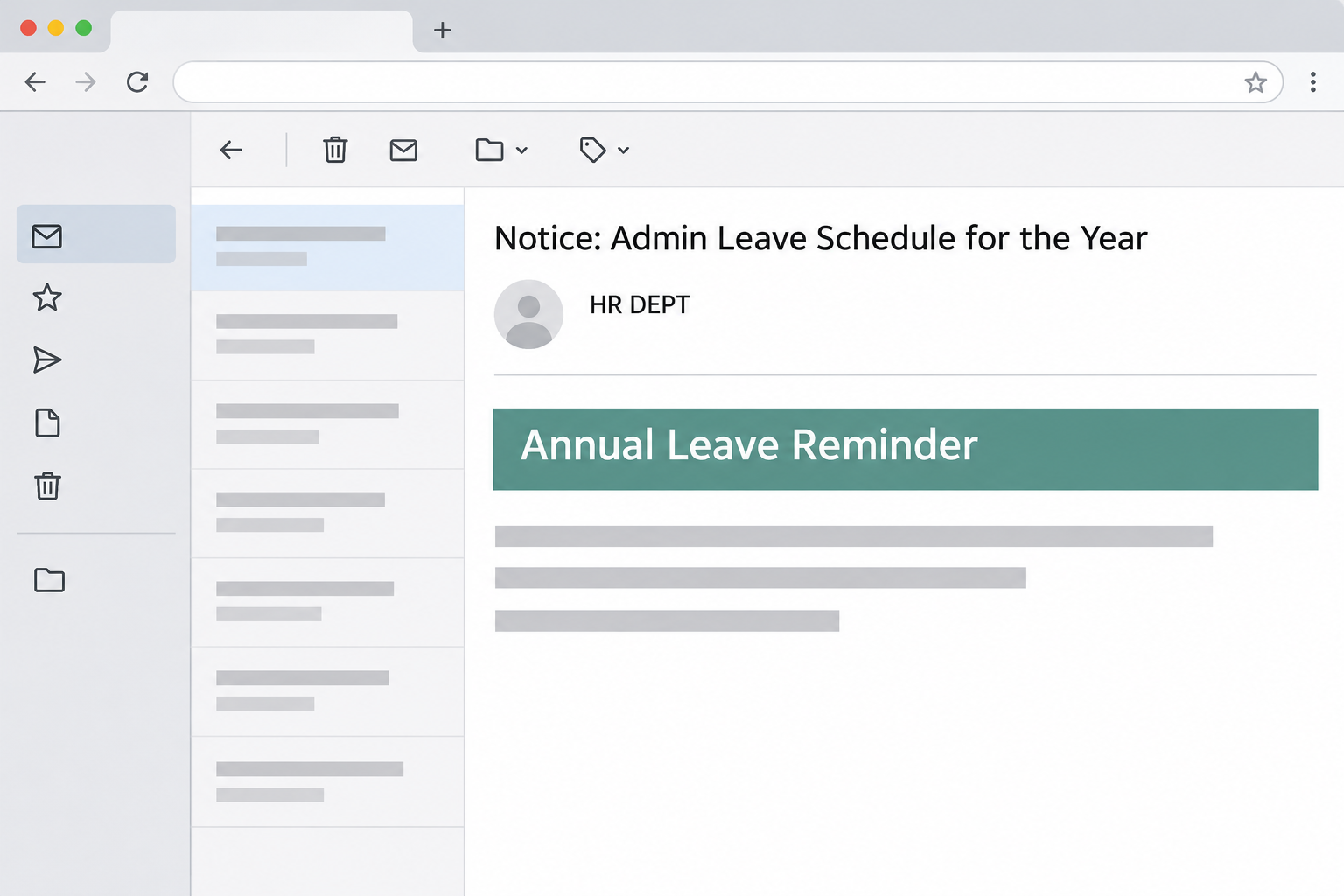
The Annual Leave Reminder email scam impersonates an employer’s HR team. It asks employees to review their leave balance and directs them away from their normal workplace systems.
The documented message was headed “Annual Leave Reminder.” Its subject referred to an admin leave schedule for the year, and the sender’s display name was “HR DEPT.”
The note also asked managers to plan coverage. That detail matters because it sounds like something a real HR team would mention when several people want the same weeks off.
There was no employee’s leave balance in the message itself. It was the kind of generic reminder that could go to one employee, five departments, or an entire address list.
An email about leave does not have to be dramatic to put pressure on you.
Most people would rather check a balance now than discover a problem after booking a trip.
Where the leave link really went
The documented link opened a page resembling a Gmail sign-in screen rather than a leave calendar. The page was hosted on qatarinvestmentbrokers-qa[.]com, a domain unrelated to Google sign-in.
That address is a historical clue, not a website to investigate yourself. The words it contains do not identify the sender or implicate anyone whose business name might resemble them.
The mismatch matters more than the mail client’s branding. Checking how many days off you have should start from your employer’s approved portal, benefits app, or internal HR contact.
On the fake page, the thing being requested was your email account password. The captured material does not show a balance check, a leave request, or a genuine company sign-in.
- The message presents an ordinary HR task, not a bill or a threat.
- The display name says HR, but the underlying sender in the sample is external.
- The link does not go to the employer’s established leave system.
- The sign-in page looks like Gmail, but its web address is not Google’s.
How to verify the leave question without the email
If you already use a company portal for time off, open it from your normal bookmark. Do not use a new address provided by the reminder.
Look for remaining days and pending requests separately. An approved holiday, a request still awaiting approval, and a balance estimate can describe different things.
Employees sometimes see more than one balance, such as days earned to date and days expected by year-end. HR can explain which number applies without asking for your email password.
If you do not recognize the portal or have just joined the company, ask where to begin in your normal work chat. An existing onboarding document is another useful reference.
A legitimate workplace can hire an outside company to handle payroll or leave.
If the reminder names a new vendor, verify the change before following instructions, even if its name sounds familiar.
How the Scam Works
Step 1: An ordinary personnel message reaches your inbox
The email makes its request look like routine administration. It talks about reviewing leave and coordinating coverage, not about opening an unusual attachment or settling a surprising financial charge.
If you are checking messages before a meeting, the note may seem familiar enough to pass at a glance. There is no dramatic demand competing for your attention.
Messages like this work especially well when you already have a reason to think about time off.
A new hire may be learning the process while a manager is preparing a schedule.
The content does not prove that anyone studied your employer’s calendar. A general message can feel personal when its topic lines up with something already on your mind.
Step 2: The apparent sender gives the request authority
The display name supplies the missing context. “HR DEPT” seems to answer who sent the note before you have opened the sender details.
Display names are labels, not credentials. Open the sender information in your mail client and compare the actual address with a message you already know came from your personnel team.
The sample’s actual sender did not match its internal-looking display name.
A company with a legitimate external HR provider may look different, so check through a known channel rather than guessing.
Forwarding is not necessary to verify authenticity. In some workplaces the phishing-report feature preserves more useful information for investigators than copying the message into chat.
Step 3: The promised leave balance changes into a sign-in request
Following the call to review the balance leads to a Gmail-style page. Instead of showing vacation dates or your remaining allowance, it presents an email sign-in form.
That transition is easy to miss when you are used to single sign-on.
Genuine work services sometimes redirect to an identity provider, so the general shape of the sequence seems plausible.
Separate the appearance from the address. A Google-style card on qatarinvestmentbrokers-qa[.]com is not an authentic Google sign-in just because the logo and the form are recognizable.
Check the address before entering anything, not after seeing whether your password works. A password manager declining to fill the form is another reason to stop and verify.
Rather than testing the link twice, close the tab and open your normal work mail or HR portal independently. See whether either actually needs you to sign in again.
Step 4: The mailbox becomes the valuable part of the encounter
The likely objective is to collect the password entered on the imitation page. The sample shows the credential prompt, not whether a particular employee submitted a password or was compromised.
An email account is valuable because it contains more than messages. Depending on your job, it may also receive account reset links, shared documents, approvals, and internal contact information.
Someone with mailbox access could read a genuine conversation and send plausible follow-up messages to your coworkers.
A thread about scheduling can become a believable place to ask for another login.
A reused email password can expose other accounts even if your employer blocks the first attempt. Multi-factor authentication helps, but a surprise approval prompt after submitting credentials deserves immediate attention.
Watch for the less obvious consequences, too. A new forwarding rule can quietly copy messages, and deleted warning emails may hide signs that someone else got in.
What to Do if You Have Fallen Victim to This Scam
-
Start with what you did, not what you fear. If you only saw the notice, report it through your workplace’s phishing channel without responding.
If you opened the destination and closed it without entering anything, tell IT exactly that. Reading a message, opening a page, and providing a password are separate events.
Give them the recipient address, the time it arrived, and the subject. Use the reporting control if available so the original headers are preserved.
-
If you entered a work password, contact security and reset it. Use a separate trusted device and go directly to the login address you already know.
Do not wait for the fake page to confirm whether the password was correct.
Let your help desk know if the page already showed your address, and whether you pressed submit.
If you received or approved a verification prompt, include the time. IT may need to close existing sessions or reset authentication methods, not just issue a new password.
-
Check the affected mailbox and connected accounts. Ask your administrator to review sign-in history, forwarding rules, and third-party app access during the relevant window.
For a work inbox, Microsoft’s compromised email account guidance explains the checks a Microsoft 365 administrator can perform.
If you entered a personal Gmail password, follow Google’s compromised-account recovery steps. Check recovery details and devices before relying on the account again.
Change matching passwords on other services from their official sites. Start with accounts that control password resets or can approve purchases.
-
Record unexpected mail before dismissing it. A reply you did not send, a new filter, or an unfamiliar login notice can give the security team a much clearer picture.
Check sent, deleted, and archived mail if your employer allows it. Report suspicious changes rather than immediately deleting material someone may need for its investigation.
If coworkers received a message from your mailbox, coordinate with IT about warning them in your usual channel. Do not forward the phishing email as your warning.
-
Treat any download or installation as a separate incident. The documented leave reminder shows a credential page, not a program you had to install.
If your version also asked you to run a file, add a browser extension, or share your screen, tell IT about that first. Follow its instructions for handling the device.
If you are using a managed computer, do not wipe it or use an unapproved cleaning tool.
Your employer may need to inspect it before deciding how to contain the incident.
-
Check the real leave record when the account is safe. Open the normal portal and confirm the days or requests you originally meant to review.
If you are a manager, verify any changed leave requests with the employee through your existing contact details. That resolves the actual scheduling question without trusting a suspicious email.
Why a Work Password Needs a Wider Check
Look at what your mailbox can unlock
Think about where your password reset links go. If a work address receives them for scheduling, procurement, or document services, tell the help desk which ones you use.
Some services share one identity system and some do not. An organisation can disable an account centrally yet still need to review what external apps were authorised to do.
Say if the affected address is a shared inbox or if you manage one for somebody else.
Messages sent from a team account can reach people who never saw the original reminder.
Look for the second email, too
The first warning may come from a coworker who receives an email from you while you are away from your desk.
Ask which address appeared and whether it was a new thread.
That detail can help separate a copied display name from mail genuinely sent through your account. Both are worth reporting, but the team will investigate them differently.
Treat later requests for recovery codes, a personal phone number, or an alternative email address as unverified until you have spoken to your normal support contact.
Build an easy route to the real policy
Save your HR portal and support channel somewhere you can find during a busy day. Put the bookmark alongside the place where you submit your own time off.
If you supervise a team, explain where leave requests are checked and how staff are told about changes. A clear routine beats relying on everyone to spot unfamiliar email design.
And if the official process really changes, announce it through a channel people already use.
Offer a way to find the new address without asking employees to trust a surprise login link.
Frequently Asked Questions
What is the Annual Leave Reminder email scam?
It is a phishing email posing as an HR request to review your leave balance.
The known example directed recipients to an imitation Gmail sign-in page instead of a leave system.
The subject line can look administrative rather than urgent. Compare the requested action and destination with the process used by your actual employer.
Can a genuine HR email ask me to sign in?
Yes, employees commonly use a protected portal. Confirm the real access route from an existing bookmark, internal policy, or familiar HR contact.
An unfamiliar lookalike sign-in reached from a reminder is not the same thing. If you are unsure, ask HR to identify the provider and the exact login procedure.
Did this email prove my company was hacked?
No, a copied display name does not prove the sender accessed your employer’s systems. Tell IT if colleagues received matching notes or if the message appeared inside a real thread.
Provide the underlying address and original headers when possible. They are more useful than the displayed sender name for checking what happened.
What if I entered my company email but not my password?
Report the incident and tell IT exactly which fields you completed. An address alone is generally not enough to sign in, but it can make a follow-up message more convincing.
If you used a password, supplied a code, or approved an unexpected prompt as well, say so. That changes the response your security team may recommend.
Should I reply to see whether it came from HR?
Do not reply to the suspicious message. Ask HR through a separate conversation in the same system you normally use to reach the personnel team.
If the note turns out to be authentic, the team can still explain why the sender or process looked different. You have lost nothing by checking independently.
Why was I taken to a Gmail page when we use Outlook?
In the documented example, the Gmail-style page was an imitation. A prompt asking for a work password in the wrong sign-in flow is an especially good reason to stop.
If your company uses several providers, ask which account is required for the leave portal before entering credentials anywhere unfamiliar.
The Bottom Line
You can safely get to the bottom of a leave reminder without touching its link. Open your employer’s systems the same way you would to request a day off.
If you typed a password into the imitation page, report it early.
Tell IT what you entered and whether you saw a follow-up approval prompt, so it can act on the right evidence.

Join the discussion
0 commentsShare your experience or ask a question about this article.
Community experiences
Did this happen to you?
Your experience could help someone recognize the same scam. Submit a private report for our team to review.
I experienced this tooReports are reviewed before publication. Sharing publicly is always your choice.
Discussion
Start the conversation
Have a question or something useful to share? Add the first comment.