


Some names carry a history that has nothing to do with crypto. When one shows up on a token page, those familiar words can make it feel trustworthy.
A page using the name Black Wallstreet is a case in point. It is worth pausing to separate the history, the cryptocurrency, and the offer in front of you.
Overview
A $TULSA claim page used the Black Wallstreet name
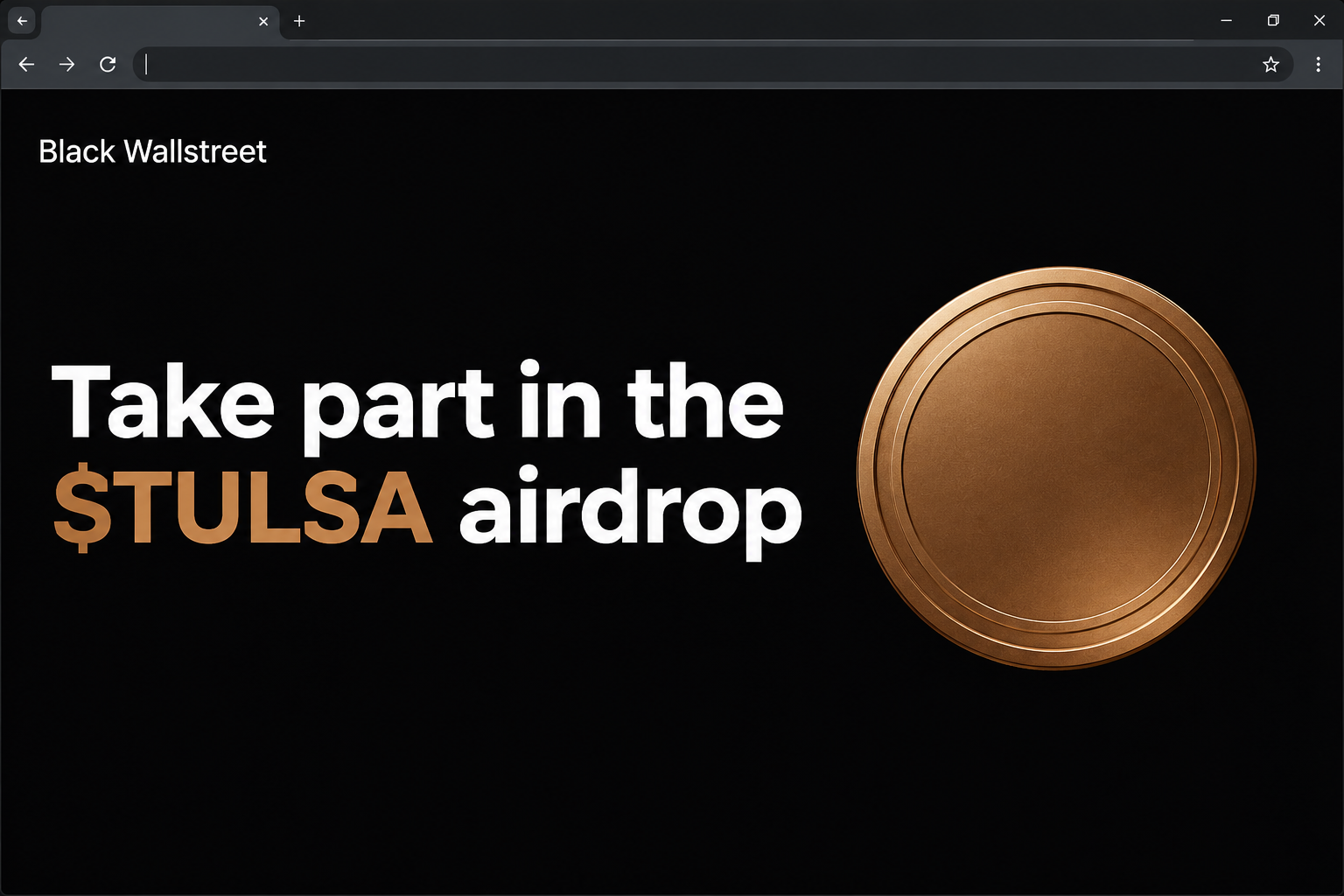
The fake Black Wallstreet $TULSA airdrop appeared at event-tulsa[.]fun. It invited early adopters and community members to claim tokens and framed the opportunity as available for a limited time.
The captured page had a bronze coin image, a purported live quote, and social icons. Together, these details gave the page the look of an established token project.
The capture also shows a wallet picker after the claim prompt. It does not show eligibility being established, tokens being distributed, or money being lost by a named person.
The concern is the specific claim site, not every account, organisation, or digital asset that uses the name Black Wall Street.
The history, the token, and the claim are separate
The National Park Service’s account of Olivia Hooker describes Tulsa’s Greenwood District, a historic Black community also known as Black Wall Street.
Separately, a crypto asset has been documented under the Black Wallstreet name and the TULSA ticker. The naming is a reference to Greenwood, not evidence of a municipal programme.
We could not verify a public endorsement of this claim site by the city, a Greenwood organisation, or the token project.
The site should not be treated as speaking for any of them.
The historical material can establish what the name refers to. It cannot say who controls an unrelated website or tell you what a wallet request would do.
- The historic name refers to a real place and community.
- The token name is a separate crypto identity, not a civic credential.
- The observed site used an unrelated .fun domain to present a claim.
- A market quote or a set of social icons does not establish who runs the giveaway.
Why the community angle deserves its own check
An offer framed around community membership can feel different from a regular advertisement. It may suggest that somebody you recognise approved it or that taking part supports a cause.
Ask what the page actually identifies. A token symbol, coin image, and a passing use of the word “community” are not the names of a registered charity, agency, or beneficiary.
If somebody shares the link as local news, find the original announcement yourself. Check whether it actually mentions a token distribution and points to the same host.
You do not need a wallet to ask who is behind an event. Start with a verified contact or the organisation’s published information, not the purported claim page’s social buttons.
How the Scam Works
Step 1: A recognisable name makes the event feel familiar
The page combines Black Wallstreet branding with the ticker TULSA and offers people a place in a limited giveaway.
The name supplies a whole story before the reader checks the address.
The site speaks of early adopters and community members. That can leave visitors to decide for themselves that they are part of the target group, even without a personal invitation.
The documented page does not establish whether individuals found it in a group, a search result, or somewhere else.
A link forwarded by a neighbour might still come from an unknown original publisher.
Pay attention to how the sender describes it. “Someone in the community posted this” is not the same as “the actual organisation announced it through its website.”
Step 2: Market-style details make the offer appear established
A quote displayed near the header helps the page feel like it is connected to a real market.
Someone seeing the ticker for the first time may assume the number has been verified.
Even if a quote happened to match an external price, it would say nothing about who runs the page. Real prices and project names can be displayed in unrelated interfaces.
The social icons work in a similar way.
Their presence does not prove that the accounts behind them are controlled by the project or that any group signed off on the terms.
Start one step away from the promotion. Look up the independent account or official community organisation you think is involved and ask whether its notice matches this specific offer.
Step 3: “Claim Tokens” becomes a wallet question
The claim button led to a selection panel displaying familiar wallet names. Rather than explaining eligibility, the next visible step asked visitors to bring a wallet into the process.
You may expect proof of membership or a dated set of terms. Instead, the interface focuses attention on which wallet you are using.
Recognising a name in a wallet menu is not a reason to pick it. Labels establish how the menu looks, not whether an approved request will deliver what was promised.
There is no need to see what happens after selection.
If the site cannot be tied to an authentic announcement, close it before exposing a public wallet address or approving anything.
Step 4: The risk changes if someone acts on a wallet prompt
Seeing a chooser is not permission to spend. A connection can let a page recognise your public address and ask for other actions, without itself authorising a transfer.
This kind of claim can become dangerous if you approve a request to move funds or grant control over certain tokens.
Those possibilities are not documented outcomes of the $TULSA capture.
Your own wallet history is the better source after a visit. It can help separate simply opening a page from agreeing to an action or sending cryptocurrency.
Do not rely on an on-page status message about a pending distribution. Reject any unexplained request and contact the wallet’s own provider if you cannot interpret your activity.
What to Do if You Have Fallen Victim to This Scam
-
Leave the claim page and reject unfamiliar prompts. Close any wallet prompt you did not expect. Do not follow a “complete claim” message sent afterwards.
If you only opened the browser page, that alone does not establish a loss. Check whether your wallet connected or displayed a request, but do not reopen the imitation.
-
Look at your wallet from a trusted starting point. Open your normal app and disconnect the event-tulsa entry if it appears in the connected-app list.
Review the affected account for any unexplained transaction or token permission from the time of the visit. A saved connection and an approval are different things.
Follow Phantom’s compromise instructions if that is your wallet. Other users should follow the instructions from the provider they already use.
-
If you authorised a request, verify what it did. Save the transaction identifier, status, amount, network, and destination when available.
A recent permission may continue after you disconnect. Seek your provider’s guidance on removing it and ask whether other assets in that account need protection.
If the wallet record shows a settled payment or transfer, do not send anything else to try to release or cancel it. A claim page cannot promise a reversal.
-
Replace a wallet if its keys were exposed. If you gave out a seed phrase or a private key, a new browser session will not fix the compromise.
Use a trusted device to create a wallet with completely new recovery information. Only move assets you know, and ask official support about positions that cannot be moved directly.
Do not put a recovery phrase in a message to volunteers or anyone who offers technical help. Nobody needs it just to read a transaction on a public network.
-
Warn the community without sending people to the page. Tell the group where you found the offer what it said and when you saw it, using a non-clickable domain.
If someone purported to represent a civic group or charity, tell that organisation through its verified office or contact page. Do not accuse members of posting the offer without evidence.
U.S. readers can refer to the FTC’s cryptocurrency scam guide for reporting. If an exchange handled a transfer, notify it through its own support route.
How to Check a Crypto Offer That Borrows a Local Name
Find out who is supposed to be giving something away
The presence of a city name does not make the city the issuer.
Read the original notice for the name of the entity offering the tokens and where it can be reached.
If a local group is mentioned, verify that the group made the announcement. A printed badge, a name that sounds familiar, and a link in somebody’s profile are not enough.
If an organisation has no record of the event, do not assume the fraud was committed by the organisation.
Many groups do not even know a page is borrowing their identity.
Be equally careful with names that sound almost right.
A heritage group might use the same phrase as a token project without having any connection to the people who issued it.
If a post describes the offer as fundraising, look for the named beneficiary and ask it directly.
An exclusive giveaway and a request to fund a real programme are different things.
Look for distinct terms before looking at the wallet
An event open to certain people should have a way to explain who qualifies. “Early adopter” makes a good slogan but does not tell you which dates or records matter.
A statement that tokens are available for a limited time should not prevent you from looking up the issuer.
Leave if your only way to get details is connecting a wallet.
Remember that verifying the correct token is not the same as confirming this event. Make both checks before treating any request as legitimate.
If nobody can tell you who qualifies, who funds the offer, or where the terms live, you have enough information to close the page.
A legitimate public event can be explained in a public notice. You should not have to reveal anything about your crypto holdings to discover who is behind it.
Avoid passing on evidence that doubles as an invitation
If you are warning others, explain the difference between the historic name and the suspicious promotion. People are more likely to pay attention when the warning is specific.
An image of the claim headline can help people identify it. Leave out scannable codes and remove sensitive wallet or account details before sharing the image.
If a story appears in a local group, ask the moderator to mark it clearly or remove the unsafe link.
The moderator need not click it to act on a well-described report.
Frequently Asked Questions
Is the Black Wallstreet $TULSA airdrop on event-tulsa real?
The documented event-tulsa[.]fun page was a fake claim site. It used the Black Wallstreet name and the TULSA ticker to present a limited giveaway and show a wallet picker.
Do not use it to see whether you qualify. Confirm a claimed event through whoever is supposed to be running it, on independently verified channels.
Is this an official Tulsa or Greenwood programme?
We did not find evidence that the fake claim was run or authorised by the city of Tulsa or a Greenwood institution. The name alone does not establish a relationship.
Ask the institution directly if someone claims it approved an offer. Use the contact information on its existing website, not contact buttons from the offer.
Did seeing the wallet menu give the site my funds?
No, seeing the menu did not authorise a payment. The next question is whether your wallet connected, approved a request, or disclosed something you meant to keep private.
If there is an unexpected transaction or you supplied a secret, act on that rather than waiting for the website to explain what happened.
The site had a price next to TULSA. Was that proof?
No, a price can be copied, stale, or simply unverified. Even an accurate quote cannot tell you who controls the site or whether a giveaway is actually operating.
Use any listing only to identify the asset. The origin and terms of the specific claim still need their own confirmation.
What if the link was forwarded by someone I trust?
Ask where they got it and whether the publisher has confirmed it. A trusted friend or community member can pass on a misleading link without knowing it.
If the page asked for your wallet, report what happened without suggesting the friend helped run it. Keep the distinction between the sender and the operator clear.
Can a support agent get a confirmed payment back?
A provider can help you understand your wallet activity and protect remaining assets. It generally cannot undo a confirmed self-custody transfer.
Be wary of anyone promising to recover the crypto if you pay a fee or hand over a phrase. Use the wallet or exchange support route you find independently.
The Bottom Line
The fake $TULSA page borrowed the name Black Wallstreet and presented a wallet prompt as part of a community giveaway.
A historic name and a trading-style design did not authenticate it.
Verify the organiser before considering a claim. If you already approved a request, check the wallet record and take the steps that fit what you actually shared or authorised.

Join the discussion
0 commentsShare your experience or ask a question about this article.
Community experiences
Did this happen to you?
Your experience could help someone recognize the same scam. Submit a private report for our team to review.
I experienced this tooReports are reviewed before publication. Sharing publicly is always your choice.
Discussion
Start the conversation
Have a question or something useful to share? Add the first comment.