


Someone you know finds your X account even though you never gave them the handle. The connection may have come from an address book, not a public post.
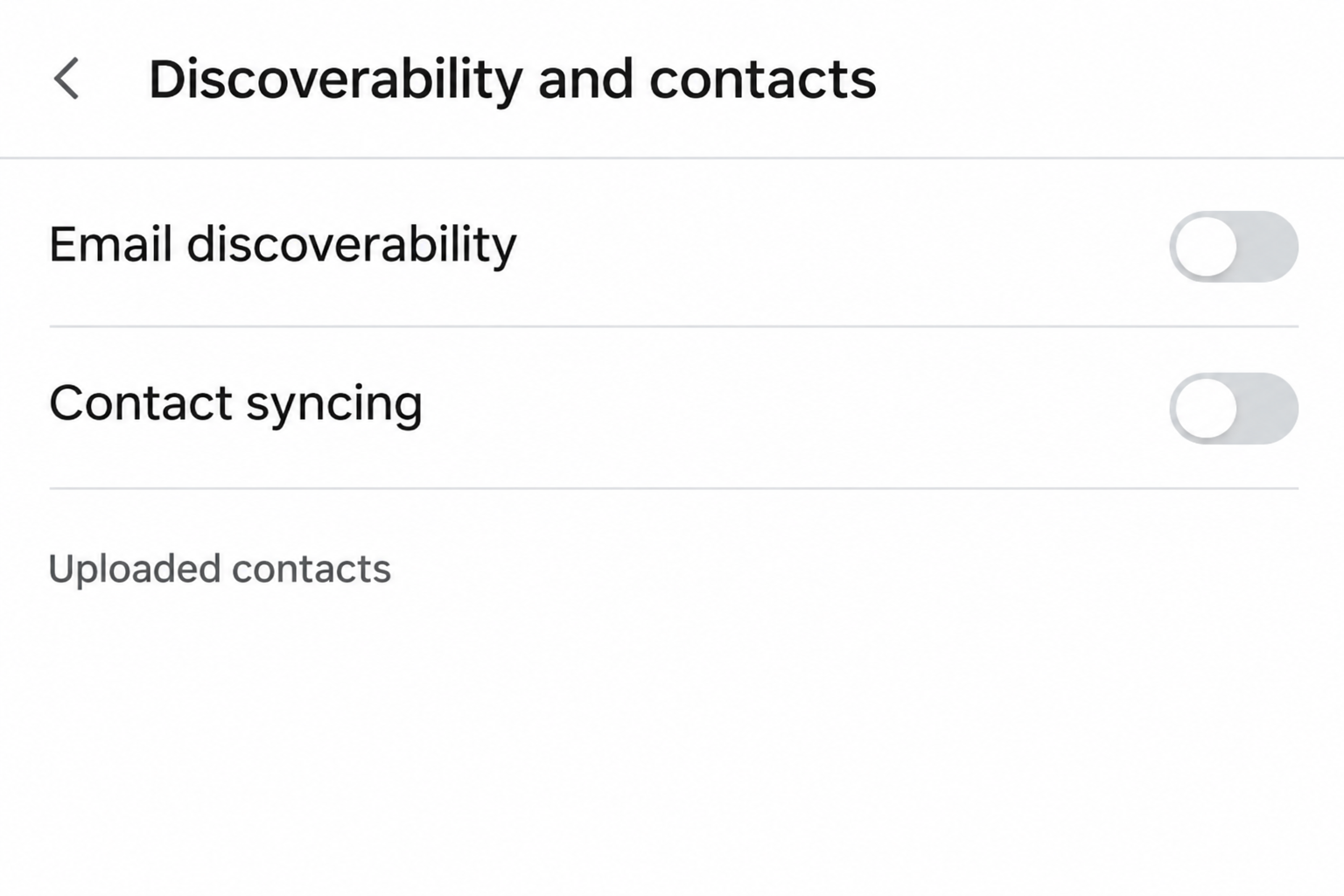
X puts the relevant controls together under Discoverability and contacts. They do different things, especially if you enabled contact syncing on more than one device.
Overview
Make the account harder to match by phone or email
X’s discoverability instructions describe two controls for whether people who have your email address or phone number can find your account through those details.
The setting isn’t a display switch for the actual number. X says it doesn’t publicly display the account’s contact details through this feature, even if discoverability is enabled.
That distinction explains how a profile can surface as a suggestion without your phone number appearing on it. The platform can match a detail somebody uploaded privately.
Turning off sync does not remove an existing upload
X’s contact management instructions say that switching off address book sync on one device stops further uploads from that device only.
Contacts you’ve already uploaded are a separate issue. The same guide describes Remove all contacts for deleting previous uploads and turning off syncing on devices from which you synced.
That’s an account setting, not removal of contacts from your phone’s local address book. It doesn’t give you control of copies other people uploaded to their accounts.
Account suggestions can outlast the change
X says removal can take some time and that suggestions based on contacts may still appear during that period. Don’t decide it failed from an immediate refresh.
Its account recommendation explanation also says it can make similar suggestions using other information, such as accounts you follow.
A familiar face in a suggestion isn’t proof of new contact syncing.
- Disable email and phone discoverability to limit matching of your own account.
- Stop syncing to prevent another upload from a particular device.
- Remove the imported address book when you want old uploads cleared.
- Set post visibility separately if you want fewer people reading your posts.
What to Do to Change Discoverability and Clear Uploaded Contacts
- Confirm which X account is open. If you use more than one, repeat the settings check on each account that shares a phone number or email you use.
- Open Settings and privacy, then Privacy and safety and Discoverability and contacts. Turn off each contact lookup option you don’t want people to use.
- On iOS or Android, inspect Sync address book contacts. Turn off syncing if you only want to stop uploads from that device.
- To clear previously uploaded contacts, use Remove all contacts and confirm. On desktop, open Manage contacts under Discoverability and contacts first.
- Recheck the settings and distinguish a contact recommendation from public posts or a direct profile link. Use the relevant visibility or safety controls if those are the problem.
First check the email and phone switches
The choice to let someone find you by email is separate from the phone number setting. Turn off both if you don’t want either detail used for discovery.
On a desktop, you can reach Discoverability and contacts from the privacy settings. X’s guidance says changes to the two discoverability choices are saved automatically.
On the iOS or Android app, begin in the profile or navigation menu, then open Settings and privacy and Privacy and safety. Menu positioning can differ by device.
If you still want to be found through one detail, leave just that option enabled. Don’t expect an unchecked email box to override a phone lookup you’ve kept on.
X says accounts tied to a shared phone number each have their own setting. Check the spare profile as well as the one you use every day.
The setting deals with how contact details help people discover an account. It doesn’t require deleting your phone number from the account just to turn off that lookup.
Stop the uploads from the device you are using
Open the app’s contact setting and check whether Sync address book contacts is enabled. X describes ongoing uploads when this setting is on.
Turning the switch off here limits what this particular device sends going forward. It doesn’t answer whether you imported contacts on a previous phone running the same app.
If a tablet or second phone still uses the account, check there before assuming future syncing has stopped everywhere. Don’t change another person’s device settings without their authorization.
You can also review whether your operating system permits the app to access contacts. That local permission isn’t a record of what X already received.
If you want to stop using address book suggestions entirely, don’t turn sync back on just to test it. The next useful evidence is the account’s imported contact list.
Remove what the account already uploaded
In the app, open the discoverability menu and find Remove all contacts. The browser route includes Manage contacts, where X says it may ask for your password.
Only enter a password on the official site you opened yourself. A private message offering to remove your contacts isn’t the same as an account prompt.
Check that you’re removing the imported contacts from X. Deleting the entries from the local address book isn’t the way to clear what the platform already received.
X’s help says the action also turns off syncing on devices where you had chosen to sync.
If an app later invites you to find contacts, review the prompt before opting in again.
For someone using a business profile, X also describes an upload route in Professional Home. Consider that route if you can’t remember how an address book ended up attached.
Why People May Still Recognize or Find Your Account
Your handle and public posts are separate from matching
A person who knows your handle can look for the account by that handle. Turning off email lookup doesn’t make a profile unsearchable or change what your post settings allow.
A professional handle, distinctive bio or direct link can identify you independently of a contact match. Check what you’ve put on the public profile if that’s your concern.
Protecting posts is about their audience. The account’s discoverability controls exist separately, so protecting posts doesn’t tell you whether contact matching is still enabled.
If you’ve shared your profile link elsewhere, the contact switches don’t remove it from those places. Decide whether that separate publication needs updating.
Do not take a report of an acquaintance finding your profile as proof X showed them your number. There can be several routes from the same person to your profile.
A suggestion isn’t a reliable test of which data caused it
X describes recommendations based on activities and follows as well as imported contacts. Familiar accounts can therefore appear for reasons other than your address book.
If you’ve just removed the contacts, wait for the platform to process that operation and recheck your settings. Don’t turn everything back on to see whether suggestions change.
A suggested account doesn’t show which address book contained your details. Don’t accuse somebody of uploading your information just because the platform placed their name in a list.
If another person already saved your username or shared a screenshot of your profile, X’s contact settings won’t recover those copies. Handle the specific unwanted exposure separately.
If a recommendation is unwanted, use the available options to manage it. Check whether your underlying account settings still reflect the privacy choice you want.
If you are trying to reduce unwanted contact
If someone is messaging or harassing you, contact matching is only one concern. Keep the messages you need for a report and use the platform’s appropriate interaction controls.
Check who can send message requests and who can see posts you don’t want public. Closing the contact discovery route doesn’t change those audience rules automatically.
If a direct threat involves your address or workplace, seek appropriate help without waiting for a recommendation to vanish. Save evidence privately, without reposting the exposed details.
If the concern is an account you don’t recognize, check your actual profile and signed-in activity before assuming somebody created it with your contact information.
Three Examples to Help You Choose the Right Fix
You used the same number for a public and a personal profile
A business profile can be easy to recognize from its name and handle.
A separate personal profile might still have phone discoverability turned on even if you set different post audiences.
Use the account switcher and confirm the handle at the top of each account before making a change.
Check the phone setting independently, rather than changing how the business handle appears.
If you need to keep business discovery available, decide whether to allow it there and not on the personal account.
Using one phone number doesn’t force both profiles to use matching settings.
You can keep the phone as a way to recover the personal account while turning off discovery through it. If the number itself is obsolete, handle account recovery separately.
You synced from an older phone, then replaced it
The switch might be off when you first open settings on a newer device even though the old phone uploaded an address book earlier.
Use the browser’s Manage contacts view to inspect the account’s prior uploads. You don’t have to find or reconnect the old device to see what the account already imported.
If you choose to remove those uploads, confirm which account you’re in before proceeding. A different profile on the same device can still have its own imported list.
If you no longer have the old device, check your account’s security and sign-in records separately. Clearing contact uploads is not a way of signing another device out.
After removing contacts, decline a new prompt to upload them unless that’s what you want.
Signing in on your new phone is not a reason to give the app that permission again.
You want old posts to stop showing to the public
X’s public and protected posts guide describes changing the audience for posts. That’s the appropriate setting to check when the problem is who can read what you’ve written.
It says existing followers can still see protected posts and can capture what they see. Protecting posts doesn’t recall copies people made while they could read them.
The audience change also has a consequence if you reverse it. X says making posts public again makes previously protected posts public, so read what remains before undoing the change.
Switch off contact discovery if you want to reduce matching by phone or email too.
Use the audience setting for posts, even if the two changes are part of one privacy cleanup.
For a public post you’ve seen copied somewhere else, look at where the copy actually lives. A setting on X isn’t a removal request to a different website.
Frequently Asked Questions
Can people see my actual phone number on X because discovery is enabled?
According to X, the setting doesn’t publish the number or email address. It can let the service use those details to help people find the account.
An address or number you added to a bio or post is different. Check the places where you may have made it public yourself.
Does switching off sync erase everything I uploaded before?
No, X says turning sync off on a device stops further uploads from that device. It describes a separate command for removing the existing imported contacts.
Use the remove command if you want the address book cleared from the X account. Then confirm the settings reflect your intended choice.
Does Remove all contacts delete my phone’s address book?
X describes that action as removing previously uploaded contacts from X and turning off syncing across the devices you’ve used for it.
It isn’t a command to erase your local address book.
If you want to change what’s saved on the phone, use the phone’s own contacts controls. That won’t tell you what X has already imported.
Can I stop someone searching my handle through these switches?
The switches are about email and phone discovery, not ordinary searches for a username. A person with a direct profile link can still try opening it.
Review your post audience and profile information independently. Turning off matching does not make every other kind of visibility private.
Why do I still see suggested contacts after removing them?
X says processing may take time. It also describes recommendations based on other information, so familiar suggestions don’t automatically mean an old upload came back.
Check the imported contact setting and whether your devices are syncing. Don’t use one suggestion as proof of which data produced it.
What if my older X account uses the same phone number?
Each account has its own discoverability setting, according to X. Switching off phone lookup on one profile doesn’t establish that you protected the other one.
Check the same menu separately on each account you control. Decide whether you want each to be discoverable by phone, email, or neither.
The Bottom Line
Turn off the email and phone options that let contacts find your X account. If you also want your past uploads gone, use the separate removal action.
Verify each profile you use and handle public posts or unwanted messages with the controls for those problems. A contact setting isn’t a way to disappear from X.

Join the discussion
0 commentsShare your experience or ask a question about this article.
Community experiences
Did this happen to you?
Your experience could help someone recognize the same scam. Submit a private report for our team to review.
I experienced this tooReports are reviewed before publication. Sharing publicly is always your choice.
Discussion
Start the conversation
Have a question or something useful to share? Add the first comment.