


The old Radaris listing can still look alive in a search result. Open the address, though, and you may land on a legal notice instead of a profile.
That leaves two different questions: what happened to the site, and where can someone still see your information? The answer changes what you should do next.
Overview
The old privacy address shows the same notice as the homepage
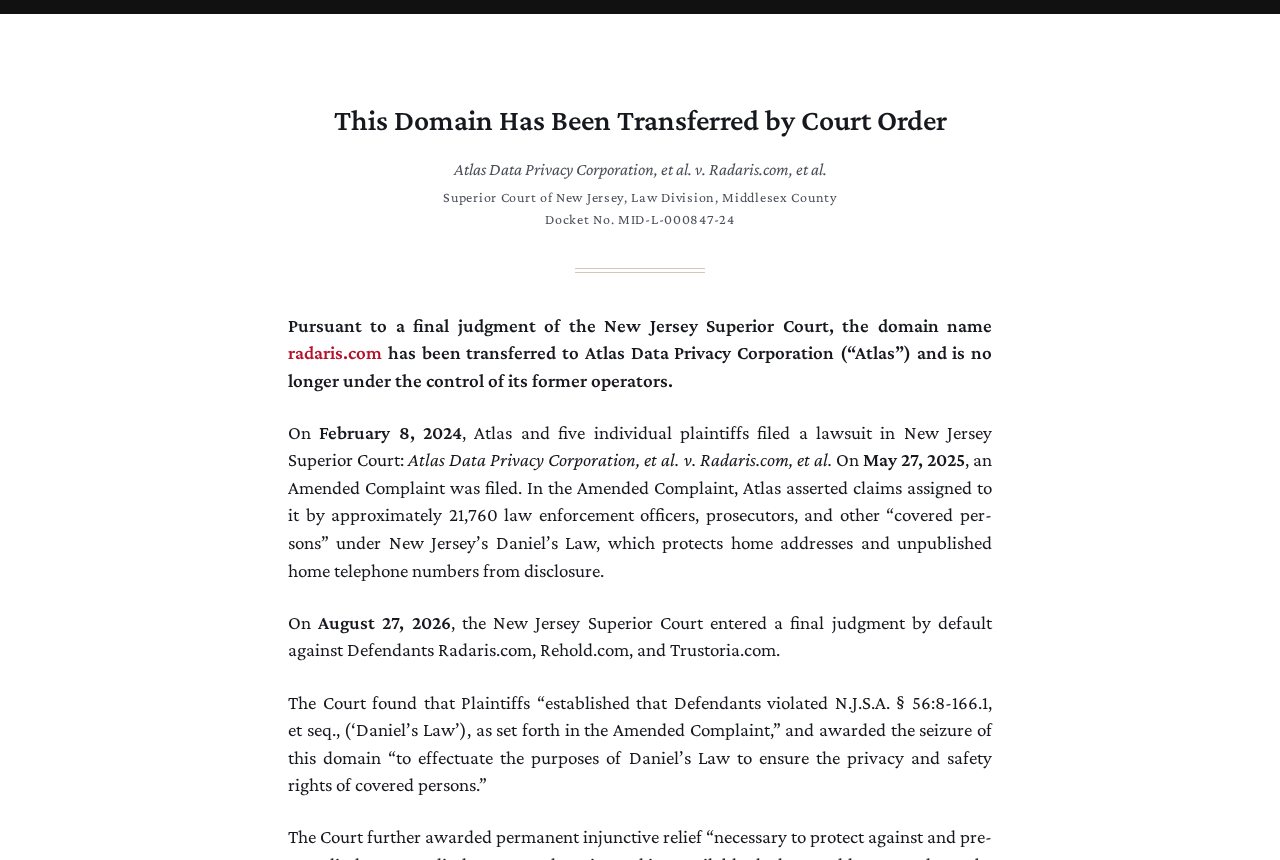
The Radaris homepage now displays a transfer notice from Atlas Data Privacy Corporation. The former privacy address presents that same notice rather than a working opt-out form.
That matters if you saved instructions from before the transfer. A guide can show a button that once existed without providing a route that still sends a request.
The notice attributes the transfer to a final judgment of the New Jersey Superior Court in Middlesex County.
It identifies case MID-L-000847-24 and gives August 27, 2026, as the default judgment date.
A domain transfer is not a finding about every stored record
The notice describes protection for the plaintiffs and covered people whose information the case concerns. It does not announce deletion of everybody’s former Radaris data.
You can verify that a particular address no longer displays a profile without knowing what the former operator retains. Those are two different facts with different evidence.
Rehold and Trustoria are also named in the notice.
Check the actual address you’re dealing with before treating another results page, similarly named service, or different domain as part of this transfer.
A stale Google result and a live copy need different fixes
If a Google preview mentions your address but the destination no longer shows it, the searchable preview is a different problem from an active broker page.
A listing that’s still open on another domain needs action there. The notice on Radaris.com is not a removal confirmation from a different operator.
- Check the destination before acting on a search result.
- Refresh a result that still describes a page that changed.
- File with a different publisher if it still displays the same information.
- Treat a safety threat as a safety problem, not a search queue.
What changed at the Radaris address
Read the notice for what it actually says
The live notice says the court transferred the Radaris.com domain to Atlas and that the former operators no longer control it.
It is posted by Atlas, a plaintiff in the case.
The notice describes the defendants named in the default judgment and addresses protected home information. It is a public account of the case, not a reader-specific request outcome.
Don’t infer from the new owner of the web address that Atlas has your old account. The notice doesn’t offer the old search, membership, or privacy controls.
A legal notice also isn’t evidence that an old password was leaked.
Treat account security and billing as separate questions rather than responding to the transfer by sending someone your credentials.
There is no reason to pay a service just to press the old Radaris removal button. If an offer promises that, ask what exact live listing it proposes to address.
A screenshot of a pre-transfer page can help show what once appeared. It doesn’t show the current owner, support process, or whether someone can open that page today.
Look at the whole host name, not just the brand
A browser’s address identifies the particular site. A similar name, favicon, or profile format isn’t enough to connect a different host to the same legal case.
If your search shows a short link or ad, first see where it actually goes.
Don’t type personal details into a page because Radaris appears in a banner or result title.
A profile-looking URL that displays the transfer notice belongs in your stale-results notes. A page that displays personal data belongs in your live-results notes, even if the wording is identical.
If the original address returns a generic error from your connection, that does not establish an active listing or universal removal. Recheck the exact address before drawing either conclusion.
Old browser bookmarks can include a profile identifier that Google has never indexed.
If a bookmark leads only to the transfer notice, a refresh request isn’t necessary unless a stale result exists.
Keep the original host visible in your private record. A list of names alone makes it hard to tell which exact indexed result to report later.
What to Do When an Old Radaris Result Still Appears
- Copy the public result address privately and check the destination. Note whether it shows the transfer notice, a missing page, or personal details that are actually still available.
- If a Google result describes information absent from the destination, use Google’s outdated content process for that exact address. Don’t submit the Radaris homepage in place of a profile result.
- If another publisher still shows the record, use that publisher’s independently verified privacy route. Ask about the specific live page, not the case against Radaris.
- Keep a separate note for each listing. Check whether an old preview changed, a live profile disappeared, or a different site still shows your details.
- Use an appropriate support route for urgent exposure, a charge, or a formal redaction issue. Don’t send sensitive information to a person promoting a replacement Radaris form.
When just the Google description is out of date
Google’s outdated content help applies when a page no longer exists or its content has changed. It isn’t a request to erase an unchanged live page.
Copy the URL that Google’s listing actually points to. Submitting the root domain might miss an old profile address with a different path.
If the tool asks for a word that’s no longer present, follow its instructions using the old result. Don’t use another person’s address or document number as a test.
Where there’s more than one result, compare the actual URLs before sending another request. Two links using the same title can lead to different records.
The MalwareTips guide to refreshing an outdated Google result explains the verification and follow-up when a former address remains in a preview.
If the result is gone but a third-party archive still serves a copy, that’s a new destination. A refresh at Google doesn’t remove that archived copy.
When a different page still has your details
Look at the exact fields you want removed. A public address listing, a phone result, and an article about the court case are not the same kind of content.
Start with the current publisher’s privacy or removal area. Save only the link, what’s visible and the date; don’t create an extra public copy of everything you want taken down.
If the publisher says the underlying source is a public record, ask which part can be corrected or redacted there.
The original record holder and the publisher can accept different requests.
Don’t tell another publisher it has been ordered to remove your information because its format resembles Radaris.
The similarity is a clue about where to look, not proof of legal coverage.
After the publisher updates its live record, check any still-visible search result independently. The removal notice from one site isn’t an update from every search engine.
If you sent a removal request before the transfer
Find the confirmation mail or other record of your old request without posting it. Keep dates and case numbers available privately if somebody asks you to verify what happened.
You don’t need another Radaris form submission just to prove an old link now opens the notice. What matters now is whether that information remains visible at a specific address.
If the document includes a full address or a verification link, share only what the provider handling a current complaint needs.
Old credentials or an active code aren’t evidence of removal.
An old opt-out does not follow you onto every people-search site. If a separate record appears, verify its source before treating it as an incomplete Radaris request.
What the change means if safety or billing is involved
The public notice is not emergency assistance
New Jersey’s Office of Information Privacy explains what Daniel’s Law covers on government websites and publishes the state’s route for eligible people.
If you believe your role or family circumstances qualify, use the state’s eligibility guidance rather than assuming anybody who appeared on Radaris is a claimant.
Don’t submit work identification, a legal order, or a home address to an unsolicited intermediary. Start with the official channel and ask how to provide necessary information securely.
If someone has threatened you using a listing, keep the communication separate from the search result and contact appropriate local assistance.
Don’t wait for a preview refresh to address an immediate threat.
The public availability of a record and its danger to a particular person are different questions. The loss of one domain does not make a targeted threat less urgent.
An order, invoice or charge needs its own evidence
If you used the former service and have a billing concern, start from the original receipt and the actual name on the payment record.
The organization named in the domain notice isn’t automatically the seller shown on that receipt. Changing control of a website does not verify who billed an old transaction.
An unfamiliar renewal should be handled through the payment provider and any independently verified merchant channel shown in your records. Keep the date, amount and cancellation evidence for that conversation.
Don’t give a caller payment details to supposedly restore an old account or cancel a fee. Contact the party that can identify the actual transaction without asking for a code.
Two Lookups That Need Different Responses
The same former address appears in several results
Suppose one result leads to Radaris.com and shows the transfer notice. Another leads to an active directory whose page still lists your former address and current number.
The result at Radaris is about a page that changed. The active directory is a fresh source of disclosure, even if the directory copied nothing from Radaris.
For the active listing, identify which entry is yours and keep its exact address.
If the current page uses aliases or multiple locations, note which exposure you want the operator to address.
For the stale result, save its exact URL and the fact that it no longer opens a profile.
Don’t send the active directory’s link through the outdated request just because its information is old.
A publisher says it updated your profile, but a print view loads
A visible profile and its separate printable copy can have different links. If you already have those links, check both before interpreting the publisher’s reply as a complete removal.
Ask the publisher to check the remaining copy you can open. A generic response saying the main listing was removed doesn’t tell you what still loads at the second URL.
Once both views are clean, check the results pointing to those addresses.
Your strongest follow-up is a specific link that still shows an old description, not a new question about the site transfer.
Frequently Asked Questions
Can I still use the old Radaris opt-out link?
The former privacy address displays the same transfer notice as the homepage. It does not accept a listing removal request through the old form.
If you have a different link, check the exact domain and current contents. Don’t use a remembered screenshot to decide where to send your identification.
Why does Google still show a Radaris profile?
Google can show information from a previous version of a page. If the live address no longer displays the information, you can request a refresh of that result.
If a page still has your information, the outdated content tool is not a substitute for dealing with the live publisher or applying the relevant removal policy.
Did the court transfer destroy the old database?
The notice identifies a domain transfer and describes protections in the case. It doesn’t establish that every former record, backup or purchased report was deleted.
Check where a record is accessible today rather than assuming all copies disappeared. A working copy on another host requires a separate decision.
Can I send the same request to every similar website?
Use each publisher’s verified route for each listing. There’s no basis to assume a request acknowledged by one operator reached all other places the details appear.
Keeping addresses and responses separate makes repeated results easier to resolve. It also reduces the chance that you send identity documents to the wrong business.
Does Daniel’s Law apply to my old listing?
The state describes eligibility and particular categories of protected information. Appearing on a people-search site by itself doesn’t answer whether you qualify under the law.
Check the state’s guidance if you believe you’re covered. For an active threat, seek appropriate assistance independently of anything you file about a listing.
Do I need to pay someone to remove a stale Radaris result?
For a Google result that no longer matches the page, Google’s own outdated content request is the route to try. You don’t need to buy an old Radaris report.
Ask anyone offering a paid service to explain which current result it would touch. If the old link only shows the transfer notice, focus on the remaining exposure.
The Bottom Line
Don’t submit personal information to a replacement Radaris form. The former privacy address now shows a transfer notice; check the specific result that still concerns you.
Request a search refresh for an outdated preview, and contact the live publisher for an active copy. Keep the two outcomes separate so you can tell what actually changed.

Join the discussion
0 commentsShare your experience or ask a question about this article.
Community experiences
Did this happen to you?
Your experience could help someone recognize the same scam. Submit a private report for our team to review.
I experienced this tooReports are reviewed before publication. Sharing publicly is always your choice.
Discussion
Start the conversation
Have a question or something useful to share? Add the first comment.