

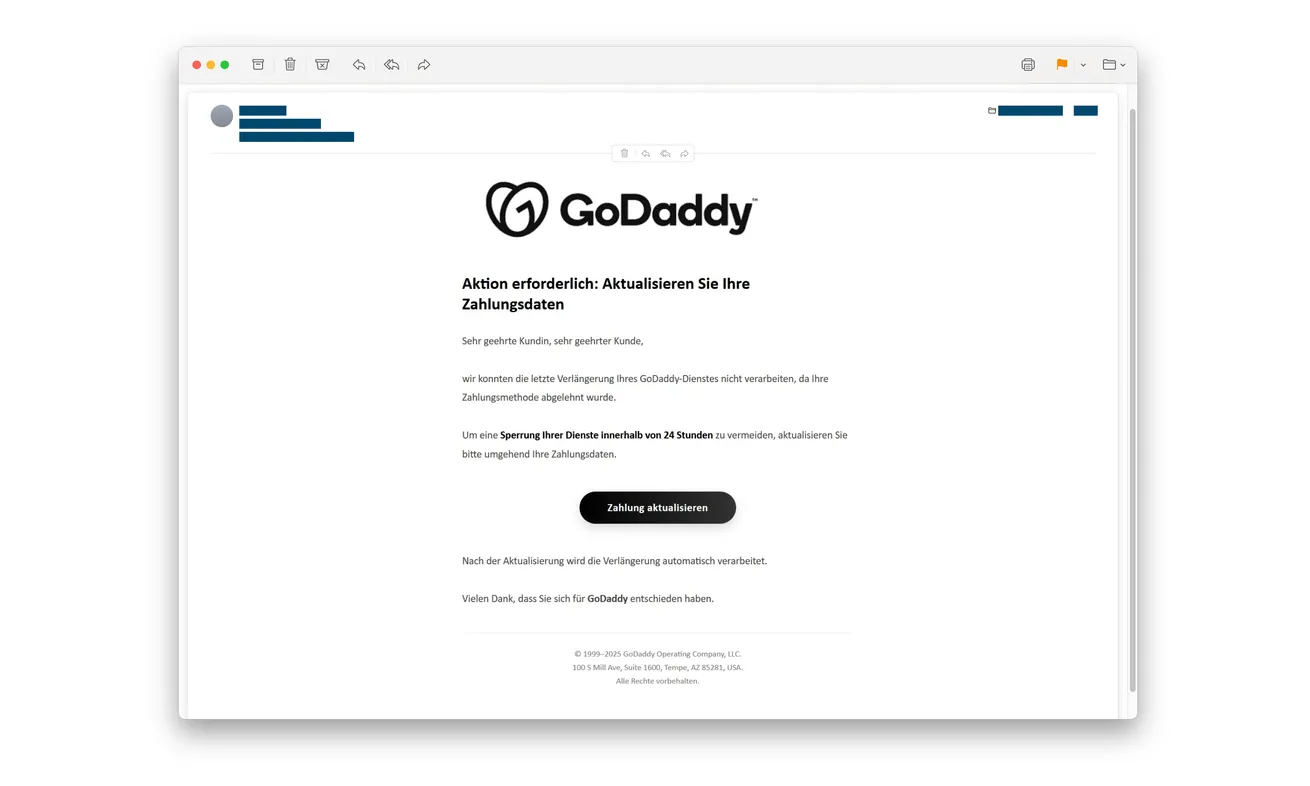
An email says GoDaddy couldn’t renew your service because a payment failed. Unless you update your details, the message warns, your services could stop within 24 hours.
For someone running a website, that’s an interruption worth avoiding. Before treating the email as an urgent maintenance task, check where its payment button takes you.
Overview
The failed-payment warning impersonates GoDaddy
The GoDaddy payment failed email scam claims a renewal couldn’t be processed. It presents an updated card as the way to prevent an approaching suspension.
The name belongs to a genuine domain and hosting provider. The scam is the counterfeit notice and linked collection process, not GoDaddy’s legitimate renewal service.
A real customer can receive the fake message. Having a website with the provider doesn’t authenticate this particular payment request.
A copied portal targets both account access and payment information
Swiss police document the GoDaddy impersonation, including the 24-hour threat and a fake portal requesting login credentials, card details and an SMS security code.
Those are separate exposures. A password can put the customer account at risk, while payment details and approvals require attention from the card issuer.
The warning doesn’t establish that every recipient’s domain was taken over. If you responded, check actual account activity instead of assuming either no damage or total compromise.
Verify the renewal outside the email
Open your established GoDaddy account independently and inspect the service concerned. A billing problem should be checked there, not solved through an unsolicited form.
- Don’t use the payment-update button in this notice.
- Check real renewal records through your usual customer route.
- Change a password disclosed to the imitation.
- Contact the issuer about exposed card information or approvals.
- Tell the person responsible for your domain if a business account was involved.
Why Website Owners May React Before Checking
A failed hosting payment sounds more consequential than a missing discount. You might picture lost orders, unavailable email or a customer arriving at a broken website.
The email doesn’t need to demonstrate any of those outcomes. The threat of interruption gives a short administrative request more weight.
Renewals can also be handled by somebody else. A business owner might not remember which card is attached, while an assistant may not know the renewal date.
That uncertainty gives the sender room to invent a problem. Instead of verifying the bill, the recipient may concentrate on keeping the service running.
The 24-hour window encourages exactly that shortcut. It makes contacting a colleague or finding the original purchase feel slower than clicking one prominent button.
Yet a payment made through an imitation doesn’t resolve a genuine renewal. It can create a security problem while leaving the real account untouched.
The useful pause is brief and concrete: close the email, open the customer account yourself and identify the actual service and billing status.
If another person manages it, ask them through an existing conversation. Don’t forward the stranger’s payment instruction as though you have already approved it.
How the GoDaddy Payment Failed Email Scam Works
Step 1: A declined-payment story creates an urgent repair
The message says renewal failed and gives a short period before suspension. Its logo and administrative tone make the demand resemble ordinary provider correspondence.
The reproduced example also includes a corporate-style footer. Public company information can be copied into a fake email without making its sender an authorized billing representative.
Don’t send the sender a customer number or invoice to help identify the issue. Verification should happen through the genuine account.
A real payment problem is possible in ordinary account management. That possibility is why independent checking works better than deciding from the email’s appearance.
Step 2: The update button opens a counterfeit customer portal
The linked page imitates GoDaddy’s customer environment. That familiar presentation can make signing in feel like the normal first step toward correcting the card.
The email chose this sign-in page for you. Leave it and open your usual account before deciding a card needs updating.
A browser padlock won’t establish ownership. An encrypted connection can still deliver your password securely to the wrong person.
Don’t type a deliberately incorrect password to test the form. A counterfeit page doesn’t have to verify the answer before collecting it.
Step 3: The form collects credentials and card information
Police identify both login and payment details as targets. The supposed repair creates a reason to request them together.
That combination can leave a website owner handling two incidents at once. Account security and payment protection should be pursued separately, without waiting for one to finish.
If the same password protects your email or another provider, reuse creates an additional account risk. Change each affected login through its real service.
A failed submission doesn’t prove nothing was collected. Don’t repeat the attempt with another card or a more privileged business login.
Record which fields you completed and whether you pressed a submission button. If you can’t remember, explain that uncertainty to support rather than guessing.
Step 4: A security-code request tries to complete another action
The documented fake site also asks for an SMS security code. The renewal story can make that request look like a protective final check.
Read the genuine code message for what it actually authorizes. A login, card transaction or changed setting isn’t automatically a renewal because the website calls it one.
Decline unexpected approvals and don’t relay the code. You can contact the provider or bank independently without finishing the unverified process.
If you already supplied a code, mention it explicitly. Support needs to distinguish information disclosure from an action that may have been approved.
Don’t let a second countdown pressure you into another attempt. A code expiring is not a reason to authorize something you didn’t independently initiate.
The Renewal Check That Doesn’t Depend on the Email
Identify the service in your actual account
Use your normal sign-in route and inspect the relevant product or renewal record. Establish what the account says before changing any payment details.
If the email is vague about the affected service, don’t supply the missing information by replying. Find the answer inside your own records.
Check an actual invoice against the service you use. A domain, hosting plan and separate email service can have different billing arrangements.
When a legitimate renewal needs attention, handle it within the genuine provider process. Refusing a fraudulent email doesn’t mean ignoring a verified bill.
Bring the account owner into the conversation
A designer or agency may manage the account while your business pays for it. Use the existing contact to establish who is responsible.
Don’t create an urgent internal request to pay solely from a forwarded screenshot. The recipient may mistake your forwarding for verification.
For a shared inbox, label the notice as suspicious while it is assessed. That helps prevent another person completing the fake update after you stop.
Never ask a colleague to send their password so you can check on their behalf. The investigation shouldn’t create another insecure credential exchange.
Keep billing information out of a public warning
You can warn others about the false suspension threat without posting customer numbers, invoice addresses or card details.
Keep an unaltered private copy for the provider and police. Use a redacted image or plain description if you choose to discuss it publicly.
The email’s visible company address isn’t evidence of the sender’s location. Don’t turn copied footer information into an accusation against a real office.
What to Check if the GoDaddy Login Was Exposed
Start with the real account’s security and recovery options. If access fails or account details changed, obtain help through the provider’s genuine route.
Explain that credentials were entered into a copied portal. Don’t describe a confirmed domain transfer or hosting intrusion unless you have evidence of one.
The responsible administrator should examine relevant account changes and service settings. What needs checking depends on the products and permissions associated with that login.
For a business account, that may include whether contact or domain-management settings changed. Treat this as a precautionary review, not a claim this campaign always changes DNS.
If the website still loads normally, that’s useful but not a complete account-security check. Some account changes wouldn’t immediately alter the public page.
Likewise, an outage doesn’t identify this email as its cause. Keep observed service problems separate from the phishing timeline until they are investigated.
Tell the account owner what you saw and when. A concise timeline helps them assess activity without spending time reconstructing the story from forwarded messages.
Payment protection should continue alongside that review. The domain administrator isn’t the person who can block an exposed credit card.
When an Agency Handles Several Client Accounts
A forwarded renewal warning can become confusing when one team manages websites for several businesses. Identify the actual account before anyone changes a payment method.
Don’t apply an email’s instruction across every client because the provider name is familiar. Check each genuine renewal record through the normal management process.
Tell the affected account owner what was disclosed, if anything. Avoid sending a whole client list to the suspicious sender to identify the supposedly overdue service.
If a business card was entered, inform the person authorized to handle that card. Their issuer conversation shouldn’t wait for a technical review of the website.
Keep one incident record listing the accounts actually involved. That prevents an alarming forwarded email from becoming a vague claim that all clients were compromised.
Other clients don’t need credentials collected “for checking.” Use the agency’s established access arrangements and escalate through the responsible account owners.
Reporting the Fake Page Without Revisiting It
GoDaddy’s abuse-reporting guidance explains available routes and the information needed for different reports. Use the route appropriate to what you have.
Its official phishing-report form asks for the impersonated brand, destination and a description. A report isn’t a promise of a particular outcome.
Don’t reopen a suspicious site merely to satisfy a reporting field. Preserve the original email and ask genuine support how to provide existing evidence safely.
A report also doesn’t replace account recovery or issuer contact. Those protective actions need their own attention, particularly after a password or code was disclosed.
What to Do if You Have Fallen Victim to This Scam
-
Stop the payment update. Close the counterfeit portal and reject further code requests. Don’t troubleshoot the supposed renewal with another account or card.
If you only read the email, mark it as phishing. Its arrival alone doesn’t establish account access or a real billing failure.
-
Secure the genuine GoDaddy account. Change an exposed password using your established account route and review the available security settings.
If you can’t sign in, contact genuine account support. Address any other accounts sharing that password, especially the email used for recovery.
-
Contact the card issuer promptly. Explain that a false hosting-payment form collected the card information. Ask about blocking or replacing the card.
Tell the issuer about SMS codes, banking prompts and approvals separately. Check attempted activity as well as charges already posted.
-
Ask the responsible administrator to review account changes. Give them the interaction time, affected login and services you believe are involved.
Let them investigate sessions and relevant management settings. Don’t make undocumented changes to a shared business account while somebody else is containing it.
-
Dispute unfamiliar payments through the provider’s process. Record amounts, currency, descriptors and reference numbers, and ask about reporting deadlines.
Don’t assume the fake site’s advertised purpose describes the bank transaction. Explain what you intended and what you actually approved.
-
Keep the evidence and report the impersonation. Save the message and destination privately, then use official reporting channels.
Contact police if money was lost or account information misused. Never include full passwords or card numbers in a public complaint.
-
Resolve genuine billing separately. Once you have an authenticated account route, check whether any real renewal needs attention.
Reject unexpected callers offering to restore hosting or recover losses for another payment. Knowledge of your domain doesn’t prove they represent the provider.
Frequently Asked Questions
Does the email mean GoDaddy will suspend my website?
The documented message makes a false suspension claim. Check real product and billing records independently rather than treating its 24-hour deadline as verified.
Is every GoDaddy payment reminder fraudulent?
No. This warning concerns an impersonation campaign. Genuine billing questions should be resolved through your established account, not dismissed or paid from this email.
Why does the payment page ask me to log in first?
The imitation targets account credentials as well as card details. A familiar-looking sign-in screen doesn’t establish that the real provider receives the information.
Should I share the SMS code to fix renewal?
Not through this process. Read what the genuine code authorizes, decline unexpected actions and contact the relevant provider independently.
What if my website still works after I entered a password?
Secure the account anyway. A working public website doesn’t show that no credentials were collected or account settings changed.
Can reporting the email protect an exposed card?
Reporting helps address impersonation, but your issuer handles card protection. Contact it separately and promptly after disclosing payment details.
The Bottom Line
Don’t update billing through the GoDaddy payment failed email scam. Its suspension threat leads to a counterfeit collection process, not a verified renewal repair.
If you responded, secure the real account and contact the card issuer as needed. Check any genuine service renewal through your established customer route.

Join the discussion
0 commentsShare your experience or ask a question about this article.
Discussion
Start the conversation
Have a question or something useful to share? Add the first comment.