


A survey says your answers are anonymous, but Google Forms asks you to sign in. Suddenly, a simple questionnaire raises questions about your identity.
Before abandoning the form or trusting its promise, separate the account needed to enter from the information that will travel with your answers.
Overview
A sign-in requirement does not automatically disclose your email
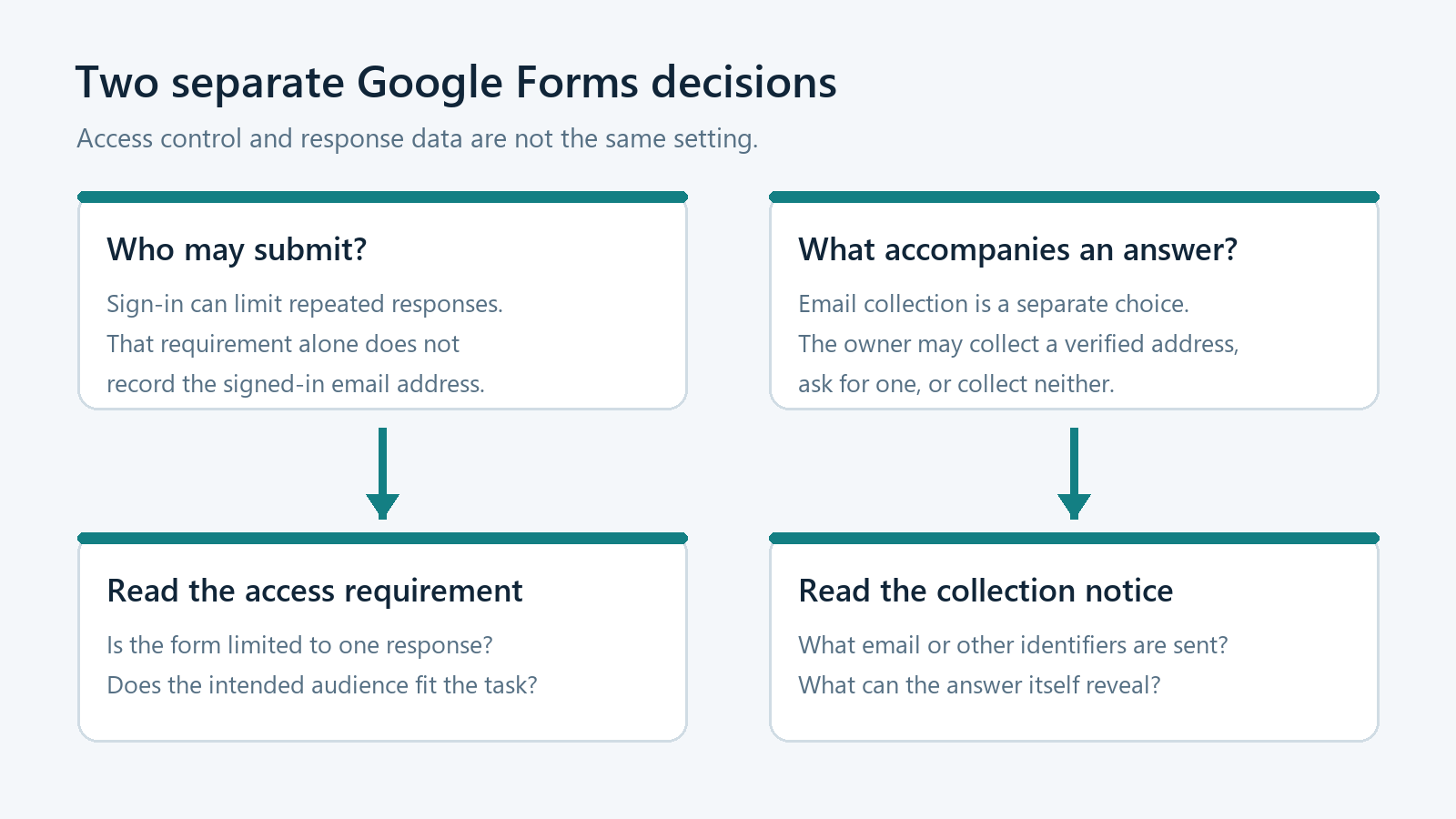
Google Forms can require a Google Account to limit someone to one response. That access requirement is different from recording the account’s email address.
Google’s form-sharing instructions explicitly distinguish those controls. A one-response limit requires sign-in, but usernames are not recorded unless email collection is enabled.
That distinction answers one narrow question, not every privacy question. Answers, uploaded material, or other identifying details can still reveal who submitted a response.
Email collection has more than one form
An owner can collect a verified Google Account address or ask respondents to type an address. These options provide different kinds of information.
A verified address connects the response to the confirmed account email. A manually entered address is information supplied by the respondent, not equivalent account verification.
According to Google’s response-management guide, verified collection includes confirmation that the Google Account email will accompany the response.
Privacy depends on the whole questionnaire
Look beyond the word anonymous and read what the form actually requests. A detailed answer can identify you even without a dedicated email column.
- Check whether the form explains any email collection.
- Notice questions asking for names or account identifiers.
- Consider whether a distinctive story reveals your identity.
- Ask who can read or export the responses.
- Avoid entering passwords or unnecessary financial information anywhere.
Anonymous to whom is the useful question
A response without an email address is not automatically anonymous to an organizer who recognizes the details you provide.
Understand the Three Decisions Behind Google Forms
Access determines who can reach the questions
A form may be open to a broad audience or restricted to selected people. An access restriction answers who may participate, not what participation reveals.
For example, an organization might want only employees to complete an internal survey. That purpose does not, by itself, explain the response collection settings.
Nor does a genuine Google sign-in authenticate the organizer’s promises. Google provides the service, while the person operating the questionnaire decides what to ask.
When the invitation is unexpected, verify its purpose through a familiar conversation. Do not let a recognizable platform replace checking who wants the information.
A one-response limit controls repeated submissions
A neighborhood organizer might want one vote per participant rather than unlimited repeat submissions. Sign-in can support that limit without recording usernames in the response results.
This can feel contradictory when the screen shows an account identity. The account used by the service and the data delivered to the organizer are separate.
Do not assume you can change the limit by omitting your name. Equally, do not assume the limit proves your address appears beside your answers.
Collection determines what is attached to the response
The owner chooses whether to collect email addresses. Verified collection and responder input should not be described as though they were the same setting.
A manually typed address may belong to a different mailbox or contain a mistake. Its presence alone does not prove control of that mailbox.
Conversely, verified collection is not just a question where someone types any address. Read the confirmation before deciding whether you want that account associated with participation.
| What you encounter | What it tells you | What it does not settle |
|---|---|---|
| A Google sign-in requirement | An account is required for that form’s access or participation rules. | Whether the organizer receives your signed-in email. |
| A verified-email collection confirmation | The confirmed account address accompanies the response. | Who else can access the response afterward. |
| An email question you complete yourself | The address you type becomes submitted information. | Whether that address has been independently verified. |
| A statement promising anonymous answers | The organizer is making a privacy representation. | Whether the settings, questions, and handling fulfill that promise. |
Read the Form Before You Start Answering
Begin with the invitation’s purpose and audience. A workplace climate survey, appointment request, school registration, and public petition have very different reasons for collecting contact details.
Check the introductory explanation for who operates the form and why the information is needed. A vague logo or familiar color scheme cannot answer that.
Then inspect any notice about email collection. Do not rely on a remembered version of the form, because its owner may have changed the settings.
Scan the questions before writing sensitive details. A form can omit automatic email collection yet ask for your employee number, full name, or personal contact information.
Required and optional questions deserve separate attention. If an optional field is unnecessary for your purpose, leaving it blank may reduce what you disclose.
Do not put invented information into a required field just to test privacy. Ask the organizer whether that field is necessary or choose not to submit.
If the topic is sensitive, request a plain explanation of access, retention, and follow-up. The important answer is what the organizer actually does with submissions.
Four Situations That Often Cause Confusion
A signed-in employee answers a staff survey
Imagine a survey that requires sign-in and limits everyone to one response, while the employer says it is not collecting email addresses.
Those two settings can be entirely consistent. The account requirement alone does not mean the employer receives the signed-in address with each submission.
However, a response describing one person’s exact job, manager, and recent incident may identify that employee. Avoid unnecessary specifics when the purpose allows a broader description.
Ask who receives the raw answers rather than assuming an anonymous label means only combined statistics will ever be available.
A registration form asks you to type an email
A club registration might need an address for schedule changes. Even if automatic account email collection is off, the address you type is still submitted.
Using a different Google Account does not hide the address entered into that field. The question and the account identity are separate information paths.
Before supplying it, check whether follow-up contact is part of the stated purpose. If you need an alternative, ask whether another registration method exists.
A school form uses verified email collection
Verified collection can help an organizer connect a response with the account that confirmed its address. That may be appropriate for a named administrative request.
It is not appropriate to promise address-free participation while knowingly collecting that verified address. The explanation should match the setting that respondents encounter.
If a personal and school account are both available, check which account is selected before proceeding. Do not submit first and investigate the mismatch afterward.
A free-text answer identifies its author
A small team survey may collect no email, name, or employee number. Yet an answer mentioning a unique project can still make its author obvious.
This is not evidence that Google secretly added an email column. Identification can come from the content rather than an account setting.
Describe the issue at the level needed for the survey. When precise details are necessary, use an appropriate confidential reporting route instead of assuming anonymity.
Choose the Check That Matches Your Situation
Open the relevant question below for a focused next step. This guide does not inspect your form, collect information, or change any Google settings.
The form requires sign-in but promises anonymous responses
Look for an email collection confirmation, then review identifying questions. Ask the owner whether raw responses contain account addresses or other identifiers.
If the answer is unclear, pause before submitting sensitive material. A reasonable privacy question should receive a specific explanation of settings and handling.
The form says your Google Account email will be collected
Assume that address will accompany your submission. Confirm the selected account and decide whether the purpose justifies connecting your identity with the answers.
If you need anonymous participation, ask for a different arrangement. Do not rely on switching browsers to override the form owner’s collection choice.
The form only asks you to type an email address
That field will disclose the address you enter. Check whether it is required and how the organizer intends to use it before supplying information.
Do not mistake manually entered information for verified account identity. An organizer needing verified ownership should use an appropriate confirmation process.
Responses Can Travel Beyond the Original Form
Privacy does not end when someone clicks submit. Organizers may review answers, connect a response spreadsheet, or download a response file for further work.
Google notes that removing a collaborator from a form and its linked spreadsheet requires separate attention. Sharing the form does not simplify every downstream permission.
An organizer should therefore check both places when access changes. A former collaborator should not retain a separate response spreadsheet merely because form access was removed.
Downloaded response files introduce another privacy boundary. Removing someone’s current access does not retrieve an earlier export or make an already shared copy disappear.
For respondents, the useful question is who handles the answers after collection. For owners, it is whether every copy still serves the stated purpose.
Check response summaries before sharing sensitive questions
Google warns that enabled response summaries can expose full-text answers or charts to people who can respond. Combined presentation does not guarantee private underlying content.
A Practical Privacy Check for Form Owners
-
Write a precise introduction before distributing the link. Explain whether participation is named, address-free, or confidential, and identify the person responsible for questions.
Use those terms carefully because they describe different promises. Confidential handling can involve known identities, while an anonymous survey should not depend on identifying participants.
-
Inspect the sign-in and one-response settings separately from email collection. Decide which control the task actually needs instead of enabling everything by habit.
For collection, distinguish verified addresses from responder-entered addresses. Do not claim verification merely because a form contains an email-shaped field.
-
Remove identifying questions that do not help the task. Department, exact age, location, and detailed narratives can become identifying when combined within a small group.
Offer broader categories where they preserve the useful answer. Explain any identifiers that remain necessary rather than letting respondents discover them unexpectedly.
-
Check response summary visibility before opening participation. A feedback survey containing personal complaints should not casually expose full-text submissions to everyone eligible to answer.
Read the results as another respondent would encounter them. If you cannot explain the audience confidently, keep the summary unavailable until you can.
-
Review collaborators and the linked spreadsheet independently. Limit access to people who need it, and decide how exports and follow-up messages will be handled.
Do not promise that access removal recalls every earlier copy. Make retention and deletion commitments that your actual process can support.
-
Test the form using a nonsensitive example before launch. Confirm the respondent-facing notices and inspect what appears with the resulting test response.
Delete your own test material through normal controls when appropriate. Do not ask real participants to supply sensitive information merely to verify the setup.
What to Do If You Already Submitted Something Sensitive
-
Identify exactly what you supplied before choosing a response. An email address, a confidential narrative, an identity document, and a password create different concerns.
-
Contact the genuine organizer through an established route. Ask what was collected, who can access it, and whether the response can be corrected or deleted.
-
If response editing was enabled, use the legitimate editing route. Do not assume that editing your answer removes previous downloads, messages, or spreadsheet copies.
-
If the invitation was deceptive, stop using its follow-up links. Report the form through Google’s available reporting process and notify the organization being impersonated.
-
If you disclosed a password, protect that account separately through its real website. A Google-hosted form is not an appropriate place to share account passwords.
A privacy concern alone does not establish malware infection. Device cleanup is relevant if you installed something suspicious, not simply because a survey requested sign-in.
Frequently Asked Questions
Does signing in mean the form owner receives my email?
Not automatically, according to Google’s one-response guidance. Email collection is separate, and the information requested inside the questionnaire also affects what you disclose.
Can a form require one response without recording usernames?
Yes, Google describes that combination explicitly. Sign-in supports the limit, while usernames are not recorded unless the owner enables email address collection.
Is an email question the same as verified collection?
No, typing an address provides a claimed contact detail. Verified collection confirms the Google Account address that accompanies the submission, so the distinction matters.
Can my written answers reveal me without email collection?
Yes, distinctive events, roles, or other personal details may identify you. Review the content itself instead of relying entirely on account collection settings.
Will removing a form collaborator remove spreadsheet access?
Google says the form and linked spreadsheet need separate removal checks. Earlier downloaded or copied information also requires attention outside the form’s current permissions.
Should I trust a form because Google hosts it?
Hosting does not establish that the organizer’s request is appropriate. Verify the purpose and operator, read collection notices, and avoid supplying unnecessary sensitive information.
The Bottom Line
Google Forms sign-in and email collection answer different questions. Read both the collection notice and the questions before deciding what your response will reveal.
If privacy matters and the explanation remains unclear, pause and ask the organizer. If you already disclosed sensitive information, address that specific disclosure through genuine channels.

Join the discussion
0 commentsShare your experience or ask a question about this article.
Community experiences
Did this happen to you?
Your experience could help someone recognize the same scam. Submit a private report for our team to review.
I experienced this tooReports are reviewed before publication. Sharing publicly is always your choice.
Discussion
Start the conversation
Have a question or something useful to share? Add the first comment.