

A stranger says they sent you pocket money by mistake. They sound embarrassed, then increasingly urgent: could you send it back before someone notices?
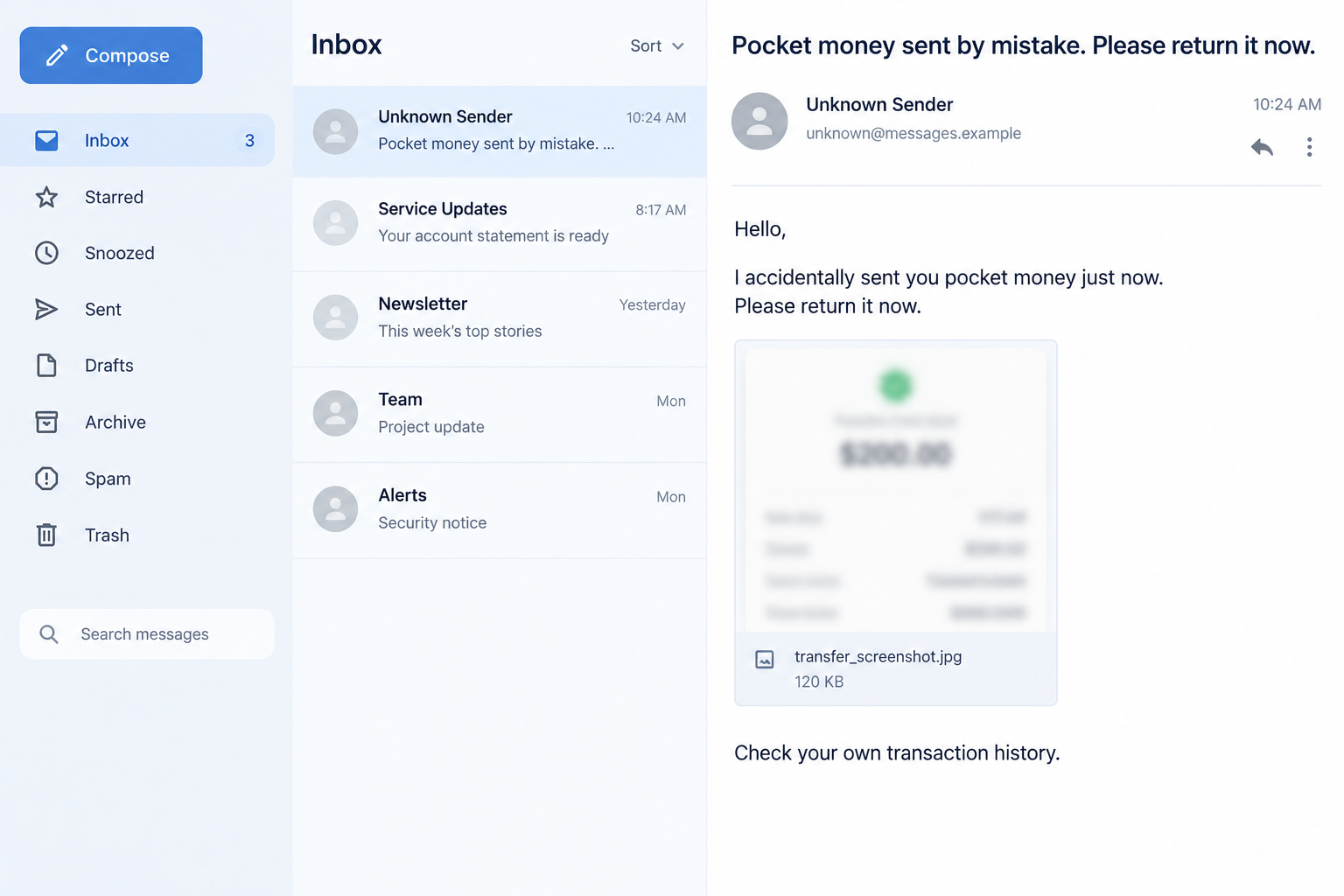
The screenshot they attach looks persuasive. The real question is whether money ever reached you, and what their proposed “refund” would actually do.
Overview
The accidental-transfer story
The Google Pay pocket money scam uses a supposed mistaken transfer to create a social obligation. Someone claims they paid you accidentally and wants an immediate return.
A version described by OnlineThreatAlerts combines that story with requests to use a QR code, approve a collection prompt, or disclose a UPI PIN.
The scam is the stranger’s deceptive request, not Google Pay itself. Real payment mistakes can happen, but their existence does not make a particular chat trustworthy.
The pressure is emotional rather than technical at first. A person who believes they are holding someone else’s money may act before checking the balance.
What can be independently checked
A receipt image, text notification, or caller’s assurance is not enough. Check the transaction history inside your own Google Pay app and with your bank.
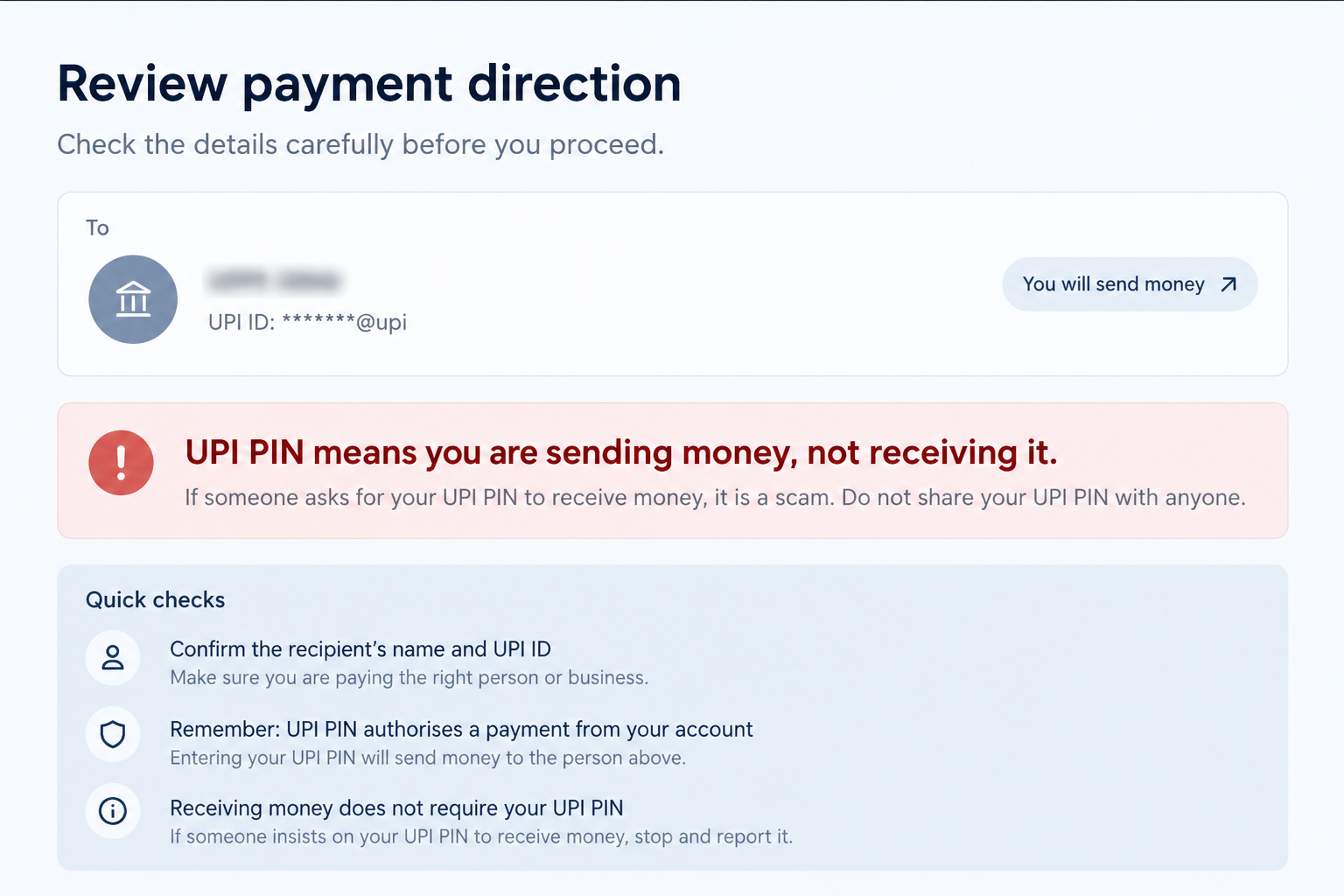
Google’s payment safety guidance explains a critical distinction: entering a UPI PIN authorizes sending money, not receiving it.
That distinction defeats the claim that you must scan a code or enter your PIN to accept an accidental refund or reverse one safely.
Google also provides guidance for an incorrect transfer. A genuine mistake belongs in the bank and app support process, not a stranger’s improvised instructions.
The illustrations here are fictional screen reconstructions. They show the message and payment-direction warning without displaying a functional code, account, or transaction.
Clues that the request is not a normal correction
- The claimed transfer exists only in an image sent by the stranger.
- Your own transaction history shows no matching incoming payment.
- The person asks you to pay a different UPI ID from the original sender.
- A “refund” requires you to scan a code or approve a collect request.
- They ask for your UPI PIN, OTP, or screen-sharing access.
- They insist a bank or platform cannot help, so you must act immediately.
Even when you can see an incoming transfer, do not assume a second outgoing payment is the right remedy. Speak with your bank before moving funds.
Why This Scam Works on Careful People
It turns honesty into urgency
Most people do not want to keep money that belongs to someone else. Scammers exploit that instinct by making caution sound selfish or obstructive.
The stranger may say they need the money for a meal, transport, or a family errand. The details can be invented, but they make delay uncomfortable.
That is why the safest reply is simple: you will verify the transaction through your own bank and the app, then follow their official process.
An honest sender may be disappointed by the wait. A fraudster is more likely to resist any process they do not control.
A screenshot can look more official than a chat
Payment screenshots are easy to crop, edit, or borrow. They may show an amount and a green success symbol without reflecting your account.
Another trick is to show a pending or failed transaction as if it were settled. The money never arrives, while your separate outgoing payment can still complete.
Only your own app and bank record can establish what happened to your account. Do not rely on the sender’s phone or forwarded screenshot.
If you see a transaction, compare the sender details carefully. Similar display names and partial account identifiers can create confusion.
The phrase “pocket money” lowers your guard
The request sounds personal and small, not like a polished phishing campaign. That casual tone makes it easy to overlook the payment instruction that follows.
Some versions never ask you to visit a website. They try to make you authorize an ordinary payment inside a legitimate app.
Using the real Google Pay interface does not make the recipient or reason legitimate. You can lose money by voluntarily approving a transfer to the wrong person.
Separate the app’s security from the story the stranger tells you. The app can execute a valid payment based on false instructions.
How the Google Pay Pocket Money Scam Works
Step 1: Someone claims they paid the wrong person
The approach may come through chat, text, social media, or a call. The sender apologizes for an accidental transfer and asks for help.
Sometimes they include your name or a partial number, which can make the message seem tailored. Such information may already be available elsewhere.
At this stage, they have not proved a transfer occurred. They are asking you to accept their account of events as the starting point.
Pause before discussing amounts or sharing screenshots of your own account. You can verify privately without showing a stranger your financial history.
Step 2: A visual “receipt” supplies false certainty
The sender forwards a screenshot marked successful. It may display a transaction ID, timestamp, or familiar payment-app colors.
Those details are persuasive because they resemble records people normally trust. But the image is controlled by the person requesting payment.
Open your own app from its icon, not from a link in the chat. Look for a matching received transaction and verify its status with your bank.
If the record is absent, stop. A missing credit cannot be refunded by sending real money to someone who merely claims it exists.
Step 3: The return route changes the payment direction
The stranger may ask for a new transfer to a different UPI ID. They might say their original account is blocked or belongs to a relative.
That shift matters. Even if a genuine mistaken payment arrived, a fresh outgoing transfer to another destination can create a separate loss.
A different version sends a QR code or a collect request. The sender describes it as a way to “receive” or “reverse” funds.
Read the actual action shown by the app. If it says you will pay or send, it is not a passive refund confirmation.
Step 4: The UPI PIN becomes the decisive moment
Google’s safety guidance is unambiguous: you do not enter a UPI PIN to receive money. A prompt for the PIN means an outgoing payment is being authorized.
The fictional second image highlights that distinction. It is a safety illustration, not an image of a real transaction or victim.
Never tell the stranger your PIN. Do not type it while they guide you through a call, screen share, or chat message.
Also reject any request for an OTP. A code meant to protect your account should not be handed to someone claiming to correct a transfer.
Step 5: The request may turn into more pressure
If the first payment fails, the stranger may say you used the wrong code or need to try again. Repeated requests can multiply the loss.
They may claim support instructed them to use a particular account. Ask for official support documentation yourself rather than accepting a screenshot of a supposed conversation.
Some attackers pivot to fake customer support and ask to control your screen. That is a separate escalation, not a necessary part of a refund.
End the conversation and contact Google Pay through its official help route if you need assistance.
What If Money Really Did Arrive?
Do not spend it or send it to a new account
A genuine unexpected credit needs careful handling. Avoid treating it as free money, but do not let a stranger dictate an immediate outgoing transfer.
Contact your bank and the payment app through their official channels. Give the transaction reference shown in your own record and ask how to resolve it.
Follow the institution’s documented process. That creates a traceable correction instead of an unrelated payment that might be difficult to reverse.
If the supposed sender keeps pushing for a different account, that is another reason to let the bank handle the dispute.
Verify status, not just notification text
A bank notification may be delayed, spoofed, or misunderstood. Check the final transaction status and available balance in the official app.
Keep a record of the transaction ID and the bank’s advice. Avoid sharing full statements or login details with the person contacting you.
Where the record shows a pending credit, wait for the bank to confirm settlement before considering any corrective action.
That small delay is not dishonesty. It prevents a second, separate transfer from being made on the basis of incomplete information.
Payment Details That Change the Answer
An incoming notification is not the same as settled funds
A notification can appear before a transaction fully settles, and a screenshot can be fabricated entirely. Neither should trigger an immediate outgoing transfer.
Look for the matching credit in the bank account linked to UPI. Compare the amount, time, sender, and final status.
If the app and bank disagree, ask support to investigate the discrepancy. Do not let the stranger interpret your records for you.
Keep the conversation separate from your account review. A caller’s running commentary can make a payment prompt feel like a harmless verification step.
A different recipient creates a new transaction
The sender may claim a relative’s account was used or that their own UPI ID is blocked. Those explanations do not justify paying a new address.
A new payment can reach someone unrelated to any incoming transfer. The bank may then see two independent transactions rather than a simple reversal.
Ask the institution how to handle the original credit. Preserve its transaction ID and avoid a manual workaround suggested by an unknown contact.
If the person becomes angry when you insist on this route, that behavior does not create a financial obligation to bypass your bank.
A collect request is not a refund
Collection prompts can be worded confusingly in a hurried conversation. The decisive question is whether the app says money will leave your account.
Read the recipient and payment direction on the final review screen. Do not type a UPI PIN merely because someone calls the action “accepting.”
A QR code can begin a payment flow, but the final screen should still tell you what you are authorizing. Stop if the explanation and screen differ.
Google’s safety guidance gives a simple anchor: receiving money does not require your UPI PIN. Keep that rule in mind during any claimed correction.
Support should begin inside the real app
A stranger may send a customer-care number or ask you to speak with a supposed specialist. That is not independent verification.
Use the Google Pay help route you opened yourself. If the issue concerns a bank account, contact the bank through its own app or card.
Explain that someone claims an accidental transfer and asks for a different refund route. Support can evaluate the actual transaction, not a forwarded image.
Keep case numbers and advice in your own notes. Do not forward sensitive replies to the person who initiated the request.
What to Do if You Have Fallen Victim to This Scam
- Stop approving requests. Do not try a second QR code, collect request, or different UPI ID. Take a moment to record what you actually authorized.
- Contact your bank immediately. Use the official banking app or number you already know. Report the outgoing transaction, recipient details, time, and the false refund story.
- Report it within Google Pay. Open the genuine app and use its transaction-help route. Share the transaction ID and ask whether the transfer can be disputed or investigated.
- Protect the account if a PIN or code was exposed. Change the UPI PIN through the app’s normal controls and ask the bank what additional restrictions are appropriate.
- Remove any remote-access app. If a caller asked you to install or share your screen, end access, uninstall the app, and review account activity from a trusted device.
- Save the complete evidence. Keep the original chat, caller details, payment-request screenshot, UPI ID, bank records, and your support case numbers.
- Report the fraud to local authorities. In India, use the appropriate cybercrime reporting route promptly. A report may help connect your case to other complaints.
- Ignore recovery promises. A new caller who claims they can instantly recover the payment for a fee may be targeting you again. Verify any follow-up independently.
If you only received the message and did not authorize a payment, you generally do not need to change your bank details. Block or report the sender.
If you did enter a PIN but no transaction appears, still ask the bank to review activity. A failed-looking screen is not proof that nothing was authorized.
Frequently Asked Questions
Do I need a UPI PIN to receive a refund?
No. A UPI PIN authorizes sending money. If someone says it is required to receive an accidental payment, stop and verify through your bank.
Is a success screenshot proof that I was paid?
No. It is only an image supplied by the other person. Check your own Google Pay history and bank account for a settled incoming transaction.
What if a transfer is visible in my account?
Do not spend it or send a fresh payment to a different destination. Ask your bank and the app how to handle an incorrect transfer.
Can scanning a QR code make me pay?
Yes, depending on what the app asks you to confirm. Read the payment direction and recipient before any PIN entry; do not rely on the stranger’s explanation.
Is Google Pay itself behind the request?
No evidence in this pattern implicates Google Pay. The fraud lies in an outsider’s story and payment instructions, possibly carried out within a legitimate app.
Should I keep talking to the sender while support checks?
You do not have to. Tell them the matter is with your bank, then stop engaging. Do not share support case numbers or account screenshots unnecessarily.
The Bottom Line
The Google Pay pocket money scam relies on a simple mismatch: the stranger says you are returning money, while the app may be asking you to send it.
Verify any incoming transfer in your own records. If money truly arrived, let your bank and the app guide the correction instead of following an unknown sender’s route.

Join the discussion
0 commentsShare your experience or ask a question about this article.
Discussion
Start the conversation
Have a question or something useful to share? Add the first comment.