


A GTA 6 listing can look familiar and still take you somewhere the real PlayStation Store would never send you.
One copy of the store advertised the Ultimate Edition at a believable price, but the next screen had nothing to do with buying the game.
Overview
What Blockaid Found on the Fake PlayStation Store
Security researchers at Blockaid documented a fake PlayStation Store listing for Grand Theft Auto VI: Ultimate Edition on a domain unrelated to Sony.
Their screenshots show a price of $89.99 beside a crossed-out $99.99 and a button inviting the visitor to place a pre-order.
The second screenshot shows what came next after the button was clicked: a window asking the visitor to connect a crypto wallet.
The offer used a real game and a recognizable edition name, so knowing that Rockstar makes GTA 6 would not help you spot it.
- The copy advertised a $10 discount, which is a small enough difference that a shopper might accept it without opening another tab.
- The window displayed familiar wallet names, including Trust Wallet and WalletConnect, even though those companies did not make the game offer.
- Blockaid reported that the wallet choices led to the same malicious destination, rather than sending buyers to different legitimate payment providers.
What the Screenshots Can and Cannot Prove
The images show the listing and the wallet prompt, while Blockaid’s investigation supplies the finding about where the wallet choices led.
They do not show how many people reached the page, how many connected a wallet, or how much anyone lost through this particular copy.
Blockaid also investigated other pages using the same edition name, but those findings do not identify the domain of the pictured store.
The Difference Between a Store Wallet and a Crypto Wallet
The official PlayStation Store payment guide for the United States lists supported payment methods and explains that shoppers can pay with money already in their PlayStation wallet.
Your PlayStation wallet is the store balance linked to your account, not a crypto wallet app that you connect to buy a game.
An offer could use the right word for the wrong thing, so look at what the next screen actually asks you to do.
- Adding funds in the PlayStation Store keeps you in the purchase process for your Sony account and uses a supported payment method.
- Connecting a self-custody crypto wallet creates a relationship between that wallet and a website, which can then send requests to the wallet.
- A request to connect Trust Wallet or sign a crypto message is not required to use your existing PlayStation Store balance.
How the Fake GTA 6 Checkout Changes the Deal
Step 1: The Game Page Looks Like a Real Store Listing
A picture of the game and a familiar page layout give shoppers something to recognize before they have checked who owns the site.
The name Ultimate Edition is especially easy to accept because Sony uses that exact edition name on its own GTA 6 page.
The smaller discount lets the fake offer look like one store charging a little less, rather than an obviously impossible giveaway.
The screenshot uses pre-order language from the time of the campaign, so it is not evidence that the game can only be pre-ordered today.
A shopper looking at the copy did not need to believe anything strange about the release itself to reach the next screen.
Step 2: The Pre-Order Button Opens a Wallet Prompt
Instead of asking the shopper to review a game purchase, the copy asked them to choose a wallet that could connect to the site.
That is the moment the offer stops behaving like the store it claims to be, even if the previous page looked right.
The promise of a secure connection in the window does not say who receives the wallet request or what comes after the connection.
A real wallet app can open in response to a request from an untrustworthy site, so its appearance does not make the site legitimate.
A shopper who sees the wallet selection can back out without picking an option or letting the site show a second request.
Step 3: A Connection Can Be Followed by a Request That Moves Money
Blockaid described a wallet drainer behind the choices, meaning the site sent shoppers toward a system designed to steal assets held in crypto wallets.
A connection and a transfer are different events, so noticing the word connected is not the same as finding an outgoing payment.
The risk changes when the wallet receives a message to sign, a transaction to send, or a request allowing future spending.
Depending on what the request authorizes, a site may gain permission without causing an obvious loss at the moment you approve it.
Do not assume the safest-looking logo was a separate way to purchase the game, because Blockaid found the options shared a malicious destination.
Step 4: The Wallet History Shows What Happened Next
If you closed the tab after doing something in your wallet, the relevant record is in the wallet or network history.
A screenshot of the game page cannot tell you which wallet account was connected or whether you approved something after opening it.
Check the network and account you actually used, especially if your wallet shows different accounts under the same app icon.
When an approval is confirmed on a network, disconnecting the site does not necessarily remove the permission it was already granted.
A missing receipt is also important, because an on-chain transaction can be real without the publisher or Sony having sold you a game.
How to Check the Offer Before You Pay
Start from your own PS5 home screen rather than using the website that sent you the offer or a follow-up discount link.
Open PlayStation Store from Games home, select Search, type Grand Theft Auto VI, and open the Rockstar Games listing on your console.
Select the price on that listing, choose the edition, and review the total and the account that will own the game before paying.
On a computer, type the official PlayStation address yourself and use the store link on Sony’s GTA 6 product page to compare the listing.
If the address bar only shows part of the name, select it to read the whole address before taking another action.
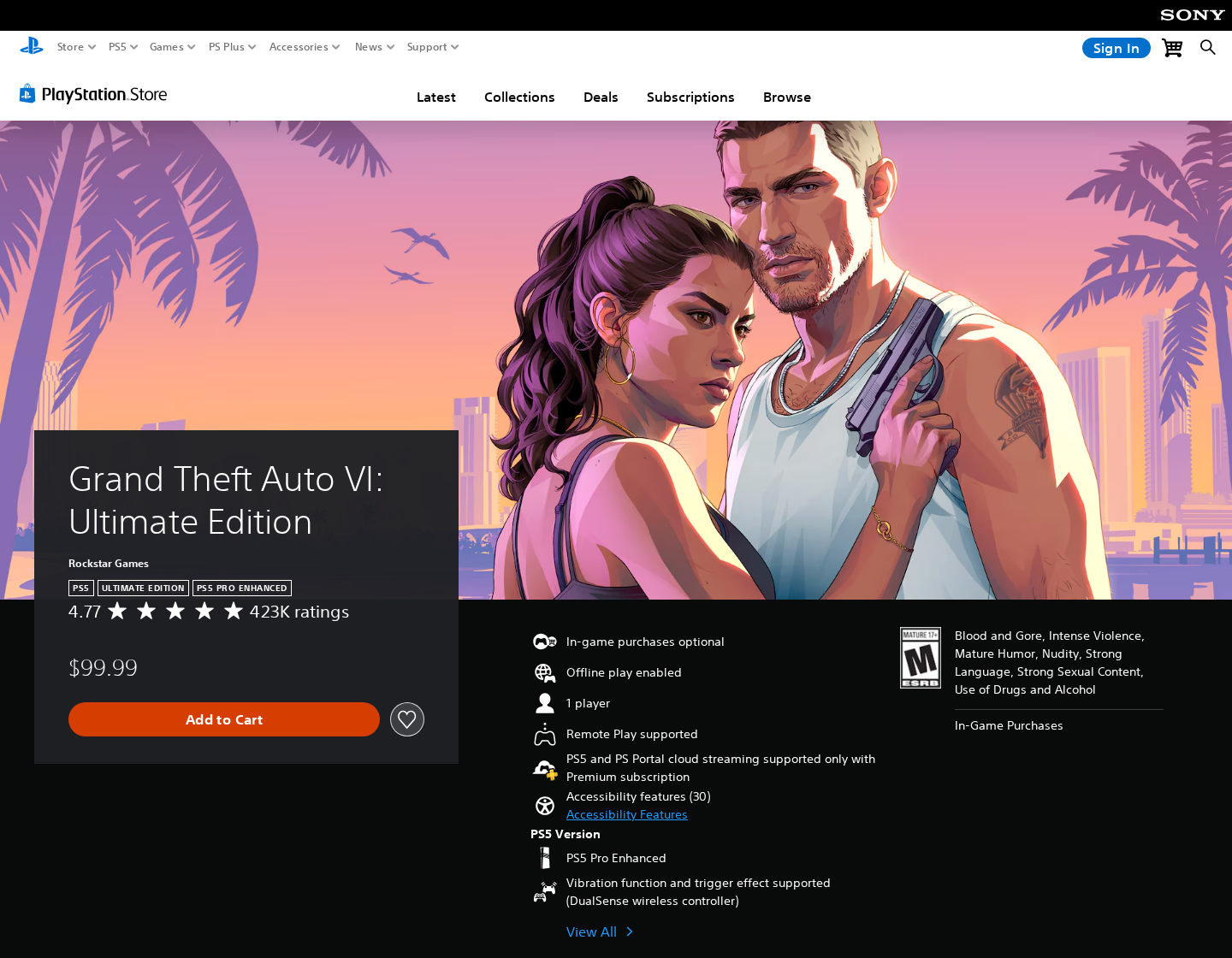
The PlayStation page checked for the United States listed the Ultimate Edition at $99.99, but prices and payment methods can differ by region.
The screenshot below shows the real PlayStation Store listing, with the $99.99 price above the Add to Cart button for the United States.
- A cheaper price alone does not prove fraud, so verify the seller and the payment process before deciding whether a discount is real.
- On a legitimate listing, review the edition and any included content before paying, because a matching cover image does not identify what you are buying.
- If a website adds a wallet step that the independent store route never asks for, stop instead of paying just to keep the discount.
If you later see a charge on your card, check PlayStation transaction history from the account rather than trusting a screenshot sent by the seller.
Use PlayStation’s unauthorized payment help for a charge you cannot identify, especially when the payment may involve your actual Sony account.
What to Do If You Have Fallen Victim to This Scam
- If you saw the fake page but did not connect or approve anything, close it and start again from the store on your console.
- If you connected without signing, open the wallet itself, find its connected sites or sessions, and disconnect the unfamiliar site from the affected account.
- If you signed a message or approved a transaction, open your wallet activity and note the account, network, time, and request details you can still see.
- If your wallet shows a spending approval you did not intend, open the provider’s official permissions tool for that network and remove the matching allowance.
- If you shared a recovery phrase or private key, use a trusted device and your provider’s official guide to secure remaining assets in a new wallet.
- If a transfer already went through, save the transaction ID, exact network, asset and date, and report it to the platform you used where applicable.
If You Only Connected the Wallet
In the MetaMask browser extension, open Permissions from the wallet menu, select the unfamiliar site, and disconnect it from the affected account.
If you used another wallet, look for its equivalent connected-site or active-session screen without reopening the website that offered the game.
A connection can let a site see your public address and ask the wallet to do something, depending on the permissions requested.
Seeing your address exposed does not mean your recovery phrase was shared or that the site received a completed payment.
If you are certain you declined every request after connecting, your first task is to end access and check that no activity appeared.
If You Signed Something or Approved Spending
MetaMask’s connection guide makes a useful distinction: ending a site session does not cancel a spending approval already recorded on a supported network.
If you use MetaMask, open its official Portfolio and check the Spending Caps area for the account and network you actually used.
Select the unfamiliar allowance only after matching the asset and network, then use the provider’s revoke option and confirm the result.
A legitimate revocation can require a network fee, but nobody needs your recovery phrase or a separate private payment to remove an allowance.
Some wallets use different permission screens, and some signed messages will not immediately appear as spending approvals in the list.
If you are unsure what a signature did, contact the wallet provider through a channel you found independently, using the details you already saved.
If Your Recovery Phrase or Private Key Was Exposed
A recovery phrase or private key lets another person control the affected wallet without asking you to approve a new request.
MetaMask’s compromised wallet guide recommends creating a new wallet with a different recovery phrase and stopping use of the old one.
Only move remaining assets when you can do so safely, and get the provider’s guidance before adding funds if theft appears to be ongoing.
In this situation, disconnecting the website or canceling a single approval does not take away the other person’s copy of your key.
Keep the new recovery phrase offline, and never type it into a site that claims it needs to verify an earlier transaction.
If a Payment or Transfer Already Happened
Open the wallet activity and select the entry itself, since the balance screen may not identify the network, status, and recipient.
If the wallet still shows a request awaiting confirmation, decline it inside the wallet rather than clicking a cancellation link from the seller.
If a transfer is already pending on the network, ask the wallet provider about supported options rather than assuming the tab controls it.
Check whether the same asset has moved from any other account you connected, while avoiding changes to wallets you did not use.
A confirmed transaction record can show where an asset went, but it does not put the asset back into your account.
Save the transaction ID, network, approximate time, and amount before reporting the loss to your wallet provider or the exchange that sent your transfer.
Separate a card charge from a blockchain transfer when you report it, since the relevant provider and the available options differ.
The Federal Trade Commission’s response guide advises contacting the service you used to send cryptocurrency and reporting that the transaction was fraudulent.
Do not pay an account that approaches you after a report and promises to release the funds if you send another fee.
What to Save Without Going Back to the Site
Keep the link as text from the original message or history, and do not open it again to gather a better screenshot.
Save any screenshots you already took and wallet activity you can still see, but cover private account information before sharing it publicly.
A useful report says what you did in order, because connecting, signing, and confirming a transfer can sound identical when described as clicking.
If a friend forwarded the deal, tell them where the unwanted wallet request appeared and ask them not to pass it on.
Frequently Asked Questions
Is the GTA 6 PlayStation Store Listing Real?
Sony has a real listing for the game, and Blockaid documented an unrelated site that copied its appearance to deliver a wallet prompt.
The quickest way to separate them is to find the game directly in the console store without using the link that sent you there.
Is the $89.99 GTA 6 Ultimate Edition Price Proof of Fraud?
That was the price shown on the copy Blockaid investigated, not a universal rule for discounts or a verdict on other sellers.
What distinguishes this incident is the combination of an unrelated domain, a copied store and a wallet request where a purchase should have been.
Can I Lose Crypto Just by Seeing the Connect Wallet Window?
Seeing the window is not the same as agreeing to a connection, approving an allowance or sending assets to another address.
If you closed it without connecting, signing, installing anything or entering information, a wallet recovery procedure is not indicated by that visit alone.
Can I Cancel the Connection Instead of Revoking an Approval?
Removing a site from the wallet’s connected list ends that connection, but it does not cancel spending permission already recorded on a network.
If you did both, end the connection and check permissions separately rather than expecting one step to undo the other automatically.
Does This Scam Mean a Virus Was Installed on My Computer?
Blockaid’s example concerned a malicious wallet request, and the reported checkout does not establish that visitors downloaded or ran a file.
If a different offer led you to run an installer, treat that as a separate exposure and use instructions designed for device recovery.
Can PlayStation Restore Crypto Sent Through the Fake Checkout?
The fake wallet window was not a Sony checkout, so a transfer made there is not a PlayStation Store purchase to refund.
Report the transaction to the provider involved and keep the transaction record, but do not count on a confirmed transfer being reversed.
If the page instead claimed to offer a leaked copy of the game, our GTA 6 leak site report covers a different wallet scam.
The Bottom Line
The fake PlayStation Store offered a small saving on a real edition of GTA 6, but its checkout asked for access to a crypto wallet.
Buy through the store you opened yourself, and base your response on whether you merely connected, signed a request, shared a key or lost assets.

Join the discussion
0 commentsShare your experience or ask a question about this article.
Community experiences
Did this happen to you?
Your experience could help someone recognize the same scam. Submit a private report for our team to review.
I experienced this tooReports are reviewed before publication. Sharing publicly is always your choice.
Discussion
Start the conversation
Have a question or something useful to share? Add the first comment.