Infosys McCamish $17.5M Class Action Settlement – What You Need to Know

In late 2023, a ransomware attack on Infosys McCamish Systems, LLC exposed highly sensitive personal data—affecting up to 6.5 million individuals, including financial account numbers, Social Security numbers, driver’s license information, and medical records. Now, Infosys McCamish has agreed to a $17.5 million settlement, offering financial compensation and protection to those impacted. Here’s a detailed look at what’s at stake and how to act.
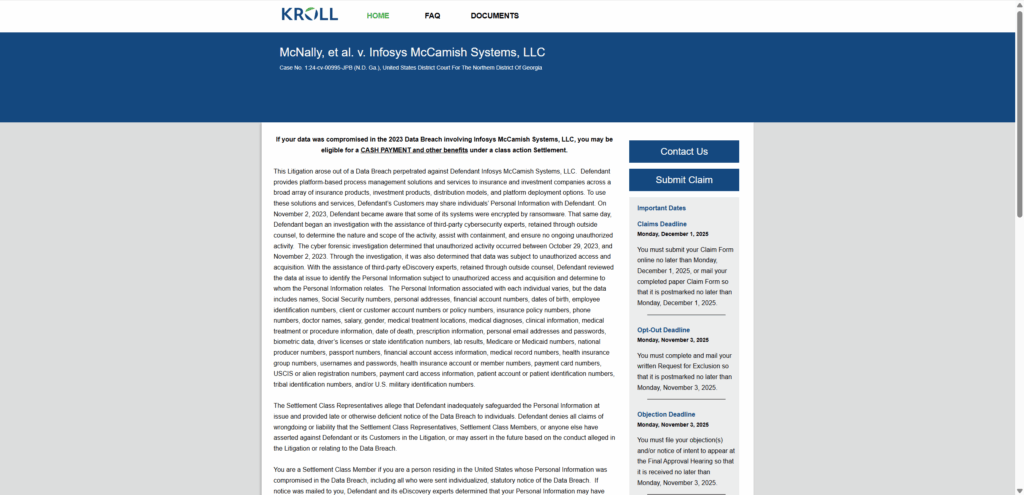
2

What Happened?

Between October 29 and November 2, 2023, a ransomware group (LockBit) breached Infosys McCamish’s systems, encrypting files and stealing dat. By April 2024, investigations revealed that up to 6.5 million individuals had been affected.

Settlement Overview: $17.5 Million

  • Amount & Scope: Infosys McCamish Systems agreed to pay $17.5 million to resolve six consolidated class action lawsuits relating to the breach.
  • Liability: The agreement resolves all claims without any admission of liability.
  • Legal Path: The settlement was reached through mediation in March 2025, pending final court approval.

What’s Included in the Settlement

  1. Monetary Reimbursement
    • Up to $6,000 for documented out-of-pocket losses—think identity theft fraud, account restoration, lost wages, etc.
  2. Credit Monitoring & Identity Protection
    • Two years of free three-bureau credit monitoring, plus $1 million insurance for identity theft-related expenses.
  3. Residual Cash Payments
    • If you can’t provide documentation for out-of-pocket losses, you’re eligible for a residual cash payout, estimated at up to $599 (commonly near $30 per person).

Who Qualifies?

You may be eligible if:

  • You reside in the United States, and
  • Your personal information was compromised in the 2023 breach, whether or not you received a notice.

Certain exceptions apply—for instance, judicial staff or their immediate family members associated with the case may be excluded.

How to File a Claim

Online: Visit the official settlement site (e.g., infosysdatasettlement.com), enter your Notice ID or Claim Number, and complete the form—including relevant documentation for reimbursement.

By Mail: Download the claim form from the website, fill it out, attach supporting documents, and mail it to the Settlement Administrator (e.g., via Kroll) .

Important Dates You Can’t Miss

ActionDeadline
Exclude Yourself / Opt-OutNovember 3, 2025
File ObjectionNovember 3, 2025
Submit Claim FormDecember 1, 2025
Final Approval HearingDecember 18, 2025 at 10:00 AM ET
Expected Payments IssuedEarly 2026 (upon approval)

Several updates have confirmed these deadlines; the claim deadline remains December 1, 2025, with a final approval hearing on December 18, 2025.

Regulatory Penalty: $125,000 More

In addition to the class action settlement, Infosys McCamish Systems also agreed to pay a $125,000 administrative penalty to the Vermont Department of Financial Regulation—settling claims of delayed breach notifications and procedural lapses.

Why This Settlement Matters

  • Scale: One of the largest exposures in the insurance tech sector, impacting millions.
  • Scope of Harm: Breach included deeply sensitive data—from SSNs to medical records—triggering long-term risk.
  • Lessons Learned: The regulatory fine underscores the importance of timely disclosure and legal compliance after a breach.

Final Thoughts & Take Action Now

If you were impacted by the Infosys McCamish 2023 breach, don’t delay—your steps today can protect your identity and secure financial compensation:

  • Check your eligibility (even if you didn’t receive a letter).
  • File your claim before the December 1, 2025 deadline.
  • Exclusions or objections? Learn more before November 3, 2025.

10 Rules to Avoid Online Scams

Here are 10 practical safety rules to help you avoid malware, online shopping scams, crypto scams, and other online fraud. Each tip includes a quick “if you already got hit” action.

  1. Stop and verify before you click, log in, download, or pay.

    warning sign

    Most scams win by creating urgency. Verify using a trusted method: type the website address yourself, use the official app, or call a known number (not the one in the message).

    If you already clicked: close the page, do not enter passwords, and run a malware scan.

  2. Keep your operating system, browser, and apps updated.

    updates guide

    Updates patch security holes used by malware and malicious ads. Turn on automatic updates where possible.

    If you saw a scary “update now” pop-up: close it and update only through your device settings or the official app store.

  3. Use layered protection: antivirus plus an ad blocker.

    shield guide

    Antivirus helps block malware. An ad blocker reduces scam redirects, phishing pages, and malvertising.

    If your browser is acting weird: remove unknown extensions, reset the browser, then run a full scan.

  4. Install apps, software, and extensions only from official sources.

    install guide

    Avoid cracked software, “keygens,” and random downloads. During installs, choose Custom/Advanced and decline bundled offers you do not recognize.

    If you already installed something suspicious: uninstall it, restart, and scan again.

  5. Treat links and attachments as untrusted by default.

    cursor sign

    Phishing often impersonates delivery services, banks, and popular brands. If it is unexpected, do not open attachments or log in through the message.

    If you entered credentials: change the password immediately and enable 2FA.

  6. Shop safely: research the store, then pay with protection.

    trojan horse

    Be cautious with brand-new stores, “closing sale” stories, and prices that make no sense. Prefer credit cards or PayPal for dispute options. Avoid wire transfers, gift cards, and crypto payments.

    If you already paid: contact your card issuer or PayPal quickly to dispute the transaction.

  7. Crypto rule: never pay a “fee” to withdraw or recover money.

    lock sign

    Common patterns include fake profits, then “tax,” “gas,” or “verification” fees. Another is a “recovery agent” who demands upfront crypto.

    If you already sent crypto: stop paying, save evidence (wallet addresses, TXIDs, chats), and report the scam to the platform used.

  8. Secure your accounts with unique passwords and 2FA (start with email).

    lock sign

    Use a password manager and unique passwords for every account. Enable 2FA using an authenticator app when possible.

    If you suspect an account takeover: change passwords, sign out of all devices, and review recent logins and recovery settings.

  9. Back up important files and keep one backup offline.

    backup sign

    Backups protect you from ransomware and device failure. Keep at least one backup on an external drive that is not always connected.

    If you suspect infection: do not connect backup drives until the system is clean.

  10. If you think you are a victim: stop losses, document evidence, and escalate fast.

    warning sign

    Move quickly. Speed matters for disputes, account recovery, and limiting damage.

    • Stop payments and contact: do not send more money or respond to the scammer.
    • Call your bank or card issuer: block transactions, replace the card if needed, and start a dispute or chargeback.
    • Secure your email first: change the email password, enable 2FA, and remove unfamiliar recovery options.
    • Secure other accounts: change passwords, enable 2FA, and log out of all sessions.
    • Scan your device: remove suspicious apps or extensions, then run a full malware scan.
    • Save evidence: screenshots, emails, order pages, tracking pages, wallet addresses, TXIDs, and chat logs.
    • Report it: to the payment provider, marketplace, social platform, exchange, or wallet service involved.

These rules are intentionally simple. Most online losses happen when decisions are rushed. Slow down, verify independently, and use payment methods and account controls that give you recourse.

Leave a Comment

Previous

Should You Buy Amplihear Hearing Aids? Honest Review & Scam Warnings

Next

Castrump.com Scam Exposed – What You Need To Know