

If you’ve received an email claiming the Spanish government owes you millions because fraudsters who previously scammed you were just arrested — pause. It’s not justice knocking at your inbox. It’s another scam, cleverly disguised as compensation. This article exposes the truth behind the “Internet Fraudsters Arrested” email, shows you how the scam works, and helps you stay safe.
Scam Overview: What Is the “Internet Fraudsters Arrested” Email Scam?
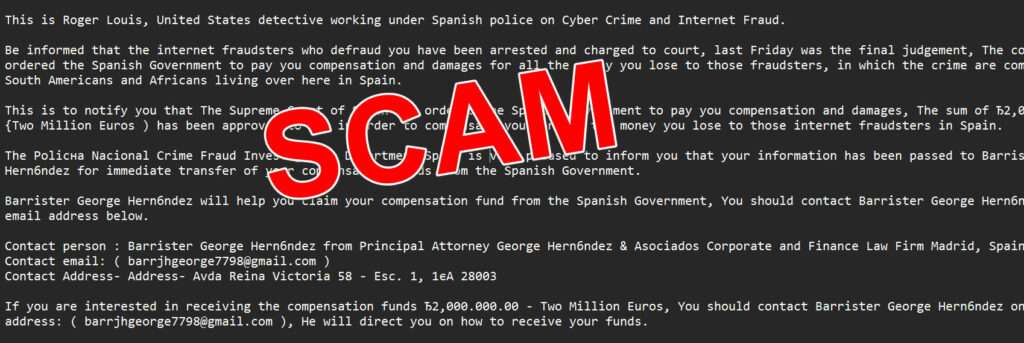
The “Internet Fraudsters Arrested” email scam is a sophisticated phishing ploy masquerading as official communication from Spanish authorities. It falsely claims that cybercriminals who previously defrauded the recipient have been arrested, and that the Spanish government has authorized a multimillion-euro compensation payout.
The fraudulent message usually reads:
“Be informed that the internet fraudsters who defraud you have been arrested and charged to court… The court has ordered the Spanish Government to pay you compensation and damages…”
The message, supposedly sent by “Roger Louis,” an alleged U.S. detective operating under the Spanish police, informs the recipient of a court-ordered payout of €2,000,000 in compensation. To claim the money, victims are instructed to contact Barrister George Hernández, who’s allegedly in charge of fund disbursement.
Sounds Official — But It’s 100% Fake
This scam leverages psychological tactics and official-sounding language to appear legitimate. Victims are drawn in by:
- Authoritative Tone: It claims to come from a U.S. detective and a high-level European court.
- Emotional Hook: It references prior losses, tapping into the victim’s hopes for justice and reparation.
- False Urgency: It uses congratulatory language and promises of large sums to nudge victims to act fast without verifying.
But upon closer inspection, glaring red flags appear:
- Email address: A Gmail account (
barrjhgeorge7798@gmail.com) is used instead of a government or law firm domain. - Grammar & Formatting: Inconsistent punctuation, grammar errors, and unnatural sentence construction.
- No Record of Agents: No verifiable evidence of “Roger Louis” or “George Hernández” tied to law enforcement or legal work in Spain.
- No Legal Precedent: No European government arbitrarily distributes compensation via unsolicited emails.
The Origins of the Scam
This scam shares structural similarities with the classic “Nigerian Prince” or 419 advance-fee fraud schemes. What makes it more dangerous is its updated narrative:
- Instead of asking for money upfront, it offers restitution.
- It preys on individuals already scammed, giving them false hope.
- It poses as international legal cooperation, adding fake legitimacy.
It has been circulating since at least 2018 and has been flagged by multiple fraud alert organizations. These types of scams are designed to build trust and eventually lure victims into sharing personal and financial data — or even sending “processing fees” to claim their imaginary funds.
How the Scam Works
This scam isn’t a simple phishing email. It’s a layered fraud built to emotionally and mentally manipulate. Let’s break it down step-by-step:
Step 1: The Bait — The First Email
The scam begins with a message from “Roger Louis,” claiming affiliation with the “Crime Fraud Investigation Department Spain.” The subject line often reads:
“From the Crime Fraud Investigation Department Spain”
The email highlights:
- Arrest of internet fraudsters.
- Court-ordered compensation for the recipient.
- Government involvement in processing the claim.
- Introduction of “Barrister George Hernández” as the point of contact.
It looks like good news — especially for someone who’s lost money in a scam before.
Step 2: Establishing Credibility
To avoid suspicion, the scam uses:
- Names and titles that sound official.
- Vague references to real-sounding organizations (e.g., “Supreme Court of Spain”).
- Language that suggests international law enforcement collaboration.
They may even advise you to ask for an ID card from the barrister, anticipating your skepticism — a move designed to lower your guard.
Step 3: The Hook — Initiating Contact
Once a victim emails “Barrister George Hernández,” the scam escalates:
- The barrister replies promptly.
- He often uses a mix of legal-sounding jargon and urgency.
- You’ll be asked for personal information — full name, address, bank details, ID.
Then, comes the twist…
Step 4: The Fee Request
Now that trust is built, they ask for a processing fee or tax clearance payment to unlock the compensation. This could be:
- A few hundred euros for legal documentation.
- An “anti-terrorism certificate.”
- A notarization or government fee.
Once paid, more fees follow — always with the promise that the big payout is just one step away.
Step 5: Continuous Exploitation
Victims who pay once are often added to a “sucker list.” Scammers will:
- Pretend to be new officials.
- Reference ongoing legal “developments.”
- Promise even larger sums — sometimes adding interest or “additional compensations.”
Step 6: Radio Silence or More Scams
Eventually, either:
- The scammer vanishes, having taken what they could.
- Or, they switch to another scam variant — asking for more or offering a new “legal opportunity.”
No money is ever received. No fraudsters were arrested. It was all a lie — wrapped in official language and false hope.
What To Do If You’ve Fallen Victim to This Scam
If you’ve interacted with this scam, especially if you’ve sent money or personal information, take these steps immediately:
1. Stop Communication Immediately
Do not reply to any further emails, and block all email addresses used by the scammers.
2. Report the Scam
Inform your national cybercrime or fraud reporting agency. Useful links:
- U.S.: ReportFraud.ftc.gov
- UK: Action Fraud
- Canada: Canadian Anti-Fraud Centre
- Australia: Scamwatch
- EU Citizens: Contact your national police or visit Europol’s Fraud Page
3. Alert Your Bank
If you sent money or shared banking information:
- Contact your bank immediately.
- Request a freeze or hold on the account.
- Ask about chargeback options or fraud investigations.
4. Monitor Your Identity
If you shared personal details:
- Consider a credit freeze or fraud alert with your national credit bureau.
- Use identity monitoring services if available.
- Watch for suspicious activity on your bank, email, and credit accounts.
5. Change Passwords
Update all potentially compromised accounts, especially:
- Banking
- Social media
Use strong, unique passwords and enable two-factor authentication.
6. Educate Others
Scammers rely on secrecy and shame. Share your story with friends and family. You could prevent someone else from falling for the same trap.
7. Stay Updated
Subscribe to updates from cybercrime watchdogs. New scam formats appear constantly, and staying informed helps you stay safe.
Frequently Asked Questions (FAQ)
What is the “Internet Fraudsters Arrested” email scam?
It’s a phishing scam that falsely claims the recipient is entitled to receive €2 million in compensation from the Spanish government due to the arrest of cybercriminals. The message is designed to trick victims into providing personal information or paying fake legal fees.
Is the email from “Roger Louis” real?
No. “Roger Louis” is not a verified U.S. detective or law enforcement officer. The name is used fictitiously in the scam to create an illusion of authority and credibility.
Who is “Barrister George Hernández”?
There is no legitimate lawyer by this name associated with Spanish legal authorities. The persona is invented by scammers to communicate with victims and demand personal information or advance fees.
Why do scammers say I’m being compensated?
This tactic plays on emotions. By referencing past financial losses, the scammers hope to earn the victim’s trust and convince them the email is a form of restitution, which makes it more believable and harder to ignore.
How do scammers benefit from this?
They typically request “processing” or “transfer” fees, or they collect personal and banking details that can be used for identity theft or further fraud.
Can I really get compensation from a government through email?
No. Governments and legal systems do not disburse compensation via unsolicited emails, especially through free email accounts like Gmail. Legitimate compensation involves formal legal proceedings and direct, verified contact.
What if I already responded to the email?
Stop all communication immediately. Report the incident to your local cybercrime unit or fraud authority, and monitor your accounts for suspicious activity.
How can I report this scam?
You can report it to national fraud agencies such as the FTC (U.S.), Action Fraud (UK), Canadian Anti-Fraud Centre, or Scamwatch (Australia). These agencies can guide you on protective steps and help warn others.
What should I do if I sent money or shared personal information?
Contact your bank or financial institution as soon as possible. You may need to freeze your accounts, change your passwords, or initiate fraud protection measures. If identity theft is a concern, place a fraud alert or credit freeze with credit bureaus.
How can I avoid similar scams in the future?
Be cautious with any unsolicited message promising large sums of money. Check email addresses, search for red flags like grammatical errors, and never send money or sensitive data without verified, official context. Staying informed is the best protection.
The Bottom Line
The “Internet Fraudsters Arrested” email scam is a cruel exploitation of trust and vulnerability. It preys on victims of past fraud by dangling false compensation from a fake legal process. While the email may seem promising, it is part of a long-running international scam format that uses believable roles and real-world legal references to appear legitimate.
If you receive such a message — do not respond. Real legal compensation is never handled via unsolicited Gmail messages from made-up barristers.

Join the discussion
0 commentsShare your experience or ask a question about this article.
Discussion
Start the conversation
Have a question or something useful to share? Add the first comment.