

An invoice is ready to pay. The vendor’s name looks familiar, and the message says the banking details have changed.
It is a small edit inside an ordinary business task. In one Iowa case, that edit redirected more than $800,000.
Overview
The request that appeared routine
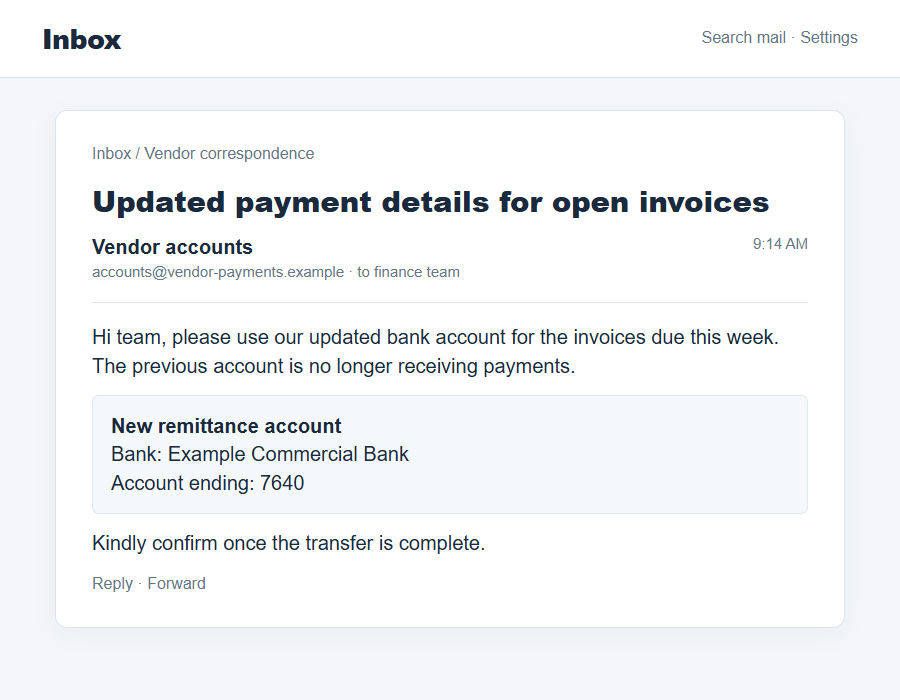
A business employee received instructions that appeared to come from vendors. The message directed payment to an account controlled by the scammer.
Instead of asking for a strange new purchase, the sender changed where an expected invoice payment should go. That made the instruction fit an existing workflow.
The Iowa business believed it was paying real invoices. It sent more than $800,000 in mid-2022 before the diversion was uncovered.
- The fraudster impersonated existing vendor relationships.
- The employee was told to direct payments to a different bank account.
- The invoices appeared connected to genuine business obligations.
- Funds moved through additional accounts after the initial payment.
What federal authorities reported
The U.S. Attorney’s Office for the Northern District of Iowa described the case in September 2026, after a court ordered forfeiture of roughly $375,000.
Its release says criminals in business email compromise schemes may use altered headers or deceptively similar addresses to appear to be trusted executives or vendors.
In this specific case, the scammer impersonated the company’s vendors and gave new payment instructions. The company reported the fraud to the FBI.
Authorities traced part of the proceeds through bank accounts and checks. The forfeiture judgment addressed roughly $375,000, not the full amount initially sent.
What the case does and does not prove
This was an actual vendor-impersonation payment diversion, not a dispute over goods or an ordinary accounting mistake. The requested bank change was fraudulent.
The public release does not name the Iowa business or provide the exact email wording. An illustrative email cannot be treated as the original message.
It also does not say the entire loss was recovered or paid back to the company. Asset forfeiture and victim reimbursement are different outcomes.
Why Changed Bank Details Deserve a Separate Check
Most accounts-payable work runs on habit. A vendor sends an invoice, the employee checks the amount and due date, and the payment joins a familiar queue.
A scammer does not have to invent a fake company if they can step into that queue. They only need to alter the destination at the right moment.
A believable email address can help. One changed letter in a domain, a spoofed display name, or a compromised mailbox may evade a quick glance.
The DOJ release describes altered headers and similar-looking addresses as common methods. It does not specify which exact email trick was used in this Iowa incident.
That distinction matters. A control that catches lookalike domains may not catch an actual compromised vendor account, and vice versa.
The stronger control is a separate verification of every new bank instruction. Call the vendor using a number already stored in your records.
Do not use the telephone number printed in the suspicious email or its attachment. If the attacker controls the message, they control those details too.
Document the callback: who confirmed the change, which known number you dialed, when you spoke, and what account was authorized.
For a large payment, a second employee should review both the invoice and the destination. That review is most valuable when it is genuinely independent.
How the Iowa Vendor Email Scam Works
Step 1: The attacker chooses a real payment moment
The reported scam relied on real invoices. The criminal’s instruction arrived where a legitimate payment was already expected.
That makes the request easier to accept than a random email demanding money. The employee sees an obligation the company already knows about.
The public record does not explain how the attacker learned the invoice timing. It may differ in other business email compromise cases.
What matters for prevention is that familiarity with an invoice should not automatically authenticate a changed bank account.
Step 2: The email claims to speak for the vendor
The message presents the new instructions as a normal administrative update. A display name, signature, and familiar subject line can make it look routine.
In a broad business email compromise scheme, the sender may spoof an address or use a deceptively similar one. The Iowa release describes both as known tactics.
The employee may be told the old bank details are no longer valid. That converts a suspicious change into a supposed requirement to finish the job.
Do not infer authenticity from a copied signature or prior email chain alone. An attacker may have obtained or imitated those details.
Step 3: The account change is buried inside legitimate-looking work
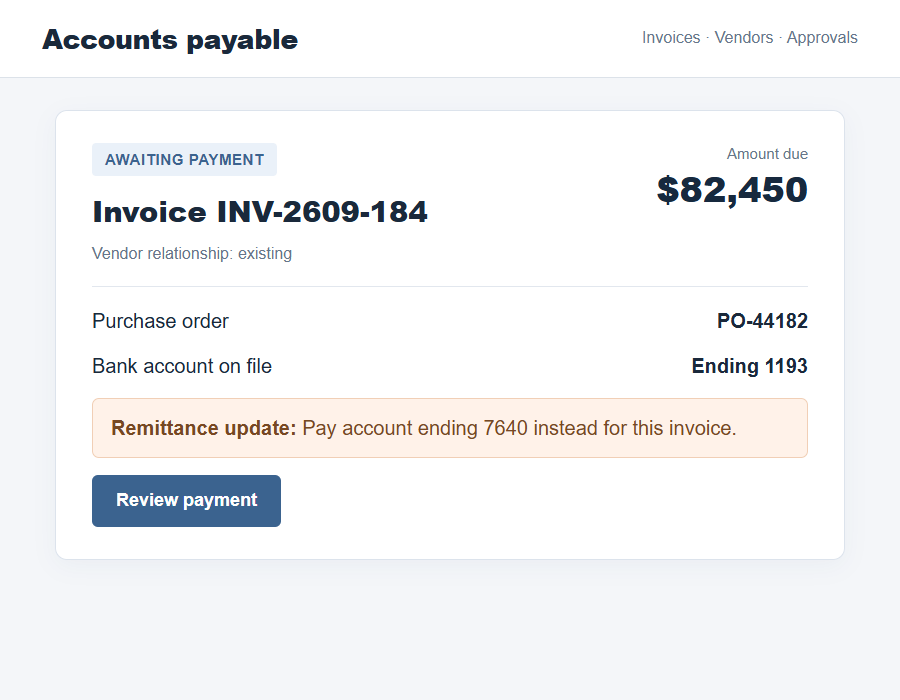
A payment instruction often arrives beside the actual invoice number, amount, purchase order, or delivery reference. The surrounding details can be accurate.
That is why this kind of fraud can fool a busy team. The invoice itself may be real while the new payment destination is not.
The attacker benefits when verification focuses only on whether goods were received and whether the amount matches the purchase order.
The key question is separate: has the legitimate vendor, reached through a known route, authorized this specific bank account?
Step 4: The business sends funds to the wrong account
The Iowa company directed more than $800,000 in payments to the scammer-controlled account, believing it was settling genuine invoices.
Once money arrives, it can be moved quickly. Authorities said the fraud proceeds were transferred to other bank accounts to make tracking harder.
Some checks used misleading memo descriptions, including references to procurement and a truck. Those labels did not turn the transfers into legitimate commerce.
Speed matters after discovery because banks and investigators may still be able to freeze funds before they pass through more accounts.
Step 5: The real vendor and payment records no longer agree
The discrepancy may emerge when a real vendor asks why an invoice is still outstanding. The company’s ledger may say “paid” while the vendor received nothing.
The Iowa release does not state exactly how its company discovered the fraud. This is a common detection point, not a documented detail of that case.
When a mismatch appears, preserve both versions of the instruction and pause further payments. Quietly changing records can destroy useful evidence.
Give the bank and investigators the original message with headers, payment confirmations, beneficiary details, and the legitimate vendor’s confirmation.
How to Verify a Vendor Bank Change
Start with a trusted contact record created before the request arrived. A phone number copied from the changed-instructions email is not independent.
Ask the vendor to confirm the account change in a live conversation. Name the account ending digits and effective date so the answer is specific.
If the person seems surprised, stop the payment and alert both organizations’ security or finance teams. Do not reply-all to the suspicious thread.
For a vendor with a portal, verify through the normal portal login you already use. Do not follow a new portal link embedded in the email.
Use dual approval for account changes and large transfers. The second approver should see the independent verification record, not just the invoice.
Some organizations maintain a locked vendor master file. Require an authenticated change request before editing it, and record who approved the change.
Confirm the destination again when releasing the payment. A correct invoice matched to the wrong beneficiary is still a fraudulent payment.
Train staff to treat urgency as a reason for extra verification. A genuine vendor can wait while a high-value bank change is checked.
The Recovery Lesson in the $375,000 Forfeiture
Federal authorities later obtained a judgment forfeiting roughly $375,000 connected to the Iowa fraud. That is a meaningful result, but it is not a full recovery claim.
The company had sent more than $800,000. The release does not say the entire amount was found, nor that all forfeited money had reached the victim.
For victims, this distinction is important. A news headline about seized proceeds should not create an assumption that a bank transfer will be automatically reversed.
The company reported the fraud to the FBI’s Internet Crime Complaint Center. Reporting provided investigators with a starting point for tracing the money.
Businesses facing a current diversion should contact their bank immediately. Waiting for a formal investigation before making a recall request can reduce recovery chances.
Keep a clear timeline of when the change request arrived, who approved it, and when payments left. This helps both internal review and external reporting.
Do not blame the employee who processed the invoice before understanding the control failure. A system built around one person’s quick judgment is easy to exploit.
Focus on how the attacker crossed trust boundaries: vendor identity, bank change approval, payment release, and post-payment reconciliation.
The Controls That Would Have Interrupted the Payment
A well-designed process does not ask one employee to decide whether a polished email is real. It creates a required pause when payment details change.
The pause should occur before the vendor master file is edited. Once a fraudulent account is recorded as normal, later invoices may flow there automatically.
The independent callback should use the contact number already on file. That number should be maintained through a separate, verified process.
If the vendor cannot be reached, hold the change. The payment deadline does not make an unconfirmed beneficiary safe.
A second employee can compare the old and new account details. They should also see evidence of the separate vendor conversation.
Consider a brief confirmation to the vendor through its usual channel after the account change is approved. This gives the real vendor a chance to object.
Some banks offer beneficiary-name checks or extra controls for new recipients. Use them, but do not treat a match as a substitute for vendor verification.
Reconciliation should compare paid invoices against vendor statements, not merely against internal payment entries. A mismatch may surface faster that way.
For recurring vendors, send a small number of controlled payment instructions through a known portal rather than accepting account changes by free-form email.
Keep the process practical. If emergency exceptions are too easy, the attacker will make every false request sound urgent.
The Iowa case shows why a high-value payment deserves these extra minutes. More than $800,000 left before the false destination was corrected.
No single control is perfect. A callback, independent approval, and bank alert together make the attack harder to complete without someone noticing.
After an incident, test the revised process with a harmless simulated bank-change request. The goal is to see whether the safeguards work during ordinary workload.
That exercise should not be a blame trap. It is a way to find where a convincing vendor message can still bypass the intended pause.
What to Do if You Have Fallen Victim to This Scam
- Call the sending bank’s fraud team now. Provide each transfer reference and ask for a recall or freeze request to the receiving institution.
- Pause related payments. Check whether other invoices or vendor records contain the same changed account before any additional funds leave.
- Contact the real vendor independently. Confirm what they received and which bank account they actually use. Keep the conversation documented.
- Preserve the original email. Save full headers, attachments, message chain, beneficiary data, approvals, and payment records without altering them.
- Report to law enforcement. File with the FBI’s IC3 and local authorities where appropriate. Include the payment timeline and recipient account details.
- Review account access. Check whether a mailbox was compromised, forwarding rules were added, or vendor-master records were changed.
- Close the process gap. Add an out-of-band callback and independent approval before resuming bank-detail changes.
If an employee opened a suspicious attachment or link, have the device checked and scan it with a reputable tool such as Malwarebytes.
If the fraud was only a forged payment instruction, a malware scan alone will not solve it. Banking intervention and evidence preservation come first.
Frequently Asked Questions
Was the Iowa invoice itself fake?
The business believed it was paying real invoices. The fraud was the instruction to send the payment to a scammer-controlled account.
Does a familiar sender name authenticate a bank change?
No. Display names, signatures, and even email threads can be spoofed or misused. Verify the specific destination through a known vendor contact.
Did the business recover all $800,000?
The public release does not say that. It reports a forfeiture judgment for roughly $375,000 tied to the proceeds.
Should staff reply to the suspicious email to check it?
No. A reply may go back to the attacker. Call a vendor contact already in your records or use an established portal.
Can a genuine vendor change banks?
Yes. The change itself is not proof of fraud. It is a high-risk event that needs independent confirmation before payment.
What should a company do first after sending funds?
Contact the sending bank immediately with the transfer details, then preserve the messages and report the diversion to law enforcement.
The Bottom Line
The Iowa vendor email scam did not need a fake invoice. It changed one destination inside a legitimate payment process and sent more than $800,000 astray.
Verify bank changes through a trusted route before paying. If money has already moved, contact the bank at once and keep the original evidence intact.

Join the discussion
0 commentsShare your experience or ask a question about this article.
Discussion
Start the conversation
Have a question or something useful to share? Add the first comment.