

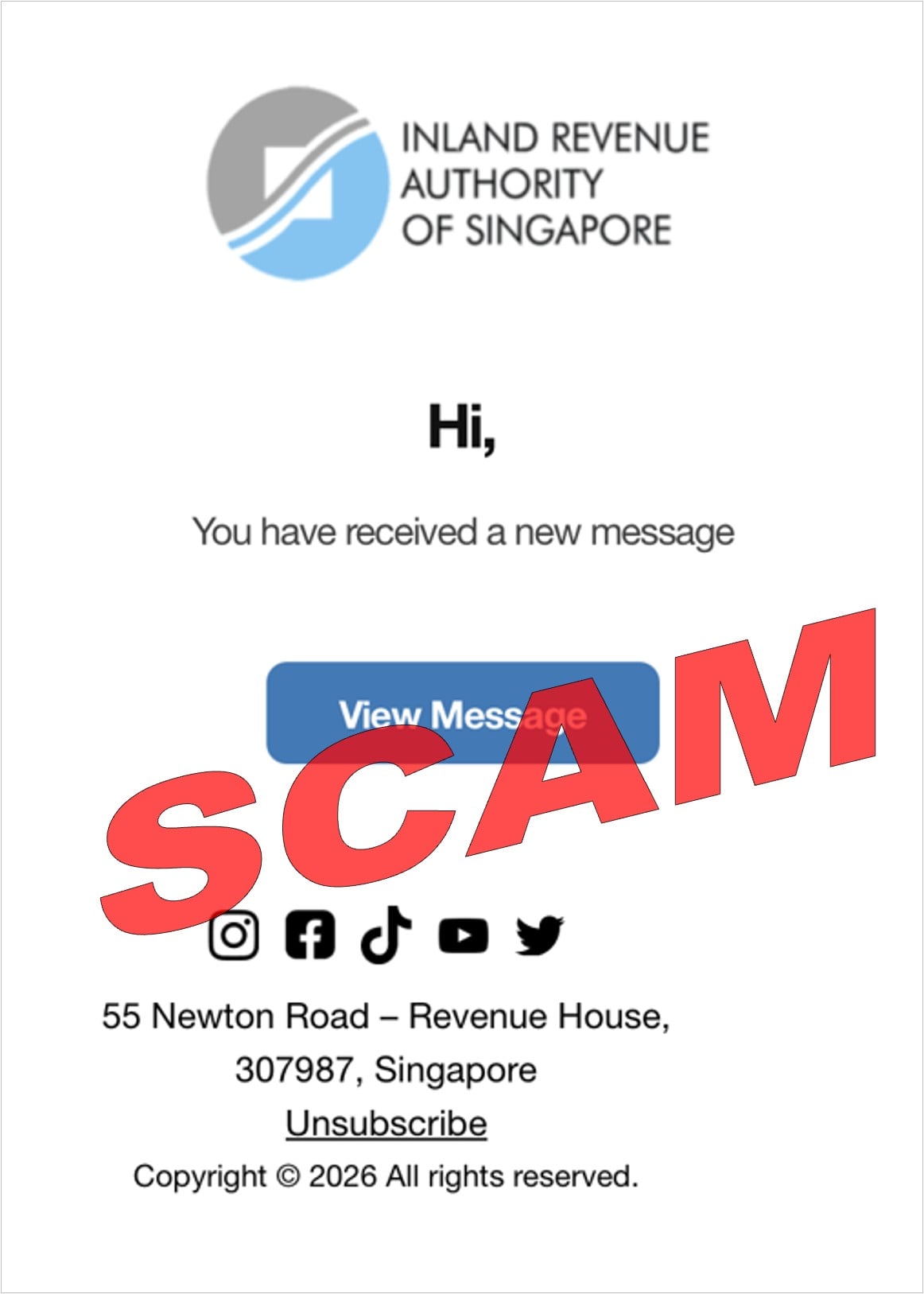
An email carrying the IRAS logo says you have a new message. There’s no dramatic threat, just a blue button inviting you to view it.
That ordinary appearance is exactly why it’s worth a second look. A tax notification can feel routine even when you haven’t been expecting one.
Overview
A small notification with a borrowed identity
The IRAS new message email scam uses a modest invitation rather than an obvious windfall or a frightening payment demand.
The example shown above displays the Inland Revenue Authority of Singapore’s name and logo, a short greeting, and a View Message button.
It also includes an address, social icons, an unsubscribe link, and a copyright line. Those familiar details make the message resemble an ordinary institutional notification.
IRAS is the genuine tax authority being impersonated. The fraudulent email isn’t proof that the agency or its real notification service is dishonest.
IRAS itself identifies the example as fraudulent
The agency’s tax-filing and payment warning publishes this message among its scam examples. The red SCAM marking belongs to that published evidence.
The email image establishes the notification lure. It doesn’t show every form a recipient might encounter after clicking.
IRAS warns that related filing and payment impersonations can seek personal information, card details, or one-time codes. The exact request varies between versions.
The strongest check is outside the email
Real email or SMS notifications can tell taxpayers to visit myTax Portal. Therefore, the words new message aren’t enough to classify every notification you receive.
- Open myTax Portal through the agency’s genuine website, independently of the message.
- Check notices and correspondence inside your own tax account.
- Don’t treat the email’s button as proof that its destination is authentic.
- Don’t provide banking secrets merely to reveal a supposed tax notice.
- Report what you actually disclosed if you already followed the invitation.
You can investigate a real tax matter without trusting this email. Taking a separate route is verification, not neglecting your obligations.
Why an Almost Empty Email Can Be Persuasive
Some scams try to overwhelm you with detail. This one gives you very little to question before the click.
A short notification doesn’t have to explain a tax issue, quote an amount, or get a complicated story right. It only has to make you curious.
You may already expect important information to sit behind an account login. A button promising access can therefore feel normal rather than intrusive.
The logo does much of the work. It encourages recognition before you’ve established who sent the message or where its link leads.
The footer helps fill out the picture. An official-looking address and familiar social icons suggest a complete communication, even though they can be copied.
Don’t use those details as independent confirmation. An address printed inside the disputed email is still a claim supplied by the sender.
Nor should you rely on the greeting alone. A generic greeting can raise suspicion, but adding your name wouldn’t prove the next version genuine.
The better question is whether you can find the claimed correspondence in an account reached without the email’s help.
How the IRAS New Message Email Scam Works
Step 1: A familiar notification creates an unfinished task
The email tells you something is waiting. It doesn’t need to say you’ve made a mistake or that money is immediately due.
That unfinished task can be enough to draw attention, particularly when it appears to concern taxes. You want to know what the authority has sent.
Pause before assuming the notification belongs to your real account. The sender hasn’t established that simply by naming the agency.
If you don’t normally handle tax correspondence yourself, ask your usual authorized contact to check the genuine account rather than forwarding an instruction to click.
Step 2: The button chooses the route for you
View Message sounds like a neutral action. In practice, the button decides which website opens and who gets the next opportunity to ask for information.
Don’t judge the destination from the label. A button can say myTax Portal, view notice, or read message without leading to the service it names.
If you’re uncertain about inspecting the link, don’t open it to find out. Start from the tax authority’s known website instead.
The same caution applies to the footer. Unsubscribe and social icons don’t need to be used while you’re trying to decide whether the message is genuine.
Step 3: A tax-looking page can make further requests seem necessary
The wider campaign family uses counterfeit tax pages and requests for sensitive information. The promise of seeing correspondence supplies a reason to continue.
A later page might ask you to sign in, provide personal details, or complete a supposed verification. Assess the request before typing anything.
The published email alone doesn’t establish which fields every recipient sees. Don’t assume one exact card or password sequence applies to every copy.
What stays useful is the boundary: don’t turn an unsolicited message into permission for an unfamiliar website to collect confidential information.
If the request shifts from viewing correspondence to paying, refund selection, or providing codes, stop and check the matter through the real agency.
A Notification Is Not the Tax Notice Itself
IRAS explains that confidential tax correspondence, notices, and documents belong in myTax Portal. The secure account is where a taxpayer checks those records.
The agency can send an email or SMS telling you to log in and view something. That notification is different from the underlying confidential document.
This distinction prevents two mistakes. You shouldn’t trust every branded email, but you also shouldn’t assume every genuine notification must be ignored.
Use the email, at most, as a reason to check independently. Don’t let it supply the credentials page, payment route, and explanation of authenticity all at once.
Once you reach the real portal through a trusted route, review the relevant notices there. If you can’t locate the claimed correspondence, ask IRAS directly.
Don’t send your full tax records to the original sender to resolve the mismatch. The disputed email isn’t the place to establish a confidential exchange.
For businesses, confirm you’re checking the appropriate account and authorization. A notification reaching one employee doesn’t automatically authorize them to disclose company records.
If you work with a tax agent, contact the person through previously verified details. Don’t replace them with a new contact introduced by the suspicious message.
This Isn’t the Same Hook as an Audit or Refund Promise
A fake audit notice tries to make you fear consequences. A refund email encourages you to claim money. This notification can succeed without either story.
The reader’s first decision is simply whether to view an unseen message. That small action may receive less scrutiny than an explicit payment request.
Don’t wait for the email to announce a penalty before taking care with its link. The dangerous request may not appear until the next screen.
At the same time, don’t invent a tax dispute from this brief text. It doesn’t establish an actual audit, a debt, a refund, or an assessment change.
The related subject Tax Bill Discrepancy for YA 2025 also appears in IRAS’s warning collection. Its presence doesn’t make every differently worded notification safe.
Checking only for one exact subject line is therefore too narrow. Verify the claimed account communication instead of building a blacklist of a few phrases.
That approach also avoids confusing fraud with ordinary tax administration. A legitimate notice can concern an issue you don’t like without being a scam.
The Padlock and the Printed Address Don’t Answer the Same Question
A secure connection is useful, but it doesn’t establish that the website represents IRAS. A dishonest destination can also use an encrypted connection.
Similarly, the office address printed in the email doesn’t show where a link goes. It’s text the sender can reproduce.
Don’t follow social icons as a way to validate the message. Even a link to a genuine public profile wouldn’t authenticate the separate View Message destination.
Look at each action individually. Reading a public social page, entering a tax account, and supplying a bank code involve different levels of exposure.
You don’t need to perform all those actions to reach a verdict on your own email. Use the independently opened account and official support route.
If the website unexpectedly asks you to approve a banking action, read what the bank actually describes. A financial approval isn’t just a way to display correspondence.
Never let a page’s explanation override an unfamiliar merchant, amount, transfer, or account change shown by a genuine provider.
Keep the Real Tax Task Separate From the Fraud Report
If you have a genuine deadline approaching, continue dealing with it through official channels. Rejecting a suspicious link doesn’t make the real matter disappear.
Ask IRAS or your established adviser about the actual notice. Keep the phishing report distinct from any question about your legitimate tax position.
This also helps if someone else manages your paperwork. Tell them what the email claimed, but don’t present its statements as confirmed agency instructions.
If you paid through a suspicious route, use your actual bank record to explain the transaction. The email’s apparent purpose isn’t the payment evidence.
Don’t make another payment to correct a supposed processing failure on the fake page. Have the real agency and financial provider clarify their own records.
For a household or business, agree who is checking the tax account and who is securing exposed financial information. Those responsibilities can run in parallel.
A clear handoff avoids the assumption that reporting spam also took care of a disclosed password or unwanted bank charge.
What to Do if You Have Fallen Victim to This Scam
-
Stop using the email’s destinations. Close the linked page and don’t return through its View Message, unsubscribe, or support controls.
If you only read the message, use your mail provider’s phishing-report option. Receiving the email doesn’t prove your tax account was accessed.
-
Check correspondence through the genuine portal. Open IRAS independently, use its official login route, and inspect your own notices.
Contact the agency through its published channels if the claimed message can’t be explained. Don’t reply with personal records to the sender you’re investigating.
-
Respond to any disclosed account information. If you entered a password or identity-access information on the suspicious page, use the genuine provider’s recovery process promptly.
Change reused passwords where relevant. Tell support if a code, scan, or approval was also provided, rather than describing the incident only as an email click.
-
Contact your bank if financial details were submitted. Explain whether you entered a card, account information, a code, or approved an operation.
Ask about card protection and any unwanted transactions. Preserve amounts, currency, merchant details, and timestamps from the bank’s records.
Request the appropriate dispute steps and reporting deadlines. Don’t assume the fake page accurately described the financial operation or its outcome.
-
Keep the relevant evidence privately. Save the original email, sender details, destination address, and existing screenshots or alerts.
Write down what you remember entering. Avoid recording full passwords or authentication codes in an unsecured note shared with other people.
Don’t revisit a phishing page to create a better record. Existing messages and transaction information can already help explain the route.
-
Check software exposure only if it happened. If the linked page persuaded you to download or install something, assess that additional risk separately.
Use Malwarebytes to assess a suspicious download if one was involved. AdGuard adds some web protection; account recovery and financial reporting still require the relevant providers.
A click alone doesn’t establish a malware infection. Cleanup should fit the actions taken, alongside any necessary account or bank recovery.
-
Report impersonation and loss through trusted routes. Notify IRAS and your email provider, and contact local police when appropriate for the incident.
Singapore’s ScamShield guidance provides the 1799 helpline for checking suspected scams. Use the relevant authority in your own location if you’re elsewhere.
Don’t respond to a new helper promising to recover money after another payment. Continue with the agency and financial institution you’ve independently contacted.
Frequently Asked Questions
Does IRAS ever send new-message notifications?
Yes. Genuine email or SMS notifications can direct taxpayers to check myTax Portal. That doesn’t authenticate every branded notification or the link inside it.
What confirms that the pictured email is a scam?
IRAS publishes the actual example in its official warning collection. The red marking is retained from that source, not added to manufacture evidence.
Does the View Message label tell me where the button goes?
No. A button’s wording isn’t proof of its destination. Open the genuine tax account independently rather than relying on the label.
Is the address in the footer enough to trust it?
No. Printed contact information can be copied. It doesn’t authenticate the sender or establish who controls the website reached by the message.
Does this email mean I owe tax or have a refund?
The brief notification establishes neither. Check your actual account and any genuine correspondence before drawing conclusions about your tax position.
Should I use unsubscribe to stop the messages?
Don’t use controls inside a suspected phishing email. Report it through your email provider and handle any real notification preferences through the genuine account.
The Bottom Line
Don’t use the IRAS new message scam email’s button to establish whether you have genuine correspondence. Open the real tax account through an independent route.
If you disclosed credentials, financial information, or an approval, contact the responsible provider promptly. Check the tax matter separately without continuing the fraudulent interaction.

Join the discussion
0 commentsShare your experience or ask a question about this article.
Discussion
Start the conversation
Have a question or something useful to share? Add the first comment.